
My Files
Effortless file management: organize, share, and access files seamlessly.
- Installs
- 108K
- Measured
- Rating
- 4.33
- Ratings
- 1K
- 3 reviews
- Version
- Varies with device
- Updated 19 Feb 2025
- Released
- 3 May 2024
- Tracked since 12 May 2026
- Size
- —
Screenshots


About My Files
The description on the store listing
<h1>"My Files" one palce solution for manage your all photos ,videos and all type of FIles.</h1>
My File Explorer app redefines how you interact with your device's content. Unleash the power of organization with a feature-rich experience designed to simplify your digital life and elevate your espeed file management experience.
<h3><font color="#124FD3">My Explore, manage, and organize files effortlessly with File Manager - Your all-in-one Solution!</font></h3>
<h3>✨ Key Features ✨</h3>
<h3>📅 File Organizer</h3>
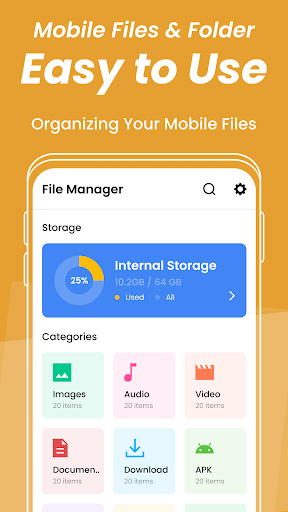
Automatically categorize and sort your files by type or you can also sort them in ascending or descending order by date, file name, and file size.
<h3>my File …
Read the full description
<h1>"My Files" one palce solution for manage your all photos ,videos and all type of FIles.</h1> My File Explorer app redefines how you interact with your device's content. Unleash the power of organization with a feature-rich experience designed to simplify your digital life and elevate your espeed file management experience. <h3><font color="#124FD3">My Explore, manage, and organize files effortlessly with File Manager - Your all-in-one Solution!</font></h3> <h3>✨ Key Features ✨</h3> <h3>📅 File Organizer</h3> Automatically categorize and sort your files by type or you can also sort them in ascending or descending order by date, file name, and file size. <h3>my File Management</h3> Take control of your files! Copy, move, rename, delete, open with, move to, compress, hide, share, open as with which file, and create a shortcut with ease. Our app ensures efficient file management tailored to your needs. <h3>⭕Storage Analyzer</h3> Stay informed about your device storage. Our built-in analyzer provides insights into storage usage, helping you free up space intelligently. <h3>💾Document Viewer</h3> Preview documents without the need for additional apps. My File Manager supports a wide range of file formats, ensuring a hassle-free viewing experience. <h3>🎵Media Player</h3> Enjoy multimedia content without switching apps. Our integrated media player supports various formats, offering a seamless playback experience. <h3>🔍Efficient Search</h3> Find files in seconds with our powerful search functionality. Our all in one Myfile manager helps you locate documents, photos, and videos effortlessly. <b>🌐Multiple Language Support:</b> My File is available in multiple languages, making it accessible to a global audience. <h3><font color="#124FD3"> Why My Files? </font></h3> <h3>💠User-Centric Design</h3> Tailored for user convenience, Our app puts you in control, making file management a delight. <h3>💠Reliability You Can Trust</h3> With a robust foundation, we offers stability, security, and performance you can rely on. <h3>💠Feedback</h3> We are eager to know your feedback about our app. So, share your feedback for the betterment of our app. <h3>Unleash the power of organization with File Manager - Your all-in-one Solution!</h3> ↓⬇ Download File Manager now and redefine the way you manage your files!
Installs since 23 Jul 2026 Measured
Exact Google Play install counts, collected daily
Ratings
1,035 ratings, 3 reviews
- 5 ★76%
- 4 ★9.5%
- 3 ★0.0%
- 2 ★0.0%
- 1 ★14%
Recent reviews
Latest public reviews from the store
No reviews in our sample for this app yet.
Top chart positions
Latest Google Play chart ranks by country, last 10 days
Not in any tracked top chart in the last 10 days.
My Files history
Release, install milestones, listing and store changes
- Removed from the store 1 Jul 2026
- Reached 100,000+ installs 19 Feb 2025
- Reached 50,000+ installs 24 Jul 2024
- First released on the store 3 May 2024
Recent versions
Current version Varies with device
- Version 1.311 Jun 2024
Listing keywords
Words and phrases My Files repeats most in its store listing
Top phrases: file management (5), file manager (4), experience h3 (3), h3 h3 (3), font color 124fd3 (2).
Highlighted words also appear in the title. Counts cover the title, short description and description.
Business model and tech
From the store listing and declared permissions
- Business model
- Free to downloadShows ads
- Sensitive access
- No sensitive permission declared
Compliance
What the listing and the app package show
- Store status
- Removed (1 Jul 2026)
- Upkeep
- Updated 19 Feb 2025
- Registered in
- India
- Privacy policy
- Linked on the listing
- Advertising
- Shows ads
- In-app purchases
- None declared
- Age rating
- Everyone
Apps like My Files
BatteryAlarmGoldLokik Soni58.2K installs★ 3.33
Photo Watch Face ProTiny Watch21.4K installs★ 4.42
GPS Location Sharing & LocatorNeo Utilities796K installs★ 4.2
Views Fans: CommunityaAa Designer36.5K installs★ 3.67
Space Clean ToolkitStarlume Tech597K installs★ 3.85
Calculator+ Photo&Video vaultGreen Water420K installs★ 4.37
Red Panic ButtonUltimate Communication Software LTD257K installs★ 3.31
Cutting Paper CalculatorTasikWeb.com84.5K installs★ 3.92
FORMSThe App Master848K installs★ 2.78
My Files: questions and answers
How many downloads does My Files have?
My Files has 107,808 installs on Google Play, measured from the store's own count on 19 Nov 2026.
Who makes My Files?
My Files is published by Creative Lab LLC, a developer based in IN.
When was My Files last updated?
The latest version (Varies with device) was released on 19 Feb 2025.
Is My Files free?
Yes. My Files is free to download, and it shows ads.
Is My Files still available?
No. My Files is no longer listed on Google Play. We first saw it missing around 1 Jul 2026.
Track My Files and its competitors
Watch any app for new versions, rating drops, chart moves and removals. Free plan, no card.