
My Files
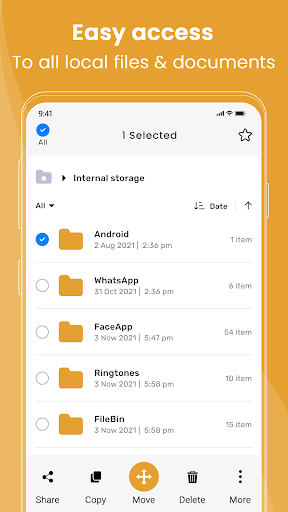
Smartphone managing tool for Easily access files,folder in the local,MicroSD,LAN
- Installs
- 2.56M
- Measured
- Rating
- 3.77
- Ratings
- 8.7K
- 355 reviews
- Version
- 1.8.6
- Updated 30 Oct 2026
- Released
- 23 Jun 2022
- Tracked since 13 May 2026
- Size
- —
Screenshots




About My Files
The description on the store listing
My Files App - The Ultimate File Management Solution
My Files is your go-to app for file management, storage optimization, and efficient file access. Whether you need to organize documents, photos, videos, or music, My Files offers powerful tools to keep everything in one place with ease.
The My Files App includes an after-call feature that lets you easily access recent files, set reminders, or send quick replies directly from the after-call screen.
<b>Key Features:</b>
<b>📁 Effortless File Management:</b>
Organize, browse, and manage files across internal storage and external storage devices. Easily create, rename, move, or delete files and folders.
<b>🔍 Quick …
Read the full description
My Files App - The Ultimate File Management Solution My Files is your go-to app for file management, storage optimization, and efficient file access. Whether you need to organize documents, photos, videos, or music, My Files offers powerful tools to keep everything in one place with ease. The My Files App includes an after-call feature that lets you easily access recent files, set reminders, or send quick replies directly from the after-call screen. <b>Key Features:</b> <b>📁 Effortless File Management:</b> Organize, browse, and manage files across internal storage and external storage devices. Easily create, rename, move, or delete files and folders. <b>🔍 Quick Search & Recent Files:</b> Use advanced file search to find what you need instantly. Access recently opened files quickly without searching through multiple folders. <b>📂 Category-Based Organization:</b> Automatically sort files into categories like Images, Videos, Documents, Audio, and Apps for easy organization and access. Mark important files as Favorites for quick retrieval. <b>🌐 Advanced Features:</b> ● Show Hidden Files 👀: Reveal hidden files and folders with one tap. ● Sort Files 🗂️: Sort files by name, size, date, or type for effortless organization. ● Multiple File Actions ✨: Perform bulk actions like copying, moving, and deleting multiple files at once. <b>📱 Storage Monitoring & Optimization:</b> Monitor storage usage, track space consumption, and clean up cache files and residual files to free up space. Optimize storage for better device performance. <b>🔧 Customization & Settings:</b> Personalize your app with themes, language preferences, and privacy settings to match your needs and protect your data. <b>Why Choose My Files?</b> ● Fast & Efficient ⚡: Quickly find and organize your files using advanced search and recent file access features. ● Organized 📂: Files are automatically categorized for easy browsing and quick access. ● Advanced Control 🗂️: Unlock hidden files, use multiple sorting options, and manage bulk file actions. ● Storage Optimization 💾: Monitor, clean, and optimize your storage for peak device performance. ● User-Friendly Interface ✨: Enjoy an intuitive, easy-to-use app that simplifies your file management experience. <b>Need Help?</b> Our support team is ready to assist you with any questions or issues. <b>Download My Files Now!</b> Start managing your files smarter with My Files. Download it today and experience fast, organized, and optimized file management.
Installs, last 30 days Measured
Exact Google Play install counts, collected daily
Ratings
8,673 ratings, 355 reviews
- 5 ★52%
- 4 ★7.0%
- 3 ★7.0%
- 2 ★1.9%
- 1 ★32%
Recent reviews
Latest public reviews from the store
- 16 May 2026
best
- 14 May 2026
good
- 14 May 2026
good
- 13 May 2026
Good
Top chart positions
Latest Google Play chart ranks by country, last 10 days
Not in any tracked top chart in the last 10 days.
My Files history
Release, install milestones, listing and store changes
- Reached 1,000,000+ installs 3 Jun 2024
- Reached 500,000+ installs 9 Mar 2024
- Reached 100,000+ installs 19 Jul 2023
- Reached 50,000+ installs 17 May 2023
- Reached 10,000+ installs 10 Dec 2022
- Reached 5,000+ installs 12 Nov 2022
- Reached 1,000+ installs 6 Aug 2022
- Reached 500+ installs 23 Jul 2022
Update frequency
How often My Files ships a new version, month by month
7 updates in the last 12 months. More often than most similar apps: they shipped a median of 2 updates in the same year.
Recent versions
Current version 1.8.6
- Version 1.8.630 Oct 2026
- Version 1.8.117 Apr 2026
- Version 1.8.026 Feb 2026
- Version 1.7.712 Feb 2026
Listing keywords
Words and phrases My Files repeats most in its store listing
Top phrases: file management (5), hidden files (3), sort files (3), files and folders (2), after call (2).
Highlighted words also appear in the title. Counts cover the title, short description and description.
Business model and tech
From the store listing, the SDKs in the app package and its declared permissions
- Business model
- Free to downloadIn-app purchasesShows ads
- Built with
- No cross-platform framework or game engine detected
- Ad networks (1)
- AdMob
- Subscriptions and payments
- Google Play billing
- Analytics and crash reports
- Firebase
- Sensitive access
- LocationContactsPhone and callsPhotos, videos and filesNearby devicesDraws over other appsAdvertising ID
2 ad, attribution and analytics SDKs detected. SDKs are read from the app package and permissions from the store listing, so code that loads later is not seen.
Technology
41 SDKs found in the app package
Ad networks
Advertising and install-attribution SDKs found in the app package
- AdMob
48 permissions
7 special access, 9 sensitive, 32 standard
- Ask to uninstall appsREQUEST_DELETE_PACKAGESSpecial access
- Change system settingsWRITE_SETTINGSSpecial access
- Draw over other appsSpecial access
- Install other appsREQUEST_INSTALL_PACKAGESSpecial access
- Manage all filesMANAGE_EXTERNAL_STORAGESpecial access
- Manage its own callsMANAGE_OWN_CALLSSpecial access
- Set exact alarmsSCHEDULE_EXACT_ALARMSpecial access
- Read contactsSensitive
- Change or delete shared storageSensitive
- Read shared storageSensitive
- Approximate locationSensitive
- Precise locationSensitive
Compliance
What the listing and the app package show
- Store status
- Live
- Upkeep
- Updated 30 Oct 2026
- Privacy policy
- Linked on the listing
- Advertising
- Shows ads
- In-app purchases
- Offered
- Age rating
- Everyone
- Sensitive permissions
- 9 sensitive, 7 special access of 48
- Location access
- Yes, while in use
- Camera and microphone
- Neither
Apps like My Files
MobileRecov - Data RecoveryStor Med Apps563K installs★ 4.69
WeBackGrit Technology949K installs★ 1.2
LED Scroller - text LED BannerCristools Simple Apps607K installs★ 4.75
Find My Bluetooth DeviceByteBox Inc.939K installs★ 3.9
Blue Speed VPNhelalik1.4M installs★ 4.51
Fibex Oficina MóvilSoluciones Medianet, C.A.632K installs★ 2.86
Electron: battery health infoMaher Safadi4M installs★ 3.81
CFMOTO RIDECFMOTO320K installs★ 3.77
Lag remover Lower Gaming PingNoLag Australia709K installs★ 4.38
My Files: questions and answers
How many downloads does My Files have?
My Files has 2,563,236 installs on Google Play, measured from the store's own count on 20 Nov 2026.
Who makes My Files?
My Files is published by UC Vaulty.
When was My Files last updated?
The latest version (1.8.6) was released on 30 Oct 2026.
Is My Files free?
Yes. My Files is free to download and offers in-app purchases, and it shows ads.
Is My Files still available?
Yes. My Files is live on Google Play as of 20 Nov 2026.
Track My Files and its competitors
Watch any app for new versions, rating drops, chart moves and removals. Free plan, no card.