
My NoteBook
A smart notebook for capturing information and managing all your tasks.
- Installs
- 14.79K
- Measured
- Rating
- 3.67
- Ratings
- 56
- 9 reviews
- Version
- 4.6
- Updated 14 Mar 2026
- Released
- 13 Sep 2016
- Tracked since 13 May 2026
- Size
- 8 MB
- Needs 4.0.3
Screenshots


About My NoteBook
The description on the store listing
MyNoteBook is an electronic notebook app designed for smart mobile devices. It enables you to record any type of information while ensuring quick access and robust data security. Just like a physical notebook, you can add as many pages as you need. Each page has a title, and you can easily browse these titles to open the desired page for reading or editing.
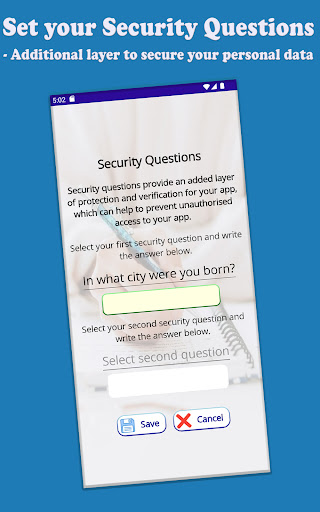
This notebook is protected by a user-defined PIN or password. Without the correct credentials, it cannot be opened or unlocked by anyone. Users can update their PIN or password at any time to suit their preferences.
This also includes a premium feature for efficiently managing tasks and events to ensure timely completion. Tasks and …
Read the full description
MyNoteBook is an electronic notebook app designed for smart mobile devices. It enables you to record any type of information while ensuring quick access and robust data security. Just like a physical notebook, you can add as many pages as you need. Each page has a title, and you can easily browse these titles to open the desired page for reading or editing. This notebook is protected by a user-defined PIN or password. Without the correct credentials, it cannot be opened or unlocked by anyone. Users can update their PIN or password at any time to suit their preferences. This also includes a premium feature for efficiently managing tasks and events to ensure timely completion. Tasks and events can be one-time occurrences or recurring with frequencies such as daily, weekly, monthly, or yearly. This feature helps users stay on top of their responsibilities—whether it's paying premiums and EMIs, handling deposit maturities, or renewing subscriptions. Users can set a target or task date for each page to organize tasks by deadline, helping them prioritize the most important work first. When a one-time task is completed, its date is removed and the page returns to its normal state. For recurring tasks—such as weekly, monthly, or yearly—the next scheduled date is automatically assigned until the specified final date is reached. The reminders / task list are always displayed in chronological order, with the earliest pending task at the top. Expired tasks appear at the top in red to prompt users to take immediate action. The key feature is cloud storage, which allows users to synchronize their page contents with the web server using their individual PrinceStars account credentials. This enables users to access their content anytime, from anywhere, and on any device. If a user has multiple mobile phones or tablets, the application contents are automatically synchronized and updated across all devices with high security. If a user loses their mobile phone or wants to switch to a new one, all content will automatically be available on the new device after providing the required credentials, ensuring no data loss and maintaining high security. All data transmissions are encrypted and secured to ensure strong protection. To safeguard your notebook information, we recommend not sharing your personal credentials or password with others. Disclaimer: Data recovery is not possible if you forget your login credentials. Please set and securely remember your notebook login details to ensure continued access and protection. We hope our efforts in developing this application provide you with immense satisfaction and greater control over your important day-to-day and recurring activities. The PrinceStars Team https://www.princestars.com/Products/MyNoteBook
Installs since 26 Aug 2026 Measured
Exact Google Play install counts, collected daily
Ratings
56 ratings, 9 reviews
- 5 ★51%
- 4 ★17%
- 3 ★7.5%
- 2 ★0.0%
- 1 ★25%
Recent reviews
Latest public reviews from the store
- 26 Nov 2025
nice
Top chart positions
Latest Google Play chart ranks by country, last 10 days
Not in any tracked top chart in the last 10 days.
My NoteBook history
Release, install milestones, listing and store changes
- Reached 10,000+ installs 2 Dec 2019
- Reached 5,000+ installs 3 Jun 2019
- Reached 1,000+ installs 6 Jun 2018
- Reached 500+ installs 6 Apr 2018
- Moved from Lifestyle to Productivity 19 Oct 2017
- Reached 100+ installs 1 Mar 2017
- Reached 50+ installs 26 Dec 2016
- Reached 10+ installs 5 Oct 2016
Update frequency
How often My NoteBook ships a new version, month by month
4 updates in the last 12 months. More often than most similar apps: they shipped a median of 1 updates in the same year.
Recent versions
Current version 4.6
- Version 4.614 Mar 2026
Version 4.6 ========== Improved layouts on certain devices for a better user experience.
- Version 4.515 Feb 2026
- Version 4.311 Jan 2026
- Version 4.130 Nov 2025
Listing keywords
Words and phrases My NoteBook repeats most in its store listing
Top phrases: monthly or yearly (2), pin or password (2), tasks and events (2), high security (2), weekly monthly (2).
Highlighted words also appear in the title. Counts cover the title, short description and description.
Business model and tech
From the store listing, the SDKs in the app package and its declared permissions
- Business model
- Free to download
- Built with
- Xamarin
- Ad networks (0)
- None detected
- Sensitive access
- LocationCameraPhotos, videos and files
0 ad, attribution and analytics SDKs detected. SDKs are read from the app package and permissions from the store listing, so code that loads later is not seen.
Technology
2 SDKs found in the app package
Development tools
15 permissions
1 special access, 7 sensitive, 7 standard
- Set exact alarmsSCHEDULE_EXACT_ALARMSpecial access
- Take photos and videosSensitive
- Change or delete shared storageSensitive
- Read photosREAD_MEDIA_IMAGESSensitive
- Read shared storageSensitive
- Approximate locationSensitive
- Precise locationSensitive
- Show notificationsPOST_NOTIFICATIONSSensitive
- Use fingerprint or face unlockUSE_BIOMETRICStandard
- Use the fingerprint readerUSE_FINGERPRINTStandard
- Full internet accessStandard
- See network connectionsStandard
Compliance
What the listing and the app package show
- Store status
- Live
- Upkeep
- Updated 14 Mar 2026
- Registered in
- India
- Privacy policy
- Linked on the listing
- Advertising
- No ads declared
- In-app purchases
- None declared
- Age rating
- Everyone
- Sensitive permissions
- 7 sensitive, 1 special access of 15
- Location access
- Yes, while in use
- Camera and microphone
- Camera
Apps like My NoteBook
Live Bluetooth MicrophoneSH Solu21.5K installs★ 2.6
Persons with Disabilities RegiBytize, Inc.31.1K installs★ 4.3
Rok Remote For Smart TVNight-Dev Solutions7.2K installs★ 3.41
ЛапЭкспертЧетыре Лапы33.4K installs★ 2.7
FaB CounterStefanKarlsson10.7K installs★ 4.67
TestApp.ioTestApp.io17.6K installs★ 3.75
My Christmas BuddyMyBuzz Technologies Ltd13.4K installs★ 3.92
Camera Suite for HeroM-Apps3.6K installs★ 2.7
Seguridad Internet TelmexTelmex59.3K installs★ 3.8
My NoteBook: questions and answers
How many downloads does My NoteBook have?
My NoteBook has 14,786 installs on Google Play, measured from the store's own count on 18 Nov 2026.
Who makes My NoteBook?
My NoteBook is published by PrinceStars World, a developer based in IN.
When was My NoteBook last updated?
The latest version (4.6) was released on 14 Mar 2026.
Is My NoteBook free?
Yes. My NoteBook is free to download.
Is My NoteBook still available?
Yes. My NoteBook is live on Google Play as of 18 Nov 2026.
Track My NoteBook and its competitors
Watch any app for new versions, rating drops, chart moves and removals. Free plan, no card.