
My Work Clock - Hours Tracker
Simple punch-in/punch-out clock & widget for tracking the time at work.
- Installs
- 1.38M
- Measured
- Rating
- 4.6
- Ratings
- 25.7K
- 9.2K reviews
- Version
- 2.2.0
- Updated 10 Nov 2026
- Released
- 17 Oct 2010
- Tracked since 14 May 2026
- Size
- —
Screenshots
About My Work Clock - Hours Tracker
The description on the store listing
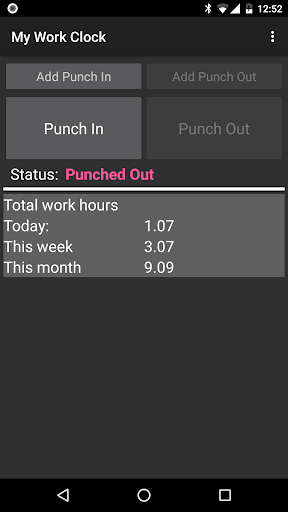
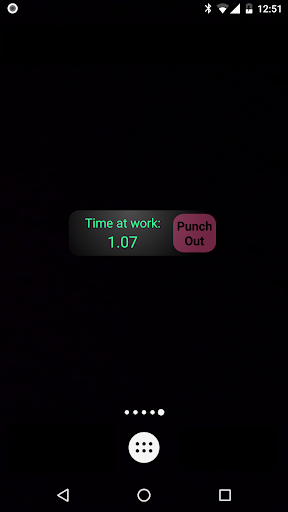
Simple punch-in/punch-out clock & widget for tracking the time at work.
Features (very partial list):
* Overtime support
* Multiple jobs support
* Calendar update [Job Setting] add records to the calendar (it's recommended to open a separate calendar for 'My Work Clock'). ONE WAY-SYNC ONLY.
* Punch in/out directly from the widget
* Quick day, week & month information
* Simple reports
* Send to mail as CSV
* Add/remove/edit records
* Multiple overtime and report periods: daily, weekly, bi-weekly, monthly and more.
NOTES:
* If the widget stops updating: make sure the application appears in your task killer 'white list'.
* No move-to-SD option: widgets do not work when an app …
Read the full description
Simple punch-in/punch-out clock & widget for tracking the time at work. Features (very partial list): * Overtime support * Multiple jobs support * Calendar update [Job Setting] add records to the calendar (it's recommended to open a separate calendar for 'My Work Clock'). ONE WAY-SYNC ONLY. * Punch in/out directly from the widget * Quick day, week & month information * Simple reports * Send to mail as CSV * Add/remove/edit records * Multiple overtime and report periods: daily, weekly, bi-weekly, monthly and more. NOTES: * If the widget stops updating: make sure the application appears in your task killer 'white list'. * No move-to-SD option: widgets do not work when an app is on the SD. We got many error reports from users so we disabled this option. Required permissions reasoning: *. READ CALENDAR EVENTS PLUS CONFIDENTIAL INFORMATION *. ADD OR MODIFY CALENDAR EVENTS AND SEND EMAIL TO GUESTS WITHOUT OWNERS' KNOWLEDGE == Required for Google calendar sync *. MODIFY/DELETE SD CARD CONTENTS == Required to save CSV before sending by e-mail backup. *. FULL INTERNET ACCESS & VIEW NETWORK STATE == Required for bug report, analytics & ads.
Installs, last 30 days Measured
Exact Google Play install counts, collected daily
Ratings
25,651 ratings, 9,155 reviews
- 5 ★73%
- 4 ★19%
- 3 ★4.1%
- 2 ★0.9%
- 1 ★2.6%
Recent reviews
Latest public reviews from the store
- 23 Feb 2026
has worked flawlessly for a decade, and been indispensable across multiple jobs and fields of employment.
- 14 Feb 2026
Perfect for tracking hours at work.
- 13 Jan 2026
I have been using this app for 5 years. it helps me keep my hours strait. Great app
- 9 Jan 2026
best time clock app
What reviewers bring up
Topics mentioned in the latest 50 reviews, by how many reviews mention them
Liked in good reviews (47 reviews)
- hours 12
- clock 9
- tracking 6
- recommend 4
- feature 4
- other 4
- jobs 4
- add 4
Raised in bad reviews (1 reviews)
No topic comes up twice.
Top chart positions
Latest Google Play chart ranks by country, last 10 days
Not in any tracked top chart in the last 10 days.
My Work Clock - Hours Tracker history
Release, install milestones, listing and store changes
- Reached 1,000,000+ installs 29 Sep 2015
- First released on the store 17 Oct 2010
Update frequency
How often My Work Clock - Hours Tracker ships a new version, month by month
4 updates in the last 12 months. Less often than most similar apps: they shipped a median of 5 updates in the same year.
Recent versions
Current version 2.2.0
- Version 2.1.928 Oct 2026
- Major app refactoring. - Switched backup method to allow flexible backup location
- Version 2.1.31 Aug 2026
Minor bug fixed
- Version 2.1.212 Mar 2026
Minor bug fixed
- Version 2.1.118 Feb 2026
Listing keywords
Words and phrases My Work Clock - Hours Tracker repeats most in its store listing
Top phrases: punch in punch (2), punch out clock (2), widget for tracking (2), calendar events (2), clock widget (2).
Highlighted words also appear in the title. Counts cover the title, short description and description.
Business model and tech
From the store listing and declared permissions
- Business model
- Free to downloadShows ads
- Sensitive access
- No sensitive permission declared
Compliance
What the listing and the app package show
- Store status
- Live
- Upkeep
- Updated 10 Nov 2026
- Registered in
- Israel
- Privacy policy
- Linked on the listing
- Advertising
- Shows ads
- In-app purchases
- None declared
- Age rating
- Everyone
Apps like My Work Clock - Hours Tracker
Sticky Note Widget: SunaoArtsPlanet1.1M installs★ 4.77
eDO AppPWPW S.A.3.6M installs★ 4.05
Xploree AI KeyboardKeyPoint Technologies17.7M installs★ 4.16
App Permission Managero16i Apps8.7M installs★ 4.09
VPN Pro - Fast & Secure VPNBean Studio HQ15M installs★ 4.45
Google AdminGoogle LLC8.5M installs★ 3.55
PeopleFirst(Only RIL Group)Reliance Enterprise Mobility1.4M installs★ 5.0
AnyList: Grocery Shopping ListAnyList1.8M installs★ 4.86
Launcher OS27: Liquid GlassHK Crafted1.5M installs★ 4.46
My Work Clock - Hours Tracker: questions and answers
How many downloads does My Work Clock - Hours Tracker have?
My Work Clock - Hours Tracker has 1,383,431 installs on Google Play, measured from the store's own count on 19 Nov 2026.
Who makes My Work Clock - Hours Tracker?
My Work Clock - Hours Tracker is published by NRS Magic LTD, a developer based in IL.
When was My Work Clock - Hours Tracker last updated?
The latest version (2.2.0) was released on 10 Nov 2026.
Is My Work Clock - Hours Tracker free?
Yes. My Work Clock - Hours Tracker is free to download, and it shows ads.
Is My Work Clock - Hours Tracker still available?
Yes. My Work Clock - Hours Tracker is live on Google Play as of 19 Nov 2026.
Track My Work Clock - Hours Tracker and its competitors
Watch any app for new versions, rating drops, chart moves and removals. Free plan, no card.