MyOffice Documents AI
AI Voice notes, text, spreadsheet, presentation and PDF editors, docs
- Installs
- 30.41M
- Measured
- Rating
- 4.1
- Ratings
- 42.5K
- 20 reviews
- Version
- 26.3.0
- Updated 31 Aug 2026
- Released
- —
- Tracked since 13 May 2026
- Size
- —
Screenshots



About MyOffice Documents AI
The description on the store listing
All the tools you need to work with documents in all popular formats, all in one app + new: AI Voice Notes.
AI Voice Notes: speak and get perfect text with correct grammar and punctuation in seconds:
✓ Accurate AI transcription that accounts for structure, grammar, and punctuation
✓ From a note to a business letter—in one click using pre-made or custom AI templates
✓ Effortless. Speak freely. AI will capture your thoughts while removing the unnecessary
✓ Anywhere: at home, on the go, in between tasks
✓ 4 times faster than typing—save time every day
✓ Data privacy—all data is stored on your phone
MyOffice Documents:
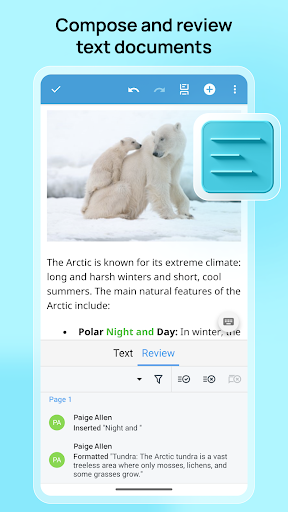
• Edit and review text documents (DOCX, DOC, RTF, etc.)
• …
Read the full description
All the tools you need to work with documents in all popular formats, all in one app + new: AI Voice Notes. AI Voice Notes: speak and get perfect text with correct grammar and punctuation in seconds: ✓ Accurate AI transcription that accounts for structure, grammar, and punctuation ✓ From a note to a business letter—in one click using pre-made or custom AI templates ✓ Effortless. Speak freely. AI will capture your thoughts while removing the unnecessary ✓ Anywhere: at home, on the go, in between tasks ✓ 4 times faster than typing—save time every day ✓ Data privacy—all data is stored on your phone MyOffice Documents: • Edit and review text documents (DOCX, DOC, RTF, etc.) • Manage calculations in spreadsheets (XLSX, XLS, etc.) • Create and present slideshows (PPTX, ODP, etc.) • Take advantage of extensive document formatting options • View PDF documents • Work with files on your device and in cloud storage services: Yandex.Disk, Mail.ru Cloud, Google Drive, DropBox, Box, OneDrive, and “MyOffice Private Cloud.” Create, edit, and store documents in all office formats in the “MyOffice Documents” mobile app. TEXT – text document editor ✓ View, create, and edit texts in DOCX, DOC, RTF, ODT, XML, TXT, and XODT formats ✓ Export text documents to DOCX, XODT, and PDF formats ✓ Add and listen to audio comments ✓ Text formatting: fonts, size, color, style, highlighting, and alignment within the document ✓ Document review: work with edits, comments, and spell check ✓ Working with tables: working with rows and columns, formatting cells and their borders ✓ Inserting, copying, moving, and resizing images, as well as editing them ✓ Many features: lists, headers and footers, numbering, reading mode, printing documents, etc. SPREADSHEET – spreadsheet editor ✓ View, create, and edit spreadsheets in XLSX, XLS, ODS, and XODS formats ✓ Export spreadsheets to XLSX, XODS, and PDF formats ✓ Working with cells: formulas, changing data formats, formatting borders ✓ Working with rows and columns: copying, deleting, moving, resizing, sorting, filtering ✓ Text formatting: fonts, size, color, highlighting, position within a cell ✓ Inserting, copying, moving, resizing, and editing images ✓ Many features: inserting charts, adding graphs, printing documents, etc. PRESENTATION – presentation editor ✓ Viewing, creating, and editing presentations in XODP, ODP, and PPTX formats ✓ Exporting presentations to XODP, ODP, and PPTX formats ✓ Working with slides: insert, copy, duplicate, move, delete ✓ Slide design: layouts, text blocks, tables, images, shapes, and links ✓ Formatting: fonts, size, color, highlighting, alignment, lists ✓ Presentation mode Activate the “MyOffice for Home” subscription to use additional app features: • Editing PDF documents • Support for spreadsheets in CSV format • Exporting text documents to RTF and DOC formats • Viewing, editing, and printing files over Wi-Fi The “MyOffice Documents” app is fully compatible with “MyOffice Professional” and “MyOffice Private Cloud” products. Learn more about MyOffice on the official website www.myoffice.ru ___________________________________________ If you have any questions, please contact support at https://support.myoffice.ru or email [email protected]—we will respond promptly.
Installs, last 30 days Measured
Exact Google Play install counts, collected daily
Ratings
42,523 ratings, 20 reviews
- 5 ★69%
- 4 ★6.2%
- 3 ★7.7%
- 2 ★1.5%
- 1 ★15%
Recent reviews
Latest public reviews from the store
- 12 Feb 2026
👍👍👍👍👍
- 2 Oct 2025
Good and convenient
- 23 Jul 2025
First, I want to thank you developers of this app. This is an excellent app and the app I've been looking for. It is easy to use and has other features such as spell check, which are very useful when writing a document. Two things, however, I want you to add are (1) save (2) save as...
- 30 Apr 2025
works very fast and correctly
What reviewers bring up
Topics mentioned in the latest 50 reviews, by how many reviews mention them
Liked in good reviews (31 reviews)
- documents 4
- useful 3
- использования 2
- developers 2
- приложение 2
- editing 2
- спасибо 2
- fonts 2
Raised in bad reviews (17 reviews)
- после 3
- постоянно 2
- открытия 2
- takes 2
- wrong 2
Top chart positions
Latest Google Play chart ranks by country, last 10 days
Not in any tracked top chart in the last 10 days.
MyOffice Documents AI history
Release, install milestones, listing and store changes
- Reached 10,000,000+ installs 9 Jul 2022
- Reached 5,000,000+ installs 6 Dec 2021
Update frequency
How often MyOffice Documents AI ships a new version, month by month
6 updates in the last 12 months. Less often than most similar apps: they shipped a median of 8 updates in the same year.
Recent versions
Current version 26.3.0
- Version 26.3.031 Aug 2026
We've made some improvements and fixed some minor issues for you.
- Version 26.2.124 Jun 2026
We've made working with files more convenient and also fixed the minor bugs.
- Version 26.2.03 Apr 2026
New! Introducing AI Voice Notes. Just speak and get perfect notes with flawless grammar and punctuation in seconds! Record anything - get accurate, AI-powered transcripts instantly. Voice to any format: Turn speech into notes, emails, meeting reports, and more using built-in or custom AI Prompts. Zero hassle: Speak naturally — AI captures your ideas and removes the fluff. Privacy First: Your data stays secure—all notes are stored locally on your device.
- Version 26.1.117 Feb 2026
Listing keywords
Words and phrases MyOffice Documents AI repeats most in its store listing
Top phrases: myoffice documents (4), ai voice notes (3), fonts size color (3), formatting fonts size (3), ai voice (3).
Highlighted words also appear in the title. Counts cover the title, short description and description.
Business model and tech
From the store listing and declared permissions
- Business model
- Free to downloadIn-app purchases
- Subscriptions and payments
- Google Play billing
- Sensitive access
- CameraMicrophonePhotos, videos and filesAccounts on the deviceAdvertising ID
30 permissions
1 special access, 6 sensitive, 23 standard
- Manage all filesMANAGE_EXTERNAL_STORAGESpecial access
- Record audioSensitive
- Take photos and videosSensitive
- See accounts on the deviceSensitive
- Change or delete shared storageSensitive
- Read shared storageSensitive
- Show notificationsPOST_NOTIFICATIONSSensitive
- Ad attribution (Privacy Sandbox)ACCESS_ADSERVICES_ATTRIBUTIONStandard
- Read how it was installed (install referrer)BIND_GET_INSTALL_REFERRER_SERVICEStandard
- Read the advertising IDAD_IDStandard
- Read the advertising ID (Privacy Sandbox)ACCESS_ADSERVICES_AD_IDStandard
- Use accounts on the deviceStandard
Compliance
What the listing and the app package show
- Store status
- Live
- Upkeep
- Updated 31 Aug 2026
- Privacy policy
- Linked on the listing
- Advertising
- No ads declared
- In-app purchases
- None declared
- Age rating
- Everyone
- Sensitive permissions
- 6 sensitive, 1 special access of 30
- Location access
- No
- Camera and microphone
- Both
Apps like MyOffice Documents AI
BLOAppElection Commission of India8.6M installs★ 3.75
Loud Alarm Clockj labs1.7M installs★ 4.8
Sentuh TanahkuKementerian Agraria Dan Tata Ruang/ BPN5.2M installs★ 3.75
Orange Max it SénégalOrange Sénégal11.1M installs★ 4.16
Telecel Play (Ghana)Telecel Ghana2.5M installs★ 4.59
My bpostbpost3.4M installs★ 3.04
Docs ViewerMelting Source8.9M installs★ 4.33
Replit: App & Website BuilderReplit8.3M installs★ 4.43
My Daily Planner: To-Do ListGeniusTools Labs3.4M installs★ 4.7
MyOffice Documents AI: questions and answers
How many downloads does MyOffice Documents AI have?
MyOffice Documents AI has 30,406,118 installs on Google Play, measured from the store's own count on 19 Nov 2026.
Who makes MyOffice Documents AI?
MyOffice Documents AI is published by New Cloud Technologies Ltd..
When was MyOffice Documents AI last updated?
The latest version (26.3.0) was released on 31 Aug 2026.
Is MyOffice Documents AI free?
Yes. MyOffice Documents AI is free to download.
Is MyOffice Documents AI still available?
Yes. MyOffice Documents AI is live on Google Play as of 19 Nov 2026.
Track MyOffice Documents AI and its competitors
Watch any app for new versions, rating drops, chart moves and removals. Free plan, no card.