Net Blocker - Block Apps
The Net Blocker allows the user to block Wi-Fi and data access to apps.
- Installs
- 48.46K
- Measured
- Rating
- 3.63
- Ratings
- 563
- 7 reviews
- Version
- 1.1.3
- Updated 6 Aug 2026
- Released
- 3 Sep 2023
- Tracked since 13 May 2026
- Size
- —
Screenshots



About Net Blocker - Block Apps
The description on the store listing
Are you tired of distractions, endless scrolling, and the constant pull of the internet affecting your productivity and focus? internet blocker block internet access for apps helps take control of your online life and make the most of your time.
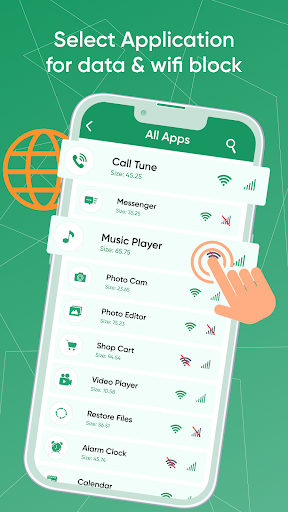
The interface of the internet blocker application / blocker shield has four main features including all apps, settings, VPN settings, and share apps. The all-apps feature of internet blocker for apps / wifi blocker allows the user to view all the apps installed on the device. The VPN setting feature of internetblocker lets the user manage the VPN settings of the device. The settings feature of the block internet to use app authorizes the user to …
Read the full description
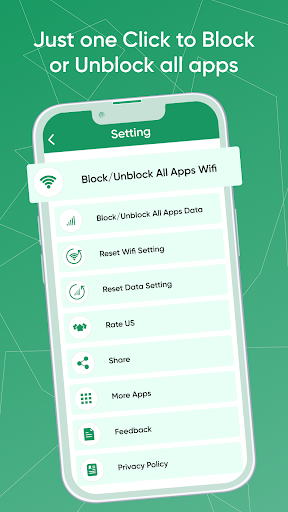
Are you tired of distractions, endless scrolling, and the constant pull of the internet affecting your productivity and focus? internet blocker block internet access for apps helps take control of your online life and make the most of your time. The interface of the internet blocker application / blocker shield has four main features including all apps, settings, VPN settings, and share apps. The all-apps feature of internet blocker for apps / wifi blocker allows the user to view all the apps installed on the device. The VPN setting feature of internetblocker lets the user manage the VPN settings of the device. The settings feature of the block internet to use app authorizes the user to manage the settings of the app. Finally, the share app feature of the internet blocker app / stop internet permits the user to share the app with friends and family. <b>Features of Net Blocker – Block Apps</b> Parental control restricts is an amazing app for internet users. It allows them to block the internet of any installed app. The home screen of the App blocker application has four main features including all apps, settings, VPN settings, and share apps. Website restriction lets the user easily block access to distracting websites and apps that keep you from getting things done. It is a quick and seamless process that will take hardly a minute or two. The VPN setting feature of Wi-Fi access restricted lets the user manage the VPN settings of the device. This way the user can enable and disable the VPN of the device. The productivity tool shows all the VPN apps installed on the device. This way the user can easily enable or disable the VPN directly from the app. Social media blocker / internet block maintains access to essential sites while blocking the rest. The user can enable or disable certain apps for work, study, or leisure. Distraction blocker manage your family's internet usage with ease. Users can easily block any application at their convenience. The settings feature of the block social media authorizes the user to manage the settings of the app. Restricted access includes unblocking all apps' wifi, unblocking all apps' data, and checking data. Using this feature, the user can enable or disable the block all apps wifi. Similarly, the user can enable or disable block all app data directly from this feature. Content blocker enables Cross-Platform Support. Whether you're on your smartphone, tablet, or computer, Website Blocker offers seamless synchronization across devices. <b> How to Use Net Blocker – Block Apps</b> To view the list of all apps, the user needs to select the All-Apps tab on the home screen. They can then click on the wifi and mobile data icons in front of each app which enables or disables them. To change the VPN settings, the user needs to select the VPN setting tab on the home screen. If the user wants to change the settings, they need to click on the settings tab on the home screen. Finally, the user can share the app directly using the share app tab. <b>✪ Disclaimers</b> All copyrights reserved. We have kept this app free by showing non-personalized ads.
Installs since 26 Aug 2026 Measured
Exact Google Play install counts, collected daily
Ratings
563 ratings, 7 reviews
- 5 ★50%
- 4 ★12%
- 3 ★6.1%
- 2 ★12%
- 1 ★19%
Recent reviews
Latest public reviews from the store
- 18 May 2026
good
- 8 Dec 2025
I had a firewall with a VPN it was supposed to block apps never did. I tried AppGuard it blocks apps I don't want Internet access this also has a VPN. I have a problem you can't use 2 VPNs at the sametime unless you know code.
- 6 Sep 2025
💗💗💗so good thanks, it's working
Top chart positions
Latest Google Play chart ranks by country, last 10 days
Not in any tracked top chart in the last 10 days.
Net Blocker - Block Apps history
Release, install milestones, listing and store changes
- Reached 10,000+ installs 3 Jun 2024
- Reached 5,000+ installs 15 Jan 2024
- Reached 1,000+ installs 9 Oct 2023
- Reached 500+ installs 25 Sep 2023
- Reached 100+ installs 11 Sep 2023
- Reached 50+ installs 9 Sep 2023
- First released on the store 3 Sep 2023
Update frequency
How often Net Blocker - Block Apps ships a new version, month by month
1 updates in the last 12 months. More often than most similar apps: they shipped a median of 0 updates in the same year.
Recent versions
Current version 1.1.3
- Version 1.1.36 Aug 2026
***App Optimized
- Version 1.1.230 Jun 2025
Issue Resolved
- Version 1.1.12 Jan 2025
- Version 1.1.09 Dec 2024
Listing keywords
Words and phrases Net Blocker - Block Apps repeats most in its store listing
Top phrases: vpn settings (5), enable or disable (4), user can enable (4), blocker block (4), home screen (4).
Highlighted words also appear in the title. Counts cover the title, short description and description.
Business model and tech
From the store listing and declared permissions
- Business model
- Free to downloadShows ads
- Sensitive access
- Advertising ID
13 permissions
0 special access, 1 sensitive, 12 standard
- Show notificationsPOST_NOTIFICATIONSSensitive
- Ad attribution (Privacy Sandbox)ACCESS_ADSERVICES_ATTRIBUTIONStandard
- Ad topics (Privacy Sandbox)ACCESS_ADSERVICES_TOPICSStandard
- Read the advertising IDAD_IDStandard
- Read the advertising ID (Privacy Sandbox)ACCESS_ADSERVICES_AD_IDStandard
- Ask to skip battery optimisationREQUEST_IGNORE_BATTERY_OPTIMIZATIONSStandard
- Foreground service (data sync)FOREGROUND_SERVICE_DATA_SYNCStandard
- Keep the phone awakeStandard
- Run a foreground serviceFOREGROUND_SERVICEStandard
- Start when the phone turns onStandard
- Full internet accessStandard
- See network connectionsStandard
Compliance
What the listing and the app package show
- Store status
- Live
- Upkeep
- Updated 6 Aug 2026
- Registered in
- Germany
- Privacy policy
- Linked on the listing
- Advertising
- Shows ads
- In-app purchases
- None declared
- Age rating
- Everyone
- Sensitive permissions
- 1 sensitive of 13
- Location access
- No
- Camera and microphone
- Neither
Apps like Net Blocker - Block Apps
Color LED ControllerStonez56 (Kevin Chen)494K installs★ 2.46
Bigg VPNBigg Software Ltd72.2K installs★ 4.86
Junk Cleaner - Cleanup Phoneepazarturkiye.com161K installs★ 3.9
CloverPool - Multi-coins PoolCloverPool Team122K installs★ 3.94
Afghan Sim (خدمات سیم کارت ها)Yasin Mohammadi52.7K installs★ 3.91
Drink Water TrackerWe Soft Global221K installs★ 4.05
ХваляГосударственное предприятие "БелГИЭ"19.2K installs★ 2.29
QR code scanner & generatorDual Design Studio333K installs★ 3.53
فیلتر شکن قوی پرسرعت اریزوSol Sol App654472293K installs★ 4.39
Net Blocker - Block Apps: questions and answers
How many downloads does Net Blocker - Block Apps have?
Net Blocker - Block Apps has 48,457 installs on Google Play, measured from the store's own count on 18 Nov 2026.
Who makes Net Blocker - Block Apps?
Net Blocker - Block Apps is published by Xero Tech, a developer based in DE.
When was Net Blocker - Block Apps last updated?
The latest version (1.1.3) was released on 6 Aug 2026.
Is Net Blocker - Block Apps free?
Yes. Net Blocker - Block Apps is free to download, and it shows ads.
Is Net Blocker - Block Apps still available?
Yes. Net Blocker - Block Apps is live on Google Play as of 18 Nov 2026.
Track Net Blocker - Block Apps and its competitors
Watch any app for new versions, rating drops, chart moves and removals. Free plan, no card.