
NetFlow Analyzer
You need to run ManageEngine NetFlow Analyzer server to work with this app.
- Installs
- 26.15K
- Measured
- Rating
- 4.94
- Ratings
- 132
- 7 reviews
- Version
- 2.9.17
- Updated 5 Oct 2026
- Released
- 17 Oct 2014
- Tracked since 13 May 2026
- Size
- 13 MB
- Needs 5.1
Also on App Store: NetFlow Analyzer (44 ratings)
Screenshots

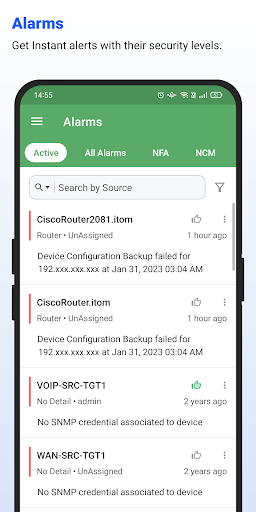


About NetFlow Analyzer
The description on the store listing
ManageEngine NetFlow Analyzer, a complete traffic analytics tool, leverages flow technologies to provide real-time visibility into the network bandwidth performance. It is a unified solution that collects, analyzes, and reports on what your network bandwidth is being used for and by whom. NetFlow Analyzer helps you keep track of network traffic activities, and diagnose and troubleshoot network anomalies and bandwidth hogs in real time.
NetFlow Analyzer mobile application
With the NetFlow Analyzer Android app, analyze network traffic and streamline it while on the move. Keep tabs on your LAN and WAN traffic from anywhere, anytime. If you are running a NetFlow Analyzer server, you can use …
Read the full description
ManageEngine NetFlow Analyzer, a complete traffic analytics tool, leverages flow technologies to provide real-time visibility into the network bandwidth performance. It is a unified solution that collects, analyzes, and reports on what your network bandwidth is being used for and by whom. NetFlow Analyzer helps you keep track of network traffic activities, and diagnose and troubleshoot network anomalies and bandwidth hogs in real time. NetFlow Analyzer mobile application With the NetFlow Analyzer Android app, analyze network traffic and streamline it while on the move. Keep tabs on your LAN and WAN traffic from anywhere, anytime. If you are running a NetFlow Analyzer server, you can use this app to access it from your Android phone. Note: This app is compatible with NetFlow Analyzer Builds 12.3 and above. The app can be used only if you are already running a NetFlow Analyzer server in your network. To start using the app, you must log in with your existing NetFlow Analyzer credentials. Key features * Get an overview of the top applications, users, and conversations in your network * Get alerts for network device availability and performance, downtime, and traffic spikes * View, clear, and acknowledge alarms and events that are raised * View IN/OUT traffic by devices, interfaces, and IP groups Have any questions? Get in touch with us at [email protected].
Installs since 29 Aug 2026 Measured
Exact Google Play install counts, collected daily
Ratings
132 ratings, 7 reviews
- 5 ★95%
- 4 ★4.8%
- 3 ★0.0%
- 2 ★0.0%
- 1 ★0.0%
Recent reviews
Latest public reviews from the store
- 4 Mar 2026
I have been using the Op Manager Network monitoring app and it is very helpful for monitoring our network devices anytime and anywhere. The app interface is simple and easy to understand, so checking device status, downtime and alerts is very convenient. I especially like the real time notifications which help me quickly identify and fix issues.
- 10 Jan 2024
OP Manager we have started using. It is a good tool to have for all monitoring purpose. Many out of the box reports and monitoring parameters are ther. This helps reducing the time to live for new customers
- 8 Aug 2023
OpManager gives deep view into the network monitoring. I can easily verify the performance of my routers and firewalls. It's a great tool.
- 25 Jul 2023
OpManager is great product. It does everything you would expect of a network monitoring software and has so many different add-ons and tools. It's quick and easily customisable for your equipment and workflows.
What reviewers bring up
Topics mentioned in the latest 10 reviews, by how many reviews mention them
Liked in good reviews (8 reviews)
- monitoring 5
- network 5
- opmanager 3
- alerts 3
- notifications 2
- monitored 2
- devices 2
- clearly 2
Raised in bad reviews (1 reviews)
No topic comes up twice.
Top chart positions
Latest Google Play chart ranks by country, last 10 days
Not in any tracked top chart in the last 10 days.
NetFlow Analyzer history
Release, install milestones, listing and store changes
- Reached 10,000+ installs 12 Dec 2018
- Reached 5,000+ installs 31 Oct 2016
- Reached 1,000+ installs 31 Mar 2015
- First released on the store 17 Oct 2014
Update frequency
How often NetFlow Analyzer ships a new version, month by month
4 updates in the last 12 months. More often than most similar apps: they shipped a median of 2 updates in the same year.
Recent versions
Current version 2.9.17
- Version 2.9.175 Oct 2026
* Security Enhancements
- Version 2.9.154 Mar 2026
- Version 2.9.1411 Feb 2026
- Version 2.9.12.122 Dec 2025
Listing keywords
Words and phrases NetFlow Analyzer repeats most in its store listing
Top phrases: netflow analyzer (10), netflow analyzer server (3), analyzer server (3), manageengine netflow analyzer (2), running netflow analyzer (2).
Highlighted words also appear in the title. Counts cover the title, short description and description.
Business model and tech
From the store listing, the SDKs in the app package and its declared permissions
- Business model
- Free to download
- Built with
- No cross-platform framework or game engine detected
- Ad networks (0)
- None detected
- Analytics and crash reports
- Firebase
- Sensitive access
- No sensitive permission declared
1 ad, attribution and analytics SDKs detected. SDKs are read from the app package and permissions from the store listing, so code that loads later is not seen.
Technology
34 SDKs found in the app package
10 permissions
0 special access, 1 sensitive, 9 standard
- Show notificationsPOST_NOTIFICATIONSSensitive
- Keep the phone awakeStandard
- Run a foreground serviceFOREGROUND_SERVICEStandard
- Start when the phone turns onStandard
- Use fingerprint or face unlockUSE_BIOMETRICStandard
- Use the fingerprint readerUSE_FINGERPRINTStandard
- Full internet accessStandard
- See network connectionsStandard
- Receive push messagesStandard
- Internal app permissionDYNAMIC_RECEIVER_NOT_EXPORTED_PERMISSIONStandard
Compliance
What the listing and the app package show
- Store status
- Live
- Upkeep
- Updated 5 Oct 2026
- Registered in
- United States
- Privacy policy
- Linked on the listing
- Advertising
- No ads declared
- In-app purchases
- None declared
- Age rating
- Everyone
- Sensitive permissions
- 1 sensitive of 10
- Location access
- No
- Camera and microphone
- Neither
Apps like NetFlow Analyzer
Fullship Hero 2 | فول شيبFULLSHIP3.5K installs★ 4.24
Cam Balkon AnalizEviz Teknoloji13.2K installs★ 4.2
Project BroadcastProject Broadcast36.7K installs★ 3.34
Cash Ninja - coin rewardsDarco Studio39.9K installs★ 3.0
Food Cost CalculatorErdees62.3K installs★ 3.0
MobalyticsResearchMetrics40.3K installs★ 2.95
FastBreak - Payday RewardsRovertown20.8K installs★ 4.06
Aizu Pro: Sistema ERP en nubeAIZU30.1K installs★ 4.1
UnFranchiseShop Mobile24.1K installs★ 4.63
NetFlow Analyzer: questions and answers
How many downloads does NetFlow Analyzer have?
NetFlow Analyzer has 26,148 installs on Google Play, measured from the store's own count on 14 Nov 2026.
Who makes NetFlow Analyzer?
NetFlow Analyzer is published by ManageEngine, a developer based in US.
When was NetFlow Analyzer last updated?
The latest version (2.9.17) was released on 5 Oct 2026.
Is NetFlow Analyzer free?
Yes. NetFlow Analyzer is free to download.
Is NetFlow Analyzer still available?
Yes. NetFlow Analyzer is live on Google Play as of 14 Nov 2026.
Track NetFlow Analyzer and its competitors
Watch any app for new versions, rating drops, chart moves and removals. Free plan, no card.