
Network Map - GIS
A GIS app for Optical Fiber Network Design and drawing of FTTP and FTTH layouts
- Installs
- 48.20K
- Measured
- Rating
- 3.67
- Ratings
- 190
- 3 reviews
- Version
- 9.1
- Updated 20 Oct 2025
- Released
- 26 Oct 2016
- Tracked since 13 May 2026
- Size
- 13 MB
- Needs 4.1
Screenshots


About Network Map - GIS
The description on the store listing
<b>NETWORK MAP</b> is a Fiber Cable Management Application using Geographic Information System (GIS) for designing and drawing Fiber Network routes for FTTP and FTTH layouts. NETWORK MAP is the best ever way to Plan, Design, Document and Maintain a Fiber Network Structure simply and effectively.
<b>WHO NEEDS NETWORK MAP?</b>
• Network Map application is very useful for Digital Cable TV operators, Internet Providers or any organizations who have to maintain fiber optic cables for their business in FTTP or FTTH models.
<b>NETWORK MAP FEATURES</b>
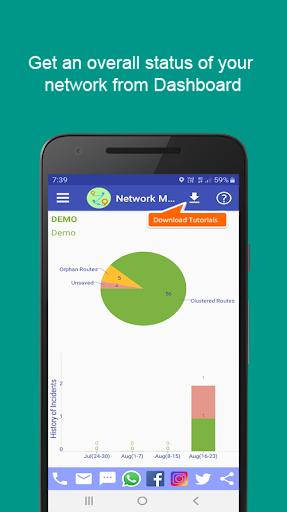
• Gives a bird's view of your network realm. You can simply drill down to its amazing details of cables, individual fiber, fiber …
Read the full description
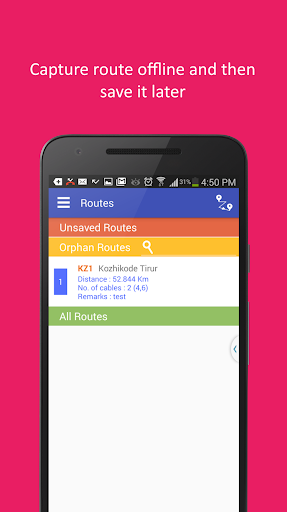
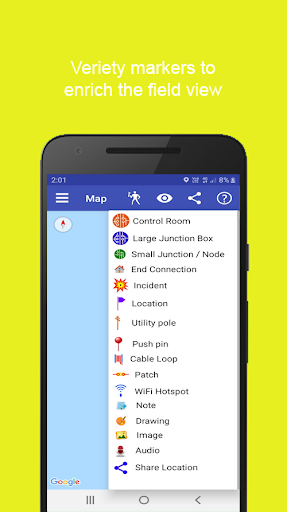
<b>NETWORK MAP</b> is a Fiber Cable Management Application using Geographic Information System (GIS) for designing and drawing Fiber Network routes for FTTP and FTTH layouts. NETWORK MAP is the best ever way to Plan, Design, Document and Maintain a Fiber Network Structure simply and effectively. <b>WHO NEEDS NETWORK MAP?</b> • Network Map application is very useful for Digital Cable TV operators, Internet Providers or any organizations who have to maintain fiber optic cables for their business in FTTP or FTTH models. <b>NETWORK MAP FEATURES</b> • Gives a bird's view of your network realm. You can simply drill down to its amazing details of cables, individual fiber, fiber connecting junctions, incidents over a fiber cable, signal strength at any junction etc • Fiber Cable paths can be recorded in the map manually or automatically with GPS assist • It is possible to trace a single fiber throughout the network structure • Expected signal strength at all junctions will be displayed for a given input signal strength • Varity of cute and beautiful location markers like junctions, flags, utility poles, cable loop, fiber patches, incidents... • Export as .kmz format • Advanced Network Design facilities • Customisable loss values in Network Design • Preloaded cables types, fiber colours, device list etc • Detailed Login/Logout Log and Activity Log • Fault location assist with OTDR input • Filter Junctions by type or devices it contains • Filter Routes by cables it contains • Cable Health Index • Junction Health Index • Three tier user access permissions: Administrator, User and Viewer • Change Language • Awesome Help text in selected language • Video tutorials • Network Map Starter Assist will guide you through the app to complete each steps in the logical order. See START USING NETWORK MAP section for details <b>ADVANTAGES OF USING NETWORK MAP</b> • Network Map GIVES you clarity in which fiber goes to where. This is most important in FTTP/FTTH layouts. You can trace a fiber forward or backward and see signal strength at each junction through which the fiber passes. • Network Map deals with minute details like fibre color code and purpose like Digital TV transmission or Internet. • Signal loss per Km of the fiber cables, loss at fiber patches and loss of each device like couplers, splitters etc are customizable. • Network Map application can project an issue location when an OTDR input is given considering even cable loops on the path. When the mobile device enters the issue circle, an alarm will ring helping the technicians to pin point the fault. • Network Design feature will help calculating loss values automatically in a network consisting of couplers and splitters. It is easy to try different values of couplers and splitters to arrive a desired value while designing FTTP and FTTH fiber networks. Automatic loss calculation in Network Design will save time by avoiding cumbersome and repeated manual calculations • Network Map can be used for planning and designing a cable lying area. Plan the routes, cables and how they are interconnected in advance in the map. This can be shared to the people who are laying fiber cables for their reference. <b>NETWORK MAP USER LICENSE AVAILABLE IN 4 MODELS</b> • <u>CORPORATE</u>: Can create sub organizations with organization level administrators. • <u>DISTRIBUTOR</u>: Those who provide input to the last mile operators • <u>OPERATOR</u>: Provides last mile connectivity to the digital TV or Internet customers • <u>DEALER</u>: Can create and distribute Distributor / Operator licenses] • Anyone can register as a Demo User of Network Map application (View only) for absolutely free. • For all license except trial, there is a <i>FREE USAGE PERIOD</i> even after the expiry of license with limitations in adding new routes and junctions. • More details on pricing plans are available in the new user registration page of the app. Connect us : https://www.facebook.com/networkmap
Installs since 29 Aug 2026 Measured
Exact Google Play install counts, collected daily
Ratings
190 ratings, 3 reviews
- 5 ★57%
- 4 ★0.0%
- 3 ★0.0%
- 2 ★0.0%
- 1 ★43%
Recent reviews
Latest public reviews from the store
- 5 Apr 2026
EXCELLENT
- 15 Jan 2026
so helpful
- 10 Jul 2025
Great app. Useful for WAN and Local Cable networks.
- 21 Oct 2024
A great app for every networking company.
What reviewers bring up
Topics mentioned in the latest 50 reviews, by how many reviews mention them
Liked in good reviews (32 reviews)
- network 4
- useful 4
- cable 4
- operator 2
- helpful 2
- worth 2
- fiber 2
- must 2
Raised in bad reviews (17 reviews)
- support 4
- payment 4
- getting 3
- send 3
- providing 2
- password 2
- money 2
- paid 2
Top chart positions
Latest Google Play chart ranks by country, last 10 days
Not in any tracked top chart in the last 10 days.
Network Map - GIS history
Release, install milestones, listing and store changes
- Reached 10,000+ installs 20 Apr 2019
- Reached 5,000+ installs 12 Apr 2018
- Reached 1,000+ installs 21 Mar 2017
- Reached 500+ installs 2 Jan 2017
- Reached 100+ installs 26 Nov 2016
- Reached 50+ installs 13 Nov 2016
- Reached 10+ installs 1 Nov 2016
- First released on the store 26 Oct 2016
Update frequency
How often Network Map - GIS ships a new version, month by month
0 updates in the last 12 months. Less often than most similar apps: they shipped a median of 3 updates in the same year.
Recent versions
Current version 9.1
- Version 9.111 Oct 2025
- Bug fixes
- Version 9.023 Aug 2025
- Version 8.91 Jun 2025
- Version 8.83 Dec 2024
Listing keywords
Words and phrases Network Map - GIS repeats most in its store listing
Top phrases: network map (15), network design (5), signal strength (4), fttp and ftth (3), network map application (3).
Highlighted words also appear in the title. Counts cover the title, short description and description.
Business model and tech
From the store listing, the SDKs in the app package and its declared permissions
- Business model
- Free to downloadIn-app purchasesShows ads
- Built with
- No cross-platform framework or game engine detected
- Ad networks (1)
- AdMob
- Subscriptions and payments
- Google Play billing
- Analytics and crash reports
- Firebase
- Sensitive access
- LocationCameraMicrophonePhotos, videos and filesAdvertising ID
2 ad, attribution and analytics SDKs detected. SDKs are read from the app package and permissions from the store listing, so code that loads later is not seen.
Technology
17 SDKs found in the app package
Ad networks
Advertising and install-attribution SDKs found in the app package
- AdMob
28 permissions
0 special access, 10 sensitive, 18 standard
- Record audioSensitive
- Take photos and videosSensitive
- Change or delete shared storageSensitive
- Read music and audioREAD_MEDIA_AUDIOSensitive
- Read photosREAD_MEDIA_IMAGESSensitive
- Read shared storageSensitive
- Read videosREAD_MEDIA_VIDEOSensitive
- Approximate locationSensitive
- Precise locationSensitive
- Show notificationsPOST_NOTIFICATIONSSensitive
- Ad attribution (Privacy Sandbox)ACCESS_ADSERVICES_ATTRIBUTIONStandard
- Ad topics (Privacy Sandbox)ACCESS_ADSERVICES_TOPICSStandard
Compliance
What the listing and the app package show
- Store status
- Live
- Upkeep
- Updated 20 Oct 2025
- Registered in
- India
- Privacy policy
- Linked on the listing
- Advertising
- Shows ads
- In-app purchases
- Offered
- Age rating
- Everyone
- Sensitive permissions
- 10 sensitive of 28
- Location access
- Yes, while in use
- Camera and microphone
- Both
Apps like Network Map - GIS
AI Prompts: AI Image GeneratorPixel Crafts7.6K installs★ 4.33
Bluedot Al Note TakerTwiso Inc.11.8K installs★ 4.71
BI LifeBI Digital16.3K installs★ 4.8
Drift: Notification TickerLight Source Labs5.5K installs★ 4.52
Magnifying Glass with FlashligOne Music Player42.1K installs★ 3.34
Mowazzi: AI Tools DirectoryKhalid Saied19.5K installs★ 4.57
Meeting Summary - AI NotesGODHITECH JSC20.7K installs★ 2.4
Speco GraySpeco Technologies10.9K installs★ 3.67
PI mPowerPI Industries16.9K installs★ 4.5
Network Map - GIS: questions and answers
How many downloads does Network Map - GIS have?
Network Map - GIS has 48,197 installs on Google Play, measured from the store's own count on 14 Nov 2026.
Who makes Network Map - GIS?
Network Map - GIS is published by ITDeveloper Zone, a developer based in IN.
When was Network Map - GIS last updated?
The latest version (9.1) was released on 20 Oct 2025.
Is Network Map - GIS free?
Yes. Network Map - GIS is free to download and offers in-app purchases, and it shows ads.
Is Network Map - GIS still available?
Yes. Network Map - GIS is live on Google Play as of 14 Nov 2026.
Track Network Map - GIS and its competitors
Watch any app for new versions, rating drops, chart moves and removals. Free plan, no card.