
Network Tools: WiFi Analyzer,
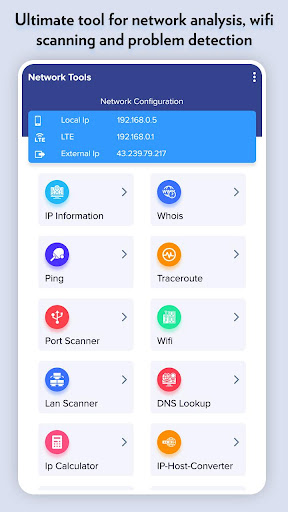
Ultimate tool for network analysis, wifi scanning and problem detection
- Installs
- 104K
- Measured
- Rating
- 4.07
- Ratings
- 615
- 18 reviews
- Version
- Varies with device
- Updated 24 Apr 2026
- Released
- 23 Apr 2020
- Tracked since 12 May 2026
- Size
- 9 MB
- Needs 5.0
Screenshots



About Network Tools: WiFi Analyzer,
The description on the store listing
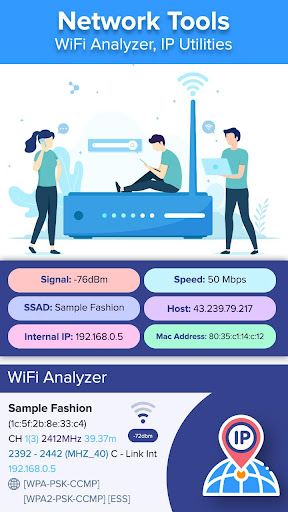
Network Tools: WiFi Analyzer, IP Utilities app is a combination of tools to help you to understand your network's configuration, WiFi states, any potential issues, the availability of the network and its performance.
• IPInfo: Network Summary, Wireless network type, status, name and IP address
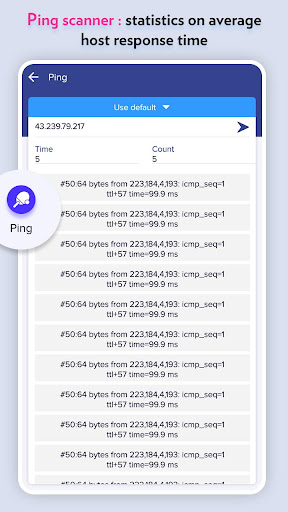
• Ping - TCP and HTTP ping, Shows how long it takes for packets to reach host.
• Traceroute - discover all intermediate hops that packets pass on their way to their destination.
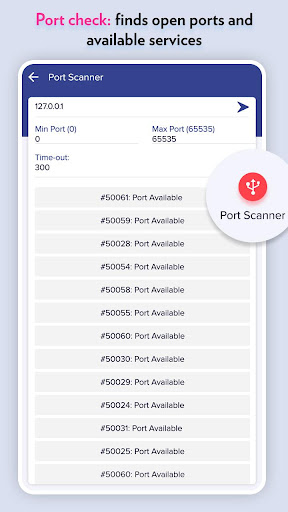
• Port scanner - TCP ports scanner, you can know which ports are open on the host.
• Whois lookup - view DNS records for a given domain/hostname
• Wi-Fi scanner - available wifi connections, WiFi band, Signal strength, …
Read the full description
Network Tools: WiFi Analyzer, IP Utilities app is a combination of tools to help you to understand your network's configuration, WiFi states, any potential issues, the availability of the network and its performance. • IPInfo: Network Summary, Wireless network type, status, name and IP address • Ping - TCP and HTTP ping, Shows how long it takes for packets to reach host. • Traceroute - discover all intermediate hops that packets pass on their way to their destination. • Port scanner - TCP ports scanner, you can know which ports are open on the host. • Whois lookup - view DNS records for a given domain/hostname • Wi-Fi scanner - available wifi connections, WiFi band, Signal strength, Security and SSID • DNS Lookup - reverse lookup & just type in a numeric address • IP Calculator - subnet/IP address calculator for setting up routers and addresses on IP networks • Wifi signal meter can view your current WiFi signal strength and detect WiFi Signal Strength around you in real time. <b>Very useful features of Network Tools: WiFi Analyzer, IP Utilities app:</b> - Ultimate tool for network analysis, wifi scanning and problem detection - Network Summary: Wireless network type, status, name and IP address - Full information about your network, find out internal or external IP - Ping scanner : statistics on average host response time - Port check: finds open ports and available services - WiFi analyzer : detail information about wifi networks & connected devices - Identify nearby WiFi Access Points & channels signal strength - Configure your WiFi Router Settings setup page, 192.168.0.1 on router setup page *WiFi Analyzer offers very useful functions for WiFI analysis such as Access points, channel rating, channel graph, WiFi strength and recommends the best available wifi channels. - Supports 2.4GHz/5GHz and WiFi Channel Optimizer - Provides you information individually on wifi channels - WiFi Analyzer tool shows signal strength in history graph
Installs since 29 Aug 2026 Measured
Exact Google Play install counts, collected daily
Ratings
615 ratings, 18 reviews
- 5 ★64%
- 4 ★7.0%
- 3 ★12%
- 2 ★4.7%
- 1 ★12%
Recent reviews
Latest public reviews from the store
- 16 Apr 2026
Good
Top chart positions
Latest Google Play chart ranks by country, last 10 days
Not in any tracked top chart in the last 10 days.
Network Tools: WiFi Analyzer, history
Release, install milestones, listing and store changes
- Reached 100,000+ installs 24 Apr 2026
- Reached 50,000+ installs 15 Aug 2021
- Reached 10,000+ installs 5 Sep 2020
- Reached 5,000+ installs 11 Jul 2020
- Reached 1,000+ installs 30 May 2020
- Reached 500+ installs 16 May 2020
- Reached 100+ installs 1 May 2020
- First released on the store 23 Apr 2020
Update frequency
How often Network Tools: WiFi Analyzer, ships a new version, month by month
0 updates in the last 12 months. Less often than most similar apps: they shipped a median of 1 updates in the same year.
Recent versions
Current version Varies with device
- Version 1.99 Oct 2025
- Version 1.817 Jul 2025
- Version 1.72 Aug 2024
- Version 1.627 Oct 2023
Listing keywords
Words and phrases Network Tools: WiFi Analyzer, repeats most in its store listing
Top phrases: wifi analyzer (6), signal strength (5), network tools wifi (3), tools wifi analyzer (3), ip address (3).
Highlighted words also appear in the title. Counts cover the title, short description and description.
Business model and tech
From the store listing and declared permissions
- Business model
- Free to downloadIn-app purchasesShows ads
- Sensitive access
- No sensitive permission declared
Compliance
What the listing and the app package show
- Store status
- Live
- Upkeep
- Updated 24 Apr 2026
- Registered in
- India
- Privacy policy
- Linked on the listing
- Advertising
- Shows ads
- In-app purchases
- Offered
- Age rating
- Everyone
Apps like Network Tools: WiFi Analyzer,
PDFReader - MasterSakhawatH 007Devworks116K installs★ 4.27
GreyscaleYufz133K installs★ 3.63
TV Remote - Roku & Smart TVFunShare Interactive101K installs★ 4.16
MT Manager+meitrack group1.1M installs★ 2.22
Sensor Box for Android SensorsNirmal Labs331K installs★ 3.46
Remote for Fire Stick & TVRetech Labs136K installs★ 4.28
SupCam Proxiaochenchen270K installs★ 2.25
ChatLock: Lock Specific ChatsShirAgin24.4K installs★ 4.89
WebView : Cookies Management,CloudEdge36.7K installs★ 4.07
Network Tools: WiFi Analyzer,: questions and answers
How many downloads does Network Tools: WiFi Analyzer, have?
Network Tools: WiFi Analyzer, has 103,812 installs on Google Play, measured from the store's own count on 14 Nov 2026.
Who makes Network Tools: WiFi Analyzer,?
Network Tools: WiFi Analyzer, is published by Fit Tech, a developer based in IN.
When was Network Tools: WiFi Analyzer, last updated?
The latest version (Varies with device) was released on 24 Apr 2026.
Is Network Tools: WiFi Analyzer, free?
Yes. Network Tools: WiFi Analyzer, is free to download and offers in-app purchases, and it shows ads.
Is Network Tools: WiFi Analyzer, still available?
Yes. Network Tools: WiFi Analyzer, is live on Google Play as of 14 Nov 2026.
Track Network Tools: WiFi Analyzer, and its competitors
Watch any app for new versions, rating drops, chart moves and removals. Free plan, no card.