
NFC Task List
Corresponding progress report is submitted after scanning an NFC tag
- Installs
- 1.08K
- Measured
- Rating
- —
- Ratings
- —
- Version
- Varies with device
- Updated 29 Apr 2026
- Released
- 18 Feb 2020
- Tracked since 13 May 2026
- Size
- 3 MB
- Needs 5.0
Screenshots





About NFC Task List
The description on the store listing
<a href="https://play.google.com/store/apps/details?id=house_intellect.nfc_reports">NFC progress report tag linking app:<a></a> https://play.google.com/store/apps/details?id=house_intellect.nfc_reports
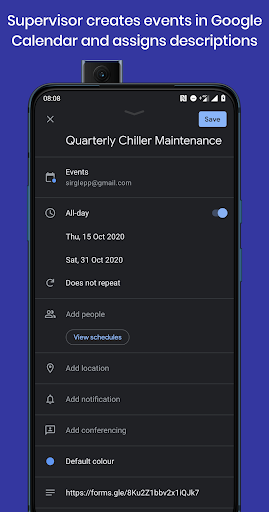
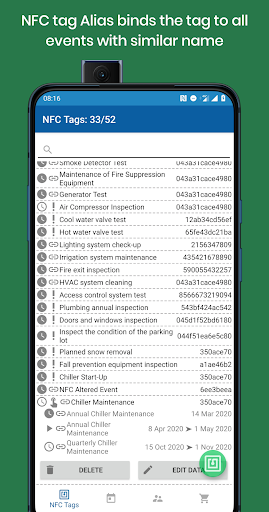
<b>Equipment maintenance instructions</b> are shown to technicians in charge upon scanning NFC tags attached to the respective equipment. This app is used to show and submit <b>progress reports</b> to the manager, whereas the association between NFC tags and Google Forms URLs is established by using <b>NFC tag linking app</b> which associates NFC tags with corresponding task lists. Manager creates these events in <b>Google Calendar</b> and places Google Forms Surveys URLs into event …
Read the full description
<a href="https://play.google.com/store/apps/details?id=house_intellect.nfc_reports">NFC progress report tag linking app:<a></a> https://play.google.com/store/apps/details?id=house_intellect.nfc_reports <b>Equipment maintenance instructions</b> are shown to technicians in charge upon scanning NFC tags attached to the respective equipment. This app is used to show and submit <b>progress reports</b> to the manager, whereas the association between NFC tags and Google Forms URLs is established by using <b>NFC tag linking app</b> which associates NFC tags with corresponding task lists. Manager creates these events in <b>Google Calendar</b> and places Google Forms Surveys URLs into event description fields. <b>NFC tag linking app</b> creates a calendar to share with technicians who use <b>NFC task list app</b> to scan the NFC tags and fill in the <b>maintenance report</b> forms. Google Form Surveys based task lists contain maintenance intstruction manuals and job descriptions relevant to the specific set of equipment marked by the NFC tag. <b>Associations between NFC tags and Google Forms URLs</b> are automatically shared with technicians via Google accounts calendar sharing. Technicians use <b>NFC task list app</b> to scan NFC tags and to fill out the Google Forms Surveys shown to them as a result of scanning. Survey results submitted by the service personnel through Google Forms Surveys can be stored arbitrarily in Google Spreadsheets in order to <b>significantly increase the degree of supervisor's control</b>. Automatic delivery of relevant maintenance manuals to technicians makes it possible to replace the most important workers with less expenses. <b>Progress reports increase transparency</b>. This solution can also be used to track inventory. <b>Progress reports</b> are kept in corporate Google Forms or Microsoft Teams platforms. <b>To link an NFC tag to a Google Form task list</b> 1. Create a Google Form in your Google Docs 2. Create a shortened URL for the created task list by pressing the "send" button 3. Create a new event in your "NFC" Google Calendar, this calendar is created by the app during first launch 4. Paste your task list URL into the description field of the new calendar event 5. Open the <b>NFC tag linking app</b> and scan a new NFC tag 6. Select the appropriate calendar event from the events list in edit mode 7. Add the technician's account to the access list in "Users" tab 8. Install <b>NFC task list app</b> on the technician's smartphone 9. Scan the NFC tag with the <b>NFC task list app</b>. Google Form task list will be shown</a>
Installs since 15 Nov 2026 Measured
Exact Google Play install counts, collected daily
Daily history starts once this app is in our daily install sample.
Ratings
- 5 ★0.0%
- 4 ★0.0%
- 3 ★0.0%
- 2 ★0.0%
- 1 ★0.0%
Recent reviews
Latest public reviews from the store
- 12 Jan 2025
Good
- 10 Nov 2024
❤️
- 22 Oct 2024
Very good
- 11 Sep 2024
Mila no zi Twaibo
What reviewers bring up
Topics mentioned in the latest 50 reviews, by how many reviews mention them
Liked in good reviews (35 reviews)
- password 4
- info 3
- application 2
- helpful 2
- saving 2
Raised in bad reviews (9 reviews)
- backup 2
Top chart positions
Latest Google Play chart ranks by country, last 10 days
Not in any tracked top chart in the last 10 days.
NFC Task List history
Release, install milestones, listing and store changes
- Reached 1,000+ installs 10 Apr 2026
- Reached 500+ installs 9 Jan 2025
- Moved from Business to Productivity 9 Jan 2024
- Reached 100+ installs 19 Mar 2022
- Reached 50+ installs 23 May 2021
- Reached 10+ installs 22 Sep 2020
- Reached 5+ installs 21 Jun 2020
- First released on the store 18 Feb 2020
Update frequency
How often NFC Task List ships a new version, month by month
1 updates in the last 12 months. More often than most similar apps: they shipped a median of 0 updates in the same year.
Recent versions
Current version Varies with device
- Version 3.429 Apr 2026
- Version 3.04 Nov 2025
- Version 2.816 Jul 2025
- Version 2.43 Dec 2023
Listing keywords
Words and phrases NFC Task List repeats most in its store listing
Top phrases: task list (9), nfc tag (8), google forms (6), nfc tags (6), nfc task list (5).
Highlighted words also appear in the title. Counts cover the title, short description and description.
Business model and tech
From the store listing and declared permissions
- Business model
- Free to downloadShows ads
- Sensitive access
- LocationNearby devicesAdvertising ID
21 permissions
0 special access, 5 sensitive, 16 standard
- Approximate locationSensitive
- Advertise to nearby Bluetooth devicesBLUETOOTH_ADVERTISESensitive
- Connect to paired Bluetooth devicesBLUETOOTH_CONNECTSensitive
- Find nearby Bluetooth devicesBLUETOOTH_SCANSensitive
- Show notificationsPOST_NOTIFICATIONSSensitive
- Ad attribution (Privacy Sandbox)ACCESS_ADSERVICES_ATTRIBUTIONStandard
- Ad topics (Privacy Sandbox)ACCESS_ADSERVICES_TOPICSStandard
- Read how it was installed (install referrer)BIND_GET_INSTALL_REFERRER_SERVICEStandard
- Read the advertising IDAD_IDStandard
- Read the advertising ID (Privacy Sandbox)ACCESS_ADSERVICES_AD_IDStandard
- Control vibrationStandard
- Keep the phone awakeStandard
Compliance
What the listing and the app package show
- Store status
- Live
- Upkeep
- Updated 29 Apr 2026
- Registered in
- Russia
- Privacy policy
- Linked on the listing
- Advertising
- Shows ads
- In-app purchases
- None declared
- Age rating
- Everyone
- Sensitive permissions
- 5 sensitive of 21
- Location access
- Yes, while in use
- Camera and microphone
- Neither
Apps like NFC Task List
영산강 안심 알림eICT융합소프트 & 스마트오더18.3K installs★ 4.0
JBLETRADOC Mobile10.3K installs★ 4.5
Two Point HeightOmega Centauri Software15.3K installs★ 2.22
Sheridan RecyclesCity of Sheridan634 installs★ 4.67
NAFNorges Automobil-Forbund200K installs★ 3.9
Ipsos Adria CAPIIpsos Serbia7.4K installs★ 3.9
Clock: Alarm Clock & TimerIntratech so36.1K installs★ 3.79
Süzme Sayaç HesaplamaNotsup30.3K installs★ 3.6
Cattle & Goat Record KeepingVetzKin10.3K installs★ 2.5
NFC Task List: questions and answers
How many downloads does NFC Task List have?
NFC Task List has 1,078 installs on Google Play, measured from the store's own count on 15 Nov 2026.
Who makes NFC Task List?
NFC Task List is published by house-intellect, a developer based in RU.
When was NFC Task List last updated?
The latest version (Varies with device) was released on 29 Apr 2026.
Is NFC Task List free?
Yes. NFC Task List is free to download, and it shows ads.
Is NFC Task List still available?
Yes. NFC Task List is live on Google Play as of 15 Nov 2026.
Track NFC Task List and its competitors
Watch any app for new versions, rating drops, chart moves and removals. Free plan, no card.