Notebloc Scanner - Scan to PDF
Scanner app to scan documents, paper, drawings & homework. Scan and create PDF.
- Installs
- 12.69M
- Measured
- Rating
- 4.25
- Ratings
- 126K
- 1.9K reviews
- Version
- 6.0.4
- Updated 30 Oct 2026
- Released
- 27 Jun 2016
- Tracked since 10 May 2026
- Size
- 13 MB
- Needs 4.2
Also on App Store: Notebloc Scanner - Scan to PDF (1.3K ratings)
Screenshots




About Notebloc Scanner - Scan to PDF
The description on the store listing
Notebloc is a 100% free document scanner app that helps you scan paper and declutter: scan receipts, tickets, notes, drawings and other documents.
You can create PDF documents or JPEG files.
• Notebloc Scanner is a <b>100% free scanner app</b> supporting unlimited usage, developed by a notebook company in Barcelona.
• You can scan documents of any type: notes, receipts, drawings, sketches, photos or images.
• Use our <b>multiple page scan</b> to scan multiple pages at once.
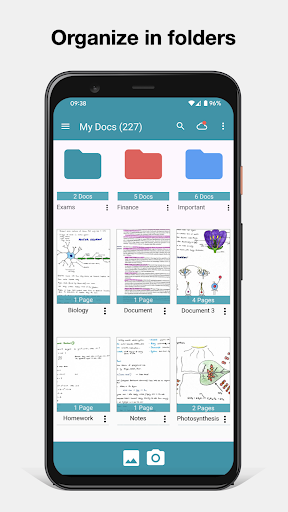
• You can create single or multi page documents and organize them in folders and subfolders.
• It includes <b>OCR</b> for typed texts in 18 different languages (English, Spanish, French, Italian, Danish, Catalan, …
Read the full description
Notebloc is a 100% free document scanner app that helps you scan paper and declutter: scan receipts, tickets, notes, drawings and other documents. You can create PDF documents or JPEG files. • Notebloc Scanner is a <b>100% free scanner app</b> supporting unlimited usage, developed by a notebook company in Barcelona. • You can scan documents of any type: notes, receipts, drawings, sketches, photos or images. • Use our <b>multiple page scan</b> to scan multiple pages at once. • You can create single or multi page documents and organize them in folders and subfolders. • It includes <b>OCR</b> for typed texts in 18 different languages (English, Spanish, French, Italian, Danish, Catalan, Dutch, German, Finnish, Hungarian, Latin, Norwegian, Polish, Portuguese, Romanian, Swedish, Tagalog and Turkish). • The app will automatically detect the corners and correct the perspective of the image. Making it appear as if it was taken with a 90 degrees angle. • Any shadows or similar will disappear. • You can crop a document or image directly inside the app. • Your scanned documents can be saved or shared through email / Whatsapp / Dropbox, etc. With the Notebloc® app: We correct the perspective of your captured piece of paper: Notebloc geometrically fits your photos (see example above), making that the image on the screen completely straight, as if you had taken the picture in a perfect 90 degree angle. We eliminate any trace of shade in your photos: Imagine you could have the perfect light intensity to digitize your notes in any circumstance, time and place. That may seem impossible, but with the Notebloc app your digitized notes will look perfect, clean, without any imperfection due to light and shadow. In your digital image you will only get what there is written or drawn on a completely white background. Within the application you can: - Create documents and save them as PDF or JPG. - Share documents online: e-mail, instant messaging, social networks, etc. - Rename documents. - Classify documents by date of creation or edition. - Choose in what size of PDF you want to keep your notes. - Digitize images / other documents that you may want to save along with your Notebloc notes. - Add, copy and order pages within the same document. - Create folders to better organize your files. When used in conjunction with our Notebloc® notebooks, you get optimal results. The gridlines and background of our paper will magically disappear. ---- About Notebloc® ---- Notebloc is a brand of digitizable paper notebooks, born in Barcelona in 2013. All Notebloc products are compatible with our mobile app that allows your ideas, notes, drawings and sketches from your Notebloc to be converted to digital. About Notebloc Scanner app: The Notebloc app is the only document scanner app developed by professionals in the notebook industry. At Notebloc, we care about the needs of all professionals and students who search for the best scanning and document organization tools.
Installs, last 30 days Measured
Exact Google Play install counts, collected daily
Ratings
126,284 ratings, 1,941 reviews
- 5 ★71%
- 4 ★7.7%
- 3 ★4.4%
- 2 ★4.4%
- 1 ★12%
Recent reviews
Latest public reviews from the store
- 18 May 2026
nice app.
- 18 May 2026
it makes document readable and clear printing
- 18 May 2026
Provides me all requirements.
- 18 May 2026
App is great. But, too many advertisements!
What reviewers bring up
Topics mentioned in the latest 50 reviews, by how many reviews mention them
Liked in good reviews (47 reviews)
- document 6
- scanner 6
- scanning 4
- quality 4
- experience 3
- features 3
- fast 3
- ads 3
Raised in bad reviews (2 reviews)
No topic comes up twice.
Top chart positions
Latest Google Play chart ranks by country, last 10 days
Not in any tracked top chart in the last 10 days.
Notebloc Scanner - Scan to PDF history
Release, install milestones, listing and store changes
- Reached 10,000,000+ installs 4 Aug 2023
- Reached 5,000,000+ installs 4 Sep 2020
- Reached 1,000,000+ installs 30 Mar 2018
- Reached 500,000+ installs 8 Feb 2018
- Reached 100,000+ installs 10 Jan 2018
- Reached 50,000+ installs 26 Dec 2017
- Reached 10,000+ installs 21 Mar 2017
- Reached 5,000+ installs 18 Dec 2016
Update frequency
How often Notebloc Scanner - Scan to PDF ships a new version, month by month
4 updates in the last 12 months. More often than most similar apps: they shipped a median of 2 updates in the same year.
Recent versions
Current version 6.0.4
- Version 6.0.430 Oct 2026
We've improved performance, enhanced stability, and fixed bugs to ensure Notebloc Scanner runs more smoothly and reliably. Thank you for choosing Notebloc Scanner to scan, save, and share your documents and notes.
- Version 5.7.426 May 2026
We've improved performance, enhanced stability, and fixed bugs to ensure Notebloc Scanner runs more smoothly and reliably. Thank you for choosing Notebloc Scanner to scan, save, and share your documents and notes.
- Version 5.7.726 May 2026
We've improved performance, enhanced stability, and fixed bugs to ensure Notebloc Scanner runs more smoothly and reliably. Bugs resolved: Sync with Google Drive - it should now work correctly again Thank you for choosing Notebloc Scanner to scan, save, and share your documents and notes.
- Version 5.7.25 May 2026
Listing keywords
Words and phrases Notebloc Scanner - Scan to PDF repeats most in its store listing
Top phrases: notebloc scanner (3), correct the perspective (2), about notebloc (2), create pdf (2), document scanner (2).
Highlighted words also appear in the title. Counts cover the title, short description and description.
Business model and tech
From the store listing and declared permissions
- Business model
- Free to downloadIn-app purchasesShows ads
- Sensitive access
- No sensitive permission declared
Compliance
What the listing and the app package show
- Store status
- Live
- Upkeep
- Updated 30 Oct 2026
- Registered in
- Spain
- Privacy policy
- Linked on the listing
- Advertising
- Shows ads
- In-app purchases
- Offered
- Age rating
- Everyone
Apps like Notebloc Scanner - Scan to PDF
My VodafoneVodafone Portugal, Comunicações Pessoais, S.A.6.2M installs★ 3.81
MediaFireMediaFire24.6M installs★ 3.65
BasicNote: Notes & NotepadNotas Notepad13.8M installs★ 4.5
All Document Reader and Viewero16i Apps4.1M installs★ 4.24
Kia AccessKia America1.6M installs★ 4.68
Cash App: Recharge Earning appReward Supreme1.6M installs★ 4.83
Easy Contacts CleanerLSM Apps3.6M installs★ 4.8
Beatron - AI Music MakerOcean Float Mobile5.5M installs★ 4.58
B-Love NetworkCloud Intense12.5M installs★ 3.0
Notebloc Scanner - Scan to PDF: questions and answers
How many downloads does Notebloc Scanner - Scan to PDF have?
Notebloc Scanner - Scan to PDF has 12,685,494 installs on Google Play, measured from the store's own count on 20 Nov 2026.
Who makes Notebloc Scanner - Scan to PDF?
Notebloc Scanner - Scan to PDF is published by Notebloc Scanner, a developer based in ES.
When was Notebloc Scanner - Scan to PDF last updated?
The latest version (6.0.4) was released on 30 Oct 2026.
Is Notebloc Scanner - Scan to PDF free?
Yes. Notebloc Scanner - Scan to PDF is free to download and offers in-app purchases, and it shows ads.
Is Notebloc Scanner - Scan to PDF still available?
Yes. Notebloc Scanner - Scan to PDF is live on Google Play as of 20 Nov 2026.
Track Notebloc Scanner - Scan to PDF and its competitors
Watch any app for new versions, rating drops, chart moves and removals. Free plan, no card.