
Notification Icon Complication
Plug-in for Bubble Cloud Widgets and any complication capable Wear OS watch face
- Installs
- 5.17K
- Measured
- Rating
- 4.09
- Ratings
- 64
- 13 reviews
- Version
- Varies with device
- Updated 12 Apr 2026
- Released
- 22 Nov 2018
- Tracked since 13 May 2026
- Size
- —
Screenshots


About Notification Icon Complication
The description on the store listing
This is a <b>plugin/theme for Bubble Cloud</b> Watch Face, <b>complication provider</b> for all complication-ready Wear OS watch faces and plugin for home screen widgets (see setup notes below)
<b>NEW:</b>
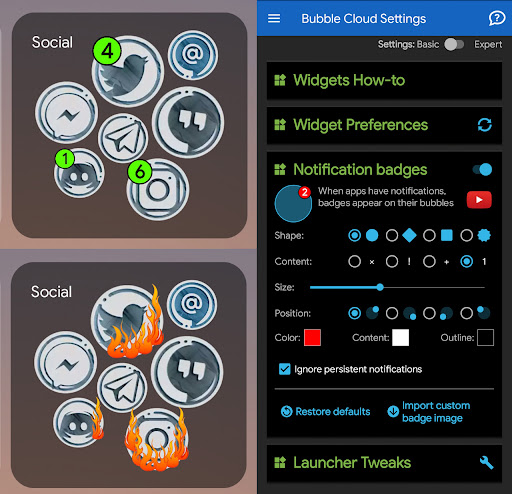
Plugin to show <b>notification count badges</b> in home screen widgets on phone/tablet
<b>FEATURES</b>
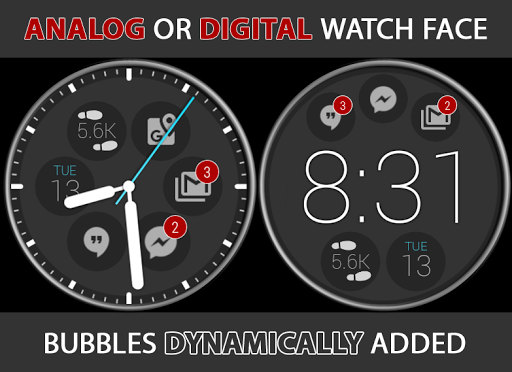
► Dynamically adds notification icons to your watch face (up to 9 icons!)
► Count badges for repeating icons
► Outline icons in ambient mode
► Tap icons to view, manage, filter notifications by app or content
► Shows full text (does not truncate like latest Wear OS)
► <b>Reply</b> via voice / keyboard / emoji
► <b>Watch face complications}</b> for use in any watch face app …
Read the full description
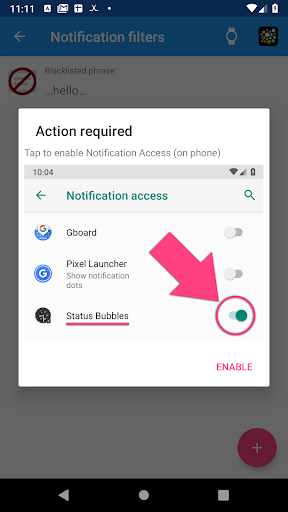
This is a <b>plugin/theme for Bubble Cloud</b> Watch Face, <b>complication provider</b> for all complication-ready Wear OS watch faces and plugin for home screen widgets (see setup notes below) <b>NEW:</b> Plugin to show <b>notification count badges</b> in home screen widgets on phone/tablet <b>FEATURES</b> ► Dynamically adds notification icons to your watch face (up to 9 icons!) ► Count badges for repeating icons ► Outline icons in ambient mode ► Tap icons to view, manage, filter notifications by app or content ► Shows full text (does not truncate like latest Wear OS) ► <b>Reply</b> via voice / keyboard / emoji ► <b>Watch face complications}</b> for use in any watch face app ► Add/remove filters via <b>Locale / MacroDroid / Tasker plugin I MAINTAIN THIS APP</b> Please report any issues. Thank you for any feedback! <b>SETUP: Complications</b> 1. Install phone app 2. Open app to enable Notification Access 3. Add complication "Icon 1"..4 to your watch face See https://bubble.dynalogix.eu/notification-icons-watch-face-complications/ <b>SETUP: Bubble Clouds</b> 1. Find <i>"Notification Bubbles"</i> section in <b>Bubble Cloud app</b> on phone 2. Install this theme/plugin to both phone and watch 3. Open "Status Bubbles" on the watch 4. You will get a prompt to enable Notification Access on phone 5. The notification bubbles should appear on your watch face <i><b>Setup is shown in video from 3:47</b> → http://youtu.be/S-A976Dcjpc?t=227</i> <b>To get a watchface with the exact look of the video:</b> 1. Install the plugin on the watch first 2. Install Bubble Cloud next 3. If Bubble Cloud finds a single theme installed it will set it up from the get go It takes 82 seconds as shown in https://youtu.be/1RavyDzmGRE <i>(If you don't follow this install order, you can still get the same look, but you will have to use the menu command "1-click themes" to select the <b>Status Bubbles</b> theme, then long press some bubbles to move them away from the watch face)</i> <b>USAGE ON WATCH</b> ► Tap any notification bubble to expand → "Phone+Eye" button to open on phone → "Block" button to <b>blacklist</b> app (long press) → "Trash" button to dismiss notification on phone+watch → Tap an expanded notification to go back to the list ► Tap the overflow (+X) bubble to see full list of notifications → "Gear icon" at top of list to change settings → Swipe left to dismiss a notification (BLUE) → Swipe left to <b>blacklist</b> a persistent notification (RED) → "Clear filter" at bottom of list to see full list → "Dismiss all" at bottom (press and hold for 1 sec) ► Long press any notification bubble to change settings → Max number of status bubbles (they are added dynamically) → Option to show app icon when no active notifications → Open app on phone for more settings <b>SETTINGS ON PHONE</b> ► See <i>"Notification bubbles"</i> section or tap on <i>"Status bubbles"</i> in the <b>Wear Cloud Editor</b> → Customize all colors → Options to override the theme colors → Some colors have transparency control! → Some colors come from theme by default, use override → Button to <b>blacklist/whitelist</b> screen ► "Funnel" icon in Wear Cloud Editor → <b>black/whitelist</b> directly → You can only blacklist apps on the watch ("Block" button) → Use "+" FAB to blacklist/whitelist phrases → Tap item to edit → Swipe left to remove apps/phrases from the list <i>App is very <b>battery friendly,</b> not running when not used</i> <b>BLACKLIST/WHITELIST</b> ► Whitelisting overrides black lists. <i>So if you have blacklisted an app, but its notification includes a whitelisted phrase it will still show up.</i> ► Phrase filters are case insensitive ► Use leading and trailing spaces cleverly! ► Wildcards might come if requested <b>BACKUP/RESTORE</b> ► Status bubble color settings are saved with Bubble Cloud backup Email me if something is still not clear. See webpage for more information: https://bubble.dynalogix.eu
Installs since 29 Aug 2026 Measured
Exact Google Play install counts, collected daily
Ratings
64 ratings, 13 reviews
- 5 ★73%
- 4 ★3.2%
- 3 ★7.9%
- 2 ★0.0%
- 1 ★16%
Recent reviews
Latest public reviews from the store
- 10 Feb 2026
mMuy buena aplicacion me soluciono un incombeniente .. monetario.
Top chart positions
Latest Google Play chart ranks by country, last 10 days
Not in any tracked top chart in the last 10 days.
Notification Icon Complication history
Release, install milestones, listing and store changes
- Reached 5,000+ installs 12 Apr 2026
- Reached 1,000+ installs 18 Dec 2019
- Reached 500+ installs 20 Apr 2019
- Reached 100+ installs 9 Dec 2018
- Reached 50+ installs 1 Dec 2018
- First released on the store 22 Nov 2018
Recent versions
Current version Varies with device
- Version 4.1313 Sep 2023
- Version 4.103 Jan 2023
- Version 4.0618 Oct 2022
- Version 4.0417 Aug 2022
Listing keywords
Words and phrases Notification Icon Complication repeats most in its store listing
Top phrases: watch face (8), bubble cloud (6), status bubbles (4), blacklist whitelist (3), long press (3).
Highlighted words also appear in the title. Counts cover the title, short description and description.
Business model and tech
From the store listing, the SDKs in the app package and its declared permissions
- Business model
- Paid, $2.75
- Built with
- No cross-platform framework or game engine detected
- Ad networks (0)
- None detected
- Sensitive access
- No sensitive permission declared
0 ad, attribution and analytics SDKs detected. SDKs are read from the app package and permissions from the store listing, so code that loads later is not seen.
Technology
12 SDKs found in the app package
Compliance
What the listing and the app package show
- Store status
- Live
- Upkeep
- Updated 12 Apr 2026
- Registered in
- Hungary
- Privacy policy
- Linked on the listing
- Advertising
- No ads declared
- In-app purchases
- None declared
- Age rating
- Everyone
Apps like Notification Icon Complication
5K Stunning Wallpapers (pro)Team - Falcon1.5K installs★ 4.25
- Earn Cash Reward: Watch & EarnCash Reward Apps3.3K installs★ 3.33
カップケーキ 壁紙きせかえ+HOME by Ateam Entertainment8.3K installs★ 4.2
Dream Catchers Live Wallpaperapofiss1.7K installs★ 4.71
Wallpapers LakeWasabi13K installs★ 5.0
Horizon 9: Watch faceamoledwatchfaces™7.3K installs★ 4.11
Invisible Watchface AKM WearOSAkchim Watchfaces8.7K installs★ 3.6
Paris wallpaperWallpapers kingdom9.9K installs★ 5.0
Cute Dogs Lock ScreenIntellect Pi App37.1K installs★ 4.2
Notification Icon Complication: questions and answers
How many downloads does Notification Icon Complication have?
Notification Icon Complication has 5,172 installs on Google Play, measured from the store's own count on 14 Nov 2026.
Who makes Notification Icon Complication?
Notification Icon Complication is published by DYNA Logix, a developer based in HU.
When was Notification Icon Complication last updated?
The latest version (Varies with device) was released on 12 Apr 2026.
Is Notification Icon Complication free?
No. Notification Icon Complication is a paid app priced at $2.75.
Is Notification Icon Complication still available?
Yes. Notification Icon Complication is live on Google Play as of 14 Nov 2026.
Track Notification Icon Complication and its competitors
Watch any app for new versions, rating drops, chart moves and removals. Free plan, no card.