
OCR Image to Text Scanner
The OCR Text-Scanner recognizes text from images using image-to-text technology
- Installs
- 19.17K
- Measured
- Rating
- —
- Ratings
- —
- Version
- Varies with device
- Updated 2 Sep 2025
- Released
- 3 Jul 2022
- Tracked since 12 May 2026
- Size
- —
Also on App Store: OCR+ Image To Text Scanner (10 ratings), OCR Image to Text Scanner (332 ratings)
Screenshots


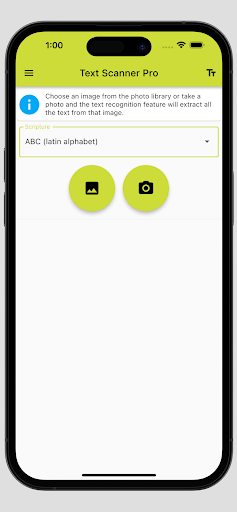


About OCR Image to Text Scanner
The description on the store listing
An OCR app is an application that can be used to digitize and edit text from images. OCR stands for Optical Character Recognition. Our text recognition app uses advanced Image-to-Text conversion technology to recognize text in different fonts and languages from images.
Are you looking for an image-to-text app for text recognition from images? With our powerful OCR Text-Scanner app, you can easily recognize text from images with our Image-to-Text feature. Our text scanner supports text recognition from Latin, Chinese, Japanese, Indian and Korean fonts and outputs the recognized text in a text field.
Use the Text-to-Speech (TTS) function built into our Text-Scanner to have the text …
Read the full description
An OCR app is an application that can be used to digitize and edit text from images. OCR stands for Optical Character Recognition. Our text recognition app uses advanced Image-to-Text conversion technology to recognize text in different fonts and languages from images. Are you looking for an image-to-text app for text recognition from images? With our powerful OCR Text-Scanner app, you can easily recognize text from images with our Image-to-Text feature. Our text scanner supports text recognition from Latin, Chinese, Japanese, Indian and Korean fonts and outputs the recognized text in a text field. Use the Text-to-Speech (TTS) function built into our Text-Scanner to have the text read aloud, or easily share it by copying or sharing. With our text recognition app, turn your smartphone into a versatile Text-Scanner with our powerful Image-to-Text conversion technology. Our OCR Text-Scanner app stands out from the competition by supporting 5 different fonts in 44 different languages. Upgrade to the ad-free version to enjoy an even smoother user experience with our text recognition. Maximize your productivity with our Image-to-Text feature! This is how our OCR Text-Scanner works: Choose an image from the gallery or take a photo and the text recognition feature, the Image-to-Text function, will recognize all the text in this image. The recognized text is then displayed in a text field where it can be edited. With our Text-to-Speech (TTS) function, the recognized text can then be read aloud. The recognized text can then be copied or shared. The Text Recognition feature uses OCR (Optical Character Recognition) to recognize text from images. Our Image-to-Text conversion technology is constantly being improved to offer our users an excellent app experience. Application examples: Our OCR Text-Scanner app can be useful in many situations. For example, if you have a textbook that you want to extract and edit text from, our OCR Text-Scanner app can help you with that. If you want to digitize cooking recipes from a cookbook to better organize or share them, you can easily do that with our OCR text recognition. Even contracts or invoices that are only available in printed form can be digitized quickly and easily with our OCR Text-Scanner app. Limitations and Tips: Please note that the OCR Text-Scanner app may have trouble recognizing text that is of poor quality or uses unusual fonts. We therefore recommend scanning texts of good quality and clear writing. Also ensure that the image has adequate lighting and the entire document is captured. Handwritten texts are only poorly recognized by our Image-to-Text function. We wish you every success with text recognition from images with our OCR Text-Scanner app.
Installs since 1 Sep 2026 Measured
Exact Google Play install counts, collected daily
Ratings
- 5 ★0.0%
- 4 ★0.0%
- 3 ★0.0%
- 2 ★0.0%
- 1 ★0.0%
Recent reviews
Latest public reviews from the store
No reviews in our sample for this app yet.
Top chart positions
Latest Google Play chart ranks by country, last 10 days
Not in any tracked top chart in the last 10 days.
OCR Image to Text Scanner history
Release, install milestones, listing and store changes
- Reached 10,000+ installs 9 Mar 2024
- Reached 5,000+ installs 3 Aug 2023
- Reached 1,000+ installs 26 Dec 2022
- Reached 500+ installs 26 Nov 2022
- First released on the store 3 Jul 2022
Update frequency
How often OCR Image to Text Scanner ships a new version, month by month
0 updates in the last 12 months. Less often than most similar apps: they shipped a median of 1 updates in the same year.
Recent versions
Current version Varies with device
- Version 1.1.22 Sep 2025
- Version 1.1.024 Oct 2023
- Version 1.0.93 May 2023
- Version 1.0.814 Mar 2023
Listing keywords
Words and phrases OCR Image to Text Scanner repeats most in its store listing
Top phrases: text scanner (13), image to text (10), ocr text (10), ocr text scanner (9), text recognition (9).
Highlighted words also appear in the title. Counts cover the title, short description and description.
Business model and tech
From the store listing and declared permissions
- Business model
- Free to downloadIn-app purchasesShows ads
- Sensitive access
- No sensitive permission declared
Compliance
What the listing and the app package show
- Store status
- Live
- Upkeep
- Updated 2 Sep 2025
- Registered in
- Austria
- Privacy policy
- Linked on the listing
- Advertising
- Shows ads
- In-app purchases
- Offered
- Age rating
- Everyone
Apps like OCR Image to Text Scanner
Great Clips ConnectGreat Clips19.3K installs★ 4.0
My NotebookArabic alphabet studio14.4K installs★ 5.0
DokandarDokandarltd8.2K installs★ 4.33
ELECTRICAL CONTRACTOR MagazineELECTRICAL CONTRACTOR Magazine17.2K installs★ 4.5
TicketManagerTicketManager12.2K installs★ 3.5
CrewConneXTA Connections15.1K installs★ 1.32
Flex Inventory ManagementUniGroup, Inc.5K installs★ 3.54
Unique Business WayPARAM COMPUTER3.3K installs★ 5.0
VeriTread CarrierVeriTread LLC12.5K installs★ 4.31
OCR Image to Text Scanner: questions and answers
How many downloads does OCR Image to Text Scanner have?
OCR Image to Text Scanner has 19,173 installs on Google Play, measured from the store's own count on 10 Nov 2026.
Who makes OCR Image to Text Scanner?
OCR Image to Text Scanner is published by Matthias Aigner, a developer based in AT.
When was OCR Image to Text Scanner last updated?
The latest version (Varies with device) was released on 2 Sep 2025.
Is OCR Image to Text Scanner free?
Yes. OCR Image to Text Scanner is free to download and offers in-app purchases, and it shows ads.
Is OCR Image to Text Scanner still available?
Yes. OCR Image to Text Scanner is live on Google Play as of 10 Nov 2026.
Track OCR Image to Text Scanner and its competitors
Watch any app for new versions, rating drops, chart moves and removals. Free plan, no card.