
Office NX: Presentations
The only complete Office presentation program for your PowerPoint files
- Installs
- 802K
- Measured
- Rating
- 4.49
- Ratings
- 8.4K
- 38 reviews
- Version
- 2026.1505.1015.0
- Updated 15 Oct 2026
- Released
- 30 Apr 2021
- Tracked since 14 May 2026
- Size
- 62 MB
- Needs 5.0
Screenshots
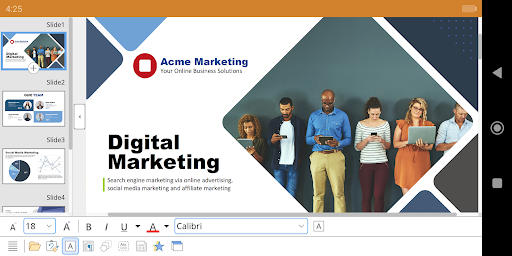


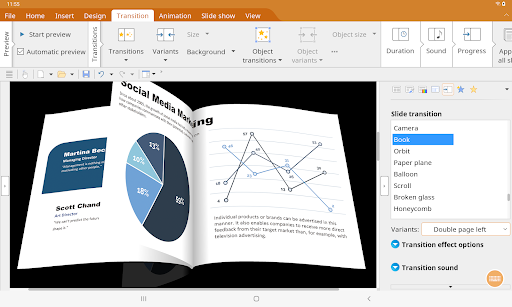

About Office NX: Presentations
The description on the store listing
■ Presentations
► <b>The only complete Office presentation program for your PowerPoint files</b>
► Work on your PowerPoint presentations wherever and whenever you want.
► When working on the go, take advantage of a feature set that you would otherwise only know from your PC or Mac.
► Almost all features can be used permanently free of charge.
The complete set of features that you know from Microsoft PowerPoint or Presentations on your PC is now offered by Presentations on your smartphone and tablet.
<b>Compatibility without compromise:</b> Presentations uses the Microsoft Office PPTX format as its native format. This guarantees seamless data exchange. You can open your …
Read the full description
■ Presentations ► <b>The only complete Office presentation program for your PowerPoint files</b> ► Work on your PowerPoint presentations wherever and whenever you want. ► When working on the go, take advantage of a feature set that you would otherwise only know from your PC or Mac. ► Almost all features can be used permanently free of charge. The complete set of features that you know from Microsoft PowerPoint or Presentations on your PC is now offered by Presentations on your smartphone and tablet. <b>Compatibility without compromise:</b> Presentations uses the Microsoft Office PPTX format as its native format. This guarantees seamless data exchange. You can open your presentations directly in Microsoft PowerPoint without having to convert them. <b>Intuitive operation on smartphones and tablets:</b> Presentations always provides an ideal user experience, regardless of whether you're using it on your smartphone or a tablet. On a phone, you can use the practical toolbars with just one finger. On your tablet, you work with ribbons similar to those on your PC. <b>Save locally or in the cloud:</b> Presentations not only enables you to open and save documents stored on your device, but it also allows you to access your files in Google Drive, Dropbox, Nextcloud and most other cloud services. The Presentations user interface is available in English, German, French, Spanish, Italian and more than 20 other languages. <b>Presentations brings the features of a desktop presentation program to your Android device. You shouldn't settle for less.</b> ■ <b>Working with files</b> ► Presentation files can be losslessly exchanged with Presentations for Windows, Mac and Linux. ► Open and save PPTX and PPT files with full fidelity from PowerPoint 97 to 2021 and PowerPoint 365 ► Export complete presentations as picture files or HTML web pages ■ <b>Designing</b> ► Numerous design templates do the design work for you. ► Color schemes, slide layouts and slide masters ■ <b>Comprehensive graphics functions</b> ► Draw and design directly in the presentation ► PowerPoint-compatible AutoShapes ► Insert pictures in a range of file formats ► Great graphics functions such as mirror effects and soft shadows ► Crop pictures, change brightness and contrast ► Drawings can be filled with colors, patterns, pictures and gradients. ► TextArt feature for font effects ► Charts ► Photo albums ■ <b>Animations and slide transitions</b> ► Hundreds of different object and text animations ► Amazing OpenGL-based animations and slide transitions ■ <b>Flexible slide shows</b> ► Both user-controlled and automatic slide shows without a presenter ► Interaction with the presentation via a virtual pen and highlighter ► Handouts for the audience ► Slide sorter for managing slides ■ <b>Other features</b> Almost all features of Presentations for Android can be used <b>free of charge</b>. The following additional features are available to you via an inexpensive subscription: ► Printing ► Export to PDF and PDF/A ► Sharing documents directly from Presentations ► Free customer support A single subscription unlocks these features simultaneously in Presentations, TextMaker and PlanMaker for Android.
Installs, last 30 days Measured
Exact Google Play install counts, collected daily
Ratings
8,426 ratings, 38 reviews
- 5 ★75%
- 4 ★13%
- 3 ★3.9%
- 2 ★1.0%
- 1 ★6.8%
Recent reviews
Latest public reviews from the store
- 29 Apr 2026
The compatibility with microsoft powerpoint could be better. The textmaker app is the proof.
- 26 Apr 2026
good
- 14 Apr 2026
best alternative of money sucker microsoft powerpoint
- 14 Apr 2026
terbaik
What reviewers bring up
Topics mentioned in the latest 50 reviews, by how many reviews mention them
Liked in good reviews (42 reviews)
- powerpoint 5
- presentation 4
- android 4
- office 4
- application 2
- microsoft 2
- wonderful 2
- windows 2
Raised in bad reviews (7 reviews)
- features 2
- support 2
- issue 2
Top chart positions
Latest Google Play chart ranks by country, last 10 days
Not in any tracked top chart in the last 10 days.
Office NX: Presentations history
Release, install milestones, listing and store changes
- Reached 500,000+ installs 3 Jun 2024
- Reached 100,000+ installs 28 Jan 2022
- Reached 50,000+ installs 8 Oct 2021
- Reached 10,000+ installs 28 May 2021
- Reached 5,000+ installs 7 May 2021
- First released on the store 30 Apr 2021
Update frequency
How often Office NX: Presentations ships a new version, month by month
1 updates in the last 12 months. About as often as similar apps, which shipped a median of 1 updates in the same year.
Recent versions
Current version 2026.1505.1015.0
- Version 2026.1505.1015.015 Oct 2026
Latest version of Presentations for Android, with the same features as Presentations 2026 for Windows, Mac and Linux
- Version 2024.1229.0929.030 Sep 2025
Bug fixes
- Version 2024.1225.0805.04 Aug 2025
- Version 2024.1223.0202.04 Feb 2025
Listing keywords
Words and phrases Office NX: Presentations repeats most in its store listing
Top phrases: presentation program (3), almost all features (2), animations and slide (2), complete office presentation (2), office presentation program (2).
Highlighted words also appear in the title. Counts cover the title, short description and description.
Business model and tech
From the store listing and declared permissions
- Business model
- Free to downloadIn-app purchases
- Sensitive access
- No sensitive permission declared
Compliance
What the listing and the app package show
- Store status
- Live
- Upkeep
- Updated 15 Oct 2026
- Registered in
- Germany
- Privacy policy
- Linked on the listing
- Advertising
- No ads declared
- In-app purchases
- Offered
- Age rating
- Everyone
Apps like Office NX: Presentations
Smart Transfer - Copy My DataZamenPlay1.5M installs★ 3.91
MaxClean - Cleaner & ManagerIMPACTSOLTER9.7M installs★ 3.62
Hancom Office ViewerHancom Inc.20.6M installs★ 2.89
Positive Thinking Status PicsSendGroupSMS.com1.2M installs★ 4.86
Recover Deleted Messages AppBattery Stats Saver4.7M installs★ 4.29
WiFi Finder: Hotspot MapInstabridge Sweden AB557K installs★ 4.36
UNJSPF Digital CEUNICC58.4K installs★ 4.61
Proton Drive: Cloud StorageProton AG1.8M installs★ 4.39
WebCode - html, css, js ideALIF Technology2.1M installs★ 4.4
Office NX: Presentations: questions and answers
How many downloads does Office NX: Presentations have?
Office NX: Presentations has 802,337 installs on Google Play, measured from the store's own count on 20 Nov 2026.
Who makes Office NX: Presentations?
Office NX: Presentations is published by SoftMaker Software GmbH, a developer based in DE.
When was Office NX: Presentations last updated?
The latest version (2026.1505.1015.0) was released on 15 Oct 2026.
Is Office NX: Presentations free?
Yes. Office NX: Presentations is free to download and offers in-app purchases.
Is Office NX: Presentations still available?
Yes. Office NX: Presentations is live on Google Play as of 20 Nov 2026.
Track Office NX: Presentations and its competitors
Watch any app for new versions, rating drops, chart moves and removals. Free plan, no card.