
OfficeMail Pro
Secure Email, Calendar, Contacts, To Do & Notes for Microsoft Exchange and Gmail
- Installs
- 27.20K
- Measured
- Rating
- 3.47
- Ratings
- 397
- 64 reviews
- Version
- 1.8.60
- Updated 29 Oct 2026
- Released
- 8 Mar 2022
- Tracked since 14 May 2026
- Size
- —
Also on App Store: OfficeMail Pro (39 ratings)
Screenshots


About OfficeMail Pro
The description on the store listing
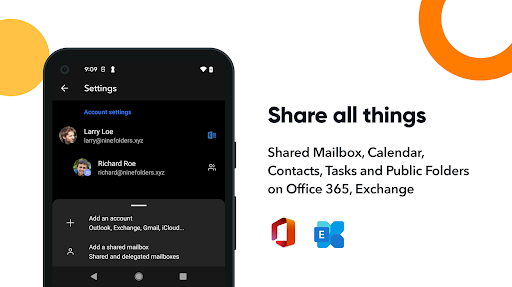
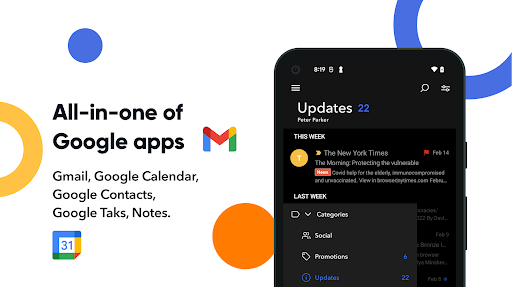
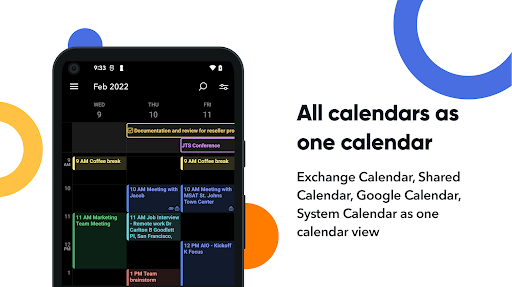
OfficeMail Pro, an email client app using ActiveSync is not only a secure and safe email client but also an app reinforcing a various convenience aspect. It is a product that has been significantly improved and implemented plenty of features like the shared mailbox and calendars for collaborations with your colleagues. Therefore, it will be an excellent gift for those who are looking for secure email for business and personal use. OfficeMail Pro will provide powerful functions that support Microsoft Exchange Server, Office365, and Google Workspace, as well as all of the internal apps such as email, calendar, contacts, tasks, and notes in Microsoft Exchange and Google Workspace. …
Read the full description
OfficeMail Pro, an email client app using ActiveSync is not only a secure and safe email client but also an app reinforcing a various convenience aspect. It is a product that has been significantly improved and implemented plenty of features like the shared mailbox and calendars for collaborations with your colleagues. Therefore, it will be an excellent gift for those who are looking for secure email for business and personal use. OfficeMail Pro will provide powerful functions that support Microsoft Exchange Server, Office365, and Google Workspace, as well as all of the internal apps such as email, calendar, contacts, tasks, and notes in Microsoft Exchange and Google Workspace. OfficeMail Pro is not a free app, it's a trial app that you may purchase after reviewing for 2 weeks. After enough time using the free trial for 2 weeks and you need to purchase the subscription membership you want if you would be satisfied. For the subscription, it's easy. You should subscribe to a yearly subscription if you want to use OfficeMail Pro. - Yearly subscription: $19.99 Your subscription automatically renews unless auto-renew is turned off 24-hours before the end of the current period. You can manage your subscription and turn off auto-renew from your Google Play Account Settings. Any unused portion of a free trial period, if offered, will be forfeited when the user purchases a subscription to that publication, where applicable. <b>Key features</b> - Direct Push Synchronization with Exchange ActiveSync - OfficeMail Pro operates the push server on its own. - Great user experience & beautiful GUI - Unified mailboxes - Multiple accounts - Shared mailboxes and calendars. - Rich-Text editor - S/MIME support - Global Address List (GAL) - Select folders to push (Email notification per each folder) - Full HTML signature editor - Automatic setup for many popular email services like Office 365, Outlook.com, Gmail or Google Workspace(G Suite). - Full HTML (inbound, outbound) - Conversation mode supports - Supports the Modern Authentication for Office 365. - Supports a workspace for accounts - Notification category supports - Dark theme <b>Supported servers</b> - Exchange Server 2010, 2013, 2016, 2019 - Office 365, Exchange Online - Outlook.com - Gmail, Google Workspace (G Suite) - Yahoo, iCloud, GMX, AOL <b>Customer support</b> If you have a question, bug report, or a special request, send an email to [email protected], and we will get back to you as soon as we can. Privacy Policy: https://www.rework.so/privacy-policy Terms and Conditions: https://www.rework.so/terms-and-conditions
Installs since 29 Aug 2026 Measured
Exact Google Play install counts, collected daily
Ratings
397 ratings, 64 reviews
- 5 ★45%
- 4 ★10%
- 3 ★11%
- 2 ★8.5%
- 1 ★25%
Recent reviews
Latest public reviews from the store
No reviews in our sample for this app yet.
Top chart positions
Latest Google Play chart ranks by country, last 10 days
Not in any tracked top chart in the last 10 days.
OfficeMail Pro history
Release, install milestones, listing and store changes
- Reached 10,000+ installs 30 May 2024
- Reached 5,000+ installs 13 Feb 2023
- Reached 1,000+ installs 27 Mar 2022
- Reached 500+ installs 13 Mar 2022
- First released on the store 8 Mar 2022
Update frequency
How often OfficeMail Pro ships a new version, month by month
8 updates in the last 12 months. More often than most similar apps: they shipped a median of 0 updates in the same year.
Recent versions
Current version 1.8.60
- Version 1.8.5929 Oct 2026
- Fixed S/MIME encrypted mail failing to send, signature certificates always shown as untrusted on IMAP/POP3. - Fixed calendar events longer than 24 hours now show in the all-day area. - Fixed attachment names showing as "noname" on IMAP. - Fixed new categories and color changes not appearing in the list. - Security updates to internal components (OpenSSL, HTML sanitizer, jsoup).
- Version 1.8.5726 Aug 2026
- Fixed emails moved or deleted in a shared mailbox reappearing in their original folder. - Fixed contacts being marked as modified in bulk, or some fields being cleared, without an actual change. - Improved app startup delay on poor network connections. - Android 16 (targetSdk 36) support.
- Version 1.8.448 Jul 2026
• Notifications & badge: Fixed notifications and the app-icon badge not clearing after reading mail from the widget or a notification (including read-then-delete and partial reads). • Contacts: Fixed the contact "File As" (display name) being emptied during sync for contacts that have a name and company. • Sync stability: Fixed repeated failures on some shared calendars that drained battery/data, with automatic recovery once the server return
- Version 1.8.352 Jun 2026
- Fixed calendar sync issues including duplicate display and missing name updates - Fixed incorrect times in recurring events and Task widget weekly view - Improved OAuth login stability and session handling - General stability, security, and bug fixes
Listing keywords
Words and phrases OfficeMail Pro repeats most in its store listing
Top phrases: officemail pro (6), google workspace (4), microsoft exchange (3), email calendar contacts (2), google workspace suite (2).
Highlighted words also appear in the title. Counts cover the title, short description and description.
Business model and tech
From the store listing and declared permissions
- Business model
- Free to downloadIn-app purchasesShows ads
- Sensitive access
- No sensitive permission declared
Compliance
What the listing and the app package show
- Store status
- Live
- Upkeep
- Updated 29 Oct 2026
- Privacy policy
- Linked on the listing
- Advertising
- Shows ads
- In-app purchases
- Offered
- Age rating
- Everyone
Apps like OfficeMail Pro
WebEyeWebgate Inc.132K installs★ 2.7
Yardi Maintenance MobileYardi Systems133K installs★ 2.98
GIG JORDANgig jordan68.5K installs★ 3.81
Zahir SimplyZahir Internasional41.7K installs★ 4.1
HunterBTTHunter Industries91.5K installs★ 1.86
SmartShareSelbetti Tecnologia S.A334K installs★ 4.29
Trellix Mobile SecurityTrellix153K installs★ 4.23
My Amana de Barid Al MaghribBarid Al-Maghrib (Poste Maroc)193K installs★ 2.85
BassitHadri Technologie29.9K installs★ 4.43
OfficeMail Pro: questions and answers
How many downloads does OfficeMail Pro have?
OfficeMail Pro has 27,203 installs on Google Play, measured from the store's own count on 14 Nov 2026.
Who makes OfficeMail Pro?
OfficeMail Pro is published by NextIntelligence.ai.
When was OfficeMail Pro last updated?
The latest version (1.8.60) was released on 29 Oct 2026.
Is OfficeMail Pro free?
Yes. OfficeMail Pro is free to download and offers in-app purchases, and it shows ads.
Is OfficeMail Pro still available?
Yes. OfficeMail Pro is live on Google Play as of 14 Nov 2026.
Track OfficeMail Pro and its competitors
Watch any app for new versions, rating drops, chart moves and removals. Free plan, no card.