
Offline Browser
Download Web pages for Offline browsing
- Installs
- 2M
- Measured
- Rating
- 4.26
- Ratings
- 12.3K
- 577 reviews
- Version
- vAndroid
- Updated 15 Oct 2026
- Released
- 17 Nov 2010
- Tracked since 13 May 2026
- Size
- —
Also on App Store: Offline Browser (6 ratings), Offline Browser
Screenshots




About Offline Browser
The description on the store listing
The best Offline Web Browser (the original one):
when you are online (for example when you have a Wi-Fi connection) you can download all the web pages you need to read during the day; then you can browse the content also when you have no WiFi or mobile connection. In this way you can also save money and mobile internet traffic.
How to use:
1) ADD site to download
Option 1) if you are using your preferred Web Browser:
- select "share" menu option
- select "Offline Browser" in the app list
Option 2) if you are in main OB page
- click the "+" button
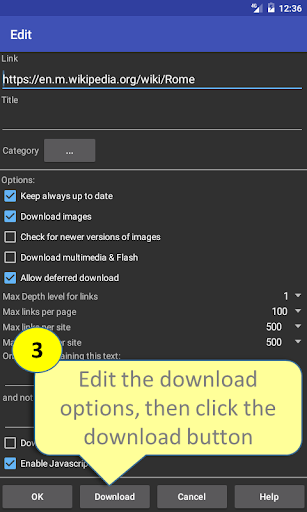
- Set the url of the link and download options
2) Download pages (when ONLINE)
- click the "download all" …
Read the full description
The best Offline Web Browser (the original one): when you are online (for example when you have a Wi-Fi connection) you can download all the web pages you need to read during the day; then you can browse the content also when you have no WiFi or mobile connection. In this way you can also save money and mobile internet traffic. How to use: 1) ADD site to download Option 1) if you are using your preferred Web Browser: - select "share" menu option - select "Offline Browser" in the app list Option 2) if you are in main OB page - click the "+" button - Set the url of the link and download options 2) Download pages (when ONLINE) - click the "download all" button in main menu to download all the sites with the flag "keep always up to date" - or click the "download" option in contextual menu of a single link to sync only 1button 3) Browse downloaded pages (when OFFLINE) - select the item from the list - navigate the downloaded pages offline. Remember that: - if you want to download only one page, set "depth level"=0 - if you want to download also the first level of sub-links set "depth level"=1 - if you want to download more links level, increase the "depth level" - if you want to download sites that require authentication (like facebook) you need to authenticate yourself with the option "Enter credentials" before starting the download If (for some site) you continue to see only the first page try these options in this order: - increase the max links per page and max links per site - if the site has a mobile version, use directly the mobile url (for ex. cnnmobile.com or mobile.nytimes.com,...) - try disabling javascript - try changing User Agent: Firefox, IE, iPhone or iPad - in complex sites, limit the number of links to download, using the option "Only links containing the text" (see the help for more info) - send me the link with the problem using the contextual menu item "Report link problem": I'll try to answer to all Remember that the app doesn't work with youtube If you need some specific feature, just ask and you'll get! P.S. to help me to improve the app, send me via email (and not only in the market feedback) errors or links with problems: in that way I can contact you to give you the solution or fix the problem in the next releases. FOR COMPANIES: If you need a customized version (with your logo and url) to let your customers browse your site offline, please contact me for quotation at this email: nikodroid70 @ gmail . com
Installs, last 30 days Measured
Exact Google Play install counts, collected daily
Ratings
12,302 ratings, 577 reviews
- 5 ★71%
- 4 ★9.0%
- 3 ★8.0%
- 2 ★1.0%
- 1 ★11%
Recent reviews
Latest public reviews from the store
- 12 Apr 2026
Very useful, but it does not synchronize the tags changed on the server side
- 3 Jan 2026
This app is great so far. It adds the ability to change colors for tags which I could not find on the web version. This ability is much appriciated, as I have muliple boards and want the tags to match. Update: It is possible to make the app show normal checkboxes by exiting edit mode and going to view mode. Click on the eye icon. It would be nice if the app could be changed to edit the markdown comments like the web version of deck does, but for me this is not a critical failing.
- 13 Dec 2025
Just downloaded it so this won't be a thorough review. But this is great. A fair price for a much needed app. One request, what about an app where we can buy multiple licenses and give activation codes to the team?
- 6 Aug 2025
Great app! It runs smoother than the browser version itself. Pleasant design and great UI to work with!
What reviewers bring up
Topics mentioned in the latest 50 reviews, by how many reviews mention them
Liked in good reviews (42 reviews)
- nextcloud 8
- deck 8
- feature 4
- cards 4
- interface 3
- recently 3
- browser 3
- support 3
Raised in bad reviews (5 reviews)
- added 2
Top chart positions
Latest Google Play chart ranks by country, last 10 days
Not in any tracked top chart in the last 10 days.
Offline Browser history
Release, install milestones, listing and store changes
- Reached 1,000,000+ installs 16 Jun 2017
- Reached 500,000+ installs 3 Oct 2015
- Reached 100,000+ installs 23 Mar 2013
- Reached 50,000+ installs 16 Jul 2012
- Reached 10,000+ installs 12 Aug 2011
- Reached 5,000+ installs 30 Apr 2011
- First released on the store 17 Nov 2010
Update frequency
How often Offline Browser ships a new version, month by month
0 updates in the last 12 months. Less often than most similar apps: they shipped a median of 7 updates in the same year.
Recent versions
Current version vAndroid
- Version vAndroid4 Oct 2017
# changes in v. 7.6: Fixed problems with Android 17 # changes in v. 6.6: Fixed problems with Android 12 # changes in v. 6.2: IMPORTANT NOTE: Due to policies update in android 11, the apps are no longer able to access the "Download" folder. To view the previously saved pages, you have to copy (by connecting your phone to a PC) the content of the folder /Download/OffBrowser to the folder reported in Settings->Root folder. - fixed some problems with Android 11 - added desktop mode (in user agent)
- Version 5.68 Nov 2016
- Version 5.38 Apr 2016
- Version 5.224 Oct 2015
Listing keywords
Words and phrases Offline Browser repeats most in its store listing
Top phrases: want to download (4), depth level (3), click the download (2), set depth level (2), contextual menu (2).
Highlighted words also appear in the title. Counts cover the title, short description and description.
Business model and tech
From the store listing, the SDKs in the app package and its declared permissions
- Business model
- Free to downloadShows ads
- Built with
- No cross-platform framework or game engine detected
- Ad networks (3)
- AdMobAmazon Mobile AdsFacebook Audience Network
- Analytics and crash reports
- Firebase
- Sensitive access
- Photos, videos and filesAdvertising ID
4 ad, attribution and analytics SDKs detected. SDKs are read from the app package and permissions from the store listing, so code that loads later is not seen.
Technology
18 SDKs found in the app package
Ad networks
Advertising and install-attribution SDKs found in the app package
- AdMob
- Amazon Mobile Ads
- Facebook Audience Network
13 permissions
0 special access, 2 sensitive, 11 standard
- Change or delete shared storageSensitive
- Read shared storageSensitive
- Ad attribution (Privacy Sandbox)ACCESS_ADSERVICES_ATTRIBUTIONStandard
- Ad topics (Privacy Sandbox)ACCESS_ADSERVICES_TOPICSStandard
- Read the advertising IDAD_IDStandard
- Read the advertising ID (Privacy Sandbox)ACCESS_ADSERVICES_AD_IDStandard
- Keep the phone awakeStandard
- Run a foreground serviceFOREGROUND_SERVICEStandard
- Connect to and disconnect from Wi-FiStandard
- Full internet accessStandard
- See network connectionsStandard
- See Wi-Fi connectionsStandard
Compliance
What the listing and the app package show
- Store status
- Live
- Upkeep
- Updated 15 Oct 2026
- Registered in
- Italy
- Privacy policy
- Linked on the listing
- Advertising
- Shows ads
- In-app purchases
- None declared
- Age rating
- Everyone
- Sensitive permissions
- 2 sensitive of 13
- Location access
- No
- Camera and microphone
- Neither
Apps like Offline Browser
Good Morning Wishes & MessagesDailyWish670K installs★ 4.59
NetShare+ Wifi TetherNetShare Softwares4.4M installs★ 3.72
Sling: Employee Scheduling AppSling Inc.2M installs★ 4.14
WimLow - Privacy in your chatLumatic Software1M installs★ 4.79
Messages: SMS Text Messengertext messages3.4M installs★ 4.08
GPP Remote ViewerGPP Soft50.2K installs★ 4.13
TubView - Increase Video ViewsNhiApp427K installs★ 4.2
Keep Browser ProxyLoopdance Inc.1.5M installs★ 4.25
MyTDPHIRELINK TECHNOLOGIES708K installs★ 5.0
Offline Browser: questions and answers
How many downloads does Offline Browser have?
Offline Browser has 2,003,362 installs on Google Play, measured from the store's own count on 19 Nov 2026.
Who makes Offline Browser?
Offline Browser is published by NiKoDroid70, a developer based in IT.
When was Offline Browser last updated?
The latest version (vAndroid) was released on 15 Oct 2026.
Is Offline Browser free?
Yes. Offline Browser is free to download, and it shows ads.
Is Offline Browser still available?
Yes. Offline Browser is live on Google Play as of 19 Nov 2026.
Track Offline Browser and its competitors
Watch any app for new versions, rating drops, chart moves and removals. Free plan, no card.