
One Button Navigation Bar
Show assistive button at the bottom of the screen.
- Installs
- 2.38M
- Measured
- Rating
- 3.94
- Ratings
- 4.5K
- 79 reviews
- Version
- Varies with device
- Updated 25 Jun 2024
- Released
- 14 Oct 2020
- Tracked since 14 May 2026
- Size
- 6 MB
- Needs 4.2
Screenshots



About One Button Navigation Bar
The description on the store listing
“One Button Navigation Bar” application can replace a failed and broken button for those people who have
trouble using buttons or navigation bar panels that are not working properly.
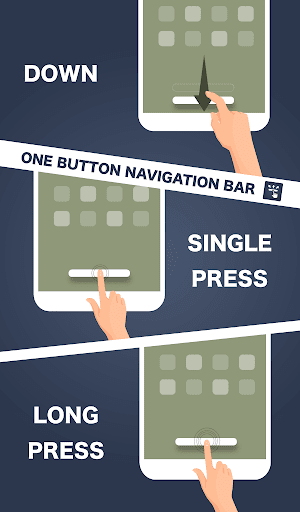
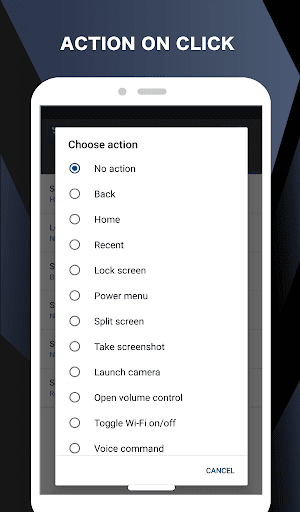
This app provides only one button at the bottom of the screen and is able to do many actions such as Back, Home, Recent.
Key Features:- There are 6 actions you can set for this button (Swipe Left, Swipe Right, Swipe Top, Swipe Down, Single Press, Long Press)
- Ability to change button color.
- Ability to set button width, height and position.
- Ability to Set vibrate on touch.
- Options to adjust position of button in landscape mode.
- Switch on/off via notification.
- Switch on/off via quick …
Read the full description
“One Button Navigation Bar” application can replace a failed and broken button for those people who have trouble using buttons or navigation bar panels that are not working properly. This app provides only one button at the bottom of the screen and is able to do many actions such as Back, Home, Recent. Key Features:- There are 6 actions you can set for this button (Swipe Left, Swipe Right, Swipe Top, Swipe Down, Single Press, Long Press) - Ability to change button color. - Ability to set button width, height and position. - Ability to Set vibrate on touch. - Options to adjust position of button in landscape mode. - Switch on/off via notification. - Switch on/off via quick settings tile. (Android 7.0+) Supported actions - Back - Home - Recent - Lock screen - Toggle Wi-Fi on/off - Power menu - Split screen - Launch camera - Open volume control - Voice command - Web search - Toggle notification panel - Toggle quick setting panel - Launch dialer - Launch web browser - Launch settings - Launch this application - Launch any application - Take a screenshot - Switch off button for 10 seconds Accessibility Service Usage. One Button Navigation Bar requires accessibility service permission in order to enable core functionality. The application will not read the sensitive data and any content on your screen. In addition, the application will not collect and share the data from accessibility service with any third-party. By enabling the service, the application will support commands for press and long press actions with the following features: - Back, Home and Recent actions (Core feature) - Lock Screen - Popup notification, Quick settings, Power dialogs - Toggle split screen - Take a screenshot If you disable the accessibility service, the main features cannot work properly. Permissions Explain CALL_PHONE - for long press action of shortcut for Direct dial to someone in contact list ACCESS_NOTIFICATION_POLICY - for long press action to toggle DND mode on/off. ACCESS_WIFI_STATE, CHANGE_WIFI_STATE - for long press action to toggle Wi-Fi on/off. BLUETOOTH, BLUETOOTH_ADMIN, BLUETOOTH_CONNECT - for long press action to toggle Bluetooth on/off. QUERY_ALL_PACKAGES - for long press action to open installed application. READ_EXTERNAL_STORAGE, WRITE_EXTERNAL_STORAGE - for long press action to save screenshot. REQUEST_DELETE_PACKAGES - for menu uninstall this app (this menu will show if user activate device admin for lock screen action for Android O and below) SYSTEM_ALERT_WINDOW - for show navigation bar on the screen VIBRATE - for option to vibrate when touch the navigation button WRITE_SETTINGS - for long press action to toggle auto rotate screen, lock portrait or landscape, toggle auto brightness, increase/decrease brightness
Installs, last 30 days Measured
Exact Google Play install counts, collected daily
Ratings
4,493 ratings, 79 reviews
- 5 ★54%
- 4 ★19%
- 3 ★9.7%
- 2 ★8.1%
- 1 ★9.7%
Recent reviews
Latest public reviews from the store
- 8 May 2025
top
- 7 Jul 2024
Good app
- 9 Feb 2024
Het is even zoeken hoe de app werkt. Jammer dat je het rooster niet kan exporteren of Nostradamus kan toevoegen als externe agenda aan bv. Google Calendar
- 14 Aug 2022
Does what it says on the tin
What reviewers bring up
Topics mentioned in the latest 8 reviews, by how many reviews mention them
Liked in good reviews (6 reviews)
- mijn 2
- zou 2
Raised in bad reviews (1 reviews)
No topic comes up twice.
Top chart positions
Latest Google Play chart ranks by country, last 10 days
Not in any tracked top chart in the last 10 days.
One Button Navigation Bar history
Release, install milestones, listing and store changes
- Reached 1,000,000+ installs 12 Oct 2023
- Reached 500,000+ installs 4 Apr 2022
- Reached 100,000+ installs 20 Mar 2021
- Reached 50,000+ installs 23 Jan 2021
- Reached 10,000+ installs 11 Nov 2020
- Reached 5,000+ installs 4 Nov 2020
- Reached 1,000+ installs 29 Oct 2020
- First released on the store 14 Oct 2020
Recent versions
Current version Varies with device
- Version 2.0.825 Jun 2024
- Version 2.0.712 Feb 2024
- Version 2.0.622 Jul 2022
- Version 2.0.414 Jul 2022
Listing keywords
Words and phrases One Button Navigation Bar repeats most in its store listing
Top phrases: long press (9), long press action (7), press action (7), navigation bar (5), action to toggle (4).
Highlighted words also appear in the title. Counts cover the title, short description and description.
Business model and tech
From the store listing and declared permissions
- Business model
- Free to downloadShows ads
- Sensitive access
- No sensitive permission declared
Compliance
What the listing and the app package show
- Store status
- Live
- Upkeep
- No update since 25 Jun 2024
- Registered in
- Thailand
- Privacy policy
- Linked on the listing
- Advertising
- Shows ads
- In-app purchases
- None declared
- Age rating
- Everyone
Apps like One Button Navigation Bar
Samsung TV RemoteNew World Apps964K installs★ 3.86
Urdu Pana Flex - Banner MakerU&S-Soft221K installs★ 4.55
Grapher - Equation PlotterBasile Van Hoorick1.5M installs★ 4.12
TiviMate CompanionArmobsoft FZE2.3M installs★ 3.23
My BTBhutan Telecom Ltd.685K installs★ 3.97
GalleryMV Gallery761K installs★ 4.5
SQCOMShenzhen SHANGQING INDUSTRIAL CO., LTD418K installs★ 3.74
NINJA TRICK FF BUTTONPAPPS1M installs★ 4.5
Mi Band 4 WatchFacesWallet Passes Alliance3.3M installs★ 3.78
One Button Navigation Bar: questions and answers
How many downloads does One Button Navigation Bar have?
One Button Navigation Bar has 2,376,733 installs on Google Play, measured from the store's own count on 19 Nov 2026.
Who makes One Button Navigation Bar?
One Button Navigation Bar is published by Nu-Kob, a developer based in TH.
When was One Button Navigation Bar last updated?
The latest version (Varies with device) was released on 25 Jun 2024.
Is One Button Navigation Bar free?
Yes. One Button Navigation Bar is free to download, and it shows ads.
Is One Button Navigation Bar still available?
Yes. One Button Navigation Bar is live on Google Play as of 19 Nov 2026.
Track One Button Navigation Bar and its competitors
Watch any app for new versions, rating drops, chart moves and removals. Free plan, no card.