
OneClock Pro
Set multiple alarms with One click! (No Ads)
- Installs
- 474
- Measured
- Rating
- 4.33
- Ratings
- 17
- 4 reviews
- Version
- 2.1.5
- Updated 10 Feb 2021
- Released
- 25 Apr 2018
- Tracked since 10 May 2026
- Size
- 4 MB
- Needs 4.4
Screenshots



About OneClock Pro
The description on the store listing
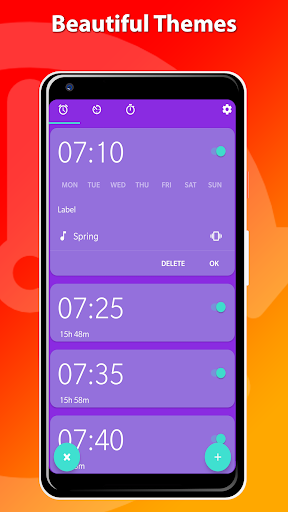
OneClock Pro has no advertisements and has 3 exclusive themes!
Tired of setting 5 alarms every evening?
With OneClock you can set multiple alarms with just one click! You can also delete all alarms at once!
When adding an alarm, OneClock will automatically add up to 8 alarms with a time difference to your choosing.
The number of alarms you wish to set and the minutes between those alarms can be customized in the settings menu.
MULTIPLE ALARMS
With OneClock you can set up to 8 alarms at once. You can change the number of alarms and time difference between alarms in the settings menu. It's also possible to add just one alarm.
DELETE ALL ALARMS
With One Click you can delete …
Read the full description
OneClock Pro has no advertisements and has 3 exclusive themes! Tired of setting 5 alarms every evening? With OneClock you can set multiple alarms with just one click! You can also delete all alarms at once! When adding an alarm, OneClock will automatically add up to 8 alarms with a time difference to your choosing. The number of alarms you wish to set and the minutes between those alarms can be customized in the settings menu. MULTIPLE ALARMS With OneClock you can set up to 8 alarms at once. You can change the number of alarms and time difference between alarms in the settings menu. It's also possible to add just one alarm. DELETE ALL ALARMS With One Click you can delete all alarms at once! NO ADS SMART TIME DIFFERENCE Use Smart settings for automatic time difference between multiple alarms. TIMER OneClock also allows you to start and follow up on multiple timers simultaneously. STOPWATCH The stopwatch is easy to use and also allows you to set laps. THEMES There are 7 themes available, 3 themes are exclusive(Purple Mint, Mint Green, Metal Gray). There is also a black theme developed for (AM)OLED displays to save battery! SETTINGS - Time Picker Style - Silence alarm after x minutes - Snooze Duration - Alarm Volume - Upcoming alarms notification - First day of week - Ringtone - Vibrate
Installs since 26 Aug 2026 Measured
Exact Google Play install counts, collected daily
Ratings
17 ratings, 4 reviews
- 5 ★69%
- 4 ★0.0%
- 3 ★31%
- 2 ★0.0%
- 1 ★0.0%
Recent reviews
Latest public reviews from the store
- 17 Jun 2022
The alarm works correctly. No bugs detected. I can set multiple alarms. Also a reasonable price $1.99.
- 4 Jun 2021
SMART=DUMB! My excitement at this app's existence waned very quickly. Smart interval is just arbitrary. Logarithmically shorter intervals but no way to set the span of time covered. And I thought we'd get to set time between EACH alarm, not a fixed interval for all. :-(
- 13 Apr 2021
Changed phone and now I can't select custom alarm tones. Please fix it for Huawei phones. Their stock alarm app lets me do it so it's doable
- 31 Mar 2021
Can somebody tell me WHEN are we going to get additional notification sounds
What reviewers bring up
Topics mentioned in the latest 9 reviews, by how many reviews mention them
Liked in good reviews (7 reviews)
- alarm 3
- add 3
- described 2
- support 2
- custom 2
Raised in bad reviews (0 reviews)
No topic comes up twice.
Top chart positions
Latest Google Play chart ranks by country, last 10 days
Not in any tracked top chart in the last 10 days.
OneClock Pro history
Release, install milestones, listing and store changes
- Reached 100+ installs 30 Jun 2018
- Moved from Productivity to Lifestyle 30 May 2018
- Reached 10+ installs 15 May 2018
- Reached 5+ installs 3 May 2018
- First released on the store 25 Apr 2018
Recent versions
Current version 2.1.5
- Version 2.1.510 Feb 2021
What's new in 2.1.5? ★ Stability Improvements ★ Fixed Bugs with Selecting Number of Alarms Stay Tuned for More updates!
- Version 2.1.325 Jul 2020
- Version 2.1.26 Jun 2020
- Version 2.1.011 Apr 2020
Listing keywords
Words and phrases OneClock Pro repeats most in its store listing
Top phrases: multiple alarms (4), alarms at once (3), delete all alarms (3), number of alarms (2), set multiple alarms (2).
Highlighted words also appear in the title. Counts cover the title, short description and description.
Business model and tech
From the store listing and declared permissions
- Business model
- Paid, $0.49
- Sensitive access
- Photos, videos and filesDraws over other apps
12 permissions
1 special access, 1 sensitive, 10 standard
- Draw over other appsSpecial access
- Read shared storageSensitive
- Read how it was installed (install referrer)BIND_GET_INSTALL_REFERRER_SERVICEStandard
- Control vibrationStandard
- Keep the phone awakeStandard
- Run a foreground serviceFOREGROUND_SERVICEStandard
- Start when the phone turns onStandard
- Full internet accessStandard
- See network connectionsStandard
- See Wi-Fi connectionsStandard
- Receive push messagesStandard
- Set alarmSET_ALARMStandard
Compliance
What the listing and the app package show
- Store status
- Live
- Upkeep
- No update since 10 Feb 2021
- Registered in
- Belgium
- Privacy policy
- Linked on the listing
- Advertising
- No ads declared
- In-app purchases
- None declared
- Age rating
- Everyone
- Sensitive permissions
- 1 sensitive, 1 special access of 12
- Location access
- No
- Camera and microphone
- Neither
Apps like OneClock Pro
목포해양대학교 도서관wiseneosco7.6K installs★ 4.8
Aza-e-HussainSyed Mehdi Raza5.2K installs★ 4.8
Jewish QuoteChabad.org Jewish Apps8K installs★ 4.85
Car Engine SoundsSboard.pro29K installs★ 4.17
Garland County LibrarySolus UK Ltd5.9K installs★ 4.78
Món Ngon 3 Miền - Nau an ngonWeOnline.VN9.1K installs★ 4.1
CARPORTPop-Pulse4.3K installs★ 4.06
블랙 심플 카톡테마은수우우45.4K installs★ 4.6
WMS WebControlWAREMA Renkhoff SE13.1K installs★ 3.5
OneClock Pro: questions and answers
How many downloads does OneClock Pro have?
OneClock Pro has 474 installs on Google Play, measured from the store's own count on 18 Nov 2026.
Who makes OneClock Pro?
OneClock Pro is published by De Millennial, a developer based in BE.
When was OneClock Pro last updated?
The latest version (2.1.5) was released on 10 Feb 2021.
Is OneClock Pro free?
No. OneClock Pro is a paid app priced at $0.49.
Is OneClock Pro still available?
Yes. OneClock Pro is live on Google Play as of 18 Nov 2026.
Track OneClock Pro and its competitors
Watch any app for new versions, rating drops, chart moves and removals. Free plan, no card.