
OptiX-6 Pro Optical Reader
Quickly read, evaluate your own forms without being bound to specific templates.
- Installs
- 8.11K
- Measured
- Rating
- —
- Ratings
- —
- Version
- Varies with device
- Updated 16 Jul 2024
- Released
- 18 Aug 2023
- Tracked since 12 May 2026
- Size
- —
Screenshots

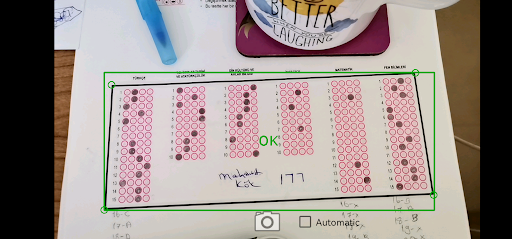
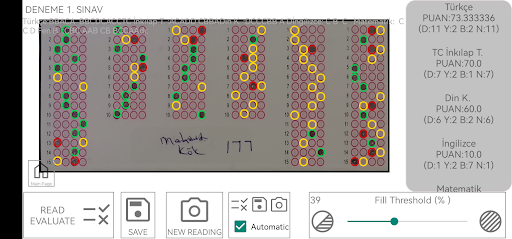
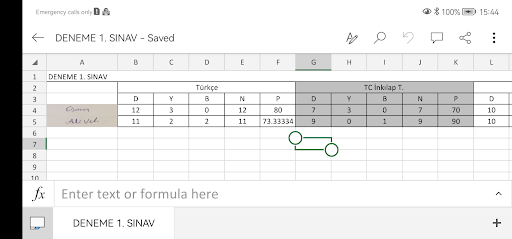
About OptiX-6 Pro Optical Reader
The description on the store listing
For exams, tests, surveys, research, and more, scan your own optical form. Optix 6 Pro optical reading application is always with you.
You have flexibility in terms of reading angle and distance. Feel comfortable while reading. With the automatic reading mode, you'll have all the papers done within minutes while sipping your tea.
Our application is designed to support multiple subjects/fields. Whether it's for a single subject or multiple subjects (there's no limit), you can read and evaluate.
Even with careless readings, you can achieve nearly 100% accuracy in reading and obtain results. In suitable conditions, proper settings, and careful readings, you can get precise results. …
Read the full description
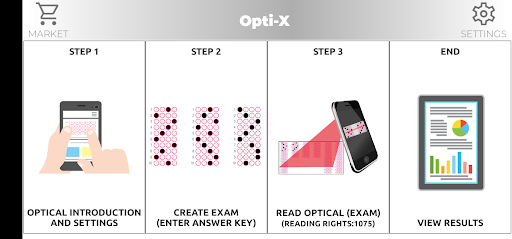
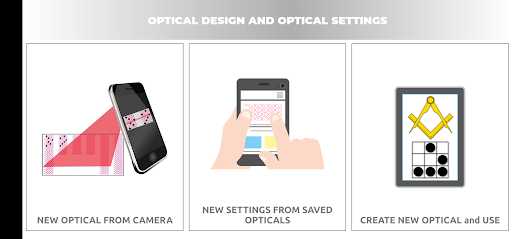
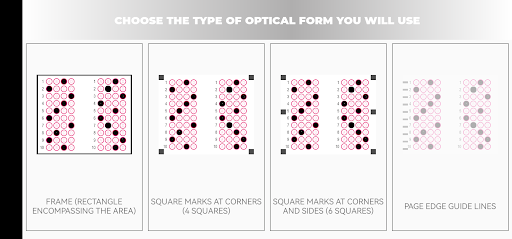
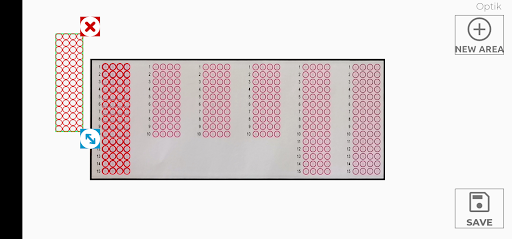
For exams, tests, surveys, research, and more, scan your own optical form. Optix 6 Pro optical reading application is always with you. You have flexibility in terms of reading angle and distance. Feel comfortable while reading. With the automatic reading mode, you'll have all the papers done within minutes while sipping your tea. Our application is designed to support multiple subjects/fields. Whether it's for a single subject or multiple subjects (there's no limit), you can read and evaluate. Even with careless readings, you can achieve nearly 100% accuracy in reading and obtain results. In suitable conditions, proper settings, and careful readings, you can get precise results. You can take a screenshot of the desired areas in your form. This way, you can record participant information like names and signatures, and if you wish, you can score open-ended question answers. (After transferring to an Excel document, you can do the scoring yourself.) You can scan full-page forms (like A4-A5) or just the optical form section somewhere on the page. So, if you're conducting an exam for a single subject, you can place the answer key anywhere on the page and read the exam without using a separate answer sheet. You can upload exams that have reached the reading stage (with optical design and answer key input) to the server. This way, other users can pull the settings of your exam to their devices and read and evaluate immediately without having to make any adjustments. (Uploaded exams are associated with a short code. By sharing this code, you can allow others to read your exam.) After evaluation, you can see the results related to reading data with the offered certificates and reports. You can export the results as an Excel document and share if you wish. Form Readability: ✓ Horizontal or vertical placed optical forms. ✓ Forms where the aspect ratio is distorted when placed on paper. (Even if the circles on the form are not perfectly round) ✓ Colored or black and white printed forms. ✓ Forms obtained from another source. ✓ Those you create yourself (using the application, Word, Excel, etc.) ✓ You can adjust the marking intensity. Neither your nor your students' personal information is stored in our application or on our servers. No data is sent to the e-school system. You can use the result Excel files for matching student numbers with names and classes. Question analyses and different report options are prepared on the server side. Once completed, only the essential evaluation data will be assessed on the server, and various certificates and reports will be provided. During reading, please pay attention to the following: Papers should be on a flat surface and as unwrinkled as possible. Reading should be done in a well-lit environment without casting shadows on the paper. You can read many optical forms, but we especially recommend framed optical forms. Forms without any special marks (frames, dots in corners, etc.) can be used on a black background. In this case, if the paper's boundaries are detected by the device, they will be considered as a frame. If you are a teacher and using our application on behalf of your school, please email us at [email protected] with the name of your school and contact information. We can provide you with a promotional code for additional free scans.
Installs since 31 Aug 2026 Measured
Exact Google Play install counts, collected daily
Ratings
- 5 ★0.0%
- 4 ★0.0%
- 3 ★0.0%
- 2 ★0.0%
- 1 ★0.0%
Recent reviews
Latest public reviews from the store
No reviews in our sample for this app yet.
Top chart positions
Latest Google Play chart ranks by country, last 10 days
Not in any tracked top chart in the last 10 days.
OptiX-6 Pro Optical Reader history
Release, install milestones, listing and store changes
- Reached 5,000+ installs 28 Jun 2024
- Reached 1,000+ installs 17 Nov 2023
- Reached 500+ installs 20 Oct 2023
- Reached 100+ installs 22 Sep 2023
- Reached 50+ installs 11 Sep 2023
- First released on the store 18 Aug 2023
Recent versions
Current version Varies with device
- Version 1.0.616 Jul 2024
- Version 1.0.514 Oct 2023
- Version 1.0.414 Sep 2023
Listing keywords
Words and phrases OptiX-6 Pro Optical Reader repeats most in its store listing
Top phrases: forms forms (3), optical forms (3), certificates and reports (2), optical forms forms (2), optix pro optical (2).
Highlighted words also appear in the title. Counts cover the title, short description and description.
Business model and tech
From the store listing and declared permissions
- Business model
- Free to downloadIn-app purchasesShows ads
- Subscriptions and payments
- Google Play billing
- Sensitive access
- CameraPhotos, videos and filesAdvertising ID
14 permissions
0 special access, 3 sensitive, 11 standard
- Take photos and videosSensitive
- Change or delete shared storageSensitive
- Read shared storageSensitive
- Ad attribution (Privacy Sandbox)ACCESS_ADSERVICES_ATTRIBUTIONStandard
- Ad topics (Privacy Sandbox)ACCESS_ADSERVICES_TOPICSStandard
- Read how it was installed (install referrer)BIND_GET_INSTALL_REFERRER_SERVICEStandard
- Read the advertising IDAD_IDStandard
- Read the advertising ID (Privacy Sandbox)ACCESS_ADSERVICES_AD_IDStandard
- Keep the phone awakeStandard
- Run a foreground serviceFOREGROUND_SERVICEStandard
- Full internet accessStandard
- See network connectionsStandard
Compliance
What the listing and the app package show
- Store status
- Live
- Upkeep
- No update since 16 Jul 2024
- Privacy policy
- Linked on the listing
- Advertising
- Shows ads
- In-app purchases
- Offered
- Age rating
- Everyone
- Sensitive permissions
- 3 sensitive of 14
- Location access
- No
- Camera and microphone
- Camera
Apps like OptiX-6 Pro Optical Reader
내공스터디 관리자IronTrain4.6K installs★ 4.9
수원대학교 수강신청수원대학교34.9K installs★ 3.1
تنزيلةTaha Ben Ashur13.6K installs★ 5.0
मध्यकालीन भारत का इतिहासSuren Tech Lab24K installs★ 3.4
365 Morning & Evening PrayersELEGANT X STUDIO™17.5K installs★ 3.71
Chitas GuideThe Saber Team3.7K installs★ 5.0
GradStar AppPlum systems33K installs★ 1.7
- Mars ViewTobias Thierer4K installs★ 3.67
Theo TabTheologetics2.5K installs★ 5.0
OptiX-6 Pro Optical Reader: questions and answers
How many downloads does OptiX-6 Pro Optical Reader have?
OptiX-6 Pro Optical Reader has 8,109 installs on Google Play, measured from the store's own count on 9 Nov 2026.
Who makes OptiX-6 Pro Optical Reader?
OptiX-6 Pro Optical Reader is published by 6th Pro.
When was OptiX-6 Pro Optical Reader last updated?
The latest version (Varies with device) was released on 16 Jul 2024.
Is OptiX-6 Pro Optical Reader free?
Yes. OptiX-6 Pro Optical Reader is free to download and offers in-app purchases, and it shows ads.
Is OptiX-6 Pro Optical Reader still available?
Yes. OptiX-6 Pro Optical Reader is live on Google Play as of 9 Nov 2026.
Track OptiX-6 Pro Optical Reader and its competitors
Watch any app for new versions, rating drops, chart moves and removals. Free plan, no card.