
Orange Antivirus
The phone is protected against viruses and malicious applications
- Installs
- 2.05M
- Measured
- Rating
- —
- Ratings
- —
- Version
- 3.5.237.2
- Updated 15 Aug 2024
- Released
- —
- Tracked since 11 May 2026
- Size
- 18 MB
- Needs 5.0
Screenshots




About Orange Antivirus
The description on the store listing
With the free application Orange Antivirus powered by Bitdefender your phone is protected against viruses and malicious applications, being completely safe when you surf the net. And if you lose your phone, you have the possibility to locate it, block it or delete information from it, even remotely. In addition, you can set an alarm, which helps you find him quickly, if he wanders around the house.
The application can be downloaded, but it is only available to Orange subscribers. If you don't have an option or subscription with included access, you can test it for 30 days. Later, to continue to benefit from its advantages, you must activate the Orange Antivirus option (1 euro/month, …
Read the full description
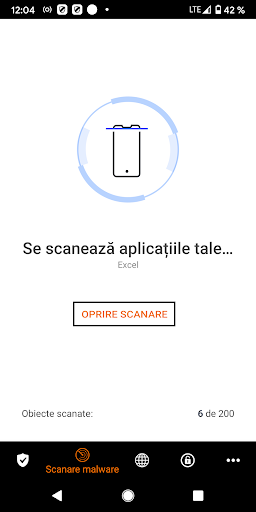
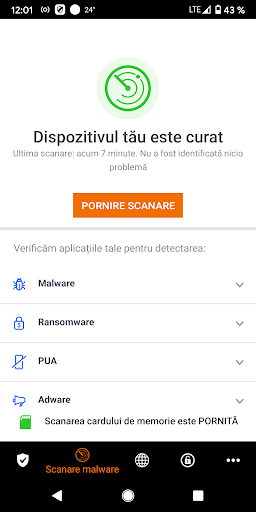
With the free application Orange Antivirus powered by Bitdefender your phone is protected against viruses and malicious applications, being completely safe when you surf the net. And if you lose your phone, you have the possibility to locate it, block it or delete information from it, even remotely. In addition, you can set an alarm, which helps you find him quickly, if he wanders around the house. The application can be downloaded, but it is only available to Orange subscribers. If you don't have an option or subscription with included access, you can test it for 30 days. Later, to continue to benefit from its advantages, you must activate the Orange Antivirus option (1 euro/month, including VAT) or a new subscription with included access. The option fee will be found on your Orange bill. To use the application, you need an Orange online account; if you don't already have one, you can create one at www.orange.ro/contul-meu. what functions does the application have? • antivirus scan, with a 100% detection rate • application security, through which you can track the access requirements of each application • web security, which protects you in real time when you use the default Android browser or Google Chrome • anti-theft, through which you can block, track or delete information from your phone from another device connected to the Internet, in case you lost it or it was stolen, directly from your Orange account or via SMS antivirus scan The application automatically scans applications when you install them. It works in the cloud, so it is always updated with the latest virus signatures to deal with all types of computer threats. You can choose to do a full scan manually every time you need it. application security With this function, you can check your installed applications at any time, to find out what information from your phone they have access to. web security Whether you're using your phone's browser or the Chrome app, this functionality protects your smartphone in real time, checking the web pages you access before displaying them. Anti Theft Lost or stolen your phone? Don't worry, with this function, you can block your phone and locate it or delete the information on it right from your Orange account. Moreover, you have the possibility to protect your information on it with the help of a password. why Orange Antivirus, powered by Bitdefender? Bitdefender's award-winning technology protects 400 million users worldwide. And now it's also available for your Orange phone, the application blocking the latest IT threats, Trojans and more. What else do you need to know? • the web security function is available for both the phone browser and Chrome • the wipe device function requires permission to access private information • if you have a phone with Android 4.1, you can uninstall the application only after manually disabling the device administrator (Device Admin) how to uninstall the app Go to the menu settings > security > device administrators, uncheck the Orange Antivirus application from the list and then click disable. Then you can uninstall the application. You will be asked to enter the PIN, this is the numerical code you used when you activated the anti-theft function. This app requires Device Administrator permission for the Anti-Theft feature and uses Accessibility Services to provide protection against online threats through web security by detecting malicious URLs while browsing the web.
Installs Measured
Exact Google Play install counts, collected daily
Daily history starts once this app is in our daily install sample.
Ratings
- 5 ★0.0%
- 4 ★0.0%
- 3 ★0.0%
- 2 ★0.0%
- 1 ★0.0%
Recent reviews
Latest public reviews from the store
No reviews in our sample for this app yet.
Top chart positions
Latest Google Play chart ranks by country, last 10 days
Not in any tracked top chart in the last 10 days.
Orange Antivirus history
Release, install milestones, listing and store changes
Recent versions
Current version 3.5.237.2
- Version 3.5.237.215 Aug 2024
Listing keywords
Words and phrases Orange Antivirus repeats most in its store listing
Top phrases: orange antivirus (5), anti theft (4), web security (4), orange antivirus powered (2), phone is protected (2).
Highlighted words also appear in the title. Counts cover the title, short description and description.
Business model and tech
From the store listing and declared permissions
- Business model
- Free to downloadShows ads
- Sensitive access
- No sensitive permission declared
Compliance
What the listing and the app package show
- Store status
- Live
- Upkeep
- No update since 15 Aug 2024
- Registered in
- Romania
- Privacy policy
- Linked on the listing
- Advertising
- Shows ads
- In-app purchases
- None declared
- Age rating
- Rated for 3+
Apps like Orange Antivirus
들어서 화면켜기Won3.5K installs★ 4.0
Height PredictionEcliptic App Ventures45.9K installs★ 2.4
Speicers`Pro VPNEldiablolucifer202021.2K installs★ 4.14
Lightning Tracker with AlertsYaksh Software4.3K installs★ 3.0
Mana Pathi (Unit Converter)Shirish Koirala2.2K installs★ 4.6
Multi-tab Calc - A simple app.Naoyuki Rikiji1.3K installs★ 5.0
Photo Recovery PlusBillApps7.1K installs★ 4.53
Just Silence. Scheduled.Akid Soft1.6K installs★ 5.0
- WoWp AssistantВиталий Робиновский2K installs★ 4.2
Orange Antivirus: questions and answers
How many downloads does Orange Antivirus have?
Orange Antivirus has 2,049,290 installs on Google Play, measured from the store's own count on 11 May 2026.
Who makes Orange Antivirus?
Orange Antivirus is published by Bitdefender Services, a developer based in RO.
When was Orange Antivirus last updated?
The latest version (3.5.237.2) was released on 15 Aug 2024.
Is Orange Antivirus free?
Yes. Orange Antivirus is free to download, and it shows ads.
Is Orange Antivirus still available?
Yes. Orange Antivirus is live on Google Play as of 11 May 2026.
Track Orange Antivirus and its competitors
Watch any app for new versions, rating drops, chart moves and removals. Free plan, no card.