
Panels - sidebar launcher
Panels, side-launcher, sidebar, edge screen, gestures, smart sidebar, launcher
- Installs
- 1.05M
- Measured
- Rating
- 4.53
- Ratings
- 7.3K
- 611 reviews
- Version
- 1.606
- Updated 24 Oct 2026
- Released
- 6 Jan 2020
- Tracked since 12 May 2026
- Size
- 7 MB
- Needs 7.0
Screenshots

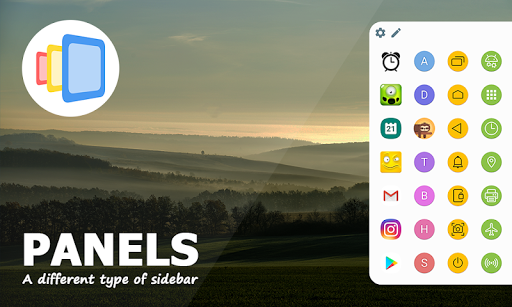
About Panels - sidebar launcher
The description on the store listing
Panels is the most customizable sidebar (edge screen) on the market!
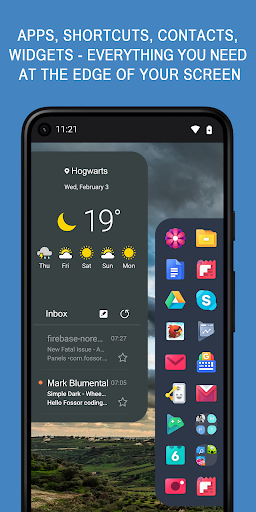
Panels is a launcher on the edge of your screen that will change the way you use your phone. Our tool provides a quick access to your favorite apps, shortcuts, contacts and widgets. No more scrolling through the launcher pages, contacts and settings, simply swipe the edge screen. Boost your multitasking and increase productivity!
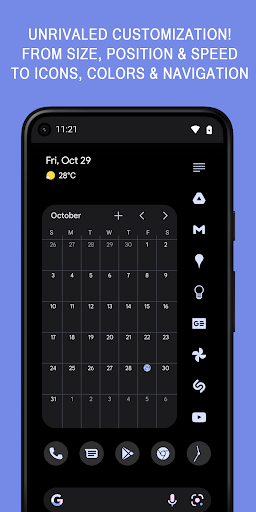
And the many ways to multitask is not all. Unlike other sidebar apps our edge screen has many features for you to customize. You can alter sidebar's row and column counts and make the edge screen as big or small as you like. You can also customize colors and position of each and every panel, …
Read the full description
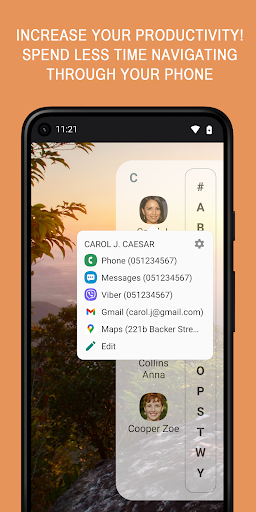
Panels is the most customizable sidebar (edge screen) on the market! Panels is a launcher on the edge of your screen that will change the way you use your phone. Our tool provides a quick access to your favorite apps, shortcuts, contacts and widgets. No more scrolling through the launcher pages, contacts and settings, simply swipe the edge screen. Boost your multitasking and increase productivity! And the many ways to multitask is not all. Unlike other sidebar apps our edge screen has many features for you to customize. You can alter sidebar's row and column counts and make the edge screen as big or small as you like. You can also customize colors and position of each and every panel, change icon and text sizes, set individual gestures for any app, contact, panel or tool. <b>Panels Features</b> • Multitasking and productivity booster • Works with any launcher • One hand operation with intuitive gestures • Always-on-top launcher on the edge of your screen • Quick access to apps and shortcuts • Edge screen gestures • Folders • Website shortcuts • Widgets on the edge of your screen • Floating widgets • A-Z app drawer • Contacts • Notification badges • Accessibility shortcuts • System settings shortcuts • Adjustable item count • Custom colors • Position - Left, Right, Bottom • Icon pack support • Auto-start on boot • Blacklist • Backup locally or using Drive • Automation apps support • Dark theme support <b>Apps and shortcuts</b> - long press and add any apps or your favorite games to fast access and launch them from any other application and without navigating through your home launcher. Boost your multitasking! <b>Widgets</b> - from google calendar to calculators, add any widgets to the sidebar and launch them with a single edge swipe <b>Floating widgets</b> - Launch widgets in a separate window on top of other apps, minimize the widget to icon size while browsing your device <b>Gestures</b> - use gestures to trigger individual items. Or set a gesture to call any panel <b>Folders</b> - group similar apps using built-in folders <b>A to Z App Drawer</b> - with only a single tap, A to Z app drawer is the quickest way to launch installed apps <b>Contacts</b> - add your favorite contacts to the sidebar and access phone, sms, email apps, Whatsapp and Viber <b>Position</b> - place any sidebar panel on the Left, Right or at the Bottom edge of your screen <b>Accessibility shortcuts</b> - this includes Home, Back, Recent, Power, Screenshot(Android P+), Lock screen(Android P+) and more <b>Notification badges</b> - long press any app icon to preview notifications <b>Icon Packs</b> - download any Icon Pack from the Play Store and apply all icons with one click or customize individual icons. You can also turn any photo from your gallery into an icon <b>System settings shortcuts</b> - access system preferences with one click and without searching through the settings <b>Adjustable item count</b> - change the position, item rows and columns counts and make Panels look and feel the way you like. <b>Color schemes</b> - you can customize each and every panel individually or all at once. Ability to load and save sidebar colors. <b>Other customization options</b> - you can customize icon and panel size, hide labels, haptic feedback and more <b>One hand operation</b> - place your sidebars wherever you like, adjust the size and navigate with a single hand <b>Automation and third party apps support</b> - You can launch individual panels using the shortcut from any third party tool Use this site if you have issues with the app not staying alive: <b>https://dontkillmyapp.com/?app=Panels</b> <b>Don't forget to check the tutorial videos!</b> Go to <b>Settings - FAQ</b> to find out solutions for some common problems <b>Accessibility API</b> Accessibility Service is required to determine the current top app when using the blacklist. Accessibility shortcuts also require this service. No user data being used or collected.
Installs, last 30 days Measured
Exact Google Play install counts, collected daily
Ratings
7,253 ratings, 611 reviews
- 5 ★78%
- 4 ★12%
- 3 ★5.0%
- 2 ★0.6%
- 1 ★3.7%
Recent reviews
Latest public reviews from the store
No reviews in our sample for this app yet.
Top chart positions
Latest Google Play chart ranks by country, last 10 days
Not in any tracked top chart in the last 10 days.
Panels - sidebar launcher history
Release, install milestones, listing and store changes
- Moved from Productivity to Tools 19 Aug 2024
- Reached 500,000+ installs 13 Jun 2024
- First released on the store 6 Jan 2020
Update frequency
How often Panels - sidebar launcher ships a new version, month by month
10 updates in the last 12 months. More often than most similar apps: they shipped a median of 0 updates in the same year.
Recent versions
Current version 1.606
- Version 1.60424 Oct 2026
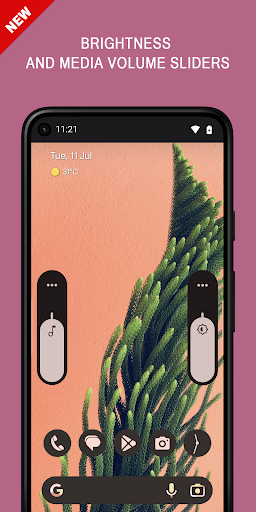
1.604 Bug fixes 1.602 Improved animations and graphics Improved folder handling Bug fixes and tweaks 1.598 Synchronize panels across different screens or orientations (See the FAQ). Shortcuts and popups tweaks and improvements 1.596 Folders now have pages. Added option to limit folder size in the More settings. 1.578 Volume slider now also controls voice calls. Triggers now also support wallpaper colors. 1.566 Open folders using trigger gestures. Freeform and app pair broadcast intents.
- Version 1.59621 Jun 2026
1.596 Folders now have pages. Added option to limit folder size in the More settings. Bug fixes. 1.578 Volume slider now also controls voice calls. Triggers now also support wallpaper colors. 1.566 Open folders using trigger gestures. Freeform and app pair broadcast intents. 1.562 You can now set widget padding in the View section 1.560 List letter spacing changes Widgets and floating widgets layout changes Updated Privacy policy, Terms of Use and GDPR compliance
- Version 1.59429 May 2026
1.594 Bug fixes and tweaks 1.578 Volume slider now also controls voice calls. Triggers now also support wallpaper colors. 1.566 Open folders using trigger gestures. Freeform and app pair broadcast intents. 1.562 You can now set widget padding in the View section 1.560 List letter spacing changes Widgets and floating widgets layout changes Updated Privacy policy, Terms of Use and GDPR compliance
- Version 1.59227 May 2026
1.592 Bug fixes and tweaks 1.578 Volume slider now also controls voice calls. Triggers now also support wallpaper colors. 1.566 Open folders using trigger gestures. Freeform and app pair broadcast intents. 1.562 You can now set widget padding in the View section 1.560 List letter spacing changes Widgets and floating widgets layout changes Updated Privacy policy, Terms of Use and GDPR compliance
Listing keywords
Words and phrases Panels - sidebar launcher repeats most in its store listing
Top phrases: edge screen (6), accessibility shortcuts (3), adjustable item count (2), boost your multitasking (2), edge screen gestures (2).
Highlighted words also appear in the title. Counts cover the title, short description and description.
Business model and tech
From the store listing and declared permissions
- Business model
- Free to downloadIn-app purchasesShows ads
- Sensitive access
- No sensitive permission declared
Compliance
What the listing and the app package show
- Store status
- Live
- Upkeep
- Updated 24 Oct 2026
- Registered in
- Israel
- Privacy policy
- Linked on the listing
- Advertising
- Shows ads
- In-app purchases
- Offered
- Age rating
- Everyone
Apps like Panels - sidebar launcher
InConnectQuantumTech Limited516K installs★ 4.1
Afghan Flag Pashto KeyboardNenoSoft Technologies245K installs★ 4.24
List, Copy And InviteManuelitaGG145K installs★ 4.4
Digital Dashboard GPSluozirui628K installs★ 3.44
Recover Deleted Messages AppAllied Clicks126K installs★ 4.3
Battery Health TemperatureSimpleEvo Apps1.1M installs★ 4.09
MyScript Calculator 2MyScript301K installs★ 4.61
StaytrackBossjob13.4K installs★ 4.96
WiFi Extract كشف الواى فاىKharphonk1.9M installs★ 3.79
Panels - sidebar launcher: questions and answers
How many downloads does Panels - sidebar launcher have?
Panels - sidebar launcher has 1,048,049 installs on Google Play, measured from the store's own count on 20 Nov 2026.
Who makes Panels - sidebar launcher?
Panels - sidebar launcher is published by fossor coding, a developer based in IL.
When was Panels - sidebar launcher last updated?
The latest version (1.606) was released on 24 Oct 2026.
Is Panels - sidebar launcher free?
Yes. Panels - sidebar launcher is free to download and offers in-app purchases, and it shows ads.
Is Panels - sidebar launcher still available?
Yes. Panels - sidebar launcher is live on Google Play as of 20 Nov 2026.
Track Panels - sidebar launcher and its competitors
Watch any app for new versions, rating drops, chart moves and removals. Free plan, no card.