Paper Scanner, OCR PDF Scanner
Paper Scanner & Camscanner is used to scan all kinds of Pdf Documents and cards
- Installs
- 4.46K
- Measured
- Rating
- —
- Ratings
- —
- Version
- Varies with device
- Updated 12 Sep 2025
- Released
- 26 Jun 2021
- Tracked since 12 May 2026
- Size
- —
Screenshots


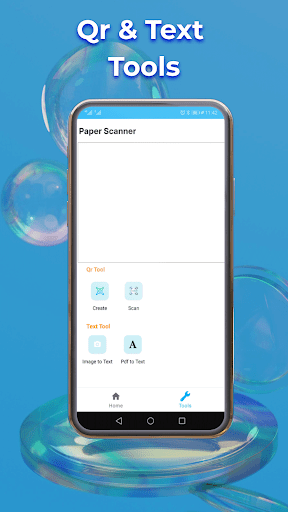

About Paper Scanner, OCR PDF Scanner
The description on the store listing
<b>Now you can turn your mobile device into a Paper Scanner and Camscanner.</b>
Nowadays, everyone tries to save all their essential documents, business cards, and identification cards digitally. For that purpose, you need to scan your pdf documents, business cards, and ID cards, and for that, you need to have a <b>Paper Scanner</b>. If you don’t have one, you need to visit different shops with a hardware scanner available for scanning the Papers and cards you need to pay charges for scanning your cards and papers.
But now you can scan all your pdf documents, cards, identification cards, and all kinds of documents. With the help of <b>Paper Scanner and OCR Pdf Scanner</b>, you can scan …
Read the full description
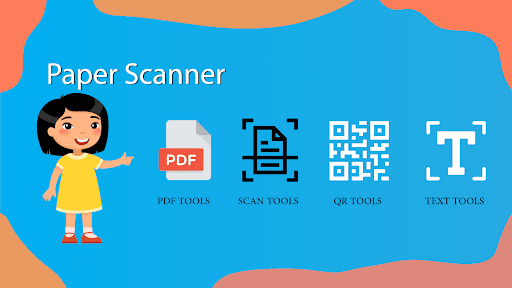
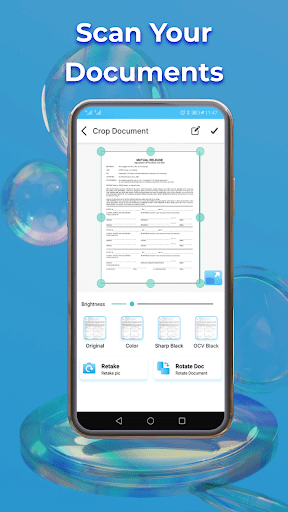
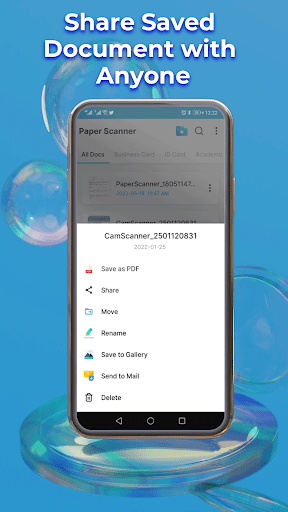
<b>Now you can turn your mobile device into a Paper Scanner and Camscanner.</b> Nowadays, everyone tries to save all their essential documents, business cards, and identification cards digitally. For that purpose, you need to scan your pdf documents, business cards, and ID cards, and for that, you need to have a <b>Paper Scanner</b>. If you don’t have one, you need to visit different shops with a hardware scanner available for scanning the Papers and cards you need to pay charges for scanning your cards and papers. But now you can scan all your pdf documents, cards, identification cards, and all kinds of documents. With the help of <b>Paper Scanner and OCR Pdf Scanner</b>, you can scan your documents within seconds and convert your documents into soft form. <b>Paper Scanner and Camscanner</b> scan all your documents and cards in high quality and give you the best result for your scanned documents and scanned business cards. After scanning your documents with the help of <b>Paper Scanner & OCR Scanner</b>, you can edit your scanned pdf documents and cards. You can apply different filters to your scanned papers and business cards available in the<b> Phone Scanner and Scanner OCR</b> application. You can also scan your images and photo with the help of a <b>photo scanning</b> app, and after scanning your pictures with the help of an <b>image scanner</b>, you can edit your images and photos and apply different filters using the <b>image scanner</b> and also convert and share your images and photos in pdf format with the help of <b>image scanner</b> app The <b>signature Scanner</b> feature is also available in the <b>image Scanner and Pdf Camscanner</b> application you can easily convert your signature into digital form from paper with the help of the <b>Signature Scanner</b> feature after scanning your scanner you can also edit your scanned signature. <b>How to Use Paper Scanner and Camscanner app</b> <ul> <li>Place your card or paper on a plane surface </li><li>Open Pdf Scanner and Paper Scanner app</li> <li>Select the type of documents you want to scan, like business cards, invoices, education documents, and identification cards. </li> <li>Click on the Scan button of the Camscanner app</li> <li> For business cards, ID cards, and passport scanning, you need to select a single side and two side option</li> <li>After Scanning, crop the extra portion from scanned cards and documents </li> <li>If an edit is required, you can edit and also apply different filters</li> <li>Click on Continue to apply background colors to your scanned pdf documents</li> <li>After scanning, you can convert your scanned images and cards into pdf formats and share</li> </ul> <b>Main Features available in Scanner Pdf and OCR Scanner</b> <ul> <li>Scanned all kinds of cards and documents</li> <li>Digitalize your business cards and identifications cards</li> <li>Best Scanned Document Quality</li> <li>PDF Reader</li> <li>Merge Pdf</li> <li>Scanned Signature</li> <li>Convert scanned documents to pdf</li> <li>Share scanned papers and cards</li> <li>Edit your scanned documents, business cards, identification cards</li> <li>Quickly and easily search your scanned documents</li> </ul> <b>Feedback:</b> Fair Apps Store develops paper Scanner and Camscanner applications. We are continuously updating our app <b>OCR Scanner and Image Scanner</b>. If you have any queries or suggestions regarding our app <b>Paper Scanner & Pdf Scanner</b>, email us at [email protected]. <b>Disclaimer:</b> <b>Camscanner and Free Pdf Scanner</b> are entirely safe and secure applications. All the scanned documents, business cards, and identification cards are saved in your local mobile storage. We didn’t use any server in our app Paper Scanner.
Installs since 2 Sep 2026 Measured
Exact Google Play install counts, collected daily
Daily history starts once this app is in our daily install sample.
Ratings
- 5 ★0.0%
- 4 ★0.0%
- 3 ★0.0%
- 2 ★0.0%
- 1 ★0.0%
Recent reviews
Latest public reviews from the store
- 3 Aug 2025
In short, the app is authentic. I love it so much. This is great and wonderful to me; but for thieves, it is a disappointment to them. Yes, it is totally a disappointment to them as they will be finding it difficult to steal my phone whenever the alarm is set. I wish I have this app before, my old phone which they stole recently wouldn't have been stolen. The app is ogbonge! I love it so much. Anyone looking for an anti theft app should quickly download this one. It is the best of the best.
- 13 Jun 2025
It prevent my phone from being stolen
- 23 Sep 2024
In the prospect of the purpose for this app, it works decently enough. There's just one complaint when my clock alarm goes off for me to wake up in the morning, and when I had the anti-theft alarm active as well, when the morning alarm rings, so does the anti-theft alarm. Just as a suggestion, maybe you should put an option in the app to have an automatic specific schedule of activation and deactivation.
- 3 Jul 2024
police
What reviewers bring up
Topics mentioned in the latest 36 reviews, by how many reviews mention them
Liked in good reviews (31 reviews)
- touch 18
- application 9
- feature 5
- quality 5
- mobile 5
- theft 5
- download 4
- superb 4
Raised in bad reviews (3 reviews)
No topic comes up twice.
Top chart positions
Latest Google Play chart ranks by country, last 10 days
Not in any tracked top chart in the last 10 days.
Paper Scanner, OCR PDF Scanner history
Release, install milestones, listing and store changes
- Reached 1,000+ installs 17 Jun 2022
- First released on the store 26 Jun 2021
Recent versions
Current version Varies with device
- Version 5.312 Sep 2025
- Version 5.27 Nov 2024
- Version 4.824 Sep 2024
- Version 4.729 May 2024
Listing keywords
Words and phrases Paper Scanner, OCR PDF Scanner repeats most in its store listing
Top phrases: li li (17), paper scanner (12), business cards (9), after scanning (5), identification cards (5).
Highlighted words also appear in the title. Counts cover the title, short description and description.
Business model and tech
From the store listing and declared permissions
- Business model
- Free to downloadIn-app purchasesShows ads
- Sensitive access
- No sensitive permission declared
Compliance
What the listing and the app package show
- Store status
- Live
- Upkeep
- Updated 12 Sep 2025
- Privacy policy
- Linked on the listing
- Advertising
- Shows ads
- In-app purchases
- Offered
- Age rating
- Everyone
Apps like Paper Scanner, OCR PDF Scanner
들어서 화면켜기Won3.5K installs★ 4.0
Height PredictionEcliptic App Ventures45.9K installs★ 2.4
Speicers`Pro VPNEldiablolucifer202021.2K installs★ 4.14
Lightning Tracker with AlertsYaksh Software4.3K installs★ 3.0
Mana Pathi (Unit Converter)Shirish Koirala2.2K installs★ 4.6
Multi-tab Calc - A simple app.Naoyuki Rikiji1.3K installs★ 5.0
Photo Recovery PlusBillApps7.1K installs★ 4.53
Just Silence. Scheduled.Akid Soft1.6K installs★ 5.0
- WoWp AssistantВиталий Робиновский2K installs★ 4.2
Paper Scanner, OCR PDF Scanner: questions and answers
How many downloads does Paper Scanner, OCR PDF Scanner have?
Paper Scanner, OCR PDF Scanner has 4,455 installs on Google Play, measured from the store's own count on 2 Sep 2026.
Who makes Paper Scanner, OCR PDF Scanner?
Paper Scanner, OCR PDF Scanner is published by Fair Apps Store..
When was Paper Scanner, OCR PDF Scanner last updated?
The latest version (Varies with device) was released on 12 Sep 2025.
Is Paper Scanner, OCR PDF Scanner free?
Yes. Paper Scanner, OCR PDF Scanner is free to download and offers in-app purchases, and it shows ads.
Is Paper Scanner, OCR PDF Scanner still available?
Yes. Paper Scanner, OCR PDF Scanner is live on Google Play as of 2 Sep 2026.
Track Paper Scanner, OCR PDF Scanner and its competitors
Watch any app for new versions, rating drops, chart moves and removals. Free plan, no card.