Partial Screen Pro
Intercepts and blocks random arbitrary self ghost touches on the damaged display
- Installs
- 4.07K
- Measured
- Rating
- 3.27
- Ratings
- 120
- 9 reviews
- Version
- 1.2.0
- Updated 31 Oct 2025
- Released
- 8 May 2018
- Tracked since 13 May 2026
- Size
- 3 MB
- Needs 4.2
Screenshots


About Partial Screen Pro
The description on the store listing
If you have a broken, damaged or defective display where appear all kinds of accidental, random, arbitrary, self, ghost ... but all the same unwanted touch.
Then this program can help you block the touch in those parts of the screen where they appear.
By blocking the touch, it means intercepting all kinds of touches and gestures in the specified zone.
There are two types of adding areas with locking of touch - <b>automatic</b> and <b>manual</b> modes.
After the automatic screen analysis running, all touches are intercepted for the established time interval to identify the lock zones. <b>(DO NOT TOUCH THE SCREEN DURING ANALYSIS RUNNING!)</b>
When analysis ended, the intercepted clicks …
Read the full description
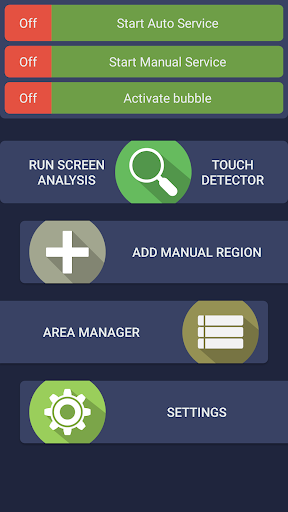
If you have a broken, damaged or defective display where appear all kinds of accidental, random, arbitrary, self, ghost ... but all the same unwanted touch. Then this program can help you block the touch in those parts of the screen where they appear. By blocking the touch, it means intercepting all kinds of touches and gestures in the specified zone. There are two types of adding areas with locking of touch - <b>automatic</b> and <b>manual</b> modes. After the automatic screen analysis running, all touches are intercepted for the established time interval to identify the lock zones. <b>(DO NOT TOUCH THE SCREEN DURING ANALYSIS RUNNING!)</b> When analysis ended, the intercepted clicks are analyzed, minimized and combined into zones with blocked touches. In manual mode, you need to add the necessary lock area yourself. Choose <b>"add manual region"</b> and place the area of the desired size on to the screen. It is also possible in the touch detector to track those parts of the screen where spontaneous touches occur. At the top of the screen, there are first two state switches for the two types of blocking. Enable both if you use zones added by automatic and manual mode. In the area manager you can: select active / inactive areas, change the color, size and position of the area, delete the unnecessary ones. Also available function of <b>rounding the corners</b> of the screen, in the settings it is possible to choose the color and radius. Added rounded corners of the screen are displayed on top of all possible elements. The bubble mode allows you to lock the entire screen by double-tap on the indicator. The indicator is displayed on top of all view and can be placed in any part of the screen. <b>Following functionality is also available:</b> - editing areas in the manager; - change the transparency of all areas; - the full overlap area mode (on top of all elements, for versions lower Android 8.0); - auto start service at power on; - touch detector for detecting damaged zones; - preload mode, for load blocked areas from a local file; - rounded corners of the screen. <b>Notice:</b> full overlap, are not supported for Android 8.0 and higher versions! <b>A short video review</b> will help you understand the operation of the program better: https://www.youtube.com/watch?v=0tpF5fa2_MA <b>Additional materials:</b> https://sites.google.com/view/che-development/partial-screen Did you have any questions or suggestions? Send an email: [email protected] For Samsung device: To prevent the app stoped by itself: <b>System Settings > Device Maintenance > Battery > Unmonitored apps > Add apps > checked Partial Screen</b> For Oppo device: To prevent the app stoped by itself: <b>Security Center > Battery > Enable Smart power-saving mode > Power-saving app control and management > Add apps > checked Partial Screen</b> For Xiaomi smartphone: need manually grant "Draw over other apps" permission (Go to <b>Setting > Installed apps > Partial Screen Pro > Permission manager > Display pop-up window > "Allow"</b>) To prevent the app turn off when clear RAM: <b>Go to Security Tab > Permission > Auto-start management > Add auto-start apps, checked Partial Screen Pro</b> For Huawei smartphone: <b>Open Phone Manager apps (or Settings app) > Permission Manager > choose Applications tab > select Partial Screen Pro > enable Draw over other apps</b>
Installs since 29 Aug 2026 Measured
Exact Google Play install counts, collected daily
Ratings
120 ratings, 9 reviews
- 5 ★64%
- 4 ★12%
- 3 ★12%
- 2 ★0.0%
- 1 ★12%
Recent reviews
Latest public reviews from the store
- 16 Feb 2023
It's useful for me. I use it maybe 2 years
- 16 Jan 2022
Quite good, but sometimes it has errors such as fail to upload data and I dun know the reason for it
- 30 Aug 2020
Ok
- 26 Aug 2020
ok
What reviewers bring up
Topics mentioned in the latest 50 reviews, by how many reviews mention them
Liked in good reviews (41 reviews)
- hay 4
- tốt 2
- khi 2
Raised in bad reviews (7 reviews)
- sao 3
Top chart positions
Latest Google Play chart ranks by country, last 10 days
Not in any tracked top chart in the last 10 days.
Partial Screen Pro history
Release, install milestones, listing and store changes
- Reached 1,000+ installs 21 Mar 2024
- Reached 500+ installs 29 Aug 2021
- Reached 100+ installs 9 Jul 2019
- Reached 50+ installs 15 Oct 2018
- Reached 10+ installs 13 Jul 2018
- Reached 5+ installs 13 Jun 2018
- First released on the store 8 May 2018
Recent versions
Current version 1.2.0
- Version 1.2.027 Oct 2025
Version 1.2.0 - Improve stability - Rework rotation logic
- Version 1.18.019 Nov 2021
- Version 1.13.010 Sep 2020
- Version 1.11.010 Nov 2018
Listing keywords
Words and phrases Partial Screen Pro repeats most in its store listing
Top phrases: partial screen (6), partial screen pro (4), screen pro (4), checked partial screen (3), auto start (3).
Highlighted words also appear in the title. Counts cover the title, short description and description.
Business model and tech
From the store listing and declared permissions
- Business model
- Paid, $2.49
- Sensitive access
- Draws over other apps
7 permissions
1 special access, 0 sensitive, 6 standard
- Draw over other appsSpecial access
- Keep the phone awakeStandard
- Reorder running appsStandard
- Run a foreground serviceFOREGROUND_SERVICEStandard
- Start when the phone turns onStandard
- High sampling rate sensorsHIGH_SAMPLING_RATE_SENSORSStandard
- Internal app permissionDYNAMIC_RECEIVER_NOT_EXPORTED_PERMISSIONStandard
Compliance
What the listing and the app package show
- Store status
- Live
- Upkeep
- Updated 31 Oct 2025
- Privacy policy
- Linked on the listing
- Advertising
- No ads declared
- In-app purchases
- None declared
- Age rating
- Everyone
- Sensitive permissions
- 0 sensitive, 1 special access of 7
- Location access
- No
- Camera and microphone
- Neither
Apps like Partial Screen Pro
Z1 VPNharun24.5K installs★ 3.86
Super Hit protect your trafficsuperhit42.3K installs★ 3.4
Deck HopperChristina Kral7.9K installs★ 4.48
ShareApp - App Details, Share3k Developers17.7K installs★ 4.35
Afrikaans / AppsTech KeyboardApps Technologies31.1K installs★ 4.0
Forsaken Skins for MinecraftBatok Magic Studio15.7K installs★ 2.4
Resize Image - Resize PhotosYogesh Dama15.3K installs★ 3.5
SoulBiBiQ[email protected]10.2K installs★ 1.39
Breeze: AI Smooth Path BrowserALASKA SYSTEMS AND SOFTWARE LLC26.8K installs★ 3.66
Partial Screen Pro: questions and answers
How many downloads does Partial Screen Pro have?
Partial Screen Pro has 4,073 installs on Google Play, measured from the store's own count on 13 Nov 2026.
Who makes Partial Screen Pro?
Partial Screen Pro is published by Andrii Ichenets.
When was Partial Screen Pro last updated?
The latest version (1.2.0) was released on 31 Oct 2025.
Is Partial Screen Pro free?
No. Partial Screen Pro is a paid app priced at $2.49.
Is Partial Screen Pro still available?
Yes. Partial Screen Pro is live on Google Play as of 13 Nov 2026.
Track Partial Screen Pro and its competitors
Watch any app for new versions, rating drops, chart moves and removals. Free plan, no card.