
PassMaster: Generate password
Generate secure passwords with custom options and save them offline securely.
- Installs
- 6
- Measured
- Rating
- —
- Ratings
- —
- Version
- Varies with device
- Updated 5 Mar 2025
- Released
- 29 Nov 2024
- Tracked since 12 May 2026
- Size
- —
Screenshots
About PassMaster: Generate password
The description on the store listing
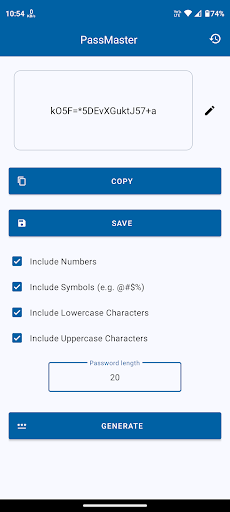
Are you tired of using weak passwords that put your accounts at risk? Meet SecureKey, the ultimate tool to create strong, secure, and unique passwords for all your online accounts. With SecureKey, password security is no longer a hassle!
Features:
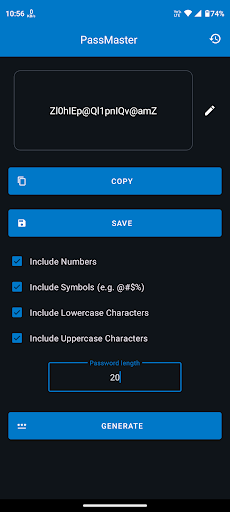
🔐 Customizable Password Generation
Create passwords tailored to your needs with options to include:
* Numbers (e.g., 12345)
* Symbols (e.g., @#$%)
* Lowercase Characters (e.g., abcdef)
* Uppercase Characters (e.g., ABCDEF)
🎯 User-Friendly Interface
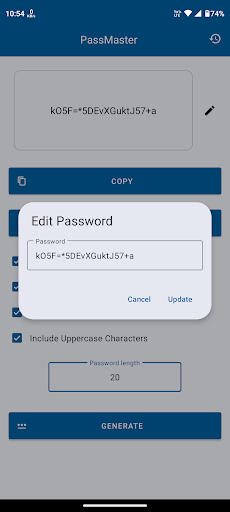
Our simple, intuitive design makes generating secure passwords a breeze, even for non-tech-savvy users.
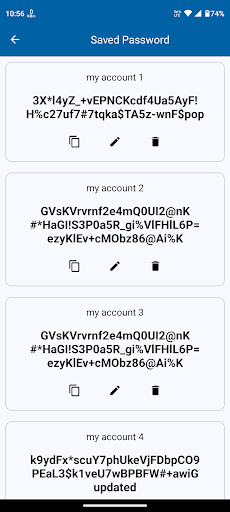
💾 Offline Storage
Save your passwords securely on your device without …
Read the full description
Are you tired of using weak passwords that put your accounts at risk? Meet SecureKey, the ultimate tool to create strong, secure, and unique passwords for all your online accounts. With SecureKey, password security is no longer a hassle! Features: 🔐 Customizable Password Generation Create passwords tailored to your needs with options to include: * Numbers (e.g., 12345) * Symbols (e.g., @#$%) * Lowercase Characters (e.g., abcdef) * Uppercase Characters (e.g., ABCDEF) 🎯 User-Friendly Interface Our simple, intuitive design makes generating secure passwords a breeze, even for non-tech-savvy users. 💾 Offline Storage Save your passwords securely on your device without requiring internet access. Your data stays private and never leaves your phone. 📋 Quick Copy and Share Easily copy your generated passwords to your clipboard or share them securely when needed. 🌍 No Internet? No Problem! SecureKey works entirely offline, ensuring that your passwords are generated and stored securely without any external access. Why Choose SecureKey? In a world where data breaches are common, strong passwords are your first line of defense. SecureKey empowers you to create and manage passwords effortlessly, keeping your online accounts safe from prying eyes. Whether you're securing your social media accounts, online banking, or any other digital asset, SecureKey has got you covered. Get SecureKey today and take the first step towards better online security!
Installs since 2 Sep 2026 Measured
Exact Google Play install counts, collected daily
Daily history starts once this app is in our daily install sample.
Ratings
- 5 ★0.0%
- 4 ★0.0%
- 3 ★0.0%
- 2 ★0.0%
- 1 ★0.0%
Recent reviews
Latest public reviews from the store
No reviews in our sample for this app yet.
Top chart positions
Latest Google Play chart ranks by country, last 10 days
Not in any tracked top chart in the last 10 days.
PassMaster: Generate password history
Release, install milestones, listing and store changes
- Removed from the store 2 Sep 2026
- Reached 5+ installs 5 Mar 2025
- First released on the store 29 Nov 2024
Listing keywords
Words and phrases PassMaster: Generate password repeats most in its store listing
Top phrases: characters abcdef (2), online accounts (2), secure passwords (2).
Highlighted words also appear in the title. Counts cover the title, short description and description.
Business model and tech
From the store listing and declared permissions
- Business model
- Free to downloadShows ads
- Sensitive access
- No sensitive permission declared
Compliance
What the listing and the app package show
- Store status
- Removed (2 Sep 2026)
- Upkeep
- Updated 5 Mar 2025
- Registered in
- India
- Privacy policy
- Linked on the listing
- Advertising
- Shows ads
- In-app purchases
- None declared
- Age rating
- Everyone
Apps like PassMaster: Generate password
들어서 화면켜기Won3.5K installs★ 4.0
Height PredictionEcliptic App Ventures45.9K installs★ 2.4
Speicers`Pro VPNEldiablolucifer202021.2K installs★ 4.14
Lightning Tracker with AlertsYaksh Software4.3K installs★ 3.0
Mana Pathi (Unit Converter)Shirish Koirala2.2K installs★ 4.6
Multi-tab Calc - A simple app.Naoyuki Rikiji1.3K installs★ 5.0
Photo Recovery PlusBillApps7.1K installs★ 4.53
Just Silence. Scheduled.Akid Soft1.6K installs★ 5.0
- WoWp AssistantВиталий Робиновский2K installs★ 4.2
PassMaster: Generate password: questions and answers
How many downloads does PassMaster: Generate password have?
PassMaster: Generate password has 6 installs on Google Play, measured from the store's own count on 2 Sep 2026.
Who makes PassMaster: Generate password?
PassMaster: Generate password is published by BengalBytes, a developer based in IN.
When was PassMaster: Generate password last updated?
The latest version (Varies with device) was released on 5 Mar 2025.
Is PassMaster: Generate password free?
Yes. PassMaster: Generate password is free to download, and it shows ads.
Is PassMaster: Generate password still available?
No. PassMaster: Generate password is no longer listed on Google Play. We first saw it missing around 2 Sep 2026.
Track PassMaster: Generate password and its competitors
Watch any app for new versions, rating drops, chart moves and removals. Free plan, no card.