
Password Manager
The best most secure Password Manager for protecting personal data on your phone
- Installs
- 16.80K
- Measured
- Rating
- —
- Ratings
- —
- Version
- Varies with device
- Updated 2 Apr 2024
- Released
- 20 Aug 2020
- Tracked since 11 May 2026
- Size
- 18 MB
- Needs 5.0
Screenshots
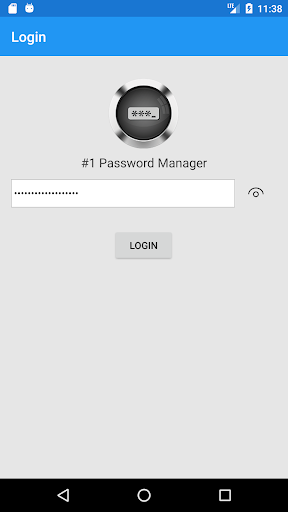


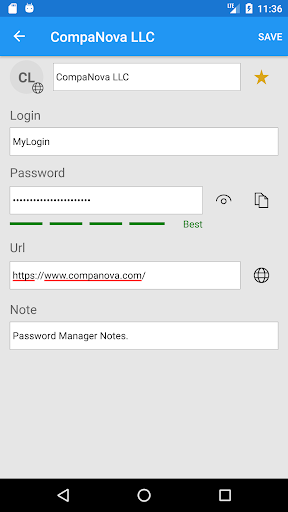


About Password Manager
The description on the store listing
#1 Password Manager is a feature-rich, most secure and safe application for managing passwords and other sensitive personal data. It uses the best practices and most advanced security standards to keep your private data protected and safe. With #1 Password Manager you will never lose or forget your passwords. No need to write them down or store in clear text. Since #1 Password Manager stores and encrypts passwords using the Advanced Encryption Standard (AES)/Rijndael algorithm with the 256 bit key, your passwords and private data are always stored encrypted and never leave your device. This means you don’t need to worry about your private data being unsafe somewhere in the “cloud”. Even if …
Read the full description
#1 Password Manager is a feature-rich, most secure and safe application for managing passwords and other sensitive personal data. It uses the best practices and most advanced security standards to keep your private data protected and safe. With #1 Password Manager you will never lose or forget your passwords. No need to write them down or store in clear text. Since #1 Password Manager stores and encrypts passwords using the Advanced Encryption Standard (AES)/Rijndael algorithm with the 256 bit key, your passwords and private data are always stored encrypted and never leave your device. This means you don’t need to worry about your private data being unsafe somewhere in the “cloud”. Even if your device is lost or stolen, your data is still safe, as there is no way to get to your passwords without a Master Password which is hashed using Sha512 – the most advanced hashing algorithm. Besides top security features, #1 Password Manager offers an easy to use and intuitive user interface. There are multiple templates to choose from to generate new secure password entries. Passwords are conveniently grouped based on the type and category. A quick search feature provides an easy and fast way to find specific entries. Passwords can be added to the “Favorites” list for a quick access. The built-in app-to-app integration with browsers makes it easy to open and login in into your favorite web sites. #1 Password Manager also offers the Password Generator and Password Strength test features. With just one click you can easily generate new random, but strong secure passwords or test your existing password strength. #1 Password Manager features: - Local protected password storage (no “clouds” or shared drives to worry about) - Advanced security protection using best practices and security standards - Advanced Encryption Standard (AES)/Rijndael algorithm with the 256 bit key to keep you private data safe and secure - #1 Password Manager never has access to your encryption key and keeps it protected with the Master Password which is hashed using Sha512 algorithm - Backup and Restore capabilities that let users archive(save) and recover passwords from the backup file - Conveniently organizes passwords, logins, and personal entries by Categories and Types - Quick search through all the entries and a separate “Favorite” list for your mostly used entries - Sort functionality to order and access entries by different fields - Copy and Paste functionality to quickly create and share entries - Ability to change your Master Password - Generate new random, strong and secure passwords (passwordgen/passwordgenerator) - Test your Password Strength - Store all your usernames, logins, passwords and other personal/private data securely on your local device - Sensitive data is always encrypted at rest - Enhanced security that locks Application access after some time of inactivity - Best Application for protecting privacy and private data - Free Password Manager - Best Password Manager - 1Password
Installs since 3 Sep 2026 Measured
Exact Google Play install counts, collected daily
Daily history starts once this app is in our daily install sample.
Ratings
- 5 ★0.0%
- 4 ★0.0%
- 3 ★0.0%
- 2 ★0.0%
- 1 ★0.0%
Recent reviews
Latest public reviews from the store
- 25 Feb 2019
so fun
Top chart positions
Latest Google Play chart ranks by country, last 10 days
Not in any tracked top chart in the last 10 days.
Password Manager history
Release, install milestones, listing and store changes
- Reached 5,000+ installs 5 Apr 2021
- Reached 1,000+ installs 13 Dec 2020
- Reached 500+ installs 15 Nov 2020
- Reached 100+ installs 1 Oct 2020
- Reached 50+ installs 16 Sep 2020
- First released on the store 20 Aug 2020
Recent versions
Current version Varies with device
- Version 1.0.13.02 Apr 2024
- Version 1.0.11.017 Apr 2021
- Version 1.0.10.024 Feb 2021
- Version 1.0.9.016 Nov 2020
Listing keywords
Words and phrases Password Manager repeats most in its store listing
Top phrases: password manager (11), private data (6), master password (3), password strength (3), secure password (3).
Highlighted words also appear in the title. Counts cover the title, short description and description.
Business model and tech
From the store listing and declared permissions
- Business model
- Free to downloadIn-app purchasesShows ads
- Subscriptions and payments
- Google Play billing
- Sensitive access
- Photos, videos and filesAdvertising ID
11 permissions
0 special access, 2 sensitive, 9 standard
- Change or delete shared storageSensitive
- Read shared storageSensitive
- Read how it was installed (install referrer)BIND_GET_INSTALL_REFERRER_SERVICEStandard
- Read the advertising IDAD_IDStandard
- Keep the phone awakeStandard
- Run a foreground serviceFOREGROUND_SERVICEStandard
- Start when the phone turns onStandard
- Full internet accessStandard
- See network connectionsStandard
- Internal app permissionDYNAMIC_RECEIVER_NOT_EXPORTED_PERMISSIONStandard
- In-app purchases with Google PlayStandard
Compliance
What the listing and the app package show
- Store status
- Live
- Upkeep
- No update since 2 Apr 2024
- Registered in
- United States
- Privacy policy
- Linked on the listing
- Advertising
- Shows ads
- In-app purchases
- Offered
- Age rating
- Everyone
- Sensitive permissions
- 2 sensitive of 11
- Location access
- No
- Camera and microphone
- Neither
Apps like Password Manager
영산강 안심 알림eICT융합소프트 & 스마트오더18.3K installs★ 4.0
JBLETRADOC Mobile10.3K installs★ 4.5
Two Point HeightOmega Centauri Software15.3K installs★ 2.22
Sheridan RecyclesCity of Sheridan634 installs★ 4.67
NAFNorges Automobil-Forbund200K installs★ 3.9
Ipsos Adria CAPIIpsos Serbia7.4K installs★ 3.9
Clock: Alarm Clock & TimerIntratech so36.1K installs★ 3.79
Süzme Sayaç HesaplamaNotsup30.3K installs★ 3.6
Cattle & Goat Record KeepingVetzKin10.3K installs★ 2.5
Password Manager: questions and answers
How many downloads does Password Manager have?
Password Manager has 16,795 installs on Google Play, measured from the store's own count on 3 Sep 2026.
Who makes Password Manager?
Password Manager is published by CompaNova LLC, a developer based in US.
When was Password Manager last updated?
The latest version (Varies with device) was released on 2 Apr 2024.
Is Password Manager free?
Yes. Password Manager is free to download and offers in-app purchases, and it shows ads.
Is Password Manager still available?
Yes. Password Manager is live on Google Play as of 3 Sep 2026.
Track Password Manager and its competitors
Watch any app for new versions, rating drops, chart moves and removals. Free plan, no card.