
Password Manager Authenticator
Safeguard, generator and autofill passwords with Password Manager Authenticator
- Installs
- 8.33K
- Measured
- Rating
- 3.2
- Ratings
- 43
- 3 reviews
- Version
- 10
- Updated 3 Apr 2025
- Released
- 30 May 2023
- Tracked since 13 May 2026
- Size
- —
Also on App Store: Password Manager Authenticator
Screenshots


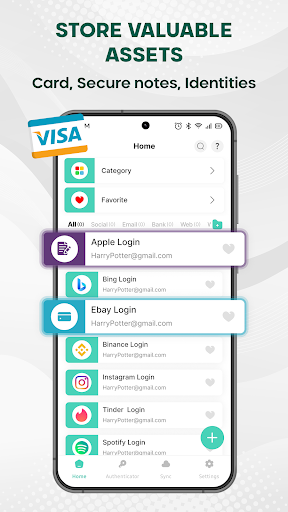

About Password Manager Authenticator
The description on the store listing
🔑 PASSWORD MANAGER AUTHENTICATOR – THE ULTIMATE SECURE FOR YOUR PASSWORDS AND PERSONAL DATA
Password Manager Authenticator is your all-in-one secure vault for storing passwords and essential personal data, including credit card details, secure notes, and identity information. Designed for maximum security, it remembers all your passwords and ensures your sensitive information is protected. Enhance password and data security by enabling fingerprint or facial recognition for instant and safe access.
❓Why Do You Need a Password Manager Authenticator on Your Device?
- In today’s digital age, we all have countless online accounts requiring passwords. Remembering them all can be …
Read the full description
🔑 PASSWORD MANAGER AUTHENTICATOR – THE ULTIMATE SECURE FOR YOUR PASSWORDS AND PERSONAL DATA Password Manager Authenticator is your all-in-one secure vault for storing passwords and essential personal data, including credit card details, secure notes, and identity information. Designed for maximum security, it remembers all your passwords and ensures your sensitive information is protected. Enhance password and data security by enabling fingerprint or facial recognition for instant and safe access. ❓Why Do You Need a Password Manager Authenticator on Your Device? - In today’s digital age, we all have countless online accounts requiring passwords. Remembering them all can be challenging, and using weak passwords can put your security at risk. - Creating long, complex passwords strengthens account security, but with the increasing number of websites and apps requiring logins, remembering unique passwords for each can be overwhelming. Password Manager Authenticator solves this problem by generating strong passwords and securely storing all of them, eliminating the frustration of forgotten passwords. With just a single tap, you can fill in your username and password for seamless, secure access to your online accounts. 🎯 EXPLORE THE KEY FEATURES: ➡️ ALL YOUR PASSWORDS IN ONE PLACE Password Manager Authenticator offers a centralized, secure storage solution for all your login credentials. Easily manage and retrieve passwords for social media, email, banking, and more. With a well-organized structure, you can quickly access your credentials from a single, user-friendly platform. ➡️ AUTO-FILL PASSWORDS Experience seamless and highly secure logins with the Auto-Fill feature. Password Manager Authenticator automatically detects and fills in login credentials across websites and apps, eliminating the need for manual entry. This feature enhances efficiency while minimizing security risks. ➡️ BACKUP, RESTORE & SYNC ACROSS ALL DEVICES Your password data remains secure and accessible across all your devices. Even if you switch or lose a device, you can easily restore your information. With cloud backup, restore, and cross-platform sync capabilities, you can access your passwords anytime, anywhere, without interruption. ➡️ PASSWORD GENERATOR Password Manager Authenticator create strong, random, and highly secure passwords in seconds. Customize password length, special characters, and complexity to meet the highest security standards, reducing vulnerability to cyber threats. ➡️AUTHENTICATOR FEATURE Password Manager Authenticator enhance your online security with built-in 2FA (two-factor authentication). This added layer of protection ensures that your accounts remain secure from unauthorized access, giving you peace of mind knowing your sensitive data is safe. ➡️ PRIVACY PROTECTION Safeguard your personal data and login credentials. Password Manager Authenticator provides multiple layers of security, including PIN, fingerprint, or facial recognition, ensuring that only you can access your sensitive data. With strict compliance to security standards, your personal information remains protected from unauthorized access and data breaches. ➡️ STORE VALUABLE ASSETS Beyond password storage, Password Manager Authenticator securely holds essential assets such as credit card details, secure notes, and identity information. Everything stays protected and easily accessible, eliminating the need for carrying physical documents or memorizing sensitive details. ➡️ DARK MODE Enjoy a sleek and modern browsing experience with Dark Mode. Not only does it enhance the app’s aesthetic, but it also reduces eye strain and conserves battery life. ✅ SECURE YOUR DIGITAL LIFE TODAY! Password Manager Authenticator is an essential tool for anyone looking to safeguard their online accounts and manage passwords effortlessly. Download the Password Manager Authenticator App today and take control of your digital security!
Installs since 26 Aug 2026 Measured
Exact Google Play install counts, collected daily
Ratings
43 ratings, 3 reviews
- 5 ★33%
- 4 ★17%
- 3 ★17%
- 2 ★17%
- 1 ★17%
Recent reviews
Latest public reviews from the store
- 6 Jul 2022
Selladurai Appa Phone number of course you have you ever need a new study was conducted in a few minutes of course I will and to be able too many people have to the first place for you and I have a great time to do it was the only thing that you can get it is the only thing that you can
- 9 Apr 2022
Good app but it takes time to download like 4hrs
- 24 Feb 2022
Nice app but need for lock screen
- 27 Mar 2021
This app is good but if you are using a sumsang J4 just forget about the fingerprint thing
What reviewers bring up
Topics mentioned in the latest 10 reviews, by how many reviews mention them
Liked in good reviews (4 reviews)
No topic comes up twice.
Raised in bad reviews (6 reviews)
- fingerprint 2
- download 2
- waste 2
Top chart positions
Latest Google Play chart ranks by country, last 10 days
Not in any tracked top chart in the last 10 days.
Password Manager Authenticator history
Release, install milestones, listing and store changes
- Reached 5,000+ installs 3 Apr 2025
- Reached 1,000+ installs 5 May 2024
- Reached 500+ installs 10 Sep 2023
- First released on the store 30 May 2023
Update frequency
How often Password Manager Authenticator ships a new version, month by month
0 updates in the last 12 months. Less often than most similar apps: they shipped a median of 1 updates in the same year.
Recent versions
Current version 10
- Version 1019 Feb 2025
Bug fixes and performance improvements
- Version 7.06 Aug 2024
Listing keywords
Words and phrases Password Manager Authenticator repeats most in its store listing
Top phrases: password manager authenticator (14), manager authenticator (14), password manager (14), login credentials (3), online accounts (3).
Highlighted words also appear in the title. Counts cover the title, short description and description.
Business model and tech
From the store listing and declared permissions
- Business model
- Free to downloadIn-app purchasesShows ads
- Subscriptions and payments
- Google Play billing
- Sensitive access
- CameraAdvertising ID
17 permissions
0 special access, 2 sensitive, 15 standard
- Take photos and videosSensitive
- Show notificationsPOST_NOTIFICATIONSSensitive
- Ad attribution (Privacy Sandbox)ACCESS_ADSERVICES_ATTRIBUTIONStandard
- Ad topics (Privacy Sandbox)ACCESS_ADSERVICES_TOPICSStandard
- Read how it was installed (install referrer)BIND_GET_INSTALL_REFERRER_SERVICEStandard
- Read the advertising IDAD_IDStandard
- Read the advertising ID (Privacy Sandbox)ACCESS_ADSERVICES_AD_IDStandard
- Keep the phone awakeStandard
- Run a foreground serviceFOREGROUND_SERVICEStandard
- Use fingerprint or face unlockUSE_BIOMETRICStandard
- Use the fingerprint readerUSE_FINGERPRINTStandard
- Full internet accessStandard
Compliance
What the listing and the app package show
- Store status
- Live
- Upkeep
- Updated 3 Apr 2025
- Registered in
- Vietnam
- Privacy policy
- Linked on the listing
- Advertising
- Shows ads
- In-app purchases
- Offered
- Age rating
- Everyone
- Sensitive permissions
- 2 sensitive of 17
- Location access
- No
- Camera and microphone
- Camera
Apps like Password Manager Authenticator
Psychrometric chart plotterEZ杉浦12.5K installs★ 2.2
FilioFilio Corp5.3K installs★ 4.74
Smart talkieHangzhou Zhidou Technology Co., Ltd.4.1K installs★ 4.45
Apk InstallerAppsLib14.2K installs★ 3.13
Anker SOLIX ProfessionalAnker47K installs★ 3.83
PicFind - Local photo searchMagic Pixel Studio3.5K installs★ 3.9
File Vault - Hide your filesALIF Technology7.3K installs★ 4.25
iSmKitAllen-Tong20.7K installs★ 3.5
AGC PlayerMobile Filters & Watermark & Video Player24.5K installs★ 3.7
Password Manager Authenticator: questions and answers
How many downloads does Password Manager Authenticator have?
Password Manager Authenticator has 8,330 installs on Google Play, measured from the store's own count on 18 Nov 2026.
Who makes Password Manager Authenticator?
Password Manager Authenticator is published by Starnest JSC, a developer based in VN.
When was Password Manager Authenticator last updated?
The latest version (10) was released on 3 Apr 2025.
Is Password Manager Authenticator free?
Yes. Password Manager Authenticator is free to download and offers in-app purchases, and it shows ads.
Is Password Manager Authenticator still available?
Yes. Password Manager Authenticator is live on Google Play as of 18 Nov 2026.
Track Password Manager Authenticator and its competitors
Watch any app for new versions, rating drops, chart moves and removals. Free plan, no card.