
Password Manager - Secure
Tired of remembering all of your passwords or annoyed of forgetting them?
- Installs
- 71
- Measured
- Rating
- —
- Ratings
- —
- Version
- Varies with device
- Released
- 24 Dec 2021
- Tracked since 13 May 2026
- Size
- —
Also on App Store: Password Manager - Secure (754 ratings), Password Manager Secure
Screenshots



About Password Manager - Secure
The description on the store listing
Password Manager is as beautiful and simple as it is secured. Password Manager helps you to save all your login credentials, private informations and passwords securely inside an excrypted database. You just need to remember a single password to access all your login information, passwords and other private data. You can also login to your application using your biometric ID (Finger Print or Face ID).
It is 100% secure since it doesn't have access to the internet. Try Password Manager free today.
Password manager
Key Feature of Password Manager :
- You can Login in to Password Manager App by using either biometric Id (Both Fingerprint and Face ID) or a master password.
- In …
Read the full description
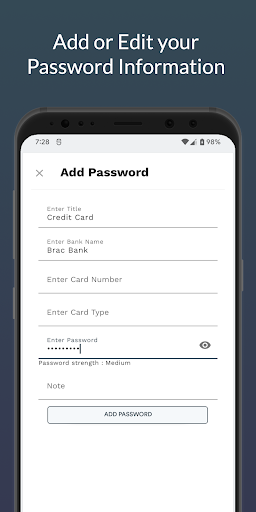
Password Manager is as beautiful and simple as it is secured. Password Manager helps you to save all your login credentials, private informations and passwords securely inside an excrypted database. You just need to remember a single password to access all your login information, passwords and other private data. You can also login to your application using your biometric ID (Finger Print or Face ID). It is 100% secure since it doesn't have access to the internet. Try Password Manager free today. Password manager Key Feature of Password Manager : - You can Login in to Password Manager App by using either biometric Id (Both Fingerprint and Face ID) or a master password. - In Password Manager app you can save unlimited password without any cost. - No subscription fee is needed in Password Manager App. - You can check your password strength while typing your password. - You can see your password edit history in Password Manager App. - You can export all your password in csv file. - You can change authentication type anytime you want. - You can change your master password anytime you want. - You can change to app theme anytime you want. - Now the app uses latest Material design of google. - And everything is free!!!! Keywords : Password, Lock, Password Manager, Secure, Security, Online, Encryption, Password Lock, Credentials
Installs since 26 Aug 2026 Measured
Exact Google Play install counts, collected daily
Ratings
- 5 ★0.0%
- 4 ★0.0%
- 3 ★0.0%
- 2 ★0.0%
- 1 ★0.0%
Recent reviews
Latest public reviews from the store
No reviews in our sample for this app yet.
Top chart positions
Latest Google Play chart ranks by country, last 10 days
Not in any tracked top chart in the last 10 days.
Password Manager - Secure history
Release, install milestones, listing and store changes
- First released on the store 24 Dec 2021
Listing keywords
Words and phrases Password Manager - Secure repeats most in its store listing
Top phrases: password manager (11), anytime you want (3), password manager secure (2), biometric id (2), face id (2).
Highlighted words also appear in the title. Counts cover the title, short description and description.
Business model and tech
From the store listing and declared permissions
- Business model
- Free to downloadShows ads
- Sensitive access
- Photos, videos and filesAdvertising ID
11 permissions
0 special access, 2 sensitive, 9 standard
- Change or delete shared storageSensitive
- Read shared storageSensitive
- Read how it was installed (install referrer)BIND_GET_INSTALL_REFERRER_SERVICEStandard
- Read the advertising IDAD_IDStandard
- Keep the phone awakeStandard
- Run a foreground serviceFOREGROUND_SERVICEStandard
- Start when the phone turns onStandard
- Use fingerprint or face unlockUSE_BIOMETRICStandard
- Use the fingerprint readerUSE_FINGERPRINTStandard
- Full internet accessStandard
- See network connectionsStandard
Compliance
What the listing and the app package show
- Store status
- Live
- Registered in
- Norway
- Privacy policy
- Linked on the listing
- Advertising
- Shows ads
- In-app purchases
- None declared
- Age rating
- Everyone
- Sensitive permissions
- 2 sensitive of 11
- Location access
- No
- Camera and microphone
- Neither
Apps like Password Manager - Secure
영산강 안심 알림eICT융합소프트 & 스마트오더18.3K installs★ 4.0
JBLETRADOC Mobile10.3K installs★ 4.5
Two Point HeightOmega Centauri Software15.3K installs★ 2.22
Sheridan RecyclesCity of Sheridan634 installs★ 4.67
NAFNorges Automobil-Forbund200K installs★ 3.9
Ipsos Adria CAPIIpsos Serbia7.4K installs★ 3.9
Clock: Alarm Clock & TimerIntratech so36.1K installs★ 3.79
Süzme Sayaç HesaplamaNotsup30.3K installs★ 3.6
Cattle & Goat Record KeepingVetzKin10.3K installs★ 2.5
Password Manager - Secure: questions and answers
How many downloads does Password Manager - Secure have?
Password Manager - Secure has 71 installs on Google Play, measured from the store's own count on 18 Nov 2026.
Who makes Password Manager - Secure?
Password Manager - Secure is published by Techascent, a developer based in NO.
Is Password Manager - Secure free?
Yes. Password Manager - Secure is free to download, and it shows ads.
Is Password Manager - Secure still available?
Yes. Password Manager - Secure is live on Google Play as of 18 Nov 2026.
Track Password Manager - Secure and its competitors
Watch any app for new versions, rating drops, chart moves and removals. Free plan, no card.