
PdaNet+
Share smart phone Internet with computers or tablets, no rooting needed.
- Installs
- 12.12M
- Measured
- Rating
- 3.65
- Ratings
- 83K
- 19.3K reviews
- Version
- 5.32
- Updated 27 Sep 2023
- Released
- —
- Tracked since 13 May 2026
- Size
- 0 MB
- Needs 4.1
Screenshots

About PdaNet+
The description on the store listing
Version 5.10 has major changes, MUST read below before updating.
1. Windows side also need updating from http://pdanet.co/install
2. Original WiFi Hotspot feature remains in the separate FoxFi app if you still need it, just install from Play Store. You can also find previous (4.19) version of PdaNet+ at http://pdanet.co/install/old
3. New location permission required by Android due to WiFi scan API call.
Please be aware that with no root access there are technical limitations of what an app can do. We try our best to offer the "most convenient solution possible" for sharing phone Internet but it may not be an "ideal" or "universal" solution (e.g. a normal WiFi Hotspot). It may not …
Read the full description
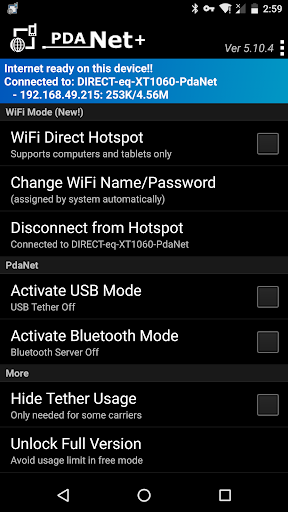
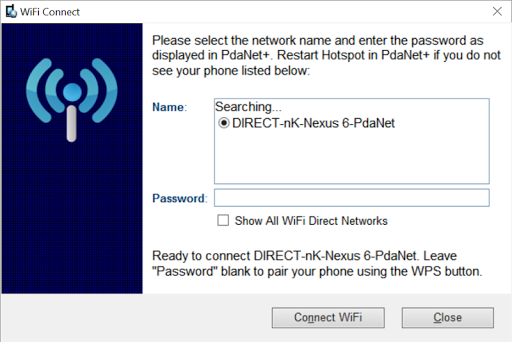
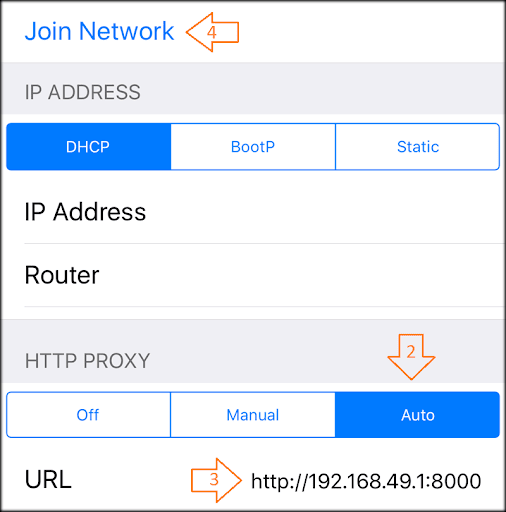
Version 5.10 has major changes, MUST read below before updating. 1. Windows side also need updating from http://pdanet.co/install 2. Original WiFi Hotspot feature remains in the separate FoxFi app if you still need it, just install from Play Store. You can also find previous (4.19) version of PdaNet+ at http://pdanet.co/install/old 3. New location permission required by Android due to WiFi scan API call. Please be aware that with no root access there are technical limitations of what an app can do. We try our best to offer the "most convenient solution possible" for sharing phone Internet but it may not be an "ideal" or "universal" solution (e.g. a normal WiFi Hotspot). It may not work for particular devices. =====WiFi Direct mode (new!) ==== PdaNet+ now comes with a completely new "WiFi Direct Hotspot" feature that works on all Android phones 4.1 or later. It allows you to connect computers and tablets to your phone using WiFi BUT it will require you to either install our client app or setup proxy depending on what device you are connecting to the phone. You can activate "WiFi Direct Hotspot" in PdaNet+ then tap the "Help!" button for detail instructions. *If your Windows computer does not see the hotspot during pairing please do two things: 1. Restart Hotspot on the phone. 2. Click on "Show All WiFi Direct Hotspot". It will verify if your adapter supports 5Ghz. ====FoxFi/WiFi Hotspot Mode (the old) ==== The original WiFi Hotspot feature remains in the separate FoxFi app if you still need it. It has ceased to function on many newer phone models due to carrier updates. Even when it works, your hotspot usage may still be metered (see plan 2 below). WiFi Direct Hotspot could solve both issues. However the new feature is not meant to support game devices, TVs or TV streaming devices. =====USB Mode===== USB mode works on all Android phones (except for some ZTE/Alcatel models). It allows connection from Windows or Mac. In addition, there is a "WiFi Share" feature that can further turn Windows into a WiFi Hotspot so that you share PdaNet Internet with other devices. *If your phone is not recognized by your computer after connecting USB, please see http://pdanet.co/driver =====Bluetooth Mode===== You can use Bluetooth mode to connect Windows. Although WiFi Direct mode is preferred. =====Do I need this software?===== The PdaNet software has been around since the first Treo smart phone in 2003. With over 30 million downloads in total, it must be something that everyone needs, right? Well...it really depends on the kind of data plan you have for your phone. There are 4 kinds of data plans from most carriers: 1. Your data plan (limited or unlimited) does not allow you to turn on the mobile hotspot feature on the phone (it prompts you to call your carrier). 2. Your data plan is unlimited and you can turn on mobile hotspot from your phone to use it. But hotspot usage is "metered" against a cap (say 5G/month). After that the speed will be throttled to a crawl. (FoxFi can't avoid this!) 3. Your data plan is unlimited, and you can turn on mobile hotspot from your phone with unlimited LTE usage and no throttling cap. This plan does NOT exist or not intended. But we have seen loopholes on some phone models to allow it. 4. You data plan is limited and it allows you to turn on mobile hotspot from your phone. The mobile hotspot usage goes under the same data plan limit. If your plan falls under 1 or 2, you will need to use PdaNet+. If your plan belongs to 3 or 4 then PdaNet+ will not make any difference. If you are unsure what plan you have, it won't harm to always use PdaNet+. ======================= Free edition of PdaNet+ will have timed usage limit, otherwise it is same as full version. Sprint and AT&T may not allow you to install our app from Play Store, please install the apk file directly from http://pdanet.co/install or install from the computer side.
Installs, last 30 days Measured
Exact Google Play install counts, collected daily
Ratings
82,962 ratings, 19,274 reviews
- 5 ★59%
- 4 ★8.5%
- 3 ★5.8%
- 2 ★4.0%
- 1 ★23%
Recent reviews
Latest public reviews from the store
- 8 Nov 2022
Mudah digunakan, mempermudah pegawai dalam keperluan presensi dan perizinan
Top chart positions
Latest Google Play chart ranks by country, last 10 days
Not in any tracked top chart in the last 10 days.
PdaNet+ history
Release, install milestones, listing and store changes
- Reached 10,000,000+ installs 20 Dec 2020
- Reached 5,000,000+ installs 26 Aug 2013
- Reached 1,000,000+ installs 16 Nov 2012
- Moved from Tools to Communication 12 Apr 2010
- Moved from Communication to Tools 9 Apr 2010
- Reached 250,000+ installs 19 Feb 2010
Update frequency
How often PdaNet+ ships a new version, month by month
0 updates in the last 12 months. Less often than most similar apps: they shipped a median of 2 updates in the same year.
Recent versions
Current version 5.32
- Version 5.3226 Sep 2023
Fix WiFi direct connection drops. Keep the screen on to avoid on some phones.
- Version 5.3111 Sep 2023
- Version 5.309 Sep 2023
- Version 5.2322 Sep 2020
Listing keywords
Words and phrases PdaNet+ repeats most in its store listing
Top phrases: data plan (6), wifi direct (6), mobile hotspot (5), wifi hotspot (5), wifi direct hotspot (4).
Highlighted words also appear in the title. Counts cover the title, short description and description.
Business model and tech
From the store listing and declared permissions
- Business model
- Free to download
- Sensitive access
- No sensitive permission declared
Compliance
What the listing and the app package show
- Store status
- Live
- Upkeep
- No update since 27 Sep 2023
- Registered in
- United States
- Privacy policy
- Linked on the listing
- Advertising
- No ads declared
- In-app purchases
- None declared
- Age rating
- Everyone
Apps like PdaNet+
Fast CallFastnet Team17.6M installs★ 4.15
Messenger - Texting AppEmoji SMS Messenger18.3M installs★ 4.49
Sound AmplifierGoogle LLC450M installs★ 3.62
Lucky Mobile My AccountLucky Mobile Canada1.2M installs★ 4.34
My AirtelAirtel Lanka6.3M installs★ 3.88
Diwali Stickers Sticker MakerStickoText.com15.4M installs★ 4.46
T-Mobile Visual VoicemailT-Mobile USA102M installs★ 3.02
ContactsGallery - Photos & Videos2.3M installs★ 4.52
Samsung Browser BetaSamsung Electronics Co., Ltd.9.5M installs★ 4.23
PdaNet+: questions and answers
How many downloads does PdaNet+ have?
PdaNet+ has 12,119,776 installs on Google Play, measured from the store's own count on 19 Nov 2026.
Who makes PdaNet+?
PdaNet+ is published by JFTech LLC, a developer based in US.
When was PdaNet+ last updated?
The latest version (5.32) was released on 27 Sep 2023.
Is PdaNet+ free?
Yes. PdaNet+ is free to download.
Is PdaNet+ still available?
Yes. PdaNet+ is live on Google Play as of 19 Nov 2026.
Track PdaNet+ and its competitors
Watch any app for new versions, rating drops, chart moves and removals. Free plan, no card.