PDF Camera Scanner
Make PDF high quality files with our camera scanner.
- Installs
- 6.17K
- Measured
- Rating
- 4.11
- Ratings
- 38
- 2 reviews
- Version
- Varies with device
- Updated 29 Aug 2024
- Released
- 26 Aug 2023
- Tracked since 13 May 2026
- Size
- —
Screenshots


About PDF Camera Scanner
The description on the store listing
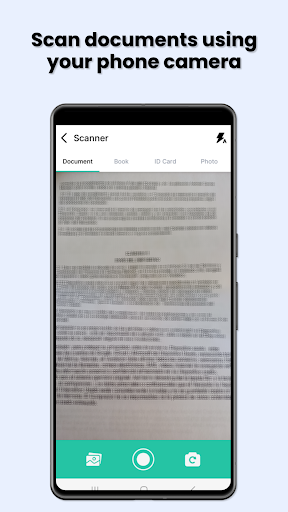
📷 PDF Camera scanner is the free app you need to scan photos (taken with your smartphone camera) and turn them into PDF files with ease. The best cam scanner to PDF ever!
PDF Camera scanner is a cutting-edge scanner app that utilizes artificial intelligence to transform any physical material into a digital PDF format effortlessly. It allows users to capture and convert a wide range of items, including receipts, notes, documents, photos, business cards, and whiteboards. The app's sleek and intuitive design elevates the in-app journey to unprecedented levels of convenience.
Make PDF with the cam scanner offers a range of exceptional features that revolutionize the scanning experience. …
Read the full description
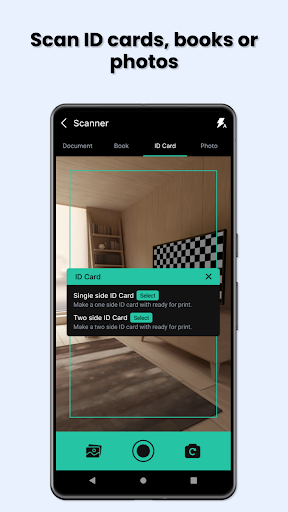
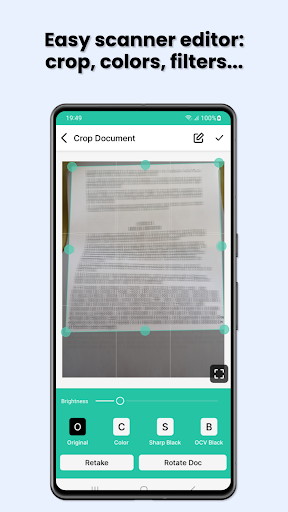
📷 PDF Camera scanner is the free app you need to scan photos (taken with your smartphone camera) and turn them into PDF files with ease. The best cam scanner to PDF ever! PDF Camera scanner is a cutting-edge scanner app that utilizes artificial intelligence to transform any physical material into a digital PDF format effortlessly. It allows users to capture and convert a wide range of items, including receipts, notes, documents, photos, business cards, and whiteboards. The app's sleek and intuitive design elevates the in-app journey to unprecedented levels of convenience. Make PDF with the cam scanner offers a range of exceptional features that revolutionize the scanning experience. With its innovative two-shot and single-image modes, users can capture multiple pages in a single go, optimize photo editing capabilities, and utilize cropping tools to tailor images to their creative vision. The correction feature enables users to efficiently identify and scan key points, allowing them to personalize and customize their scans according to their specific requirements. The OCR will help to get texts from images. Are you ready to scan? The PDF scanner app also revolutionizes document sharing by seamlessly integrating with popular social networks and online communication platforms, allowing users to share their meticulously scanned documents with friends, colleagues, and beyond. It also offers seamless document file management and convenient storage capabilities. Scan? Go for it. The compelling reasons to utilize PDF Camera scanner include excluding watermarks, avoiding mandatory login, providing complimentary access to fundamental functionalities within the scanner app, and transforming camera photos into high-quality PDFs or images. Scan PDF, the ultimate scanning solution for entrepreneurs, offers two powerful scanning modes: Batch and Single. Batch mode allows users to scan multiple documents in one go, saving time and increasing productivity. Single mode allows users to focus on scanning individual documents with precision and ease. The app also offers two powerful scanning modes: Batch and Single. Batch mode allows users to scan multiple documents in one go, saving time and increasing productivity. Single mode allows users to focus on scanning individual documents with precision and ease. The app also offers a secure PDF scanner app that ensures utmost confidentiality for all documents, ensuring that all files are stored exclusively on the user's personal device. Discover the PDF maker option using the camera OCR. To enhance the professionalism of scanned documents, users can eliminate shadows and artifacts, elevate the professionalism of their scans, or convert them to a sleek black and white format for a more sophisticated appeal. Scan PDF is an incredible, game-changing app that offers users the unparalleled convenience of scanning documents with absolute ease and efficiency. The app is currently in the process of developing its cutting-edge Scanner app, with the utmost dedication to delivering an unparalleled user experience. 📷 Camera scanner is the free PDF maker app that you need to scan photos (taken with your smartphone camera) and turn them into files with ease. The best cam scanner to make PDF files ever! You can also generate documents and files using the OCR feature. A free pdf maker just using the phone camera. Are you ready to scan with your camera and generate PDF files from photos / images? Download PDF camera scanner now!
Installs since 31 Aug 2026 Measured
Exact Google Play install counts, collected daily
Ratings
38 ratings, 2 reviews
- 5 ★67%
- 4 ★11%
- 3 ★0.0%
- 2 ★11%
- 1 ★11%
Recent reviews
Latest public reviews from the store
- 23 Dec 2022
I'm always looking for new apps to help me with my editing, and the background remover app has definitely impressed me. It's super easy to use and the results are stunning. I've tried Photoroom and Superimpose in the past, but this app is by far the best for removing backgrounds. I highly recommend giving it a try if you're in need of a reliable and effective background remover tool.
- 21 Dec 2022
I was a little hesitant to try out another background remover app, but I'm so glad I gave this one a chance. It's incredibly user-friendly and the results are amazing. I've used it on a few professional projects and my clients have been blown away by the seamless backgrounds. I've tried Photoroom and Pixelcut in the past, but this app is by far the best I've used. Highly recommend!
- 21 Dec 2022
I've been using the background remover app for a few weeks now and it has been a game changer for my social media posts. The tools are easy to use and the results are impressive. I've tried other apps like Photoroom and Pixelcut, but this one is by far the best in terms of quality and speed. Highly recommend giving it a try!
- 9 Oct 2022
Great, idk what to say, it works well sometimes and doesn't sometimes, the issue is that if you have something with the color cyan, the AI will see that the cyan color is a sky so that needs to be fixed
What reviewers bring up
Topics mentioned in the latest 10 reviews, by how many reviews mention them
Liked in good reviews (6 reviews)
- background 4
- highly recommend 3
- photoroom 3
- remover 3
- results 3
- tried 3
- far 3
- try 3
Raised in bad reviews (3 reviews)
- reached 2
- remove 2
Top chart positions
Latest Google Play chart ranks by country, last 10 days
Not in any tracked top chart in the last 10 days.
PDF Camera Scanner history
Release, install milestones, listing and store changes
- Reached 5,000+ installs 12 Feb 2024
- Reached 1,000+ installs 5 Feb 2024
- Reached 5+ installs 22 Jan 2024
- Reached 1+ installs 30 Oct 2023
- First released on the store 26 Aug 2023
Recent versions
Current version Varies with device
- Version 2.0.129 Aug 2024
- Version 2.0.04 Aug 2024
- Version 1.0.319 Jan 2024
- Version 1.0.131 Aug 2023
Listing keywords
Words and phrases PDF Camera Scanner repeats most in its store listing
Top phrases: camera scanner (7), pdf camera scanner (5), allows users (5), pdf camera (5), mode allows users (4).
Highlighted words also appear in the title. Counts cover the title, short description and description.
Business model and tech
From the store listing and declared permissions
- Business model
- Free to downloadIn-app purchasesShows ads
- Subscriptions and payments
- Google Play billing
- Sensitive access
- CameraPhotos, videos and filesAdvertising ID
24 permissions
1 special access, 4 sensitive, 19 standard
- Change system settingsWRITE_SETTINGSSpecial access
- Take photos and videosSensitive
- Change or delete shared storageSensitive
- Read shared storageSensitive
- Show notificationsPOST_NOTIFICATIONSSensitive
- Ad attribution (Privacy Sandbox)ACCESS_ADSERVICES_ATTRIBUTIONStandard
- Ad topics (Privacy Sandbox)ACCESS_ADSERVICES_TOPICSStandard
- Read how it was installed (install referrer)BIND_GET_INSTALL_REFERRER_SERVICEStandard
- Read the advertising IDAD_IDStandard
- Read the advertising ID (Privacy Sandbox)ACCESS_ADSERVICES_AD_IDStandard
- App icon badge countsBADGE_COUNT_READStandard
- Control vibrationStandard
Compliance
What the listing and the app package show
- Store status
- Live
- Upkeep
- No update since 29 Aug 2024
- Registered in
- Spain
- Privacy policy
- Linked on the listing
- Advertising
- Shows ads
- In-app purchases
- Offered
- Age rating
- Everyone
- Sensitive permissions
- 4 sensitive, 1 special access of 24
- Location access
- No
- Camera and microphone
- Camera
Apps like PDF Camera Scanner
들어서 화면켜기Won3.5K installs★ 4.0
Height PredictionEcliptic App Ventures45.9K installs★ 2.4
Speicers`Pro VPNEldiablolucifer202021.2K installs★ 4.14
Lightning Tracker with AlertsYaksh Software4.3K installs★ 3.0
Mana Pathi (Unit Converter)Shirish Koirala2.2K installs★ 4.6
Multi-tab Calc - A simple app.Naoyuki Rikiji1.3K installs★ 5.0
Just Silence. Scheduled.Akid Soft1.6K installs★ 5.0
- WoWp AssistantВиталий Робиновский2K installs★ 4.2
LINKa: напишиLINKa7.9K installs★ 4.4
PDF Camera Scanner: questions and answers
How many downloads does PDF Camera Scanner have?
PDF Camera Scanner has 6,165 installs on Google Play, measured from the store's own count on 9 Nov 2026.
Who makes PDF Camera Scanner?
PDF Camera Scanner is published by Molibe Tools: Productivity and tools apps, a developer based in ES.
When was PDF Camera Scanner last updated?
The latest version (Varies with device) was released on 29 Aug 2024.
Is PDF Camera Scanner free?
Yes. PDF Camera Scanner is free to download and offers in-app purchases, and it shows ads.
Is PDF Camera Scanner still available?
Yes. PDF Camera Scanner is live on Google Play as of 9 Nov 2026.
Track PDF Camera Scanner and its competitors
Watch any app for new versions, rating drops, chart moves and removals. Free plan, no card.