PDF Converter - Scan Documents
Easily convert PDF File & add lock and unlock it, Scan Receipts & Sign PDF
- Installs
- 102
- Measured
- Rating
- —
- Ratings
- —
- Version
- Varies with device
- Updated 26 Apr 2026
- Released
- 31 Dec 2023
- Tracked since 13 May 2026
- Size
- —
Also on App Store: PDF Converter : Scan Documents (15 ratings), PDF Converter - Scan Documents
Screenshots




About PDF Converter - Scan Documents
The description on the store listing
Convert image to pdf easily and safely! You can use a password to protect pdf with this PDF Creator. With a user-friendly interface design, this free pdf converter app makes it easy for you to convert photo to pdf. You can merge multiple pictures to a single pdf file and share it as you like.
PDF to Image
Image Converter & PDF Merger is best Application to Convert your PDF file into images.
Share converted PDF files
Easily send and share converted PDF files via social media, Bluetooth, Email, quick share, etc.
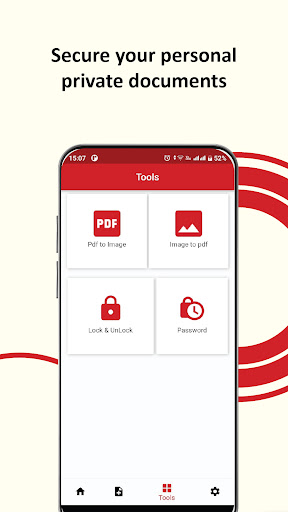
PDF Converter is currently supporting the PDF Edit Options.
1. UNLOCK PDF
2. Lock PDF
3. PDF to Image
4. Photo to PDF File
Convert your Documents in …
Read the full description
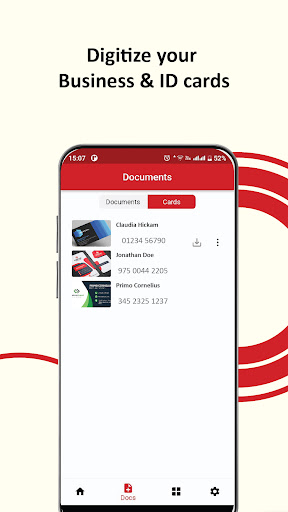
Convert image to pdf easily and safely! You can use a password to protect pdf with this PDF Creator. With a user-friendly interface design, this free pdf converter app makes it easy for you to convert photo to pdf. You can merge multiple pictures to a single pdf file and share it as you like. PDF to Image Image Converter & PDF Merger is best Application to Convert your PDF file into images. Share converted PDF files Easily send and share converted PDF files via social media, Bluetooth, Email, quick share, etc. PDF Converter is currently supporting the PDF Edit Options. 1. UNLOCK PDF 2. Lock PDF 3. PDF to Image 4. Photo to PDF File Convert your Documents in few east steps. 1. Select your desired Conversion Tool. 2. Add your input file. 3. Convert! It will only take a few seconds. 4. Download the file in your Local Storage. Business Card Scanner & Reader The PDF Converter & Scanner is the easiest app to manage, exchange business cards and Contact Management App for Mobile device. No need to manually enter contact information, Business Card Scanner provides a time , cost efficient way to enter and organise important contacts. Instant recognition of business cards right on your phone. Fetch contact information from a business card directly to your Mobile Contacts. FEATURES INCLUDE: • Accurate recognition of business cards • Auto Recognise Business Card • Smart contact field filling: emails, phone numbers, websites • Export to Salesforce as Contact, Lead or Account available as a subscription • Export as PDF • Business Card Reader allows you to search and sort contacts • Anti-shake image capture
Installs since 13 Nov 2026 Measured
Exact Google Play install counts, collected daily
Daily history starts once this app is in our daily install sample.
Ratings
- 5 ★0.0%
- 4 ★0.0%
- 3 ★0.0%
- 2 ★0.0%
- 1 ★0.0%
Recent reviews
Latest public reviews from the store
- 3 Apr 2025
super!!
Top chart positions
Latest Google Play chart ranks by country, last 10 days
Not in any tracked top chart in the last 10 days.
PDF Converter - Scan Documents history
Release, install milestones, listing and store changes
- Reached 100+ installs 26 Apr 2026
- Reached 50+ installs 25 Feb 2024
- Reached 10+ installs 26 Jan 2024
- First released on the store 31 Dec 2023
Listing keywords
Words and phrases PDF Converter - Scan Documents repeats most in its store listing
Top phrases: business card (5), pdf converter (4), pdf file (4), business cards (3), business card scanner (2).
Highlighted words also appear in the title. Counts cover the title, short description and description.
Business model and tech
From the store listing and declared permissions
- Business model
- Free to download
- Sensitive access
- LocationCameraPhotos, videos and files
9 permissions
1 special access, 5 sensitive, 3 standard
- Manage all filesMANAGE_EXTERNAL_STORAGESpecial access
- Take photos and videosSensitive
- Change or delete shared storageSensitive
- Read photosREAD_MEDIA_IMAGESSensitive
- Read shared storageSensitive
- Precise locationSensitive
- Full internet accessStandard
- See network connectionsStandard
- Internal app permissionDYNAMIC_RECEIVER_NOT_EXPORTED_PERMISSIONStandard
Compliance
What the listing and the app package show
- Store status
- Live
- Upkeep
- Updated 26 Apr 2026
- Registered in
- Pakistan
- Privacy policy
- Linked on the listing
- Advertising
- No ads declared
- In-app purchases
- None declared
- Age rating
- Everyone
- Sensitive permissions
- 5 sensitive, 1 special access of 9
- Location access
- Yes, while in use
- Camera and microphone
- Camera
Apps like PDF Converter - Scan Documents
영산강 안심 알림eICT융합소프트 & 스마트오더18.3K installs★ 4.0
JBLETRADOC Mobile10.3K installs★ 4.5
Two Point HeightOmega Centauri Software15.3K installs★ 2.22
Sheridan RecyclesCity of Sheridan634 installs★ 4.67
NAFNorges Automobil-Forbund200K installs★ 3.9
Ipsos Adria CAPIIpsos Serbia7.4K installs★ 3.9
Clock: Alarm Clock & TimerIntratech so36.1K installs★ 3.79
Süzme Sayaç HesaplamaNotsup30.3K installs★ 3.6
Cattle & Goat Record KeepingVetzKin10.3K installs★ 2.5
PDF Converter - Scan Documents: questions and answers
How many downloads does PDF Converter - Scan Documents have?
PDF Converter - Scan Documents has 102 installs on Google Play, measured from the store's own count on 13 Nov 2026.
Who makes PDF Converter - Scan Documents?
PDF Converter - Scan Documents is published by TS Technology, a developer based in PK.
When was PDF Converter - Scan Documents last updated?
The latest version (Varies with device) was released on 26 Apr 2026.
Is PDF Converter - Scan Documents free?
Yes. PDF Converter - Scan Documents is free to download.
Is PDF Converter - Scan Documents still available?
Yes. PDF Converter - Scan Documents is live on Google Play as of 13 Nov 2026.
Track PDF Converter - Scan Documents and its competitors
Watch any app for new versions, rating drops, chart moves and removals. Free plan, no card.