
PDF Editor - Sign, edit forms
Edit PDF and WORD (.doc) Add signatures, write, fill and sign pdf documents now
- Installs
- 3.78M
- Measured
- Rating
- 4.7
- Ratings
- 111K
- 438 reviews
- Version
- 7.51.0
- Updated 9 Oct 2026
- Released
- 21 Aug 2021
- Tracked since 14 May 2026
- Size
- —
Screenshots


About PDF Editor - Sign, edit forms
The description on the store listing
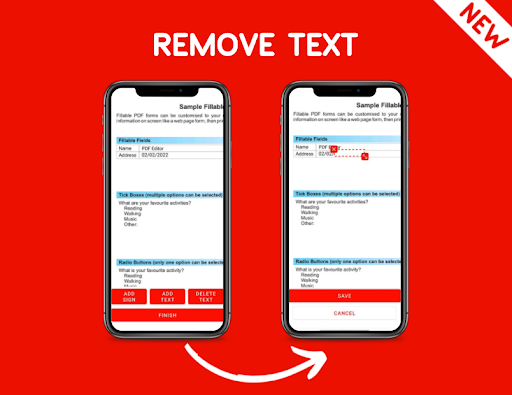
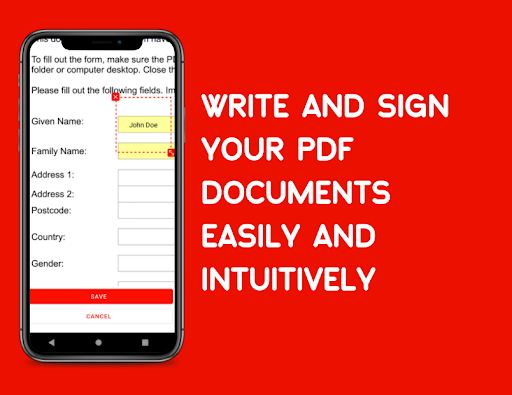
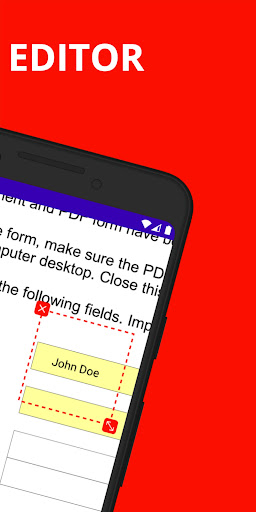
The <b>PDF Editor</b> online app lets you fill text in pdf, add signatures, add text, and sign forms easy and fast.
Also you can <b>fill and sign</b> word documents.
🔝 Multiple extensions: This is an editor for <b>.doc</b> <b>.docx</b> and <b>.pdf</b>, includes a <b>docx to pdf converter</b>.
✍️ Do you need to edit or esign PDF documents?
Use this Editor APP for Android to add your e-sign or text to your document. No printing needed. Super <b>easy pdf signer</b>!
📝 FILL. Select to enter text on pdf or signatures in the file document. Sign forms even faster. <b>Edit pdfs and word documents.</b>
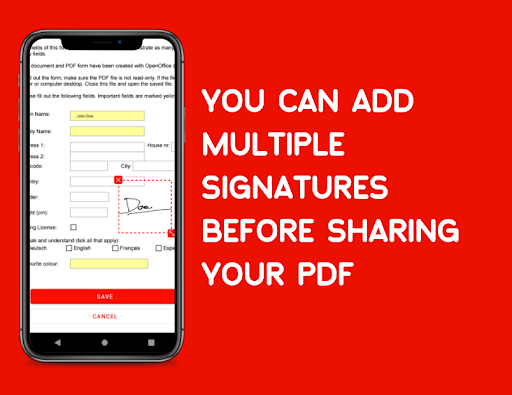
✍️ SIGN. Easily create your signature with your finger, then apply your …
Read the full description
The <b>PDF Editor</b> online app lets you fill text in pdf, add signatures, add text, and sign forms easy and fast. Also you can <b>fill and sign</b> word documents. 🔝 Multiple extensions: This is an editor for <b>.doc</b> <b>.docx</b> and <b>.pdf</b>, includes a <b>docx to pdf converter</b>. ✍️ Do you need to edit or esign PDF documents? Use this Editor APP for Android to add your e-sign or text to your document. No printing needed. Super <b>easy pdf signer</b>! 📝 FILL. Select to enter text on pdf or signatures in the file document. Sign forms even faster. <b>Edit pdfs and word documents.</b> ✍️ SIGN. Easily create your signature with your finger, then apply your signature, name or initials to the pdf or the .doc ☁️ Cloud: Import files & documents from Dropbox, Google Drive, iCloud easily to edit & signing in your device. 👥 EDIT and SHARE. Save forms fast, and send to others immediately in your device. It’s that easy, and fast. Sign pdf documents on android. 📈 SIGN NOW. Fill in forms anytime, anywhere. 💚 GO GREEN. Fill forms on your app to eliminate printing and faxing. The best and simple pdf editor free, transform and sign your word documents to pdf in seconds. You are downloading the best and simple document editor pdf app, to fill PDF, Filler, Writer, Electronic Signature app now, Sign digital pdf, pdf editor text FAQ 👉 How to sign pdf document? It's very easy, select your pdf file, sign with your finger, place the signature and share or save your signed document. 👉 How to edit pdf documents? The same process, add your pdf to the editor, click on add text, write your text and place it on the edit pdf app. 👉 How to edit word document? This app allow you to edit pdf and word documents, when you add a .doc or .docx file the app is going to convert the word document to pdf. Then, you can fill and sign the docx as pdf. Includes a docx to pdf converter.
Installs, last 30 days Measured
Exact Google Play install counts, collected daily
Ratings
111,314 ratings, 438 reviews
- 5 ★83%
- 4 ★12%
- 3 ★1.5%
- 2 ★1.0%
- 1 ★2.5%
Recent reviews
Latest public reviews from the store
- 12 May 2026
Just what I needed and more its other features are great too not to mention they are quick to support should any problems come up.
- 9 May 2026
I'm only upset I didn't find this app sooner. After multiple frustrating attempts, I found this app and it was super easy. I managed to edit the document in minutes.
- 16 Mar 2026
make more improve like when editing text make have a when need to change make have back not for delete to input txt box. should be edit the txt when some need change thank you so much very helpful that can't afford to pay and use free. more blessing to come
- 4 Mar 2026
Easy Edit of PDFs! I was able to add text and a signature to a PDF very easy using this app. I totally recommend it!
What reviewers bring up
Topics mentioned in the latest 10 reviews, by how many reviews mention them
Liked in good reviews (6 reviews)
- edit 3
- signature 2
- change 2
- delete 2
- input 2
- come 2
- font 2
- add 2
Raised in bad reviews (4 reviews)
- typing 2
- longer 2
- save 2
- hit 2
Top chart positions
Latest Google Play chart ranks by country, last 10 days
Not in any tracked top chart in the last 10 days.
PDF Editor - Sign, edit forms history
Release, install milestones, listing and store changes
- Moved from Tools to Productivity 20 Nov 2023
- Reached 1,000,000+ installs 23 Dec 2022
- Reached 500,000+ installs 8 Jul 2022
- Reached 100,000+ installs 4 Feb 2022
- Reached 50,000+ installs 7 Jan 2022
- Reached 10,000+ installs 26 Nov 2021
- Reached 5,000+ installs 12 Nov 2021
- Reached 1,000+ installs 1 Oct 2021
Update frequency
How often PDF Editor - Sign, edit forms ships a new version, month by month
8 updates in the last 12 months. More often than most similar apps: they shipped a median of 2 updates in the same year.
Recent versions
Current version 7.51.0
- Version 7.51.09 Oct 2026
✨ Edit text and images with the new selection editing mode! It’s experimental—your suggestions help me improve it. 🤖 Edit with AI! Tell the chat what you need and it’ll do it… hopefully 😉 Also experimental! 📝 Moving annotations, duplicating text and more is now easier. ❤️ I read your feedback! Your reviews motivate me to keep improving the app for free, without paywalls.
- Version 7.40.922 Jun 2026
✨ Free AI! ✨ ✨✨ Summarize or ask AI questions about your PDFs ✨✨ PDF to Podcast and PDF to audiobook ✨✨ Smart reader: Read PDFs like ebooks ✨✨ Create PDFs through conversations 🌁 You can now add images to PDFs 💬 Have a suggestion? Feel free to leave me a comment to keep improving this app
- Version 7.40.220 Jun 2026
✨ Free AI! Summarize or ask questions about your PDFs using artificial intelligence 🌁 You can now add images to your PDFs ✅ Improvements to make the app simpler, more intuitive and clearer 💬 Got a suggestion? Leave me a comment so I can keep improving this app
- Version 7.30.42 Mar 2026
Fill PDF forms easily AI document scanner Convert any file type to PDF Improved text writing experience Performance improvements If you enjoy free apps with no subscriptions, please rate the app — it's the best way to help us keep improving it for free. Thank you all!
Listing keywords
Words and phrases PDF Editor - Sign, edit forms repeats most in its store listing
Top phrases: edit pdf (4), pdf documents (4), pdf editor (4), word documents (4), fill and sign (3).
Highlighted words also appear in the title. Counts cover the title, short description and description.
Business model and tech
From the store listing and declared permissions
- Business model
- Free to downloadShows ads
- Sensitive access
- No sensitive permission declared
Compliance
What the listing and the app package show
- Store status
- Live
- Upkeep
- Updated 9 Oct 2026
- Registered in
- Spain
- Privacy policy
- Linked on the listing
- Advertising
- Shows ads
- In-app purchases
- None declared
- Age rating
- Everyone
Apps like PDF Editor - Sign, edit forms
My VodafoneVodafone Portugal, Comunicações Pessoais, S.A.6.2M installs★ 3.81
MediaFireMediaFire24.6M installs★ 3.65
BasicNote: Notes & NotepadNotas Notepad13.8M installs★ 4.5
All Document Reader and Viewero16i Apps4.1M installs★ 4.24
Kia AccessKia America1.6M installs★ 4.68
Cash App: Recharge Earning appReward Supreme1.6M installs★ 4.83
Easy Contacts CleanerLSM Apps3.6M installs★ 4.8
Beatron - AI Music MakerOcean Float Mobile5.5M installs★ 4.58
B-Love NetworkCloud Intense12.5M installs★ 3.0
PDF Editor - Sign, edit forms: questions and answers
How many downloads does PDF Editor - Sign, edit forms have?
PDF Editor - Sign, edit forms has 3,782,599 installs on Google Play, measured from the store's own count on 20 Nov 2026.
Who makes PDF Editor - Sign, edit forms?
PDF Editor - Sign, edit forms is published by PDF Editor, a developer based in ES.
When was PDF Editor - Sign, edit forms last updated?
The latest version (7.51.0) was released on 9 Oct 2026.
Is PDF Editor - Sign, edit forms free?
Yes. PDF Editor - Sign, edit forms is free to download, and it shows ads.
Is PDF Editor - Sign, edit forms still available?
Yes. PDF Editor - Sign, edit forms is live on Google Play as of 20 Nov 2026.
Track PDF Editor - Sign, edit forms and its competitors
Watch any app for new versions, rating drops, chart moves and removals. Free plan, no card.