
PDF Reader
View, read & search PDF files with a simple PDF reader app.
- Installs
- 157K
- Measured
- Rating
- 4.23
- Ratings
- 753
- 3 reviews
- Version
- 3.10
- Updated 13 Oct 2026
- Released
- 22 Mar 2022
- Tracked since 14 May 2026
- Size
- —
Screenshots




About PDF Reader
The description on the store listing
Do you need to work with documents, files, and PDFs on the go? Get the PDF reader app, the most reliable PDF viewer. Manage your files and read PDF files anywhere with this best user experience, PDF reader, and file manager. You can also view, share, print, and bookmark PDF documents. PDF reader app is the best office app that helps you interact with PDF files, PDF documents easily and conveniently. If you are looking for a simple PDF and easy document reading application to support your daily work and study, the PDF viewer is the perfect app for you. More than just a reading app, you can also take notes, conveniently and easy-to-memorize pages. People use online browsers to open PDF files, …
Read the full description
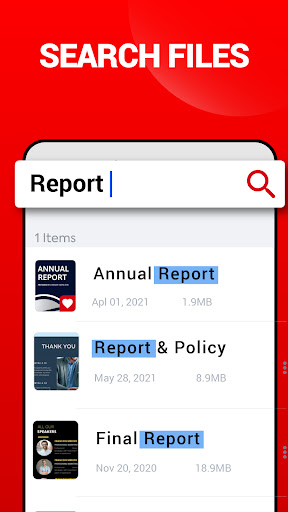
Do you need to work with documents, files, and PDFs on the go? Get the PDF reader app, the most reliable PDF viewer. Manage your files and read PDF files anywhere with this best user experience, PDF reader, and file manager. You can also view, share, print, and bookmark PDF documents. PDF reader app is the best office app that helps you interact with PDF files, PDF documents easily and conveniently. If you are looking for a simple PDF and easy document reading application to support your daily work and study, the PDF viewer is the perfect app for you. More than just a reading app, you can also take notes, conveniently and easy-to-memorize pages. People use online browsers to open PDF files, but with this all PDF app, you can read PDF offline. PDF reader - all PDF viewer is for office app to help read documents downloaded from the internet. Reader app supports fast reading pdf files and all of the documents. Use PDF reader to manage receipts, notes, documents, photos, business cards, and whiteboards. PDF viewer saves your time by saving the latest reading page and net time you can resume pdf where you left. PDF reader scans all PDF files on the device, and you can search and get all documents easily. Book reader app make anything scannable. Manage all documents in one place because this application supports all kinds of file formats. Easily share PDF documents with others with one click. Bookmark PDF files and manage them in a separate tab of the PDF viewer application. The eBook reader is a workplace for text files or reading material when downloading PDF files. Expand all documents to make the display clear for a better user experience. PDF reader & viewer is a professional PDF file manager. <h1>View and print all PDF files </h1> • Open and view PDF files with the simple PDF viewer app. • Choose Single Page or Continuous scroll mode. • Save battery life with dark mode. • Print PDF documents directly from your device. <h1>Key features of the PDF reader app </h1> • <b>Automatically</b> search and display PDF files in your device. • <b>Recent</b> - Easily read recently viewed PDF files without spending time. • <b>Search</b> - Lots of documents! The "Search" function makes searching easy. • <b>Delete / Rename</b> - Now rename, delete files and view details of all PDFs easily. • <b>Share</b> - Do you want to share PDF? A feature that helps to share with others. • <b>Horizontal / Vertical</b> - With 2 scrolling modes, the app provides the most complete experience. • <b>Zoom in / Out</b> - According to your choice. • <b>Go to page</b> - Takes you to the desired page. • <b>Keep screen on</b> - For long reading. • <b>Bookmark</b> - Any pages for future reference. • <b>Offline PDF Viewer</b> - Read all files without internet. • <b>Night mode</b> - For comfortable reading in dark environments. <b> Terms of Service: </b> https://clicklinkgroup.blogspot.com/p/terms-conditions_21.html <b>Privacy Policy: </b> https://clicklinkgroup.blogspot.com/p/privacy-policy_21.html
Installs since 29 Aug 2026 Measured
Exact Google Play install counts, collected daily
Ratings
753 ratings, 3 reviews
- 5 ★75%
- 4 ★0.0%
- 3 ★8.3%
- 2 ★0.0%
- 1 ★17%
Recent reviews
Latest public reviews from the store
- 14 May 2026
Niice
- 12 May 2026
Good
- 9 Mar 2026
nice
- 1 Feb 2026
good for pdf file read
What reviewers bring up
Topics mentioned in the latest 50 reviews, by how many reviews mention them
Liked in good reviews (43 reviews)
- useful 3
- read 2
- pdf 2
Raised in bad reviews (7 reviews)
No topic comes up twice.
Top chart positions
Latest Google Play chart ranks by country, last 10 days
Not in any tracked top chart in the last 10 days.
PDF Reader history
Release, install milestones, listing and store changes
- Reached 100,000+ installs 4 Jun 2022
- Reached 50,000+ installs 26 Mar 2022
- First released on the store 22 Mar 2022
- Reached 10,000+ installs 12 Feb 2022
Update frequency
How often PDF Reader ships a new version, month by month
0 updates in the last 12 months. Less often than most similar apps: they shipped a median of 2 updates in the same year.
Recent versions
Current version 3.10
- Version 3.1028 Oct 2025
• Faster loading for PDF files! • PDF Reader with Day/Night reading modes • Search any PDF by name, size, & date • Horizontal / Vertical scrolling modes • Read any PDF from File Manager! • Rename any files • Read in landscape mode • Swipe page by page. • Android 11 supported
- Version 3.77 Sep 2024
- Version 3.226 Dec 2022
- Version 3.022 Apr 2022
Listing keywords
Words and phrases PDF Reader repeats most in its store listing
Top phrases: pdf files (12), pdf reader (10), pdf viewer (7), pdf documents (4), experience pdf reader (2).
Highlighted words also appear in the title. Counts cover the title, short description and description.
Business model and tech
From the store listing and declared permissions
- Business model
- Free to downloadIn-app purchasesShows ads
- Sensitive access
- No sensitive permission declared
Compliance
What the listing and the app package show
- Store status
- Live
- Upkeep
- Updated 13 Oct 2026
- Registered in
- Israel
- Privacy policy
- Linked on the listing
- Advertising
- Shows ads
- In-app purchases
- Offered
- Age rating
- Everyone
Apps like PDF Reader
PlayZXBaltazar Studios, LLC44.7K installs★ 4.4
Notes - Notepad & To-Do ListPhoto Video Music Team278K installs★ 3.83
Domicile Management SystemPunjab Information Technology Board354K installs★ 3.05
Deutschland KalenderWidi Ariandi549K installs★ 4.3
AI Paragraph - Essay WriterAllMath53.9K installs★ 4.78
Superhuman MailSuperhuman Labs79K installs★ 4.5
Smartareainstant:solutions OG146K installs★ 4.6
Draw Floor PlansBTStudio364K installs★ 2.67
Sri Lanka Calendar 2026Arvin Apps31.4K installs★ 4.17
PDF Reader: questions and answers
How many downloads does PDF Reader have?
PDF Reader has 157,345 installs on Google Play, measured from the store's own count on 14 Nov 2026.
Who makes PDF Reader?
PDF Reader is published by Loose Pen, a developer based in IL.
When was PDF Reader last updated?
The latest version (3.10) was released on 13 Oct 2026.
Is PDF Reader free?
Yes. PDF Reader is free to download and offers in-app purchases, and it shows ads.
Is PDF Reader still available?
Yes. PDF Reader is live on Google Play as of 14 Nov 2026.
Track PDF Reader and its competitors
Watch any app for new versions, rating drops, chart moves and removals. Free plan, no card.