
PDF Reader AI: Scanner, Editor
PDF Reader & Editor - Scanner PDF : Translate, Speech, Summary PDF and Aftercall
- Installs
- 552K
- Measured
- Rating
- 4.53
- Ratings
- 2K
- 1 reviews
- Version
- 1.2.8
- Updated 27 Oct 2026
- Released
- 31 Dec 2024
- Tracked since 13 May 2026
- Size
- —
Screenshots




About PDF Reader AI: Scanner, Editor
The description on the store listing
AI PDF Reader: A Next-Generation Smart PDF Reading and Management Experience
Are you looking for a PDF app that goes beyond simply displaying text? AI PDF Reader delivers a completely new experience with the power of artificial intelligence, helping you work with PDFs more efficiently and intelligently than ever before.
PDF Reader AI: Scanner, Editor shows an after-call screen enabling you to identify incoming calls as they happen so you can summarize PDF files, translate PDF files immediately after the incoming call. This enables users to summarize and translate PDF files and share them with friends and family after calls.
Key Features:
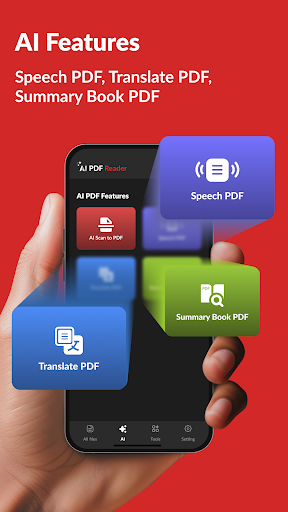
▶ AI Scan to PDF: Easily convert camera …
Read the full description
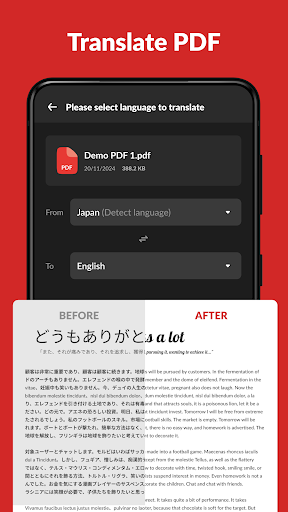
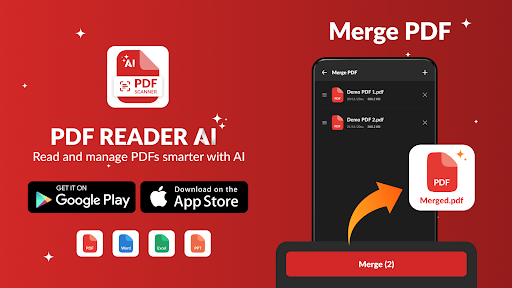
AI PDF Reader: A Next-Generation Smart PDF Reading and Management Experience Are you looking for a PDF app that goes beyond simply displaying text? AI PDF Reader delivers a completely new experience with the power of artificial intelligence, helping you work with PDFs more efficiently and intelligently than ever before. PDF Reader AI: Scanner, Editor shows an after-call screen enabling you to identify incoming calls as they happen so you can summarize PDF files, translate PDF files immediately after the incoming call. This enables users to summarize and translate PDF files and share them with friends and family after calls. Key Features: ▶ AI Scan to PDF: Easily convert camera snapshots into high-quality PDF files using AI technology, automatically detecting and cropping edges, and optimizing image quality. ▶ Speech PDF (Text-to-Speech): Conveniently listen to PDF content with the text-to-speech feature, supporting multiple languages and various reading speeds. ▶ Translate PDF: Quickly and accurately translate PDF content into multiple languages, making it easy for you to access information from foreign documents. ▶ Summary book PDF: Automatically summarize the main content of PDF books, helping you quickly and efficiently grasp core information. ▶ Convenient and Optimized PDF Reading ▶ Automatic search and display: No need to waste time searching; the app automatically scans and organizes all PDF files on your device. ▶ Fast opening and reading: Open any PDF file in an instant, allowing you to access information immediately. ▶ Clear and friendly interface: The PDF file list is scientifically organized, making it easy for you to search and manage. ▶ Flexible reading modes: Page-by-page or continuous scrolling mode, horizontal and vertical viewing mode, full-screen mode for the best reading experience. ▶ Zoom in and out: Easily adjust the page size to suit your reading needs. Bookmarks: Bookmark important pages for easy return later. ▶ The Power of AI in Editing and Annotations ▶ Smart search: Quickly find any word or phrase within a PDF file using advanced search technology. ▶ Notes and highlights: Easily add notes, highlight with colors, underline, and strikethrough to emphasize important content. ▶ Freehand drawing: Freely write, draw, or sketch directly on the PDF file. ▶ Copy text: Easily copy any text from the PDF file. ▶ Efficient PDF Management ▶ Merge and split PDF files: Easily combine multiple PDF files into one or split one PDF file into multiple smaller files. ▶ Password protection: Set a password to protect sensitive PDF files. Recently opened files list: Quickly access the PDF files you have recently opened. ▶ Easy sharing: Share PDF files with anyone via email, messages, or social media. ▶ Lightweight: The app is lightweight, saving storage space on your device. ▶ Rename files: Easily rename PDF files as you wish. ▶ Print PDF files: Print PDF files directly from your device. Experience the future of PDF reading today! Download AI PDF Reader to discover the power of artificial intelligence.
Installs since 26 Aug 2026 Measured
Exact Google Play install counts, collected daily
Ratings
1,987 ratings, 1 reviews
- 5 ★80%
- 4 ★9.9%
- 3 ★9.9%
- 2 ★0.0%
- 1 ★0.0%
Recent reviews
Latest public reviews from the store
- 13 May 2026
the best app ever I tried connecting my TV in the app but it's not working please fix it
- 12 Mar 2026
good
- 6 Mar 2026
nice
- 24 Jan 2026
good
Top chart positions
Latest Google Play chart ranks by country, last 10 days
Not in any tracked top chart in the last 10 days.
PDF Reader AI: Scanner, Editor history
Release, install milestones, listing and store changes
- Reached 50,000+ installs 12 Apr 2025
- Reached 10,000+ installs 10 Mar 2025
- Reached 1,000+ installs 24 Jan 2025
- First released on the store 31 Dec 2024
Update frequency
How often PDF Reader AI: Scanner, Editor ships a new version, month by month
1 updates in the last 12 months. About as often as similar apps, which shipped a median of 1 updates in the same year.
Recent versions
Current version 1.2.8
- Version 1.2.827 Oct 2026
- Version 1.2.17 Oct 2025
Update: ✯ We have updated the All App About to improve performance and optimize behavior functions. New feature: ✯ Calldorado ✯ View Office: Word, Excel, PowerPoint, PDF ✯ AI PDF Editor: Highlight text, Underline text, Strike Text Functions: ✯ Smooth PDF Reader and Scanner ✯ PDF Tools: Convert, Merge, Split, Lock, Unlock ✯ AI PDF Transcribe Notes ✯ AI PDF Translate ✯ AI PDF Speech ✯ AI PDF Summary
- Version 1.1.525 Aug 2025
- Version 1.1.43 Aug 2025
Listing keywords
Words and phrases PDF Reader AI: Scanner, Editor repeats most in its store listing
Top phrases: pdf files (13), pdf file (6), pdf reader (6), translate pdf (4), ai pdf reader (3).
Highlighted words also appear in the title. Counts cover the title, short description and description.
Business model and tech
From the store listing and declared permissions
- Business model
- Free to downloadIn-app purchasesShows ads
- Subscriptions and payments
- Google Play billing
- Sensitive access
- CameraPhotos, videos and filesAdvertising ID
24 permissions
2 special access, 4 sensitive, 18 standard
- Manage all filesMANAGE_EXTERNAL_STORAGESpecial access
- Set exact alarmsSCHEDULE_EXACT_ALARMSpecial access
- Take photos and videosSensitive
- Change or delete shared storageSensitive
- Read shared storageSensitive
- Show notificationsPOST_NOTIFICATIONSSensitive
- Ad attribution (Privacy Sandbox)ACCESS_ADSERVICES_ATTRIBUTIONStandard
- Ad topics (Privacy Sandbox)ACCESS_ADSERVICES_TOPICSStandard
- Privacy Sandbox ads (custom audience)ACCESS_ADSERVICES_CUSTOM_AUDIENCEStandard
- Read how it was installed (install referrer)BIND_GET_INSTALL_REFERRER_SERVICEStandard
- Read the advertising IDAD_IDStandard
- Read the advertising ID (Privacy Sandbox)ACCESS_ADSERVICES_AD_IDStandard
Compliance
What the listing and the app package show
- Store status
- Live
- Upkeep
- Updated 27 Oct 2026
- Registered in
- Vietnam
- Privacy policy
- Linked on the listing
- Advertising
- Shows ads
- In-app purchases
- Offered
- Age rating
- Everyone
- Sensitive permissions
- 4 sensitive, 2 special access of 24
- Location access
- No
- Camera and microphone
- Camera
Apps like PDF Reader AI: Scanner, Editor
Day & Date Calendar Widgetoxdb.net439K installs★ 3.95
Calculator Volt/Amp/Watt/OhmAktham Ahmed486K installs★ 4.5
AI Poem GeneratorAllMath73.7K installs★ 4.62
Pixolor - Live Color PickerHanping293K installs★ 4.14
DNS Changer Pro (No Root)GreatStuffApps172K installs★ 4.24
Safe Clean Browsermusicchamsmobile111K installs★ 4.33
Megaphone & Voice AmplifierJan Augustyniak110K installs★ 4.0
Multi Timer with AdsCatfantom232K installs★ 4.28
SmartCleaner--Photo&FileWH1546HHMM2.7M installs★ 3.98
PDF Reader AI: Scanner, Editor: questions and answers
How many downloads does PDF Reader AI: Scanner, Editor have?
PDF Reader AI: Scanner, Editor has 551,524 installs on Google Play, measured from the store's own count on 18 Nov 2026.
Who makes PDF Reader AI: Scanner, Editor?
PDF Reader AI: Scanner, Editor is published by TOMODEV JSC, a developer based in VN.
When was PDF Reader AI: Scanner, Editor last updated?
The latest version (1.2.8) was released on 27 Oct 2026.
Is PDF Reader AI: Scanner, Editor free?
Yes. PDF Reader AI: Scanner, Editor is free to download and offers in-app purchases, and it shows ads.
Is PDF Reader AI: Scanner, Editor still available?
Yes. PDF Reader AI: Scanner, Editor is live on Google Play as of 18 Nov 2026.
Track PDF Reader AI: Scanner, Editor and its competitors
Watch any app for new versions, rating drops, chart moves and removals. Free plan, no card.