PDF Reader & PDF Converter
Convert images, text & HTML into PDF files or PDF to image, split & merge docs
- Installs
- 205K
- Measured
- Rating
- —
- Ratings
- —
- Version
- 2.0.8
- Updated 28 Aug 2026
- Released
- 22 Sep 2022
- Tracked since 13 May 2026
- Size
- —
Screenshots




About PDF Reader & PDF Converter
The description on the store listing
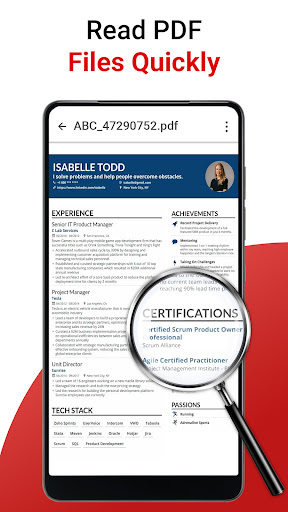
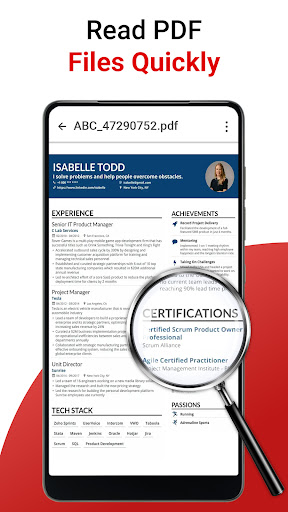
Discover the all-in-one solution for managing PDF documents with the highly efficient PDF READER & PDF Converter app. Seamlessly navigate, view, and review your PDF files with its intuitive and user-friendly interface. This pdf tool is designed to complete all your pdf-related needs.
Merge or split PDFs effortlessly to suit your specific needs. Benefit from the advanced image converter that supports multiple formats including PNG, JPG, GIF, and WebP, empowering you to handle diverse visual requirements effortlessly.
Moreover, leverage the bookmark feature to easily access and organize your PDFs for optimal efficiency. Experience the utmost convenience with PDF READER and image …
Read the full description
Discover the all-in-one solution for managing PDF documents with the highly efficient PDF READER & PDF Converter app. Seamlessly navigate, view, and review your PDF files with its intuitive and user-friendly interface. This pdf tool is designed to complete all your pdf-related needs. Merge or split PDFs effortlessly to suit your specific needs. Benefit from the advanced image converter that supports multiple formats including PNG, JPG, GIF, and WebP, empowering you to handle diverse visual requirements effortlessly. Moreover, leverage the bookmark feature to easily access and organize your PDFs for optimal efficiency. Experience the utmost convenience with PDF READER and image converter. Additionally, transform your PDFs into various formats, including images, HTML, and text to pdf. Whether you're a professional managing intricate reports, a dedicated student studying textbooks, or an individual handling personal documents, our reader provides a seamless platform for navigating through your PDF files with ease and efficiency. It’s a perfect pdf viewer. Key Features of PDF Reader and PDF Converter app: 1. Image Converter: An inclusive image conversion tool offering diverse functionalities for transforming images across various formats. 2. Text to PDF: Effortlessly convert text documents into PDF format, ensuring compatibility and easy sharing of textual information. 3. PDF to Image: Convert PDF files into image formats, allowing you to extract and utilize specific pages or sections as images for various purposes. 4. HTML to PDF: Convert web pages or HTML content into PDF documents, preserving the original layout and content structure. 5. Images to PDF: Convert image to PDF and compile multiple image files into a single PDF document, ideal for creating portfolios, presentations, or reports. 6. Zoom pdf: you can zoom your PDF documents for a clear reading. 7. Split PDF: Seamlessly split large PDF files into smaller, more manageable sections, enabling better organization and distribution. 8. Merge PDF: Combine multiple PDF files into a single comprehensive document, facilitating easier handling and sharing. 9. PNG to JPG: Convert PNG images to JPG format, ensuring compatibility and flexibility in image usage. 10. JPG to PNG: Convert JPG images to PNG format, preserving image quality and enabling transparency support. 11. GIF to JPG: Transform GIF images into JPG format, allowing better image optimization and compression. 12. GIF to PNG: Convert GIF images to PNG format, ensuring image quality and transparency preservation. 13. WebP to JPG: Effortlessly convert WebP images to JPG format, enabling wider compatibility and utilization. 14. JPG to WebP: Convert JPG images to WebP format, offering enhanced compression and web optimization. 15. Bookmark PDF: Easily bookmark your PDF documents by clicking on the icon. 16. Dark theme: Enhance your reading experience with the Dark Theme feature, allowing you to switch to a darker color scheme. With the PDF READER & image converter, experience the ultimate convenience of a comprehensive PDF converter that meets all your digital document needs. Accessing, viewing, and interacting with PDF documents of various sizes and complexities is effortless.
Installs since 8 Nov 2026 Measured
Exact Google Play install counts, collected daily
Daily history starts once this app is in our daily install sample.
Ratings
- 5 ★0.0%
- 4 ★0.0%
- 3 ★0.0%
- 2 ★0.0%
- 1 ★0.0%
Recent reviews
Latest public reviews from the store
- 11 May 2026
very fast and prompt, easy use for elderly people
- 4 Apr 2026
It is very useful and helpful app but a little mistake in this app we open a big file example that 20 to 30 pages that then you watch add first that after watch add to open the file I requested the developers that solve the little problem Thank you so much
- 9 Mar 2026
this app is very useful in viewing the PDF of different books and documents I view my school books pdf through this app
- 8 Jan 2026
If you can turn off ads in this app, it will be more useful. It will be much more beautiful. And I find this app very useful. And if you launch so many add in an effective app, then no one will use it or want to use it.Because they will get bored.
What reviewers bring up
Topics mentioned in the latest 10 reviews, by how many reviews mention them
Liked in good reviews (7 reviews)
- through 3
- useful 3
- pages 3
- add 3
- pdf 3
- developers 2
- effective 2
- reading 2
Raised in bad reviews (3 reviews)
- pdfs 2
Top chart positions
Latest Google Play chart ranks by country, last 10 days
Not in any tracked top chart in the last 10 days.
PDF Reader & PDF Converter history
Release, install milestones, listing and store changes
- Reached 100,000+ installs 12 Apr 2023
- Reached 50,000+ installs 1 Mar 2023
- Moved from Books & Reference to Productivity 21 Dec 2022
- First released on the store 22 Sep 2022
Update frequency
How often PDF Reader & PDF Converter ships a new version, month by month
1 updates in the last 12 months. More often than most similar apps: they shipped a median of 0 updates in the same year.
Recent versions
Current version 2.0.8
- Version 2.0.823 Jan 2026
This update brings improvements and fixes. Update the app and enjoy a smooth user experience.
- Version 2.0.419 Oct 2023
- Version 2.0.36 Oct 2023
- Version 2.0.212 Jun 2023
Listing keywords
Words and phrases PDF Reader & PDF Converter repeats most in its store listing
Top phrases: pdf files (6), pdf documents (5), pdf reader (5), image converter (4), pdf converter (4).
Highlighted words also appear in the title. Counts cover the title, short description and description.
Business model and tech
From the store listing, the SDKs in the app package and its declared permissions
- Business model
- Free to downloadShows ads
- Built with
- No cross-platform framework or game engine detected
- Ad networks (3)
- AdMobAppLovinFacebook Audience Network
- Attribution and measurement
- Open Measurement
- Analytics and crash reports
- Firebase
- Sensitive access
- Photos, videos and filesAdvertising ID
4 ad, attribution and analytics SDKs detected. SDKs are read from the app package and permissions from the store listing, so code that loads later is not seen.
Technology
24 SDKs found in the app package
Ad networks
Advertising and install-attribution SDKs found in the app package
- AdMob
- AppLovin
- Facebook Audience Network
- Open Measurement
19 permissions
2 special access, 4 sensitive, 13 standard
- Change system settingsWRITE_SETTINGSSpecial access
- Manage all filesMANAGE_EXTERNAL_STORAGESpecial access
- Change or delete shared storageSensitive
- Read photosREAD_MEDIA_IMAGESSensitive
- Read shared storageSensitive
- Show notificationsPOST_NOTIFICATIONSSensitive
- Read how it was installed (install referrer)BIND_GET_INSTALL_REFERRER_SERVICEStandard
- Read the advertising IDAD_IDStandard
- App icon badge countsBADGE_COUNT_READStandard
- Control vibrationStandard
- Keep the phone awakeStandard
- Run a foreground serviceFOREGROUND_SERVICEStandard
Compliance
What the listing and the app package show
- Store status
- Live
- Upkeep
- Updated 28 Aug 2026
- Registered in
- Pakistan
- Privacy policy
- Linked on the listing
- Advertising
- Shows ads
- In-app purchases
- None declared
- Age rating
- Everyone
- Sensitive permissions
- 4 sensitive, 2 special access of 19
- Location access
- No
- Camera and microphone
- Neither
Apps like PDF Reader & PDF Converter
영산강 안심 알림eICT융합소프트 & 스마트오더18.3K installs★ 4.0
JBLETRADOC Mobile10.3K installs★ 4.5
Two Point HeightOmega Centauri Software15.3K installs★ 2.22
Sheridan RecyclesCity of Sheridan634 installs★ 4.67
NAFNorges Automobil-Forbund200K installs★ 3.9
Ipsos Adria CAPIIpsos Serbia7.4K installs★ 3.9
Clock: Alarm Clock & TimerIntratech so36.1K installs★ 3.79
Süzme Sayaç HesaplamaNotsup30.3K installs★ 3.6
Cattle & Goat Record KeepingVetzKin10.3K installs★ 2.5
PDF Reader & PDF Converter: questions and answers
How many downloads does PDF Reader & PDF Converter have?
PDF Reader & PDF Converter has 205,133 installs on Google Play, measured from the store's own count on 8 Nov 2026.
Who makes PDF Reader & PDF Converter?
PDF Reader & PDF Converter is published by Vision Apps Tech, a developer based in PK.
When was PDF Reader & PDF Converter last updated?
The latest version (2.0.8) was released on 28 Aug 2026.
Is PDF Reader & PDF Converter free?
Yes. PDF Reader & PDF Converter is free to download, and it shows ads.
Is PDF Reader & PDF Converter still available?
Yes. PDF Reader & PDF Converter is live on Google Play as of 8 Nov 2026.
Track PDF Reader & PDF Converter and its competitors
Watch any app for new versions, rating drops, chart moves and removals. Free plan, no card.