PDF Reader for Android
It supports all PDF file management, fast PDF reading and editing.
- Installs
- 36.29M
- Measured
- Rating
- 3.23
- Ratings
- 157K
- 3.1K reviews
- Version
- 99.6
- Updated 3 Nov 2026
- Released
- 16 Dec 2017
- Tracked since 13 May 2026
- Size
- 28 MB
- Needs 5.0
Screenshots


About PDF Reader for Android
The description on the store listing
<b>PDF Reader</b> is the best PDF reading and editing application on android. PDF Reader manages and displays all PDF files on a single screen. You will not need to find PDF files everywhere in the phone. You just select the PDF file you want to view and open it. This application supports you to easily open PDF files and read documents offline anywhere, anytime.
With PDF Reader you can easily search, read, mark or create a new PDF document, easily share it via email or social networking.
Powerful PDF reader for text search, bookmark bookmarks, underline, colorization, and text copy support..
Now, reading PDFs is no longer an obstacle to your life and work. The only thing you need to do …
Read the full description
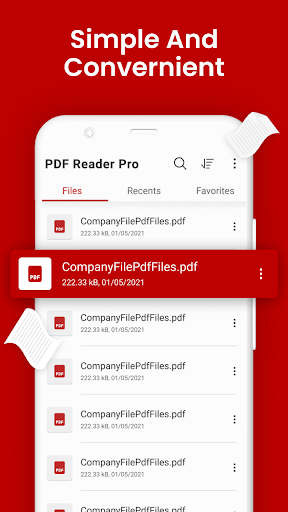
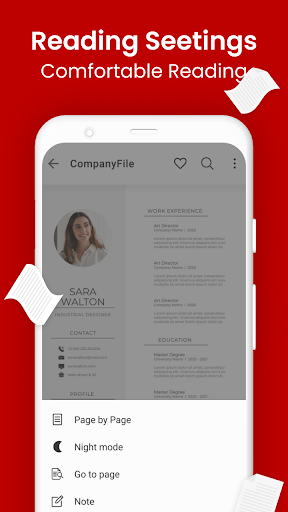
<b>PDF Reader</b> is the best PDF reading and editing application on android. PDF Reader manages and displays all PDF files on a single screen. You will not need to find PDF files everywhere in the phone. You just select the PDF file you want to view and open it. This application supports you to easily open PDF files and read documents offline anywhere, anytime. With PDF Reader you can easily search, read, mark or create a new PDF document, easily share it via email or social networking. Powerful PDF reader for text search, bookmark bookmarks, underline, colorization, and text copy support.. Now, reading PDFs is no longer an obstacle to your life and work. The only thing you need to do is to download this PDF Reader application, we will help you do all the rest. PDF Reader is the best choice for you to work with professional-looking PDF files anytime, anywhere. More particularly, it is completely free for you. PDF has a user-friendly interface so you only need 1 touch to view the desired PDF file. From the optimization of the user experience, we developed the PDF open application with many other advantages: <b>Manage all the PDF files in your device:</b> <b>"All PDF"</b> The application will scan all the PDF files in your device and focus in a single screen. <b>"Recent"</b> Contains all the PDFs you have open, sorted by the latest open time, and you can easily view the PDFs you have recently viewed. <b>"Favorite"</b> Contains the favorite PDF files that can be opened quickly. If you have a lot of PDF files, you'll also easily find them with "Organize" and "Search" features in the application's PDF management interface. You can easily change the name, delete file, view details of your PDF file. Share it to your fellow colleagues by email or co-worker at this screen. Touch to open the PDF file you want to view. <b>Powerful PDF reader with many convenient features to help you read, edit, and make notes directly on this application:</b> <b>Quick display:</b> PDF Reader uses the most advanced technology available today to speed the loading and display of PDF files quickly even with large PDF files. <b>Diverse view mode:</b> You can choose the vertical or horizontal view that fits your needs. Transition modes between pages are optimized to deliver the best reading experience. <b>Quick page moving:</b> You can go to any page with the scroll bar, or you can enter the page index to move to the page you want to read. <b>Outline of the PDF file:</b> PDF Reader will list the chapters of the PDF file. You will easily move to that chapter. <b>Search for text:</b> Search for important keywords in the document with search tool. <b>Support tools:</b> The tool supports reading PDFs such as underlining, yellowing, copying; you can work best with your PDF file. Also you can draw up PDF files. <b>Add bookmark to a PDF page:</b> You can bookmark a page with great content, so that it can easily be read again later. <b>Night view:</b> You can switch the night view mode with darker colors to help protect your eyes when reading PDFs at night. <b>Change screen brightness:</b> Increase the brightness of the screen to suit your lighting conditions. <b>Mark the page you are reading:</b> When you exit the PDF reader, the application saves your current page. At the next PDF reading, you can continue to see the page you are viewing. We are always interested in your experience, so please let us know your comments by leaving a comment. We will try to develop to bring the best version of software to open PDF files. Do not forget to rate this app 5 * for developer support. Thank you for using!
Installs, last 30 days Measured
Exact Google Play install counts, collected daily
Ratings
157,173 ratings, 3,143 reviews
- 5 ★44%
- 4 ★10%
- 3 ★9.0%
- 2 ★5.2%
- 1 ★32%
Recent reviews
Latest public reviews from the store
- 30 Oct 2025
good
Top chart positions
Latest Google Play chart ranks by country, last 10 days
Not in any tracked top chart in the last 10 days.
PDF Reader for Android history
Release, install milestones, listing and store changes
- First released on the store 16 Dec 2017
Update frequency
How often PDF Reader for Android ships a new version, month by month
16 updates in the last 12 months. More often than most similar apps: they shipped a median of 4 updates in the same year.
Recent versions
Current version 99.6
- Version 99.63 Nov 2026
- Version 99.05 Aug 2026
- Version 98.724 Jun 2026
- Version 98.924 Jun 2026
Listing keywords
Words and phrases PDF Reader for Android repeats most in its store listing
Top phrases: pdf files (12), pdf reader (11), pdf file (8), pdf reading (3), reading pdfs (3).
Highlighted words also appear in the title. Counts cover the title, short description and description.
Business model and tech
From the store listing, the SDKs in the app package and its declared permissions
- Business model
- Free to downloadIn-app purchasesShows ads
- Built with
- No cross-platform framework or game engine detected
- Ad networks (5)
- AdMobAppLovinFacebook Audience NetworkInMobiUnity Ads
- Subscriptions and payments
- Google Play billing
- Attribution and measurement
- Open Measurement
- Analytics and crash reports
- Firebase
- Sensitive access
- CameraPhotos, videos and filesAccounts on the deviceAdvertising ID
6 ad, attribution and analytics SDKs detected. SDKs are read from the app package and permissions from the store listing, so code that loads later is not seen.
Technology
51 SDKs found in the app package
Ad network libraries
Development tools
Ad networks
Advertising and install-attribution SDKs found in the app package
- AdMob
- AppLovin
- Facebook Audience Network
- InMobi
- Open Measurement
- Unity Ads
27 permissions
1 special access, 5 sensitive, 21 standard
- Manage all filesMANAGE_EXTERNAL_STORAGESpecial access
- Take photos and videosSensitive
- See accounts on the deviceSensitive
- Change or delete shared storageSensitive
- Read shared storageSensitive
- Show notificationsPOST_NOTIFICATIONSSensitive
- Ad attribution (Privacy Sandbox)ACCESS_ADSERVICES_ATTRIBUTIONStandard
- Ad topics (Privacy Sandbox)ACCESS_ADSERVICES_TOPICSStandard
- Privacy Sandbox ads (custom audience)ACCESS_ADSERVICES_CUSTOM_AUDIENCEStandard
- Read how it was installed (install referrer)BIND_GET_INSTALL_REFERRER_SERVICEStandard
- Read the advertising IDAD_IDStandard
- Read the advertising ID (Privacy Sandbox)ACCESS_ADSERVICES_AD_IDStandard
Compliance
What the listing and the app package show
- Store status
- Live
- Upkeep
- Updated 3 Nov 2026
- Registered in
- Vietnam
- Privacy policy
- Linked on the listing
- Advertising
- Shows ads
- In-app purchases
- Offered
- Age rating
- Everyone
- Sensitive permissions
- 5 sensitive, 1 special access of 27
- Location access
- No
- Camera and microphone
- Camera
Apps like PDF Reader for Android
HaloVPN: Fast Secure VPN ProxyHalo Online31.9M installs★ 4.53
Authenticator App - SafeAuthSafeAuth Services.37.3M installs★ 4.33
Pawxy - Fast VPN & Web BrowserPawxy Inc.9.9M installs★ 4.63
Mi Movistar ColombiaMovistar Colombia16.5M installs★ 3.54
Language Translator iGlotTRANSLATE14M installs★ 4.64
QRscanner: Barcode & QR appLyrebird Studio Teknoloji Limited Şirketi30.2M installs★ 4.5
IMEI tracker find my deviceHammer Security - Phone Anti-Theft systems10.2M installs★ 4.2
Electrodoc - electronics toolsIODEMA Srl15.7M installs★ 4.65
TurboSpeed: Game Mode FPSSTVN29.8M installs★ 4.31
PDF Reader for Android: questions and answers
How many downloads does PDF Reader for Android have?
PDF Reader for Android has 36,291,628 installs on Google Play, measured from the store's own count on 19 Nov 2026.
Who makes PDF Reader for Android?
PDF Reader for Android is published by Reader Tools, a developer based in VN.
When was PDF Reader for Android last updated?
The latest version (99.6) was released on 3 Nov 2026.
Is PDF Reader for Android free?
Yes. PDF Reader for Android is free to download and offers in-app purchases, and it shows ads.
Is PDF Reader for Android still available?
Yes. PDF Reader for Android is live on Google Play as of 19 Nov 2026.
Track PDF Reader for Android and its competitors
Watch any app for new versions, rating drops, chart moves and removals. Free plan, no card.