
PDF Reader - PDF Scanner
Easily Read, Annotate and Manage all files with PDF Reader - PDF Scanner App
- Installs
- 260K
- Measured
- Rating
- 4.52
- Ratings
- 1K
- 2 reviews
- Version
- Varies with device
- Updated 9 Apr 2026
- Released
- 25 Sep 2023
- Tracked since 12 May 2026
- Size
- —
Screenshots




About PDF Reader - PDF Scanner
The description on the store listing
FILE READER FOR ALL FORMAT IS NO LONGER A HEADACHE!
<b>File Master: PDF Reader - PDF Scanner</b> is the perfect tool for working and managing your documents, and it is COMPLETELY FREE!
Access your important files anytime, anywhere, even without an internet connection, <b>File Master</b> enables you to read and review your documents offline, ensuring productivity on the go. With diverse and convenient functions, the application helps you to access and work with WORD, PPT, XLS, TXT and PDF files easily and conveniently.
⭐️ MAIN FEATURES
SMART FILE READER AND ANNOTATE
- Document viewer supports for all formats: PDF, DOCX, XLS, PPT, TXT.
- Easily switch between portrait or …
Read the full description
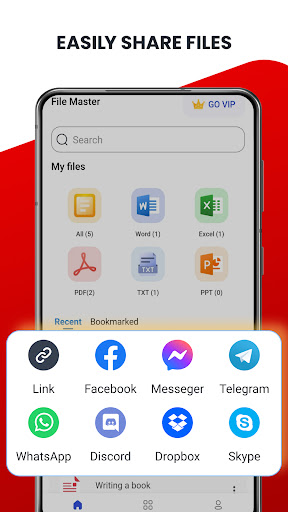
FILE READER FOR ALL FORMAT IS NO LONGER A HEADACHE! <b>File Master: PDF Reader - PDF Scanner</b> is the perfect tool for working and managing your documents, and it is COMPLETELY FREE! Access your important files anytime, anywhere, even without an internet connection, <b>File Master</b> enables you to read and review your documents offline, ensuring productivity on the go. With diverse and convenient functions, the application helps you to access and work with WORD, PPT, XLS, TXT and PDF files easily and conveniently. ⭐️ MAIN FEATURES SMART FILE READER AND ANNOTATE - Document viewer supports for all formats: PDF, DOCX, XLS, PPT, TXT. - Easily switch between portrait or landscape viewing modes - Adjust the brightness to suit your eyes - Zoom in or zoom out, or jump to the specific page you're interested in. - PDF Annotate: Highlight, Underline or Strike out any word! 2. EFFECTIVE FILE SCANNER | PDF SCANNER Need to digitize physical documents? Our app allow you to scan any document to PDF, making it a breeze to store and manage paper documents digitally. Now, everytime you need scan your agreements, ID, passport or driver's liensce, let <b>File Master</b> do it and save your time! 3. CONVERT ANY FILES TO PDF | PDF CONVERTER Using Convert Feature, you could convert your files to universally accessible PDF format, ensuring compatibility and share your content without worrying about formatting discrepancies. <b>File Master</b> supports convert DOCX to PDF, EXCEL to PDF, PPT to PDF and Image to PDF. Let's try it! 4. EASILY SHARE YOUR FILES ACROSS SOCIAL NETWORKS Collaborate seamlessly by sharing your documents via email or your favorite social networks directly from within the app. Effortlessly collaborate with colleagues or friends on the documents that matter. 5. SMART SEARCH ENGINE Have you ever stucked in the moment that you don't remember what type of your document or where exactly it is? <b>File Master</b> could help! You can search any files via keyword (in the name of document), or types, created date. Whether you're a professional managing important work documents or an individual organizing personal files, our app provides a comprehensive solution for reading, managing, and sharing various office document formats offline. Elevate your document management experience - Download Now! We are always interested in your experience, so please let us know your opinion by leaving a comment or send feedback directly to us via email [email protected]. We will try to develop to bring the best version of our application. Do not forget to rate this app 5 * for developer support. Thank you for using! PDF reader for Android free Our essential app allows you to view, annotate, and manage PDF documents on your mobile devices. It offers features like text highlighting, bookmarking, and making it convenient to access and work with PDFs anywhere. Document Reader File Master is a handy tool for accessing and viewing different types of files, such as PDFs, Word documents, and Excel spreadsheets, on mobile devices. PDF scanner app File Master could transform your mobile device into a portable scanner, allowing you to quickly capture and digitize documents, receipts, and photos.
Installs since 29 Aug 2026 Measured
Exact Google Play install counts, collected daily
Ratings
1,022 ratings, 2 reviews
- 5 ★75%
- 4 ★15%
- 3 ★0.0%
- 2 ★10.0%
- 1 ★0.0%
Recent reviews
Latest public reviews from the store
- 23 Jan 2026
So amazing 🤩😻
- 6 Apr 2024
Like the way this is set up, but I can't open a PDF file that I just downloaded. What good is it if you can't open a PDF file that that you just downloaded? Update: It would be great if this app was able to open files on my phones USB chip.
- 14 Jan 2024
Super
- 13 Jan 2024
Very nice app for low gb ram phone
What reviewers bring up
Topics mentioned in the latest 23 reviews, by how many reviews mention them
Liked in good reviews (8 reviews)
- useful 2
Raised in bad reviews (14 reviews)
- file 4
- open 4
Top chart positions
Latest Google Play chart ranks by country, last 10 days
- Countries ranked
- 3
- Best rank
- #100
- Top 10 placements
- 0
- of 3 chart placements
- Average rank
- #145.3
Best countries on Google Play
- 🇬🇧 United Kingdom · Top free, Productivity#100
- 🇨🇦 Canada · Top free, Productivity#168
- 🇦🇺 Australia · Top free, Productivity#168
PDF Reader - PDF Scanner history
Release, install milestones, listing and store changes
- Reached 50,000+ installs 18 Mar 2024
- Reached 10,000+ installs 9 Nov 2023
- Reached 5,000+ installs 26 Oct 2023
- Reached 1,000+ installs 5 Oct 2023
- Reached 500+ installs 3 Oct 2023
- First released on the store 25 Sep 2023
Update frequency
How often PDF Reader - PDF Scanner ships a new version, month by month
2 updates in the last 12 months. About as often as similar apps, which shipped a median of 2 updates in the same year.
Recent versions
Current version Varies with device
- Version 1.8.29 Apr 2026
- Version 1.8.118 Mar 2026
- Version 1.8.021 Sep 2025
- Version 1.7.89 Sep 2024
Listing keywords
Words and phrases PDF Reader - PDF Scanner repeats most in its store listing
Top phrases: file master (7), pdf scanner (5), pdf reader (4), pdf reader pdf (3), reader pdf scanner (3).
Highlighted words also appear in the title. Counts cover the title, short description and description.
Business model and tech
From the store listing and declared permissions
- Business model
- Free to downloadIn-app purchasesShows ads
- Sensitive access
- No sensitive permission declared
Compliance
What the listing and the app package show
- Store status
- Live
- Upkeep
- Updated 9 Apr 2026
- Registered in
- Vietnam
- Privacy policy
- Linked on the listing
- Advertising
- Shows ads
- In-app purchases
- Offered
- Age rating
- Everyone
Apps like PDF Reader - PDF Scanner
MTPROXY MTPROTO Proxy TelegramSAG Team87.2K installs★ 3.0
Mewdicate: Pill Reminder AlarmThe Chillest Cat37.7K installs★ 4.68
Malayalam calendar 2026 കലണ്ടരSamvat Calendars LLP412K installs★ 4.8
My Tasks: Lists and SchedulesStefanos Kouzounis: Apps & Games119K installs★ 3.71
Nepali Keyboard: Type NepaliBizcraft Apps853K installs★ 3.91
EcuadatosDevoxs S.A.57.6K installs★ 4.91
Speaker Cleaner - Water EjectEgo Global Ltd1.2M installs★ 3.89
Geny AI - Chatbot AssistantSWAPP YAZILIM LIMITED SIRKETI21.8K installs★ 4.36
Heynote - Wallpaper NotesShfik Ismail133K installs★ 4.41
PDF Reader - PDF Scanner: questions and answers
How many downloads does PDF Reader - PDF Scanner have?
PDF Reader - PDF Scanner has 259,811 installs on Google Play, measured from the store's own count on 14 Nov 2026.
Who makes PDF Reader - PDF Scanner?
PDF Reader - PDF Scanner is published by Office Master Studio, a developer based in VN.
When was PDF Reader - PDF Scanner last updated?
The latest version (Varies with device) was released on 9 Apr 2026.
Is PDF Reader - PDF Scanner free?
Yes. PDF Reader - PDF Scanner is free to download and offers in-app purchases, and it shows ads.
Is PDF Reader - PDF Scanner still available?
Yes. PDF Reader - PDF Scanner is live on Google Play as of 14 Nov 2026.
Track PDF Reader - PDF Scanner and its competitors
Watch any app for new versions, rating drops, chart moves and removals. Free plan, no card.