
PDF Reader - PDF Scanner
The Ultimate PDF Viewer, PDF Scanner, PDF Editor, and PDF Manager App
- Installs
- 1.63M
- Measured
- Rating
- 4.71
- Ratings
- 55.7K
- 154 reviews
- Version
- 1.1.78
- Updated 5 Nov 2026
- Released
- 14 Apr 2025
- Tracked since 12 May 2026
- Size
- —
Screenshots


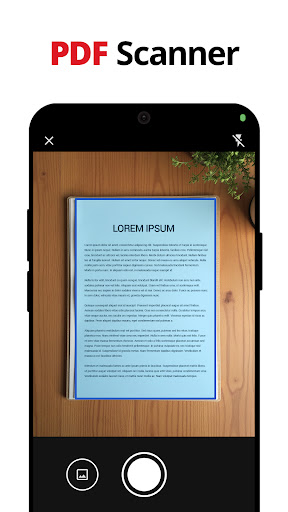


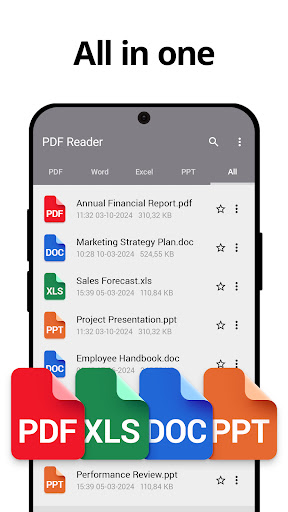


About PDF Reader - PDF Scanner
The description on the store listing
If you’re looking for a powerful, user-friendly PDF Reader, this app has everything you need. With its all-in-one functionality, you can view, scan, add text, sign, and organize your PDF files with ease. Designed to make managing documents simple and efficient, this app also supports Word, Excel, and PPT files for enhanced usability.
Comprehensive Features to Manage Your PDFs
- PDF Reader: Open and read any PDF file effortlessly. Navigate smoothly through pages, zoom in on text, and enjoy an intuitive reading experience. For nighttime reading, use the built-in night mode to reduce eye strain.
- PDF Viewer: Quickly load and view your documents with precision. Use bookmarks to jump …
Read the full description
If you’re looking for a powerful, user-friendly PDF Reader, this app has everything you need. With its all-in-one functionality, you can view, scan, add text, sign, and organize your PDF files with ease. Designed to make managing documents simple and efficient, this app also supports Word, Excel, and PPT files for enhanced usability. Comprehensive Features to Manage Your PDFs - PDF Reader: Open and read any PDF file effortlessly. Navigate smoothly through pages, zoom in on text, and enjoy an intuitive reading experience. For nighttime reading, use the built-in night mode to reduce eye strain. - PDF Viewer: Quickly load and view your documents with precision. Use bookmarks to jump back to important sections or pages instantly. - PDF Scanner: Scan documents, receipts, or notes using your device's camera and convert them into high-quality PDFs. This feature is ideal for creating professional PDFs on the go. - PDF Editor: Add text, notes, and annotations to any PDF document. Customize your files with ease, whether you’re highlighting important sections or adding comments. - Sign PDF: Add your signature directly to PDF documents or use e-signature functionality to sign forms and contracts effortlessly. - PDF Maker: Create PDF files from images or scanned documents. Perfect for turning physical paperwork into a digital format. Advanced Management and Editing Tools 1. Image to PDF Converter: Quickly convert images or scanned files into professional-quality PDFs for sharing or archiving. 2. Merge and Split PDFs: Combine multiple PDF files into one or split larger PDFs into smaller, more manageable documents. 3. Secure Your PDFs: Protect sensitive files by setting passwords. Easily unlock password-protected PDFs when needed. 4. Annotate PDFs: Highlight, underline, or strike through text. Add notes, draw on the document, or use freehand tools for customization. 5. Form Filling: Fill out PDF forms directly on your device, making it perfect for applications, contracts, and other paperwork. 6. Page Management: Add new pages, delete unwanted ones, or reorder pages to organize your PDF documents as needed. 7. Search Functionality: Locate specific PDF, Word, Excel, or PPT files quickly with the built-in search tool. 8. Bookmark and Organize: Bookmark important documents or pages for quick access. The app automatically detects supported files on your device, helping you organize everything effortlessly. 9. File Cleanup: Identify and delete old or unnecessary PDFs to free up storage space. 10. Share PDFs: Share documents via email, messaging apps, or cloud services directly from the app. Why Choose This App for Your PDF Needs? This app combines the essential features of a PDF Reader, Viewer, Scanner, Editor, and Maker in one intuitive package. It’s built to handle everything from everyday document viewing to professional-grade PDF management. With its ability to scan documents using your camera, convert images to PDFs, and add notes or text, this app ensures you can handle any task efficiently. Perfect for Every User - Professionals: Scan and sign contracts, manage invoices, and organize reports with ease. - Students: Annotate textbooks, take notes, highlight study material, and bookmark important sections. - Everyday Users: Scan receipts, create digital versions of documents, and organize personal files. Top Benefits - User-Friendly Interface: Navigate effortlessly through features with a clean and intuitive design. - Fast and Reliable Performance: Open large files, process tasks quickly, and handle multiple functions without lag. - All-in-One Functionality: Manage your PDFs with tools for viewing, scanning, adding text, annotating, signing, and organizing. Download the PDF Reader today andtake control of your PDFs now!
Installs since 19 Jul 2026 Measured
Exact Google Play install counts, collected daily
Ratings
55,667 ratings, 154 reviews
- 5 ★87%
- 4 ★9.0%
- 3 ★0.9%
- 2 ★0.9%
- 1 ★2.0%
Recent reviews
Latest public reviews from the store
- 27 Apr 2026
It's not a waste of time like other apps 👍
- 27 Apr 2026
I downloaded it just to try it out… now I check it every day 😅 The stories are really good.
- 17 Apr 2026
I would not recommend this app pm me for reason
- 8 Apr 2026
it freezes way to much. they lag like crazy when you try to watch the 5 free episodes.or your 7 extra credits. the only reason I got this was to watch the new one they have but this is crazy
What reviewers bring up
Topics mentioned in the latest 50 reviews, by how many reviews mention them
Liked in good reviews (33 reviews)
- twists 7
- crime 7
- episodes 5
- actually 4
- stories 4
- intense 4
- short 4
- lol 4
Raised in bad reviews (14 reviews)
- watch 4
- subscription 3
- email 3
- money 3
- pay 3
- different 2
- without 2
- issues 2
Top chart positions
Latest Google Play chart ranks by country, last 10 days
- Countries ranked
- 23
- Best rank
- #10
- Top 10 placements
- 1
- of 28 chart placements
- Average rank
- #85.4
Best countries on Google Play
- 🇫🇷 France · Top free, Productivity#10
- 🇨🇦 Canada · Top free, Productivity#15
- 🇩🇪 Germany · Top free, Productivity#15
- 🇯🇵 Japan · Top free, Productivity#16
- 🇦🇺 Australia · Top free, Productivity#17
- 🇺🇸 United States · Top free, Productivity#25
| Country | Chart | Category | Rank | Best (10 days) | Date |
|---|---|---|---|---|---|
| 🇫🇷 France | Top free | Productivity | #10 | #10 | 14 Nov 2026 |
| 🇨🇦 Canada | Top free | Productivity | #15 | #13 | 14 Nov 2026 |
| 🇩🇪 Germany | Top free | Productivity | #15 | #12 | 14 Nov 2026 |
| 🇯🇵 Japan | Top free | Productivity | #16 | #16 | 14 Nov 2026 |
| 🇦🇺 Australia | Top free | Productivity | #17 | #14 | 14 Nov 2026 |
| 🇺🇸 United States | Top free | Productivity | #25 | #25 | 14 Nov 2026 |
| 🇲🇽 Mexico | Top free | Productivity | #26 | #24 | 14 Nov 2026 |
| 🇬🇧 United Kingdom | Top free | Productivity | #26 | #23 | 14 Nov 2026 |
| 🇰🇷 South Korea | Top free | Productivity | #36 | #31 | 14 Nov 2026 |
| 🇮🇹 Italy | Top free | All apps | #36 | #36 | 14 Nov 2026 |
PDF Reader - PDF Scanner history
Release, install milestones, listing and store changes
- Reached 1,000,000+ installs 6 Jan 2026
- Reached 500,000+ installs 28 Sep 2025
- Reached 100,000+ installs 7 Aug 2025
- Reached 50,000+ installs 12 Jul 2025
- Reached 10,000+ installs 2 Jun 2025
- Reached 5,000+ installs 26 May 2025
- Reached 1,000+ installs 8 May 2025
- Reached 500+ installs 6 May 2025
Update frequency
How often PDF Reader - PDF Scanner ships a new version, month by month
6 updates in the last 12 months. More often than most similar apps: they shipped a median of 1 updates in the same year.
Recent versions
Current version 1.1.78
- Version 1.1.785 Nov 2026
Bug fixes and performance improvements.
- Version 1.1.4817 Mar 2026
- Version 1.1.4224 Dec 2025
- Version 1.1.411 Dec 2025
Listing keywords
Words and phrases PDF Reader - PDF Scanner repeats most in its store listing
Top phrases: pdf reader (5), important sections (3), pdf files (3), pdf scanner (3), files with ease (2).
Highlighted words also appear in the title. Counts cover the title, short description and description.
Business model and tech
From the store listing and declared permissions
- Business model
- Free to downloadIn-app purchasesShows ads
- Sensitive access
- No sensitive permission declared
Compliance
What the listing and the app package show
- Store status
- Live
- Upkeep
- Updated 5 Nov 2026
- Registered in
- Hong Kong SAR China
- Privacy policy
- Linked on the listing
- Advertising
- Shows ads
- In-app purchases
- Offered
- Age rating
- Everyone
Apps like PDF Reader - PDF Scanner
Sim Owner Details & Sim InfoSimpleSerenity3.5M installs★ 4.54
Ezhuthani - Tamil KeyboardC V Raju - Mary Martin Software Services9.5M installs★ 4.09
Ocean AI-Chatbot・Ask AnythingDijital Elma4.1M installs★ 4.6
PDFO - Photo to PDF ConverterAppoxide.com4.3M installs★ 4.8
cashour Earn cash every minuteCAS(H)OUR983K installs★ 3.93
Note EverythingSoftXperience.com7.3M installs★ 4.41
E2PDF SMS Call Backup RestoreDay Dreamer LLC29.3M installs★ 3.96
Ridmik Classic KeyboardRidmik Labs26.8M installs★ 4.26
Classic Notes Lite - NotepadFluffy Delusions7.2M installs★ 4.01
PDF Reader - PDF Scanner: questions and answers
How many downloads does PDF Reader - PDF Scanner have?
PDF Reader - PDF Scanner has 1,634,079 installs on Google Play, measured from the store's own count on 15 Nov 2026.
Who makes PDF Reader - PDF Scanner?
PDF Reader - PDF Scanner is published by Gamma Play, a developer based in HK.
When was PDF Reader - PDF Scanner last updated?
The latest version (1.1.78) was released on 5 Nov 2026.
Is PDF Reader - PDF Scanner free?
Yes. PDF Reader - PDF Scanner is free to download and offers in-app purchases, and it shows ads.
Is PDF Reader - PDF Scanner still available?
Yes. PDF Reader - PDF Scanner is live on Google Play as of 15 Nov 2026.
Track PDF Reader - PDF Scanner and its competitors
Watch any app for new versions, rating drops, chart moves and removals. Free plan, no card.