
PDF Reader - PDF Tools
Ultimate Guide to PDF Reader & Viewer, Comprehensive Tool for All Your PDF Needs
- Installs
- 174
- Measured
- Rating
- —
- Ratings
- —
- Version
- Varies with device
- Updated 20 Jan 2025
- Released
- 19 Jun 2024
- Tracked since 12 May 2026
- Size
- —
Screenshots




About PDF Reader - PDF Tools
The description on the store listing
The Ultimate Guide to PDF Reader & Viewer: A Comprehensive Tool for All Your PDF Needs
In today’s digital age, managing PDF files efficiently is crucial for both personal and professional productivity. Whether you’re handling business reports, academic papers, or simply organizing your personal documents, a reliable PDF reader and viewer can make a world of difference. Enter the PDF Reader & Viewer app, a powerful, free, and offline tool that doesn’t require an account to use. This app not only simplifies the process of reading and managing PDF files but also comes with a suite of tools to enhance your document workflow.
Key Features of PDF Reader & Tools
1. Comprehensive PDF Tools …
Read the full description
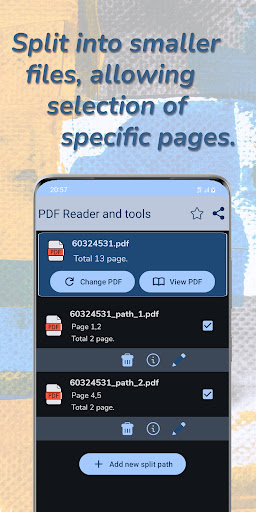
The Ultimate Guide to PDF Reader & Viewer: A Comprehensive Tool for All Your PDF Needs In today’s digital age, managing PDF files efficiently is crucial for both personal and professional productivity. Whether you’re handling business reports, academic papers, or simply organizing your personal documents, a reliable PDF reader and viewer can make a world of difference. Enter the PDF Reader & Viewer app, a powerful, free, and offline tool that doesn’t require an account to use. This app not only simplifies the process of reading and managing PDF files but also comes with a suite of tools to enhance your document workflow. Key Features of PDF Reader & Tools 1. Comprehensive PDF Tools Compress PDF: Reduce the file size of your PDFs without compromising quality. This is particularly useful for sharing documents via email or saving space on your device. Password Protection: Secure your PDF files with passwords to protect sensitive information. This feature is essential for confidential documents. Password : Easily remove passwords from PDF files, making it simpler to manage and edit your documents. Page Management: Delete specific pages from your PDF files with ease. This is handy for removing unnecessary pages or splitting documents. Split & Merge PDFs: Split a PDF into multiple documents or merge several PDFs into one. This feature is perfect for organizing reports, presentations, and other multi-page documents. Night Mode: Switch to night mode for a better reading experience in low light environments. This reduces eye strain and makes it easier to read for extended periods. 2. Secure Your PDFs Encryption: Protect sensitive data with robust password encryption. Keeping your documents safe and confidential is crucial, especially when dealing with personal or business information. 3. Document Management Save, and send PDFs. This feature eliminates the need for printing, User-Friendly Interface: Navigate the app effortlessly thanks to its intuitive design and user-friendly controls. Even those who are not tech-savvy will find it easy to use. 4. Merge PDFs Simple Merging: Combine multiple PDF files into a single document with just a few clicks. This is ideal for compiling reports, presentations, or any other multi-document projects. Reading and Viewing PDFs Best PDF Reading App This app is touted as one of the best PDF reading apps availabl. It manages and displays all your PDF files on a single screen, making it easy to find and open the documents you need. Ultra-fast Reading The app supports ultra-fast reading of files in all formats. Whether you’re viewing documents, receipts, photos, business cards, or whiteboards, you can expect quick and seamless access. Additional Features for Enhanced Productivity Fast Opening and Viewing The app allows for fast opening and viewing of PDF documents, ensuring that you don’t waste time waiting for files to load. Easy Navigation With features like search, scroll, and zoom, you can easily navigate through your documents. The app also offers single page and continuous scroll modes to suit your reading preference. Night Mode For those who like to read at night, the app offers a night mode that reduces eye strain and makes reading in low light more comfortable. EBook Reader Experience The app provides an eBook reader experience, allowing you to read PDFs as books. This is great for reading long documents or eBooks. Offline Access and File Management No Internet Needed One of the standout features of this app is that it doesn’t require an internet connection. You can read and manage your PDF files anytime, anywhere. Easy File Sharing The app makes it easy to share all your PDF documents with others. Whether you need to send a file via email or share it through messaging apps, it’s just a few taps away. Recent Files Quickly access recently viewed PDFs without having to search for them. This feature saves time and makes it easier to pick up where you left off.
Installs since 14 Nov 2026 Measured
Exact Google Play install counts, collected daily
Daily history starts once this app is in our daily install sample.
Ratings
- 5 ★0.0%
- 4 ★0.0%
- 3 ★0.0%
- 2 ★0.0%
- 1 ★0.0%
Recent reviews
Latest public reviews from the store
No reviews in our sample for this app yet.
Top chart positions
Latest Google Play chart ranks by country, last 10 days
Not in any tracked top chart in the last 10 days.
PDF Reader - PDF Tools history
Release, install milestones, listing and store changes
- Reached 100+ installs 24 Sep 2024
- Reached 50+ installs 25 Aug 2024
- First released on the store 19 Jun 2024
Recent versions
Current version Varies with device
- Version Version20 Jan 2025
Listing keywords
Words and phrases PDF Reader - PDF Tools repeats most in its store listing
Top phrases: pdf files (8), pdf reader (6), night mode (4), pdf reader viewer (3), reader viewer (3).
Highlighted words also appear in the title. Counts cover the title, short description and description.
Business model and tech
From the store listing and declared permissions
- Business model
- Free to downloadShows ads
- Sensitive access
- Phone and callsPhotos, videos and filesAdvertising ID
22 permissions
1 special access, 4 sensitive, 17 standard
- Manage all filesMANAGE_EXTERNAL_STORAGESpecial access
- Change or delete shared storageSensitive
- Read photosREAD_MEDIA_IMAGESSensitive
- Read shared storageSensitive
- Read phone status and identitySensitive
- Ad attribution (Privacy Sandbox)ACCESS_ADSERVICES_ATTRIBUTIONStandard
- Ad topics (Privacy Sandbox)ACCESS_ADSERVICES_TOPICSStandard
- Read the advertising IDAD_IDStandard
- Read the advertising ID (Privacy Sandbox)ACCESS_ADSERVICES_AD_IDStandard
- Keep the phone awakeStandard
- Run a foreground serviceFOREGROUND_SERVICEStandard
- Full internet accessStandard
Compliance
What the listing and the app package show
- Store status
- Live
- Upkeep
- Updated 20 Jan 2025
- Privacy policy
- Linked on the listing
- Advertising
- Shows ads
- In-app purchases
- None declared
- Age rating
- Everyone
- Sensitive permissions
- 4 sensitive, 1 special access of 22
- Location access
- No
- Camera and microphone
- Neither
Apps like PDF Reader - PDF Tools
들어서 화면켜기Won3.5K installs★ 4.0
Height PredictionEcliptic App Ventures45.9K installs★ 2.4
Speicers`Pro VPNEldiablolucifer202021.2K installs★ 4.14
Lightning Tracker with AlertsYaksh Software4.3K installs★ 3.0
Mana Pathi (Unit Converter)Shirish Koirala2.2K installs★ 4.6
Multi-tab Calc - A simple app.Naoyuki Rikiji1.3K installs★ 5.0
Photo Recovery PlusBillApps7.1K installs★ 4.53
Just Silence. Scheduled.Akid Soft1.6K installs★ 5.0
- WoWp AssistantВиталий Робиновский2K installs★ 4.2
PDF Reader - PDF Tools: questions and answers
How many downloads does PDF Reader - PDF Tools have?
PDF Reader - PDF Tools has 174 installs on Google Play, measured from the store's own count on 14 Nov 2026.
Who makes PDF Reader - PDF Tools?
PDF Reader - PDF Tools is published by CKH.
When was PDF Reader - PDF Tools last updated?
The latest version (Varies with device) was released on 20 Jan 2025.
Is PDF Reader - PDF Tools free?
Yes. PDF Reader - PDF Tools is free to download, and it shows ads.
Is PDF Reader - PDF Tools still available?
Yes. PDF Reader - PDF Tools is live on Google Play as of 14 Nov 2026.
Track PDF Reader - PDF Tools and its competitors
Watch any app for new versions, rating drops, chart moves and removals. Free plan, no card.