
PDF Reader - PDF Viewer
PDF viewer & book reader for reading, sharing & viewing all your PDF documents.
- Installs
- 1.87M
- Measured
- Rating
- 4.3
- Ratings
- 119
- Version
- 5.3.1
- Updated 18 Aug 2026
- Released
- 24 Dec 2020
- Tracked since 13 May 2026
- Size
- 7 MB
- Needs 4.4
Screenshots



About PDF Reader - PDF Viewer
The description on the store listing
<h2> PDF Reader - PDF Viewer, Book Reader & File Viewer </h2>
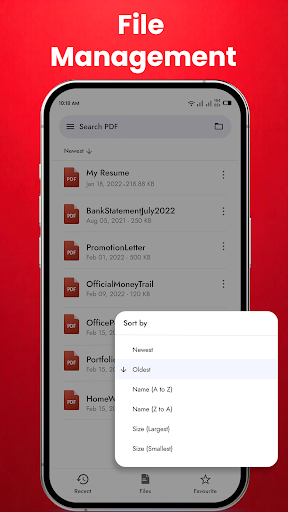
PDF Reader & Book Reader is the best PDF reading app on Google Play. Free eBook Reader is a great office application that helps you interact with PDF files, PDF documents easily and conveniently. The PDF viewer manages and displays all PDF files on one screen.
You will not need to search for PDF files everywhere on your phone. Just select the PDF file you want to view and open it. This application allows you to easily open PDF files and document offline anywhere and anytime.
Try the quick search function and you will find it easy to search your target PDF file. Just enter the keywords and the results will be displayed …
Read the full description
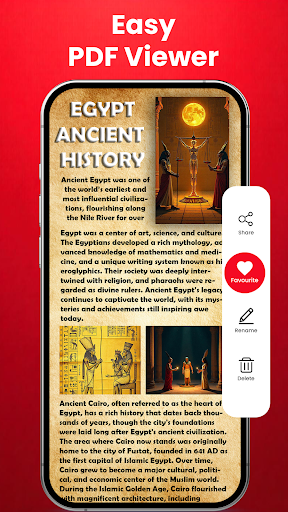
<h2> PDF Reader - PDF Viewer, Book Reader & File Viewer </h2> PDF Reader & Book Reader is the best PDF reading app on Google Play. Free eBook Reader is a great office application that helps you interact with PDF files, PDF documents easily and conveniently. The PDF viewer manages and displays all PDF files on one screen. You will not need to search for PDF files everywhere on your phone. Just select the PDF file you want to view and open it. This application allows you to easily open PDF files and document offline anywhere and anytime. Try the quick search function and you will find it easy to search your target PDF file. Just enter the keywords and the results will be displayed automatically. PDF Reader and Free PDF viewer also allows you to rename files, delete files, share PDF files as you like. Use it as your default PDF viewer or PDF reader and directly open a PDF file from the file manager, email, cloud, or web in this PDF reader without having to open the app. This PDF viewer is the most efficient office and productivity tool for reading PDF files. This app is not only an effective PDF reader but also an instant all document reader. <h3>Key Features of PDF Reader & Free PDF Viewer:</h3> <font color=" #2D3152"><b>Quickly open and view PDF documents. </b></font> <font color=" #2D3152"><b>A simple list of PDF files. </b></font> <font color=" #2D3152"><b>Search, scroll, and zoom in and out. </b></font> <font color=" #2D3152"><b>Choose a single page or continuous scroll mode. </b></font> <font color=" #2D3152"><b>Bookmark PDF pages for future reference. </b></font> <font color=" #2D3152"><b>Go to the page number directly and see the page count and total pages. </b></font> <font color=" #2D3152"><b>Scroll PDF Documents page by page. </b></font> <h3>Start working right away with these PDF Viewer features: </h3> ⭕ Automatically search and display PDF files: Find and display PDF files on your device. ⭕ Recent - It contains all the PDF docs you have opened, sorted by the last time you opened it, and you can easily view the PDF files you have recently viewed without having to spend time searching for them. ⭕ Search - If there are many documents on your device, the "Search" function will make your search easier. ⭕ Delete/Rename - You can rename, delete files, and view details of your PDF files easily with simple operations. ⭕ Share - If you view a PDF file or want to share it, it is a great feature that will help you broadcast to your friends. ⭕ Reader - This is a simple and easy to use reader that has great support for you ⭕ View mode - Horizontal/vertical scrolling mode. With 2 reading modes, File Reader Free - File Viewer provides the most complete experience. ⭕ Zoom in and out according to your taste ⭕ Go to page - directs you to the desired page. With many useful features that help you read PDF files, the PDF reader for android is a very good tool to help you in life, especially in work and study. From now on, you can open, read PDF files professionally. Download now the PDF viewer for android free download application to experience useful features completely FREE! If you like our app, please help us with a 5-star review. Thank you.
Installs since 29 Aug 2026 Measured
Exact Google Play install counts, collected daily
Ratings
119 ratings
- 5 ★0.0%
- 4 ★0.0%
- 3 ★0.0%
- 2 ★0.0%
- 1 ★0.0%
Recent reviews
Latest public reviews from the store
- 30 Jan 2026
good working 😃 and more helpful in pdf marge and invert , split it's very easy to use . you can download and enjoy specialally stodents and e mita
- 13 Nov 2025
This App has solved a lot of problems of mine! Nowadays we cannot access the necessary tools like splitting or converting PDF for free. But this app offers literally a lot of things for free... great work, my man!
- 23 Jul 2025
Great app with variable conversion options, and the most important thing to highlight is that these all are available offline, and no time is required for an ideal conversion. You can easily convert files by offline. Great Experience
- 5 Sep 2024
This app is very good according to my opinion.. As I have installed this app becoz to change pdf background.. this app have this feature but the bg colour only change into light pink colour (but I want it White⚪ and I am not able to do that)!!
What reviewers bring up
Topics mentioned in the latest 10 reviews, by how many reviews mention them
Liked in good reviews (7 reviews)
- pdf 5
- invert 3
- features 2
- needed 2
- tools 2
- files 2
- find 2
Raised in bad reviews (2 reviews)
- format 2
Top chart positions
Latest Google Play chart ranks by country, last 10 days
- Countries ranked
- 3
- Best rank
- #82
- Top 10 placements
- 0
- of 3 chart placements
- Average rank
- #94.3
Best countries on Google Play
- 🇯🇵 Japan · Top grossing, Tools#82
- 🇺🇸 United States · Top grossing, Tools#96
- 🇦🇺 Australia · Top grossing, Tools#105
| Country | Chart | Category | Rank | Best (10 days) | Date |
|---|---|---|---|---|---|
| 🇯🇵 Japan | Top grossing | Tools | #82 | #82 | 13 Nov 2026 |
| 🇺🇸 United States | Top grossing | Tools | #96 | #82 | 19 Nov 2026 |
| 🇦🇺 Australia | Top grossing | Tools | #105 | #101 | 18 Nov 2026 |
PDF Reader - PDF Viewer history
Release, install milestones, listing and store changes
- Reached 1,000,000+ installs 26 Mar 2026
- Reached 500,000+ installs 22 Nov 2025
- Reached 100,000+ installs 19 May 2025
- Reached 50,000+ installs 11 Sep 2022
- Reached 10,000+ installs 7 Apr 2021
- Reached 5,000+ installs 10 Mar 2021
- Reached 1,000+ installs 24 Feb 2021
- Reached 500+ installs 10 Feb 2021
Update frequency
How often PDF Reader - PDF Viewer ships a new version, month by month
3 updates in the last 12 months. More often than most similar apps: they shipped a median of 2 updates in the same year.
Recent versions
Current version 5.3.1
- Version 5.2.918 Aug 2026
📑 Open & read all PDF files easily 🔍 Quick search inside documents ⭐ Add bookmarks & favorites 📂 Smart file management 🔎 Zoom in/out for better reading 🌙 Dark mode for comfortable viewing ⚡ Fast, smooth & user-friendly Read PDFs anytime, anywhere! 🎉
- Version 5.2.67 Mar 2026
-✨Improved UI New UI 🤩☺ -✨Added history feature -✨Added favorites feature - ✨Improved file fetching. - ✨Enhanced user experience. - Better performance. - Bugs & crashes resolved.
- Version 5.2.519 Feb 2026
-✨Improved UI New UI 🤩☺ -✨Added history feature -✨Added favorites feature - ✨Improved file fetching. - ✨Enhanced user experience. - Better performance. - Bugs & crashes resolved.
- Version 5.2.429 Oct 2025
Listing keywords
Words and phrases PDF Reader - PDF Viewer repeats most in its store listing
Top phrases: pdf files (13), pdf viewer (10), pdf reader (9), font color 2d3152 (7), color 2d3152 (7).
Highlighted words also appear in the title. Counts cover the title, short description and description.
Business model and tech
From the store listing, the SDKs in the app package and its declared permissions
- Business model
- Free to downloadIn-app purchasesShows ads
- Built with
- No cross-platform framework or game engine detected
- Ad networks (2)
- AppLovinFacebook Audience Network
- Subscriptions and payments
- Google Play billing
- Attribution and measurement
- Open Measurement
- Analytics and crash reports
- Firebase
- Sensitive access
- Photos, videos and filesAdvertising ID
3 ad, attribution and analytics SDKs detected. SDKs are read from the app package and permissions from the store listing, so code that loads later is not seen.
Technology
18 SDKs found in the app package
Ad networks
Advertising and install-attribution SDKs found in the app package
- AppLovin
- Facebook Audience Network
- Open Measurement
16 permissions
1 special access, 3 sensitive, 12 standard
- Manage all filesMANAGE_EXTERNAL_STORAGESpecial access
- Change or delete shared storageSensitive
- Read shared storageSensitive
- Show notificationsPOST_NOTIFICATIONSSensitive
- Ad attribution (Privacy Sandbox)ACCESS_ADSERVICES_ATTRIBUTIONStandard
- Ad topics (Privacy Sandbox)ACCESS_ADSERVICES_TOPICSStandard
- Read how it was installed (install referrer)BIND_GET_INSTALL_REFERRER_SERVICEStandard
- Read the advertising IDAD_IDStandard
- Read the advertising ID (Privacy Sandbox)ACCESS_ADSERVICES_AD_IDStandard
- Keep the phone awakeStandard
- Run a foreground serviceFOREGROUND_SERVICEStandard
- Full internet accessStandard
Compliance
What the listing and the app package show
- Store status
- Live
- Upkeep
- Updated 18 Aug 2026
- Registered in
- United Arab Emirates
- Privacy policy
- Linked on the listing
- Advertising
- Shows ads
- In-app purchases
- Offered
- Age rating
- Everyone
- Sensitive permissions
- 3 sensitive, 1 special access of 16
- Location access
- No
- Camera and microphone
- Neither
Apps like PDF Reader - PDF Viewer
aDataConMonamazing-create13.6K installs★ 4.3
Universal TV Remote for All TVAlphard Solutions56K installs★ 3.17
Auto Scroll TTAbyssiniatech64.2K installs★ 2.67
Whistle SoundsInfinite_Apps64.4K installs★ 3.5
QR Barcode : Scanner & CreateScan Team320K installs★ 3.38
Calendario de Puerto Rico 2025FamilyAppsPro15.2K installs★ 4.57
Motion Detector: Security CamFabioDeveloper8.1K installs★ 4.1
Watt VA Amp Volt CalculationsElectroMission Co.53.2K installs★ 1.0
Zip Extractor–Unzip UnRARMS Apps Lab30.1K installs★ 3.5
PDF Reader - PDF Viewer: questions and answers
How many downloads does PDF Reader - PDF Viewer have?
PDF Reader - PDF Viewer has 1,874,915 installs on Google Play, measured from the store's own count on 16 Nov 2026.
Who makes PDF Reader - PDF Viewer?
PDF Reader - PDF Viewer is published by Technoline Apps, a developer based in AE.
When was PDF Reader - PDF Viewer last updated?
The latest version (5.3.1) was released on 18 Aug 2026.
Is PDF Reader - PDF Viewer free?
Yes. PDF Reader - PDF Viewer is free to download and offers in-app purchases, and it shows ads.
Is PDF Reader - PDF Viewer still available?
Yes. PDF Reader - PDF Viewer is live on Google Play as of 16 Nov 2026.
Track PDF Reader - PDF Viewer and its competitors
Watch any app for new versions, rating drops, chart moves and removals. Free plan, no card.