
PDF Reader - PDF Viewer App
Simple PDF document reader. Share, print & read all documents with PDF reader.
- Installs
- 726K
- Measured
- Rating
- 4.33
- Ratings
- 2.7K
- 10 reviews
- Version
- 2.1.4
- Updated 21 Aug 2026
- Released
- 30 Aug 2022
- Tracked since 14 May 2026
- Size
- —
Screenshots



About PDF Reader - PDF Viewer App
The description on the store listing
Can't open PDF files and other documents on mobile? Need a simple and easy-to-use document reader app? PDF Reader is the app you've been looking for!
PDF reader can view pdf files on android & open PDF and all types of documents. Users can read, share and view pdf files and all other documents with the PDF viewer. PDF opener auto scan, find, and list all PDF files on the phone. PDF reader supports quick reading of files in all formats. PDF file opener can easily manage and view pdf files as well as all format documents. PDF viewer can also view excel files, read word documents, and open PowerPoint files.
<h1>Key Features of PDF Opener</h1>
<b>View PDF File & All Documents Offline</b> …
Read the full description
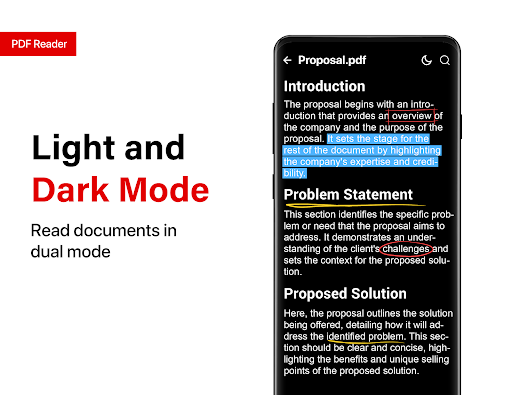
Can't open PDF files and other documents on mobile? Need a simple and easy-to-use document reader app? PDF Reader is the app you've been looking for! PDF reader can view pdf files on android & open PDF and all types of documents. Users can read, share and view pdf files and all other documents with the PDF viewer. PDF opener auto scan, find, and list all PDF files on the phone. PDF reader supports quick reading of files in all formats. PDF file opener can easily manage and view pdf files as well as all format documents. PDF viewer can also view excel files, read word documents, and open PowerPoint files. <h1>Key Features of PDF Opener</h1> <b>View PDF File & All Documents Offline</b> ● View office files, and assignments & read PDF documents. ● Read letters, memos & word reports in word viewer. ● View business forecasts, and pie charts in PPT reader. ● Read ebooks, stories, and novels in Epub reader ● View all files in dark mode in document reader. <b>Share & Print</b> ● Share PDF documents & other files easily. ● Quickly print PDF & read documents. <b>Search In Document Reader</b> ● Search & find text in all document reader. ● Search all types of documents by name. ● Search and go to different page numbers. <b>Add/Remove Password</b> ● Protect documents by adding passwords in PDF file viewer. ● Add or remove passwords on PDF documents. <b> Manage all documents<b> ● Arrange documents by name, size, and date. ● Delete/rename all documents in in PDF file viewer ● Bookmark frequently used documents. ● View recently opened documents in the recent folder. PDF opener is a very simple and easy-to-use document reader app. PDF viewer app makes it very easy to scan and read PDF files and manage documents on mobile. Users can view and read PDF documents on full screen with very smooth scrolling. All PDF files & documents can be viewed without interruption with PDF file opener. PDF file reader offers horizontal and vertical views in reading mode. With the PDF viewer app, users can view all documents in dark mode. PDF file opener allows users to search text in documents. Users can rename and delete files in the PDF file reader app. Files can be sorted by name, file size, and date in the PDF viewer app. Frequently used files can be added to favorites for quick access in the PDF document viewer. Users can view recently opened documents in the recent folder in PDF file opener. PDF reader also supports password-protected files. Users can add/remove passwords on PDF documents. Users can read PDF and share all types of documents with the PDF file reader. Documents can be searched easily by name in the PDF opener. Users can go to any page of any document by just entering the page number in the PDF file opener. PDF file viewer can also open Word documents and Excel files. Users can also view PowerPoint and epub files in the PDF viewer app. Other files like TXT, HTML, RTF, etc can also be viewed in the PDF reader app. Users can view and share all types of document files with the PDF file reader app. <b>PDF reader needs all file access permission to scan and manage the list of documents in the document reader on the user's phone. The developer of the PDF file viewer app doesn't collect any private data.</b></b></b>
Installs, last 30 days Measured
Exact Google Play install counts, collected daily
Ratings
2,707 ratings, 10 reviews
- 5 ★85%
- 4 ★0.0%
- 3 ★2.5%
- 2 ★2.5%
- 1 ★10%
Recent reviews
Latest public reviews from the store
- 18 May 2026
good without ads
- 18 May 2026
no ad 💯, superb app
- 17 May 2026
No Ads app on Google play?! That's godsend! Guys, you are heroes!
- 17 May 2026
Really fantastic app works very smoothly recommend that others thanks again
What reviewers bring up
Topics mentioned in the latest 50 reviews, by how many reviews mention them
Liked in good reviews (46 reviews)
- ads 11
- pdf 6
- without 5
- reader 4
- adds 3
- exceptional 2
- fantastic 2
- recommend 2
Raised in bad reviews (4 reviews)
No topic comes up twice.
Top chart positions
Latest Google Play chart ranks by country, last 10 days
Not in any tracked top chart in the last 10 days.
PDF Reader - PDF Viewer App history
Release, install milestones, listing and store changes
- Reached 500,000+ installs 9 Oct 2025
- Reached 100,000+ installs 26 May 2024
- Reached 50,000+ installs 9 Apr 2023
- Reached 10,000+ installs 25 Sep 2022
- Reached 5,000+ installs 11 Sep 2022
- First released on the store 30 Aug 2022
- Reached 1,000+ installs 28 Aug 2022
- Reached 100+ installs 17 Aug 2022
Update frequency
How often PDF Reader - PDF Viewer App ships a new version, month by month
2 updates in the last 12 months. More often than most similar apps: they shipped a median of 0 updates in the same year.
Recent versions
Current version 2.1.4
- Version 2.1.421 Aug 2026
- Version 1.0.4931 Dec 2025
- AI Assistant Added - Signature Working Added - Summarize PDF with AI - Improved Performance. - Improved PDF Reader. - Bugs Fixed. - UI Fixed.
- Version 1.0.479 Nov 2025
- Version 1.0.4621 Oct 2025
Listing keywords
Words and phrases PDF Reader - PDF Viewer App repeats most in its store listing
Top phrases: pdf file (14), pdf reader (8), document reader (7), pdf files (7), pdf viewer (7).
Highlighted words also appear in the title. Counts cover the title, short description and description.
Business model and tech
From the store listing and declared permissions
- Business model
- Free to downloadIn-app purchasesShows ads
- Sensitive access
- No sensitive permission declared
Compliance
What the listing and the app package show
- Store status
- Live
- Upkeep
- Updated 21 Aug 2026
- Registered in
- United States
- Privacy policy
- Linked on the listing
- Advertising
- Shows ads
- In-app purchases
- Offered
- Age rating
- Everyone
Apps like PDF Reader - PDF Viewer App
Craft Lucky Block Mods MCPEWira N Dev280K installs★ 4.54
Recover Everything: Photo&DataGIYASTAR2.9M installs★ 3.67
GameDriver - Mali (S20/N20)Samsung Electronics Co., Ltd.23.2M installs★ 3.85
SaveTok - Video DownloaderCynt Maxwell Apps243K installs★ 4.39
Mulugu Astro - Panchangam 2024Kameshwari e Services Pvt Ltd582K installs★ 3.36
TaskarioRichaMiguel307K installs★ 4.66
Authenticator App - 2FA AuthTaka Applications1.8M installs★ 4.34
MTG Tracker & Life CounterPlatty Soft Ltd38.7K installs★ 2.46
Shake to Enable TorchLuxebyte Labs531K installs★ 4.62
PDF Reader - PDF Viewer App: questions and answers
How many downloads does PDF Reader - PDF Viewer App have?
PDF Reader - PDF Viewer App has 725,699 installs on Google Play, measured from the store's own count on 19 Nov 2026.
Who makes PDF Reader - PDF Viewer App?
PDF Reader - PDF Viewer App is published by Bizcraft Apps, a developer based in US.
When was PDF Reader - PDF Viewer App last updated?
The latest version (2.1.4) was released on 21 Aug 2026.
Is PDF Reader - PDF Viewer App free?
Yes. PDF Reader - PDF Viewer App is free to download and offers in-app purchases, and it shows ads.
Is PDF Reader - PDF Viewer App still available?
Yes. PDF Reader - PDF Viewer App is live on Google Play as of 19 Nov 2026.
Track PDF Reader - PDF Viewer App and its competitors
Watch any app for new versions, rating drops, chart moves and removals. Free plan, no card.