PDF Reader: PDF Viewer, Ebooks
PDF Reader to view & manage documents & PDF files . PDF, ebook, notes reader app
- Installs
- 22.02K
- Measured
- Rating
- —
- Ratings
- —
- Version
- 1.3.5
- Updated 17 Sep 2025
- Released
- 12 Jun 2021
- Tracked since 12 May 2026
- Size
- —
Screenshots


About PDF Reader: PDF Viewer, Ebooks
The description on the store listing
<b>PDF Reader: Multiple Tab, Autosave, Mark Favorite </b>
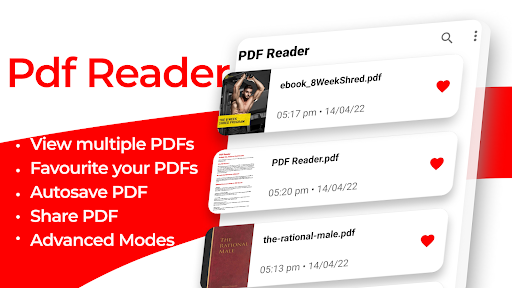
PDF Reader that remembers page number, view multiple PDFs at the same time and lets you Favorite your PDFs.
<b>Why PDF Reader ?</b>
PDF Reader that allows you to read, view, and manage PDF in one place, read and view PDF files downloaded from the internet, supports PDF sharing, read multiple PDFs at once, all favourite PDF at one place, and quick jump between pages in PDF, vertical and horizontal scrolling, Autosave and Bookmark in PDF supported, Keep screen on while you are reading, supports 2 page View at once in PDF, PDF full-screen viewing supported, Support for documentation zooming and the PDF reader is free for Android. …
Read the full description
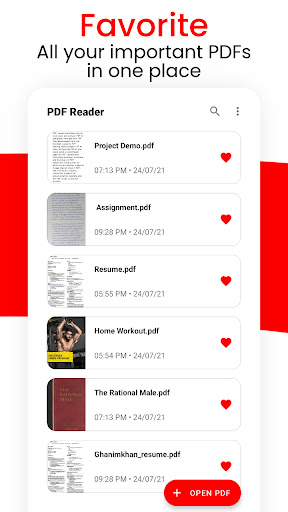
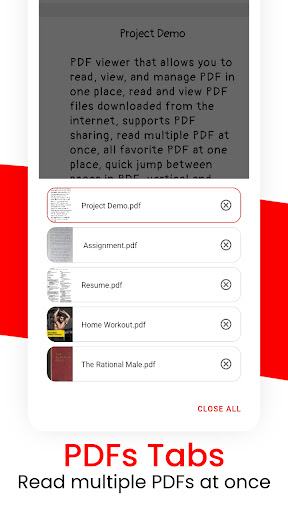
<b>PDF Reader: Multiple Tab, Autosave, Mark Favorite </b> PDF Reader that remembers page number, view multiple PDFs at the same time and lets you Favorite your PDFs. <b>Why PDF Reader ?</b> PDF Reader that allows you to read, view, and manage PDF in one place, read and view PDF files downloaded from the internet, supports PDF sharing, read multiple PDFs at once, all favourite PDF at one place, and quick jump between pages in PDF, vertical and horizontal scrolling, Autosave and Bookmark in PDF supported, Keep screen on while you are reading, supports 2 page View at once in PDF, PDF full-screen viewing supported, Support for documentation zooming and the PDF reader is free for Android. <b> So how’s this PDF Reader different? </b> This PDF Reader has some unique features like quickly jumping to a specific page in a large PDF, Tab view to see all recent PDF you have opened and view/read multiple PDF at the same time, Autosave your PDF progress and remembering where you read, Mark PDF as a favourite for quick access <b>Different Features included in PDF Reader : </b> <b>• Quick Tab:</b> Your PDFs open as tabs just like in a web browser. You can instantly switch between these recently opened PDFs while you reading. Simply tap on the tabs icon and switch to your desired PDF and Open multiple PDFs at the same time <b>• Autosave and Bookmark in PDF Reader:</b> PDF Viewer automatically saves your PDF progress and remembers where you read the PDFs and you can continue reading where you left in PDF Reader. <b>• Favorite PDF in PDF reader:</b> Set your important PDFs like Assignments, Essays, Letters or some important document as a favourite for faster access find them easily in this PDF Reader. <b>• Vertical and horizontal scrolling:</b> PDF Reader provides 2 reading modes, you can switch between vertical or horizontal scrolling viewing angles as per your choice <b>• Advance Mode PDF reader:</b> invert PDF colour: for dark theme, high-quality rendering, Anti-aliasing, Keep the screen on while reading, page snapping for free <b>• Share PDF:</b> you can Multiple PDF in PDF Reader to your friends very easily <b>• Save storage:</b> PDF Reader app is very small in size as compared to other PDF viewers or PDF readers in the market <b>• Easy to Use PDF reader:</b> Set it as your default PDF reader and instantly view PDF files from the file manager, email, cloud, or web in this PDF Reader without having to open the app. <b>PDF Reader Tools Features : </b> • Beautiful dark and light theme • Read multiple PDF at once inside Tabs • All favourite and important PDF in one PDF reader • Quickly jump between pages in PDF • Autosave and Bookmark in PDF reader • Quickly open and view PDF documents in PDF reader. • A simple list of PDF files. • Horizontal / Vertical scrolling mode in PDF reader • Go to the page number directly and see the page count and total pages PDF file. • Share with your friend on email, cloud, or any messaging apps with one click • Scroll, and zoom PDF in and out of the PDF reader. • Full-screen mode in PDF reader • Thumbnails make it easy to search faster without opening. • No need for the internet, read PDF offline in PDF reader. • Night mode for comfortable PDF reading at night or in low light. • Easy and quick to use PDF reader • 2 page View in one in PDF Reader <b>Permissions Notice:</b> • File access - it is used to save files, share files, read files
Installs since 15 Nov 2026 Measured
Exact Google Play install counts, collected daily
Daily history starts once this app is in our daily install sample.
Ratings
- 5 ★0.0%
- 4 ★0.0%
- 3 ★0.0%
- 2 ★0.0%
- 1 ★0.0%
Recent reviews
Latest public reviews from the store
- 5 May 2025
كيف اضيف الوزن المتغير؟
Top chart positions
Latest Google Play chart ranks by country, last 10 days
Not in any tracked top chart in the last 10 days.
PDF Reader: PDF Viewer, Ebooks history
Release, install milestones, listing and store changes
- Reached 10,000+ installs 19 Jul 2022
- Reached 5,000+ installs 18 Jan 2022
- Reached 1,000+ installs 31 Aug 2021
- First released on the store 12 Jun 2021
Recent versions
Current version 1.3.5
- Version 1.3.217 Sep 2025
- Version 1.3.119 Jul 2025
- Version 1.3.014 Feb 2025
- Version 1.2.826 Mar 2023
Listing keywords
Words and phrases PDF Reader: PDF Viewer, Ebooks repeats most in its store listing
Top phrases: pdf reader (31), pdf files (4), autosave and bookmark (3), bookmark in pdf (3), pdf reader pdf (3).
Highlighted words also appear in the title. Counts cover the title, short description and description.
Business model and tech
From the store listing, the SDKs in the app package and its declared permissions
- Business model
- Free to downloadShows ads
- Built with
- No cross-platform framework or game engine detected
- Ad networks (0)
- None detected
- Sensitive access
- Photos, videos and filesAdvertising ID
0 ad, attribution and analytics SDKs detected. SDKs are read from the app package and permissions from the store listing, so code that loads later is not seen.
Technology
12 SDKs found in the app package
13 permissions
0 special access, 2 sensitive, 11 standard
- Change or delete shared storageSensitive
- Read shared storageSensitive
- Ad attribution (Privacy Sandbox)ACCESS_ADSERVICES_ATTRIBUTIONStandard
- Ad topics (Privacy Sandbox)ACCESS_ADSERVICES_TOPICSStandard
- Read how it was installed (install referrer)BIND_GET_INSTALL_REFERRER_SERVICEStandard
- Read the advertising IDAD_IDStandard
- Read the advertising ID (Privacy Sandbox)ACCESS_ADSERVICES_AD_IDStandard
- Keep the phone awakeStandard
- Run a foreground serviceFOREGROUND_SERVICEStandard
- Full internet accessStandard
- See network connectionsStandard
- Internal app permissionDYNAMIC_RECEIVER_NOT_EXPORTED_PERMISSIONStandard
Compliance
What the listing and the app package show
- Store status
- Live
- Upkeep
- Updated 17 Sep 2025
- Registered in
- India
- Privacy policy
- Linked on the listing
- Advertising
- Shows ads
- In-app purchases
- None declared
- Age rating
- Everyone
- Sensitive permissions
- 2 sensitive of 13
- Location access
- No
- Camera and microphone
- Neither
Apps like PDF Reader: PDF Viewer, Ebooks
들어서 화면켜기Won3.5K installs★ 4.0
Height PredictionEcliptic App Ventures45.9K installs★ 2.4
Speicers`Pro VPNEldiablolucifer202021.2K installs★ 4.14
Lightning Tracker with AlertsYaksh Software4.3K installs★ 3.0
Mana Pathi (Unit Converter)Shirish Koirala2.2K installs★ 4.6
Multi-tab Calc - A simple app.Naoyuki Rikiji1.3K installs★ 5.0
Photo Recovery PlusBillApps7.1K installs★ 4.53
Just Silence. Scheduled.Akid Soft1.6K installs★ 5.0
- WoWp AssistantВиталий Робиновский2K installs★ 4.2
PDF Reader: PDF Viewer, Ebooks: questions and answers
How many downloads does PDF Reader: PDF Viewer, Ebooks have?
PDF Reader: PDF Viewer, Ebooks has 22,017 installs on Google Play, measured from the store's own count on 15 Nov 2026.
Who makes PDF Reader: PDF Viewer, Ebooks?
PDF Reader: PDF Viewer, Ebooks is published by Androxus, a developer based in IN.
When was PDF Reader: PDF Viewer, Ebooks last updated?
The latest version (1.3.5) was released on 17 Sep 2025.
Is PDF Reader: PDF Viewer, Ebooks free?
Yes. PDF Reader: PDF Viewer, Ebooks is free to download, and it shows ads.
Is PDF Reader: PDF Viewer, Ebooks still available?
Yes. PDF Reader: PDF Viewer, Ebooks is live on Google Play as of 15 Nov 2026.
Track PDF Reader: PDF Viewer, Ebooks and its competitors
Watch any app for new versions, rating drops, chart moves and removals. Free plan, no card.