
PDF Reader - View PDF Files
PDF Reader - PDF Viewer, Read and Edit All PDF Files Easily.
- Installs
- 73.81K
- Measured
- Rating
- 4.46
- Ratings
- 168
- 4 reviews
- Version
- 2.8
- Updated 1 Nov 2025
- Released
- 25 May 2025
- Tracked since 14 May 2026
- Size
- —
Screenshots

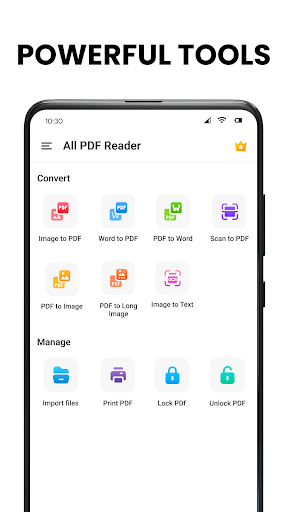
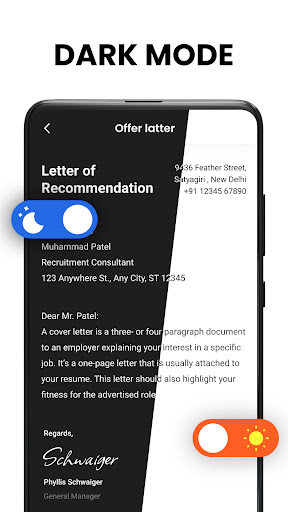

About PDF Reader - View PDF Files
The description on the store listing
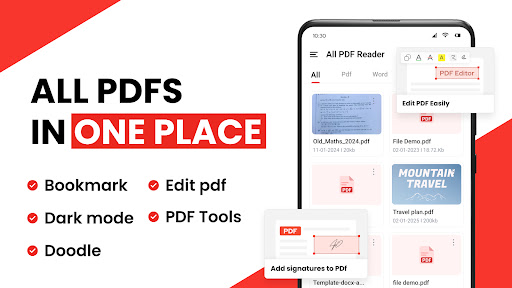
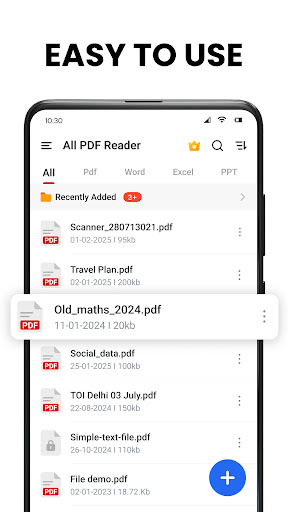
✔️ Looking for a simple and easy-to-use app to read <b>PDF</b> documents? PDF Reader is the best app to meet your needs exactly. This app scans your phone, finds all PDF files, and lists them in one place. It lets you open, read, edit, and manage your PDFs easily
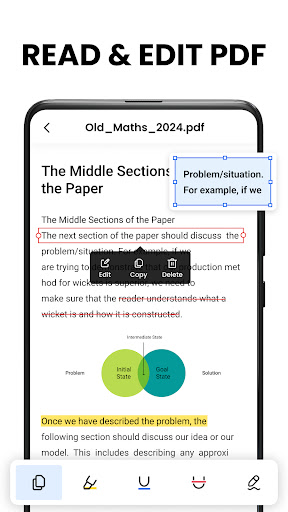
✔️ This <b>PDF reader</b> supports all document files like Word, Excel, PowerPoint, and TXT formats with high speed. This is not just a reading app. With this PDF reader, you can easily edit any PDF page, bookmark PDF files, add notes to PDF, and share PDFs with others easily.
✔️ Download this simple <b>PDF reader</b> app to help you manage your files better. It gives you a <b>PDF viewer</b>, <b>PDF reader</b>, and <b>PDF …
Read the full description
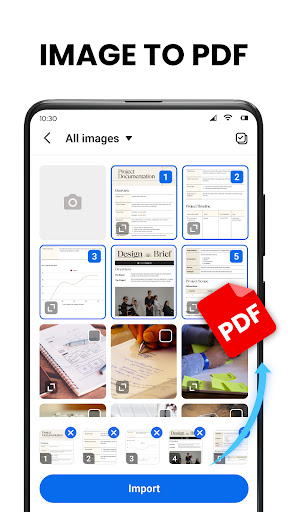
✔️ Looking for a simple and easy-to-use app to read <b>PDF</b> documents? PDF Reader is the best app to meet your needs exactly. This app scans your phone, finds all PDF files, and lists them in one place. It lets you open, read, edit, and manage your PDFs easily ✔️ This <b>PDF reader</b> supports all document files like Word, Excel, PowerPoint, and TXT formats with high speed. This is not just a reading app. With this PDF reader, you can easily edit any PDF page, bookmark PDF files, add notes to PDF, and share PDFs with others easily. ✔️ Download this simple <b>PDF reader</b> app to help you manage your files better. It gives you a <b>PDF viewer</b>, <b>PDF reader</b>, and <b>PDF editor</b> all in one place. It is lightweight, free, and easy to use. Try it once! 📕 <b>Download this PDF reader and enjoy all its features easily.</b> - A simple PDF list to quickly find and manage files. - Dark mode and dim color options for better reading. - Full-screen mode for a better reading experience. - Scroll pages horizontally or vertically. - Read page by page or continuously for easy reading. - Zoom in and out on any page. - Search for any text in a PDF easily. - Jump to any desired page by entering just page number in PDF 📝 <b>Powerful PDF Editor</b> - Add text to PDF. - Highlight Important Information in Various colours in PDF. - Draw and Annotate on PDF pages. - Easily Search and copy the text in PDF. - underline and strikethrough any PDF text. - Add notes in PDF. 🧰 <b>USEFUL PDF TOOLS (COMING SOON)</b> - Easily convert image into PDF. - Split PDF and merge PDF Quickly and easily. - Convert WORD files into PDF and Vice Versa. - Convert your Full PDF Document to a single Long image. - Draw and Annotate in any PDF Documents whenever you require. - Add e-signature in any PDF files. - Add or Delete any Particular page in PDF files. - Compress PDF or any Document file with one click. - Fill out PDF forms easily using this app. - Convert PDF into WORD, IMG, XLS Easily. 🗃️<b>Smart PDF manager</b> - Bookmark PDFs for future use. - Recently opened files are shown in a simple list for easy viewing. - Add or Remove Password to any PDF Easily. - Share, Delete, or Rename any PDF files. - Recycle Bin: With this Document Viewer, you can easily get back any file accidentally deleted, so you don't have to worry about losing any files forever. 🔹Enjoy your Reading Experience with this simple and easy <b>PDF reader</b> 🕵🏼♂️ <b>Permission Needed</b> - To read and edit files on your device, Android 11 and above users must allow the MANAGE_EXTERNAL_STORAGE permission. We only use this access to make the app work properly, keeping your data safe and private. 🙋 We are working hard to make the app better for you! If you have any suggestions or comments, Please feel free to reach out via email.🤝 🤳 <b>PDF App</b> - Need a powerful PDF app? With this app, you can view and send PDF files easily. It's perfect for your need. 📋 <b>PDF Reader free for all</b> - Are you Looking for a free and easy PDF reader for Android? With this app, you can create, open, edit, and share PDF files anytime. It helps you work with all kinds of PDF documents easily. 📝 <b>Read/View/Edit All PDF file</b> - This is not only a simple PDF viewer but also a Powerful PDF Viewer and Editor. This Simple PDF reader makes your work more efficient and easy. Let's try this PDF reader to manage your All Documents in one Place and with one click. 📚 <b>Document Reader</b> - This PDF reader can also read all other documents like - word, Excel, ppt, text, etc. Using this simple PDF reader you can easily manage all types of documents.
Installs since 29 Aug 2026 Measured
Exact Google Play install counts, collected daily
Ratings
168 ratings, 4 reviews
- 5 ★50%
- 4 ★12%
- 3 ★38%
- 2 ★0.0%
- 1 ★0.0%
Recent reviews
Latest public reviews from the store
- 18 May 2026
I'm a kid head prefect at my school and if our prefect teacher send us a pdf this app always works
- 18 May 2026
nice
- 18 May 2026
it nice app it can make such a great pdf
- 18 May 2026
good 😊
What reviewers bring up
Topics mentioned in the latest 50 reviews, by how many reviews mention them
Liked in good reviews (41 reviews)
- pdf 5
- useful 4
- school 2
Raised in bad reviews (7 reviews)
- ads 2
Top chart positions
Latest Google Play chart ranks by country, last 10 days
Not in any tracked top chart in the last 10 days.
PDF Reader - View PDF Files history
Release, install milestones, listing and store changes
- Reached 50,000+ installs 16 Oct 2025
- First released on the store 25 May 2025
Update frequency
How often PDF Reader - View PDF Files ships a new version, month by month
0 updates in the last 12 months. Less often than most similar apps: they shipped a median of 2 updates in the same year.
Recent versions
Current version 2.8
- Version 2.91 Nov 2025
- Version 2.82 Oct 2025
- Bug Fixed - Performance Improved
- Version 2.71 Oct 2025
- Version 2.613 Aug 2025
Listing keywords
Words and phrases PDF Reader - View PDF Files repeats most in its store listing
Top phrases: pdf reader (15), pdf files (9), pdf viewer (4), pdf documents (3), powerful pdf (3).
Highlighted words also appear in the title. Counts cover the title, short description and description.
Business model and tech
From the store listing and declared permissions
- Business model
- Free to downloadIn-app purchasesShows ads
- Sensitive access
- No sensitive permission declared
Compliance
What the listing and the app package show
- Store status
- Live
- Upkeep
- Updated 1 Nov 2025
- Registered in
- India
- Privacy policy
- Linked on the listing
- Advertising
- Shows ads
- In-app purchases
- Offered
- Age rating
- Everyone
Apps like PDF Reader - View PDF Files
SnagID - Snagging & InspectionAppculus – Audit, Inspection, Checklists & Utility22.7K installs★ 3.65
SimLab AR/VR ViewerSimulation Lab software23K installs★ 3.8
Allo: AI Second Business PhoneThe Mobile-First Company26.7K installs★ 3.7
DDA at Your ServiceCivic Solutions Pvt. Ltd.54.2K installs★ 2.6
DevHub for GitHubBruno Lemos13.4K installs★ 4.5
RBX Skins & Clothes MakerVenus Gold88.1K installs★ 3.29
CC RecyclesCity of Corpus Christi, Texas7.6K installs★ 4.77
Arcade: El principioArcadeLab14.2K installs★ 4.8
Password SecureAppInsane18.4K installs★ 4.05
PDF Reader - View PDF Files: questions and answers
How many downloads does PDF Reader - View PDF Files have?
PDF Reader - View PDF Files has 73,809 installs on Google Play, measured from the store's own count on 14 Nov 2026.
Who makes PDF Reader - View PDF Files?
PDF Reader - View PDF Files is published by iStrom Apps, a developer based in IN.
When was PDF Reader - View PDF Files last updated?
The latest version (2.8) was released on 1 Nov 2025.
Is PDF Reader - View PDF Files free?
Yes. PDF Reader - View PDF Files is free to download and offers in-app purchases, and it shows ads.
Is PDF Reader - View PDF Files still available?
Yes. PDF Reader - View PDF Files is live on Google Play as of 14 Nov 2026.
Track PDF Reader - View PDF Files and its competitors
Watch any app for new versions, rating drops, chart moves and removals. Free plan, no card.