
PDF Scanner - Document Scanner
Scan image to PDF, camera scanner
- Installs
- 161K
- Measured
- Rating
- 4.88
- Ratings
- 928
- Version
- 1.0.3
- Updated 6 Mar 2023
- Released
- 14 Dec 2022
- Tracked since 13 May 2026
- Size
- —
Screenshots

About PDF Scanner - Document Scanner
The description on the store listing
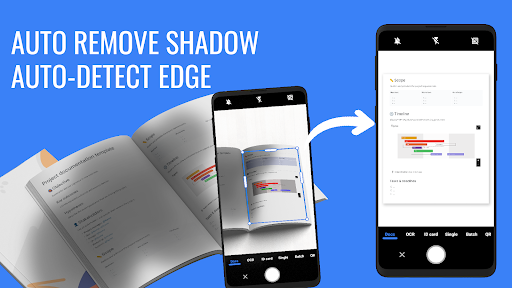
✨Do you need to scan documents to PDF? With PDF Scanner you just use the camera or choose a photo from the gallery then just one click to convert from an image to a PDF file.
Main functions of PDF Scanner application:
✔ Scan Document: Scan all document pages into a PDF file
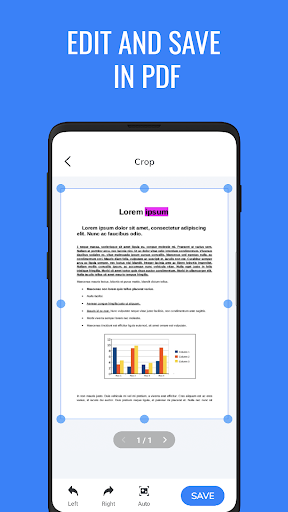
✔ PDF Reader: Read and edit all PDF files on your phone
✔ Scan OCR: Scan characters from the image or camera, extract text from the image
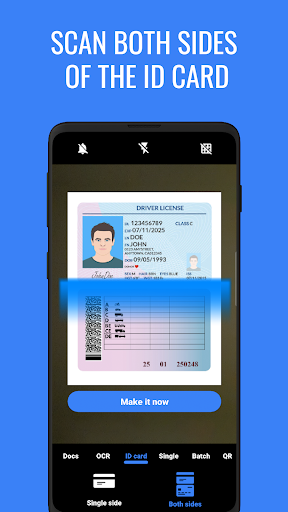
✔ Scan Card ID: Scan one-sided or double-sided scan your important papers to PDF, easy to share, print documents
✔ Scan QR code: Scan the QR code and Barcode quickly and conveniently
✔ Scan PDF with 2 modes: Batch / Single
Easily edit and share PDF documents
👉 …
Read the full description
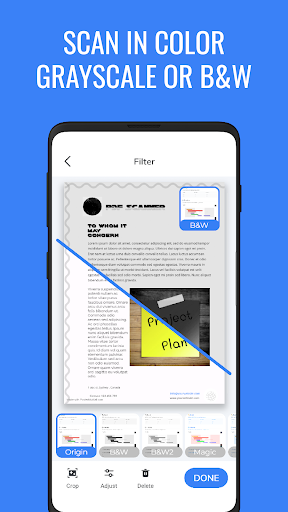
✨Do you need to scan documents to PDF? With PDF Scanner you just use the camera or choose a photo from the gallery then just one click to convert from an image to a PDF file. Main functions of PDF Scanner application: ✔ Scan Document: Scan all document pages into a PDF file ✔ PDF Reader: Read and edit all PDF files on your phone ✔ Scan OCR: Scan characters from the image or camera, extract text from the image ✔ Scan Card ID: Scan one-sided or double-sided scan your important papers to PDF, easy to share, print documents ✔ Scan QR code: Scan the QR code and Barcode quickly and conveniently ✔ Scan PDF with 2 modes: Batch / Single Easily edit and share PDF documents 👉 Powerful document filters: Black & White, Grayscale, Magic color, Shadow removal... 👉 No watermark 👉 Remove the shadow in the document 👉 Share documents via mail, Dropbox, Google Drive, One Drive, Telegram 👉 Print documents PDF Scanner app will help you to scan everything and convert them to the PDF file you need.
Installs since 29 Aug 2026 Measured
Exact Google Play install counts, collected daily
Ratings
928 ratings
- 5 ★88%
- 4 ★12%
- 3 ★0.0%
- 2 ★0.0%
- 1 ★0.0%
Recent reviews
Latest public reviews from the store
- 26 Mar 2021
Bir ürüne olumsuz yorum yapmıştım. Benden sonra yapılan olumlu yönde yorum yayınlanmış, benimki yok. İlginç.
- 11 May 2020
Alışveriş yaparken o an stokta biten sepetteki ürünün hangisi olduğu da keşke bi eklenti haline getirilse, o anki heyecanla göremiyoruz hangisi olduğunu
- 21 Mar 2020
👍🏻
Top chart positions
Latest Google Play chart ranks by country, last 10 days
Not in any tracked top chart in the last 10 days.
PDF Scanner - Document Scanner history
Release, install milestones, listing and store changes
- Reached 100,000+ installs 6 Mar 2023
- Reached 50,000+ installs 20 Feb 2023
- Reached 10,000+ installs 6 Feb 2023
- Reached 1,000+ installs 23 Jan 2023
- Reached 10+ installs 12 Jan 2023
- First released on the store 14 Dec 2022
Recent versions
Current version 1.0.3
- Version 1.0.48 Feb 2023
- Version 1.0.31 Feb 2023
* PDF Scanner * Scan Documents to PDF * Scan Image to PDF
- Version 1.0.118 Jan 2023
Listing keywords
Words and phrases PDF Scanner - Document Scanner repeats most in its store listing
Top phrases: pdf scanner (4), pdf file (3), image to pdf (2), print documents (2), qr code (2).
Highlighted words also appear in the title. Counts cover the title, short description and description.
Business model and tech
From the store listing and declared permissions
- Business model
- Free to downloadIn-app purchasesShows ads
- Subscriptions and payments
- Google Play billing
- Sensitive access
- LocationCameraPhotos, videos and filesAdvertising ID
17 permissions
1 special access, 5 sensitive, 11 standard
- Manage all filesMANAGE_EXTERNAL_STORAGESpecial access
- Take photos and videosSensitive
- Change or delete shared storageSensitive
- Read shared storageSensitive
- Approximate locationSensitive
- Show notificationsPOST_NOTIFICATIONSSensitive
- Read how it was installed (install referrer)BIND_GET_INSTALL_REFERRER_SERVICEStandard
- Read the advertising IDAD_IDStandard
- Control vibrationStandard
- Keep the phone awakeStandard
- Run a foreground serviceFOREGROUND_SERVICEStandard
- Start when the phone turns onStandard
Compliance
What the listing and the app package show
- Store status
- Live
- Upkeep
- No update since 6 Mar 2023
- Registered in
- Vietnam
- Privacy policy
- Linked on the listing
- Advertising
- Shows ads
- In-app purchases
- None declared
- Age rating
- Everyone
- Sensitive permissions
- 5 sensitive, 1 special access of 17
- Location access
- Yes, while in use
- Camera and microphone
- Camera
Apps like PDF Scanner - Document Scanner
Sharpdesk MobileSHARP CORPORATION453K installs★ 2.79
Listen Docs: Text to SpeechMatlub Yazılım A.Ş.34.2K installs★ 4.34
Sonic SenderBravura33.1K installs★ 4.3
DNS Checker - Network ToolsSoftrix Technologies97.4K installs★ 4.37
1Hub MobileMovista, Inc.68.2K installs★ 2.91
Clearspaceclearspace technologies, inc.247K installs★ 4.53
Clear: To-Dos & Remindernedkaboo19.7K installs★ 4.61
BS Patro - Nepali BsCalendarK Kafle411K installs★ 4.4
English Voice typing KeyboardAppsCaps318K installs★ 4.1
PDF Scanner - Document Scanner: questions and answers
How many downloads does PDF Scanner - Document Scanner have?
PDF Scanner - Document Scanner has 161,499 installs on Google Play, measured from the store's own count on 15 Nov 2026.
Who makes PDF Scanner - Document Scanner?
PDF Scanner - Document Scanner is published by TSoft Productions, a developer based in VN.
When was PDF Scanner - Document Scanner last updated?
The latest version (1.0.3) was released on 6 Mar 2023.
Is PDF Scanner - Document Scanner free?
Yes. PDF Scanner - Document Scanner is free to download, and it shows ads.
Is PDF Scanner - Document Scanner still available?
Yes. PDF Scanner - Document Scanner is live on Google Play as of 15 Nov 2026.
Track PDF Scanner - Document Scanner and its competitors
Watch any app for new versions, rating drops, chart moves and removals. Free plan, no card.