
PDF Scanner • Document Scanner
Scan like a Genius! Create & share PDFs with PDF Scanner – free & reliable!
- Installs
- 9.06K
- Measured
- Rating
- —
- Ratings
- —
- Version
- Varies with device
- Updated 26 Feb 2026
- Released
- 7 Jun 2022
- Tracked since 13 May 2026
- Size
- —
Screenshots

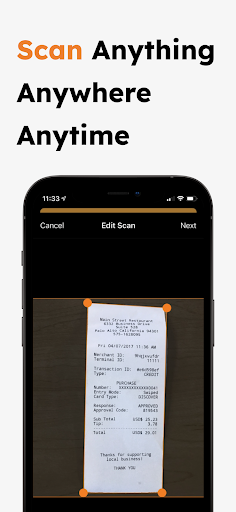


About PDF Scanner • Document Scanner
The description on the store listing
PDF Scanner App – Your Ultimate Document Scanning Solution
Transform your device into a powerful, portable document scanner with PDF Scanner App, rivaling the capabilities of market leaders like CamScanner, PDF Scanner, Simple Scan, Genius Scan, iScanner, TurboScan, and Adobe Scan. PDF Scanner is engineered to provide you with a swift and efficient scanning experience without any cost, making it the preferred choice for millions of users worldwide.
Why Choose PDF Scanner?
• Completely Free: Enjoy all features without any hidden fees. It’s your free alternative to paid apps like CamScanner and Adobe Scan.
• User-Friendly Interface: Scan, manage, and share documents with a few …
Read the full description
PDF Scanner App – Your Ultimate Document Scanning Solution Transform your device into a powerful, portable document scanner with PDF Scanner App, rivaling the capabilities of market leaders like CamScanner, PDF Scanner, Simple Scan, Genius Scan, iScanner, TurboScan, and Adobe Scan. PDF Scanner is engineered to provide you with a swift and efficient scanning experience without any cost, making it the preferred choice for millions of users worldwide. Why Choose PDF Scanner? • Completely Free: Enjoy all features without any hidden fees. It’s your free alternative to paid apps like CamScanner and Adobe Scan. • User-Friendly Interface: Scan, manage, and share documents with a few taps. Our interface is as simple as those of iScanner and Simple Scan, but with more robust free features. • High-Quality Scans: Get clear and sharp images comparable to TurboScan and Genius Scan, ensuring your scans look professional. Exclusive Features: • Multi-Page Scanning: Like PDF Scanner, scan multiple pages quickly and merge them into a single document. Ideal for both personal and professional use. • Advanced Export Options: Choose how you export—single PDF for full documents or multiple JPGs for individual scans, similar to options offered by Adobe Scan and TurboScan. • Precision Border Detection: Automatically detects document edges with precision, outperforming tools like CamScanner and Genius Scan. Manual adjustment is also available for perfectionists. • Multiple Scanning Modes: Whether documents, receipts, or photos, PDF Scanner handles them all with ease, much like iScanner and Simple Scan. • Secure and Private: We prioritize your privacy. Your documents are processed on your device, just as securely as with TurboScan and Adobe Scan. Optimized for Efficiency: • Quick Sharing and Exporting: Seamlessly share or email your scanned documents as PDF or JPG directly from the app, a feature praised in apps like CamScanner and PDF Scanner. • Cloud Integration: Easily save scans to your favorite cloud services, including Google Drive and Dropbox, for accessibility and backup, matching the flexibility of iScanner and Adobe Scan. • Customization Options: Customize document names, sizes, and more to suit your needs, a step beyond what’s offered in Simple Scan and Genius Scan. PDF Scanner is not just another document scanning app; it’s a comprehensive tool designed to enhance productivity and streamline document management. It’s perfect for professionals, students, and anyone who needs a reliable document scanner at no cost. Download PDF Scanner today and experience the ease of document scanning and management at your fingertips. Discover why it stands out from CamScanner, PDF Scanner, Genius Scan, and more as the best free scanner app available.
Installs since 3 Sep 2026 Measured
Exact Google Play install counts, collected daily
Ratings
- 5 ★0.0%
- 4 ★0.0%
- 3 ★0.0%
- 2 ★0.0%
- 1 ★0.0%
Recent reviews
Latest public reviews from the store
- 4 Apr 2026
dont like that i cant slid over more then 1right square
Top chart positions
Latest Google Play chart ranks by country, last 10 days
Not in any tracked top chart in the last 10 days.
PDF Scanner • Document Scanner history
Release, install milestones, listing and store changes
- Reached 5,000+ installs 16 Apr 2025
- Reached 1,000+ installs 30 Oct 2023
- Reached 500+ installs 3 Jan 2023
- Reached 100+ installs 2 Aug 2022
- Reached 50+ installs 3 Jul 2022
- First released on the store 7 Jun 2022
Update frequency
How often PDF Scanner • Document Scanner ships a new version, month by month
1 updates in the last 12 months. More often than most similar apps: they shipped a median of 0 updates in the same year.
Recent versions
Current version Varies with device
- Version 2.1.426 Feb 2026
- Version 2.1.129 Oct 2025
- Version 2.0.16 Nov 2024
- Version 1.9.05 Nov 2024
Listing keywords
Words and phrases PDF Scanner • Document Scanner repeats most in its store listing
Top phrases: pdf scanner (13), adobe scan (5), genius scan (5), document scanner (3), document scanning (3).
Highlighted words also appear in the title. Counts cover the title, short description and description.
Business model and tech
From the store listing and declared permissions
- Business model
- Free to downloadShows ads
- Sensitive access
- CameraPhotos, videos and filesAdvertising ID
12 permissions
0 special access, 3 sensitive, 9 standard
- Take photos and videosSensitive
- Change or delete shared storageSensitive
- Read shared storageSensitive
- Read how it was installed (install referrer)BIND_GET_INSTALL_REFERRER_SERVICEStandard
- Read the advertising IDAD_IDStandard
- Keep the phone awakeStandard
- Run a foreground serviceFOREGROUND_SERVICEStandard
- Full internet accessStandard
- See network connectionsStandard
- Access all downloadsACCESS_ALL_DOWNLOADSStandard
- Access download managerACCESS_DOWNLOAD_MANAGERStandard
- Access download manager advancedACCESS_DOWNLOAD_MANAGER_ADVANCEDStandard
Compliance
What the listing and the app package show
- Store status
- Live
- Upkeep
- Updated 26 Feb 2026
- Registered in
- Canada
- Privacy policy
- Linked on the listing
- Advertising
- Shows ads
- In-app purchases
- None declared
- Age rating
- Everyone
- Sensitive permissions
- 3 sensitive of 12
- Location access
- No
- Camera and microphone
- Camera
Apps like PDF Scanner • Document Scanner
영산강 안심 알림eICT융합소프트 & 스마트오더18.3K installs★ 4.0
JBLETRADOC Mobile10.3K installs★ 4.5
Two Point HeightOmega Centauri Software15.3K installs★ 2.22
Sheridan RecyclesCity of Sheridan634 installs★ 4.67
NAFNorges Automobil-Forbund200K installs★ 3.9
Ipsos Adria CAPIIpsos Serbia7.4K installs★ 3.9
Clock: Alarm Clock & TimerIntratech so36.1K installs★ 3.79
Süzme Sayaç HesaplamaNotsup30.3K installs★ 3.6
Cattle & Goat Record KeepingVetzKin10.3K installs★ 2.5
PDF Scanner • Document Scanner: questions and answers
How many downloads does PDF Scanner • Document Scanner have?
PDF Scanner • Document Scanner has 9,065 installs on Google Play, measured from the store's own count on 12 Nov 2026.
Who makes PDF Scanner • Document Scanner?
PDF Scanner • Document Scanner is published by Golden Mind, a developer based in CA.
When was PDF Scanner • Document Scanner last updated?
The latest version (Varies with device) was released on 26 Feb 2026.
Is PDF Scanner • Document Scanner free?
Yes. PDF Scanner • Document Scanner is free to download, and it shows ads.
Is PDF Scanner • Document Scanner still available?
Yes. PDF Scanner • Document Scanner is live on Google Play as of 12 Nov 2026.
Track PDF Scanner • Document Scanner and its competitors
Watch any app for new versions, rating drops, chart moves and removals. Free plan, no card.