
PDF Scanner - Document Scanner
Scan and convert files into PDF; send and share as PDF with document scanner.
- Installs
- 30.23M
- Measured
- Rating
- 4.76
- Ratings
- 512K
- 5.9K reviews
- Version
- 1.2.6
- Updated 5 Nov 2026
- Released
- 25 Dec 2020
- Tracked since 14 May 2026
- Size
- 13 MB
- Needs 5.0
Screenshots




About PDF Scanner - Document Scanner
The description on the store listing
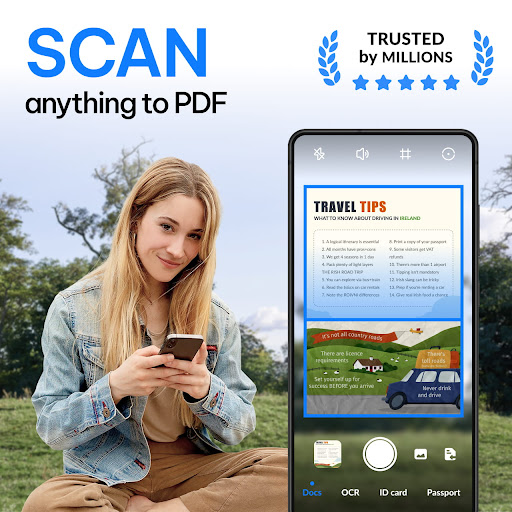
Any Scanner, a smart scanner app that turns your device into a portable PDF scanner, can easily convert paper documents and images to PDF/JPG in just one single tap.
<b>Amazing Features:</b>
1.Convert All Kinds of Documents to PDFs
Easily scan & convert all kinds of documents to PDF format in a simple tap - <b>receipts, invoices, notes, documents, photos, business cards, certificates, whiteboards, etc.</b> The scan results can be printed out instantly via Cloud Print.
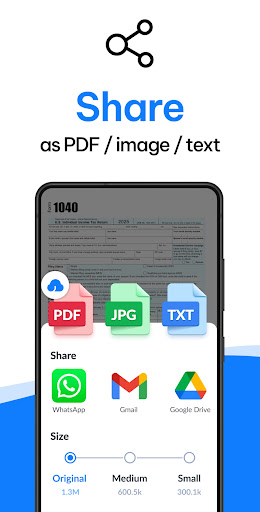
2.Easily Share Scanned Files
Conveniently <b>share scanned files in PDF or JPEG</b> formats with friends via Email, or post them on social media. Save and view the scanned files anytime, anywhere.
3.Professional …
Read the full description
Any Scanner, a smart scanner app that turns your device into a portable PDF scanner, can easily convert paper documents and images to PDF/JPG in just one single tap. <b>Amazing Features:</b> 1.Convert All Kinds of Documents to PDFs Easily scan & convert all kinds of documents to PDF format in a simple tap - <b>receipts, invoices, notes, documents, photos, business cards, certificates, whiteboards, etc.</b> The scan results can be printed out instantly via Cloud Print. 2.Easily Share Scanned Files Conveniently <b>share scanned files in PDF or JPEG</b> formats with friends via Email, or post them on social media. Save and view the scanned files anytime, anywhere. 3.Professional Quality Scan Results Its precise border detecting, <b>smart cropping</b>, and <b>auto enhancing</b> features ensure the PDF outputs clear, sharp, and high-resolution. Multiple filter options are also provided to further optimize the scan results - photo, document, clear, color, black & white. 4.Extract Texts from Images Accurately The integrated OCR (optical character recognition) technology can precisely <b>recognize and extract texts from papers and images</b>. After extraction, you can edit, copy, search, and share the texts for free. 5.Add E-Signatures Any Scanner allows you to add <b>electronic signatures</b> to the scan results. Easily sign your PDFs before sending and printing them! 6.Add Security Watermarks You can add <b>security watermarks</b> to protect your files. Mark scanned files with customized watermarks at any time! 7.Search Files Quickly Thanks to its <b>quick search</b> feature, you can quickly find your target files among multiple category folders by entering keywords; its OCR search feature can help you <b>find texts inside notes and images</b> in the shortest time. 8.Easy and Useful File Management Tools <b>Supports creating subfolders</b> to help you categorize messy documents. Its amazing searching, sorting, and <b>adding notes</b> features can help you quickly find the document you want. 9.Convenient Documents Editing Add or delete one page or the entire document; adjust the layout of documents; set page sizes of your PDF (Letter, Legal, A4, and more), all are supported! <b>Coming Soon:</b> ►Add Annotations The advanced editing feature allows you to add annotations to the scan results. Conveniently review and mark the scanned documents! ►Protect Important Documents You can <b>set passwords to protect</b> your confidential documents. Also, encrypting the files to be shared can effectively prevent others from peeking at it. ►Backup and Sync Worried about losing important files when changing devices? Any Scanner helps you <b>backup and sync</b> scanned documents to Google Drive, Dropbox, Evernote, OneDrive, etc. Just log in to your account on any device, you can manage these documents conveniently. <b>Store, sync and collaborate across smartphones, tablets, and computers.</b> Any Scanner can be used almost <b>in any case</b>: *Receipt, Invoice, Contract, Tax Roll, Business Card... *PPT, Whiteboard, Note, Book, Curriculum Vitae... *Passport, ID Card, Driver License, Certificate... *QR Code, Memo, Letter, Map... *Travel Brochure, Paint, Work Plan, Manuscript... Scanner Try this scanner now! Scanner can convert all kinds of documents to PDF format! Document Scanner Document scanner supports to categorise messy documents. Try document scanner! Scan to PDF Scan to PDF can scan papers in high-quality. Just download Scan to PDF to scan documents! Scanner Document App Scanner document app helps you extract texts from images. Use scanner document app now! Camera Scanner Want an attractive camera scanner? Camera Scanner helps you extract PDFs. Scanner App This portable scanner app can meet your needs! Try scanner app! PDF Scanner PDF scanner is your best assistant! Download PDF scanner for free!
Installs, last 30 days Measured
Exact Google Play install counts, collected daily
Ratings
511,939 ratings, 5,945 reviews
- 5 ★90%
- 4 ★4.6%
- 3 ★1.0%
- 2 ★1.5%
- 1 ★3.1%
Recent reviews
Latest public reviews from the store
- 16 Jul 2023
جميل
- 19 Nov 2022
راااائع
- 25 Oct 2022
Perfect
- 13 Feb 2021
كتاب جميل و مميز ❤😍
What reviewers bring up
Topics mentioned in the latest 14 reviews, by how many reviews mention them
Liked in good reviews (14 reviews)
- جميل 3
- كتاب 3
- جدا 2
Raised in bad reviews (0 reviews)
No topic comes up twice.
Top chart positions
Latest Google Play chart ranks by country, last 10 days
Not in any tracked top chart in the last 10 days.
PDF Scanner - Document Scanner history
Release, install milestones, listing and store changes
- Reached 10,000,000+ installs 22 Jul 2022
- Reached 5,000,000+ installs 21 Oct 2021
- Reached 1,000,000+ installs 28 May 2021
- Reached 500,000+ installs 1 May 2021
- Reached 100,000+ installs 6 Mar 2021
- Reached 50,000+ installs 6 Feb 2021
- Reached 10,000+ installs 10 Jan 2021
- Reached 5,000+ installs 6 Jan 2021
Update frequency
How often PDF Scanner - Document Scanner ships a new version, month by month
1 updates in the last 12 months. Less often than most similar apps: they shipped a median of 9 updates in the same year.
Recent versions
Current version 1.2.6
- Version 1.2.65 Nov 2026
- Version 1.2.323 Oct 2025
- Version 1.2.24 Mar 2025
- Version 1.2.123 Dec 2024
Listing keywords
Words and phrases PDF Scanner - Document Scanner repeats most in its store listing
Top phrases: document scanner (5), pdf scanner (5), scan results (5), scanner document (5), scanned files (4).
Highlighted words also appear in the title. Counts cover the title, short description and description.
Business model and tech
From the store listing and declared permissions
- Business model
- Free to downloadIn-app purchasesShows ads
- Sensitive access
- No sensitive permission declared
Compliance
What the listing and the app package show
- Store status
- Live
- Upkeep
- Updated 5 Nov 2026
- Registered in
- Hong Kong SAR China
- Privacy policy
- Linked on the listing
- Advertising
- Shows ads
- In-app purchases
- Offered
- Age rating
- Everyone
Apps like PDF Scanner - Document Scanner
Yandex Disk – Cloud StorageDirect Cursus Computer Systems Trading LLC85.5M installs★ 3.39
Any.do - To do list & CalendarAny.do To-do list & Calendar32.7M installs★ 4.43
Document Reader & PDF EditorQR Code Scanner.134M installs★ 4.51
Manus AIBUTTERFLY EFFECT PTE. LTD.11.7M installs★ 4.63
Notes, Notepad - FlyNoteEco Mobile for Work30.8M installs★ 4.55
ACE Scanner - PDF Scanner AppQR Code Scanner.75.2M installs★ 4.45
ДіяMinistry of Digital Transformation of Ukraine35M installs★ 4.08
Microsoft To Do: Lists & TasksMicrosoft Corporation31M installs★ 4.59
eGovPHDICT eGovernment35.4M installs★ 3.98
PDF Scanner - Document Scanner: questions and answers
How many downloads does PDF Scanner - Document Scanner have?
PDF Scanner - Document Scanner has 30,234,691 installs on Google Play, measured from the store's own count on 19 Nov 2026.
Who makes PDF Scanner - Document Scanner?
PDF Scanner - Document Scanner is published by Simple Design Ltd., a developer based in HK.
When was PDF Scanner - Document Scanner last updated?
The latest version (1.2.6) was released on 5 Nov 2026.
Is PDF Scanner - Document Scanner free?
Yes. PDF Scanner - Document Scanner is free to download and offers in-app purchases, and it shows ads.
Is PDF Scanner - Document Scanner still available?
Yes. PDF Scanner - Document Scanner is live on Google Play as of 19 Nov 2026.
Track PDF Scanner - Document Scanner and its competitors
Watch any app for new versions, rating drops, chart moves and removals. Free plan, no card.