PDF Scanner - Scan Docs & PDF
PDF Maker, Scan Documents, Generate PDF, Scan QR Code and much more
- Installs
- 470K
- Measured
- Rating
- 4.49
- Ratings
- 5.7K
- 4 reviews
- Version
- 16.0
- Updated 18 Aug 2026
- Released
- 29 Aug 2022
- Tracked since 13 May 2026
- Size
- —
Screenshots
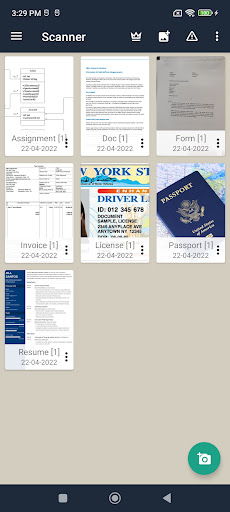
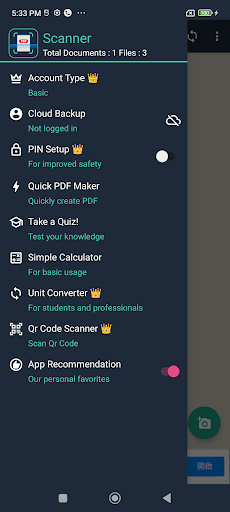


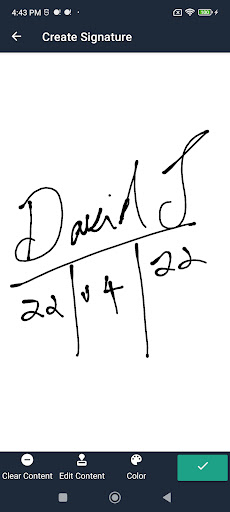

About PDF Scanner - Scan Docs & PDF
The description on the store listing
Scanner lets you scan and create PDF files on your device using photos and camera. You can click or scan your document from your camera or choose photos from gallery. PDF generation is completely offline and requires no internet connection. It saves your PDF file history and the list of recently scanned documents. With a light clean and easy to use interface, using Scanner is a breeze. Along with scanning, features like cropping and filters improve the visibility of your documents.
Scanner is extremely convenient and helps you scan and digitize all your documents, receipts, notes, photos, discussions and cards. You can also share your documents as image or as pdf easily. It is literally …
Read the full description
Scanner lets you scan and create PDF files on your device using photos and camera. You can click or scan your document from your camera or choose photos from gallery. PDF generation is completely offline and requires no internet connection. It saves your PDF file history and the list of recently scanned documents. With a light clean and easy to use interface, using Scanner is a breeze. Along with scanning, features like cropping and filters improve the visibility of your documents. Scanner is extremely convenient and helps you scan and digitize all your documents, receipts, notes, photos, discussions and cards. You can also share your documents as image or as pdf easily. It is literally a scanner in your pocket. Scanner is not just easy to use but also completely secure. The documents scanned are not uploaded to any server for any processing. Document recognition in the photos after scanning is done on the device. How to Use? - Use options in the top bar to scan, click or chose photos from gallery - The “Create PDF” tab shows the documents/scans that will be included in the PDF - The “Recent Files” tab shows the recently used documents/scans - The “History” tab shows recently generated PDF files - In the “Create PDF” tab, use the options button for additional options - “Generate PDF” button generates PDF file using the files in the first tab Features: - No subscription charges - unlimited scans, shares and document creation, absolutely free! - Works completely offline - no online servers - Choose document from your gallery or scan/click photos from camera - Maintains file history - Open the PDF with any PDF viewer - High quality image option for PDF - Convert multiple images into single PDF - Easily share your PDF file via email - Saves your document in process, so you can start over from where you left - Rotate/Enhance the visibility of your documents after scanning using built in effects - Select multiple images from your gallery (using a supported like Google Photos) - Cloud Backup(supported by Dropbox) - Multiple filters
Installs, last 30 days Measured
Exact Google Play install counts, collected daily
Ratings
5,741 ratings, 4 reviews
- 5 ★79%
- 4 ★6.1%
- 3 ★4.9%
- 2 ★3.7%
- 1 ★6.1%
Recent reviews
Latest public reviews from the store
- 10 Aug 2025
topcoach quality declined a lot with the new version
- 24 Jul 2025
why with the update only displaying top 5 people in your league it looked better when u could see everyone
- 10 May 2025
good app! usually works well
- 25 Jan 2025
Great app! :)
What reviewers bring up
Topics mentioned in the latest 50 reviews, by how many reviews mention them
Liked in good reviews (27 reviews)
- fantasy 3
- sports 3
- cycling 2
Raised in bad reviews (20 reviews)
- ads 4
- betaald 3
- niet 3
- die 3
- gebruikers 2
- experience 2
- navigeren 2
- annoying 2
Top chart positions
Latest Google Play chart ranks by country, last 10 days
Not in any tracked top chart in the last 10 days.
PDF Scanner - Scan Docs & PDF history
Release, install milestones, listing and store changes
- Reached 100,000+ installs 20 Oct 2022
- Reached 50,000+ installs 22 Sep 2022
- Reached 10,000+ installs 6 Sep 2022
- First released on the store 29 Aug 2022
Update frequency
How often PDF Scanner - Scan Docs & PDF ships a new version, month by month
1 updates in the last 12 months. Less often than most similar apps: they shipped a median of 2 updates in the same year.
Recent versions
Current version 16.0
- Version 16.018 Aug 2026
Internal updates and defect fixes.
- Version 15.018 Nov 2025
Internal updates.
- Version 13.026 Aug 2025
- Version 12.022 Jul 2025
Listing keywords
Words and phrases PDF Scanner - Scan Docs & PDF repeats most in its store listing
Top phrases: create pdf (3), pdf file (3), tab shows (3), create pdf tab (2), photos from gallery (2).
Highlighted words also appear in the title. Counts cover the title, short description and description.
Business model and tech
From the store listing, the SDKs in the app package and its declared permissions
- Business model
- Free to downloadIn-app purchasesShows ads
- Built with
- No cross-platform framework or game engine detected
- Ad networks (3)
- AdMobAppLovinFacebook Audience Network
- Subscriptions and payments
- Google Play billing
- Attribution and measurement
- Open Measurement
- Analytics and crash reports
- Firebase
- Sensitive access
- CameraPhotos, videos and filesAccounts on the deviceAdvertising ID
4 ad, attribution and analytics SDKs detected. SDKs are read from the app package and permissions from the store listing, so code that loads later is not seen.
Technology
52 SDKs found in the app package
Ad networks
Advertising and install-attribution SDKs found in the app package
- AdMob
- AppLovin
- Facebook Audience Network
- Open Measurement
20 permissions
0 special access, 4 sensitive, 16 standard
- Take photos and videosSensitive
- See accounts on the deviceSensitive
- Change or delete shared storageSensitive
- Read shared storageSensitive
- Ad attribution (Privacy Sandbox)ACCESS_ADSERVICES_ATTRIBUTIONStandard
- Ad topics (Privacy Sandbox)ACCESS_ADSERVICES_TOPICSStandard
- Read how it was installed (install referrer)BIND_GET_INSTALL_REFERRER_SERVICEStandard
- Read the advertising IDAD_IDStandard
- Read the advertising ID (Privacy Sandbox)ACCESS_ADSERVICES_AD_IDStandard
- Control vibrationStandard
- Keep the phone awakeStandard
- Run a foreground serviceFOREGROUND_SERVICEStandard
Compliance
What the listing and the app package show
- Store status
- Live
- Upkeep
- Updated 18 Aug 2026
- Registered in
- India
- Privacy policy
- Linked on the listing
- Advertising
- Shows ads
- In-app purchases
- Offered
- Age rating
- Everyone
- Sensitive permissions
- 4 sensitive of 20
- Location access
- No
- Camera and microphone
- Camera
Apps like PDF Scanner - Scan Docs & PDF
Touch Calendar FTouchable Apps1.2M installs★ 3.73
AI Notes & Transcribe MemoNewway Apps1.2M installs★ 4.17
ScanAll - QR code & BarcodesGlilab525K installs★ 5.0
RICOH Smart Device ConnectorRicoh Co., Ltd.3.3M installs★ 3.16
Sleep Time - Alarm CalculatorOleg Filimonov1.5M installs★ 4.6
AdsCoin - Easy Mobile EarningsCDM Apps263K installs★ 3.37
TIM Segurança DigitalFS SECURITY SERVIÇOS DE TECNOLOGIA S A328K installs★ 4.69
All Document Reader - ViewerDragster Production2.1M installs★ 3.37
Habit Tracker - Habit RadarGoal Tracker203K installs★ 4.48
PDF Scanner - Scan Docs & PDF: questions and answers
How many downloads does PDF Scanner - Scan Docs & PDF have?
PDF Scanner - Scan Docs & PDF has 470,410 installs on Google Play, measured from the store's own count on 20 Nov 2026.
Who makes PDF Scanner - Scan Docs & PDF?
PDF Scanner - Scan Docs & PDF is published by DroidVeda LLP, a developer based in IN.
When was PDF Scanner - Scan Docs & PDF last updated?
The latest version (16.0) was released on 18 Aug 2026.
Is PDF Scanner - Scan Docs & PDF free?
Yes. PDF Scanner - Scan Docs & PDF is free to download and offers in-app purchases, and it shows ads.
Is PDF Scanner - Scan Docs & PDF still available?
Yes. PDF Scanner - Scan Docs & PDF is live on Google Play as of 20 Nov 2026.
Track PDF Scanner - Scan Docs & PDF and its competitors
Watch any app for new versions, rating drops, chart moves and removals. Free plan, no card.