
PDF Utils: Merge, Split & Edit
PDF Utility to Merge, Reorder, Split, Compress, Extract Images & Watermark PDF
- Installs
- 1.99M
- Measured
- Rating
- 4.75
- Ratings
- 26.6K
- 538 reviews
- Version
- 16.0.3
- Updated 4 Nov 2026
- Released
- 16 Apr 2017
- Tracked since 14 May 2026
- Size
- 20 MB
- Needs 5.0
Screenshots
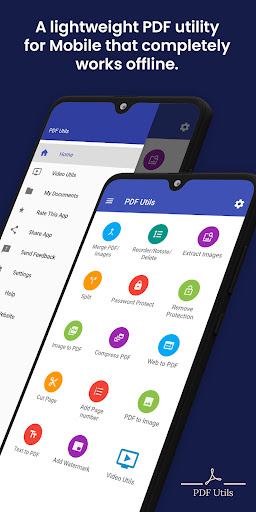


About PDF Utils: Merge, Split & Edit
The description on the store listing
All-in-One PDF Editor, Scanner & Signer — free offline PDF tool
The complete offline PDF toolkit for Android. Scan documents to PDF,
sign PDFs, highlight and annotate, merge, split, compress, and more —
no Wi-Fi needed, no account required. Everything runs on-device and
works completely offline.
CREATE
• Document Scanner — scan to PDF with your camera. Auto edge-detection
and perspective correction included.
• Image to PDF / Photo to PDF — convert JPG, PNG, TIFF, and BMP
(including pictures and photos) to PDF. Free, offline.
• Text to PDF — convert custom text and emojis to PDF.
• Web to PDF — share any web page to our app and save as PDF.
SIGN …
Read the full description
All-in-One PDF Editor, Scanner & Signer — free offline PDF tool The complete offline PDF toolkit for Android. Scan documents to PDF, sign PDFs, highlight and annotate, merge, split, compress, and more — no Wi-Fi needed, no account required. Everything runs on-device and works completely offline. CREATE • Document Scanner — scan to PDF with your camera. Auto edge-detection and perspective correction included. • Image to PDF / Photo to PDF — convert JPG, PNG, TIFF, and BMP (including pictures and photos) to PDF. Free, offline. • Text to PDF — convert custom text and emojis to PDF. • Web to PDF — share any web page to our app and save as PDF. SIGN & ANNOTATE • Sign PDF / E-Signature — draw your digital signature and stamp it onto any PDF page. Drag to reposition before saving. • Annotate PDF / Highlight PDF — freehand draw, highlight, and mark up PDF pages directly. Full undo support. • PDF Watermark — add text or image watermarks to your PDFs. • Add Page Numbers — stamp page numbers onto any PDF. EDIT • Merge PDF / Combine PDF — merge PDFs or images into a single PDF file, free. Supports Google Drive and OneDrive. • Split PDF — split PDFs into smaller files or extract specific pages from a PDF. • Reorder PDF Pages — drag and drop pages into any order. • Cut PDF / Extract Pages — cut pages or extract sections to reformat your content. • Rotate PDF — rotate pages 90, 180, or 270 degrees. • Delete PDF Pages — remove any PDF page with a single swipe. • PDF to Image — convert PDF pages to PNG or JPG. • Extract Images from PDF — extract embedded images from any PDF. PROTECT & COMPRESS • Compress PDF / Reduce PDF Size — reduce PDF file size without quality loss, free and offline. • PDF Password Protect — encrypt PDFs with owner and user passwords, or remove existing password protection. READ • PDF Reader / PDF Viewer — open and view PDFs with a smooth, customisable offline PDF viewer. Works fully offline. Free PDF editor with optional ad-free upgrade. Supports Google Drive and OneDrive — share any file to our app and start editing your PDFs instantly. 📺 Tutorial videos: Merge PDF: https://youtu.be/Ws_-xr3VYhs Reorder, Delete & Rotate: https://youtu.be/bpbS0XBDyyU Cut PDF: https://youtu.be/kYbcGzNokqI Extract Image: https://youtu.be/4v0ixO7co7A Split PDF: https://youtu.be/puJZyPdT6eQ Watermark: https://youtu.be/uHfH5wjBg_g 📧 Feedback or suggestions? [email protected] Love the app? Upgrade to ad-free to support development.
Installs, last 30 days Measured
Exact Google Play install counts, collected daily
Ratings
26,599 ratings, 538 reviews
- 5 ★77%
- 4 ★13%
- 3 ★1.9%
- 2 ★0.0%
- 1 ★7.9%
Recent reviews
Latest public reviews from the store
- 18 May 2026
good
- 18 May 2026
bahut Achcha hai
- 18 May 2026
How to get the full information data from Any Scanner if it has been uninstalled?
- 17 May 2026
so far so good.
What reviewers bring up
Topics mentioned in the latest 50 reviews, by how many reviews mention them
Liked in good reviews (47 reviews)
- friendly 3
- scanner 3
- far 3
- developer 2
- download 2
- must 2
- user 2
Raised in bad reviews (3 reviews)
No topic comes up twice.
Top chart positions
Latest Google Play chart ranks by country, last 10 days
Not in any tracked top chart in the last 10 days.
PDF Utils: Merge, Split & Edit history
Release, install milestones, listing and store changes
- Reached 1,000,000+ installs 21 Apr 2022
- Reached 500,000+ installs 23 Jul 2020
- Reached 100,000+ installs 17 Oct 2018
- Moved from Tools to Productivity 22 Jul 2018
- Reached 50,000+ installs 24 Jun 2018
- Reached 10,000+ installs 4 Mar 2018
- Reached 5,000+ installs 18 Feb 2018
- First released on the store 16 Apr 2017
Update frequency
How often PDF Utils: Merge, Split & Edit ships a new version, month by month
6 updates in the last 12 months. More often than most similar apps: they shipped a median of 3 updates in the same year.
Recent versions
Current version 16.0.3
- Version 16.0.34 Nov 2026
• More privacy: PDF Utils no longer asks for access to your photos. Pick files with Android's own picker – the app only sees the files you choose. • Stability improvements and bug fixes.
- Version 15.716 Aug 2026
Bug fixes and stability improvements: • Fixed crashes on certain PDFs and devices • Updated for Android 16 compatibility
- Version 15.61 May 2026
3 new features: • PDF Scanner — scan documents with your camera and save as PDF • E-Signature — draw your signature and stamp it onto any PDF page • Annotate PDF — draw, highlight and erase on PDF pages with undo support
- Version 15.45 Apr 2026
Listing keywords
Words and phrases PDF Utils: Merge, Split & Edit repeats most in its store listing
Top phrases: offline pdf (4), pdf pages (4), pdf extract (3), cut pdf extract (2), drive and onedrive (2).
Highlighted words also appear in the title. Counts cover the title, short description and description.
Business model and tech
From the store listing and declared permissions
- Business model
- Free to downloadIn-app purchasesShows ads
- Sensitive access
- No sensitive permission declared
Compliance
What the listing and the app package show
- Store status
- Live
- Upkeep
- Updated 4 Nov 2026
- Registered in
- India
- Privacy policy
- Linked on the listing
- Advertising
- Shows ads
- In-app purchases
- Offered
- Age rating
- Everyone
Apps like PDF Utils: Merge, Split & Edit
Sticky Note Widget: SunaoArtsPlanet1.1M installs★ 4.77
eDO AppPWPW S.A.3.6M installs★ 4.05
Xploree AI KeyboardKeyPoint Technologies17.7M installs★ 4.16
Google AdminGoogle LLC8.5M installs★ 3.55
App Permission Managero16i Apps8.7M installs★ 4.08
AnyList: Grocery Shopping ListAnyList1.8M installs★ 4.86
Launcher OS27: Liquid GlassHK Crafted1.5M installs★ 4.46
FactTechz Ultimate Brain BoostFactTechz554K installs★ 4.54
AI Grammar Checker for EnglishHelloTalk Limited2.9M installs★ 3.44
PDF Utils: Merge, Split & Edit: questions and answers
How many downloads does PDF Utils: Merge, Split & Edit have?
PDF Utils: Merge, Split & Edit has 1,985,049 installs on Google Play, measured from the store's own count on 21 Nov 2026.
Who makes PDF Utils: Merge, Split & Edit?
PDF Utils: Merge, Split & Edit is published by shash9989, a developer based in IN.
When was PDF Utils: Merge, Split & Edit last updated?
The latest version (16.0.3) was released on 4 Nov 2026.
Is PDF Utils: Merge, Split & Edit free?
Yes. PDF Utils: Merge, Split & Edit is free to download and offers in-app purchases, and it shows ads.
Is PDF Utils: Merge, Split & Edit still available?
Yes. PDF Utils: Merge, Split & Edit is live on Google Play as of 21 Nov 2026.
Track PDF Utils: Merge, Split & Edit and its competitors
Watch any app for new versions, rating drops, chart moves and removals. Free plan, no card.