
PDF Viewer - All PDF Reader
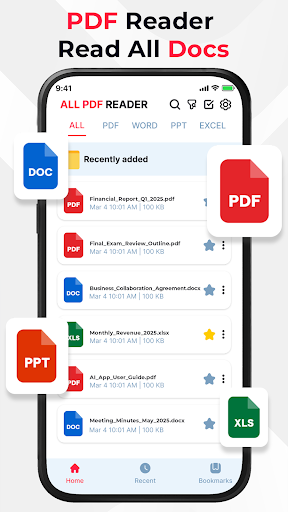
Fast PDF Reader & Editor. Open, read, and edit all your PDF documents easily!
- Installs
- 5.37M
- Measured
- Rating
- 4.45
- Ratings
- 7.1K
- 22 reviews
- Version
- 1.5.5
- Updated 15 Oct 2026
- Released
- 30 Sep 2025
- Tracked since 31 May 2026
- Size
- —
Screenshots


About PDF Viewer - All PDF Reader
The description on the store listing
PDF Viewer - All PDF Reader - Edit & View PDF, Word, Excel & PowerPoint on Android
Looking for a smart and powerful document editor for Android? This PDF Viewer - All PDF Reader app is your complete solution to open, view, and edit all major document types including PDF files, Word documents (DOC, DOCX), Excel spreadsheets (XLS, XLSX), and PowerPoint presentations (PPT, PPTX) - all in one convenient and efficient interface.
<b>What Makes PDF Viewer - All PDF Reader Stand Out?</b>
✅ PDF Tools: Beyond just reading - highlight text, underline key points, and freely draw or annotate using the brush tool. Ideal for reviewing contracts, study materials, or reports.
✅ Word Editor (DOC …
Read the full description
PDF Viewer - All PDF Reader - Edit & View PDF, Word, Excel & PowerPoint on Android Looking for a smart and powerful document editor for Android? This PDF Viewer - All PDF Reader app is your complete solution to open, view, and edit all major document types including PDF files, Word documents (DOC, DOCX), Excel spreadsheets (XLS, XLSX), and PowerPoint presentations (PPT, PPTX) - all in one convenient and efficient interface. <b>What Makes PDF Viewer - All PDF Reader Stand Out?</b> ✅ PDF Tools: Beyond just reading - highlight text, underline key points, and freely draw or annotate using the brush tool. Ideal for reviewing contracts, study materials, or reports. ✅ Word Editor (DOC & DOCX): Open and edit Word files with support for text formatting, font styles, alignment, bullet points, and more. Perfect for updating resumes, writing reports, or editing notes on the go. ✅ Excel Editor (XLS & XLSX): View and edit spreadsheets with full access to cells, columns, and rows. Enter data, apply basic formulas, format cells, and manage tables - ideal for budgeting, organizing work, or reviewing numbers. ✅ PowerPoint Editor (PPT & PPTX): Open and edit presentations in real-time - modify slide text, insert photo, shape and adjust basic formatting. Great for making quick updates before meetings or lectures. <b>Key Features & Tools</b> ⭐ All-in-One Document Editor: Seamlessly edit and manage PDF, DOC, DOCX, XLS, XLSX, PPT, and PPTX files. ⭐ Editing Support: Modify text, format content, and work across multiple file types with ease. ⭐ Fast Loading Performance: Open large files quickly with minimal wait time. ⭐ Smooth Navigation: Effortlessly scroll through pages, sheets, or slides. ⭐ Zoom In/Out: Customize your view for better readability or precision while editing. ⭐ Portrait & Landscape Modes: Flexible viewing and editing experience in any orientation. ⭐ User-Friendly Interface: Clean, intuitive design for efficient workflows. ⭐ Secure Local Access: Works entirely offline with files stored on your device - no cloud upload required. <b>Who Is It For?</b> ✨ Students: Highlight key points in PDFs, edit lecture notes, update assignments, or revise slides. ✨ Professionals: Annotate documents, update spreadsheets, and tweak presentations - all while on the move. ✨ Everyone: A handy tool to manage, edit, and organize your personal or work-related documents in one place. Stay productive and organized with this powerful document editing app. Whether you're updating a Word doc, editing an Excel sheet, or marking up a PDF - everything you need is just a tap away. Download now and transform your Android device into a portable office - fast, flexible, and always ready.
Installs since 29 Aug 2026 Measured
Exact Google Play install counts, collected daily
Ratings
7,067 ratings, 22 reviews
- 5 ★85%
- 4 ★1.9%
- 3 ★2.9%
- 2 ★3.8%
- 1 ★6.7%
Recent reviews
Latest public reviews from the store
No reviews in our sample for this app yet.
Top chart positions
Latest Google Play chart ranks by country, last 10 days
- Countries ranked
- 5
- Best rank
- #48
- Top 10 placements
- 0
- of 5 chart placements
- Average rank
- #116
Best countries on Google Play
- 🇧🇷 Brazil · Top free, Productivity#48
- 🇰🇷 South Korea · Top free, Productivity#97
- 🇲🇽 Mexico · Top free, Productivity#108
- 🇵🇹 Portugal · Top free#151
- 🇩🇪 Germany · Top free, Productivity#176
PDF Viewer - All PDF Reader history
Release, install milestones, listing and store changes
- First released on the store 30 Sep 2025
Update frequency
How often PDF Viewer - All PDF Reader ships a new version, month by month
3 updates in the last 12 months. More often than most similar apps: they shipped a median of 2 updates in the same year.
Recent versions
Current version 1.5.5
- Version 1.5.515 Oct 2026
📸 New PDF Scanner – Scan documents instantly with high quality. ✏️ Edit PDF, Word, Excel & PPT effortlessly on your phone. 🚀 Update now and boost your productivity!
- Version 1.4.925 Aug 2026
📸 New PDF Scanner – Scan documents instantly with high quality. ✏️ Edit PDF, Word, Excel & PPT effortlessly on your phone. 🚀 Update now and boost your productivity!
- Version 1.3.828 May 2026
📸 New PDF Scanner – Scan documents instantly with high quality. ✏️ Edit PDF, Word, Excel & PPT effortlessly on your phone. 🚀 Update now and boost your productivity!
Listing keywords
Words and phrases PDF Viewer - All PDF Reader repeats most in its store listing
Top phrases: pdf reader (5), viewer all pdf (4), pdf viewer (4), doc docx (3), xls xlsx (3).
Highlighted words also appear in the title. Counts cover the title, short description and description.
Business model and tech
From the store listing and declared permissions
- Business model
- Free to downloadIn-app purchasesShows ads
- Sensitive access
- No sensitive permission declared
Compliance
What the listing and the app package show
- Store status
- Live
- Upkeep
- Updated 15 Oct 2026
- Privacy policy
- Linked on the listing
- Advertising
- Shows ads
- In-app purchases
- Offered
- Age rating
- Everyone
Apps like PDF Viewer - All PDF Reader
Touch Calendar FTouchable Apps1.2M installs★ 3.73
AI Notes & Transcribe MemoNewway Apps1.2M installs★ 4.17
ScanAll - QR code & BarcodesGlilab525K installs★ 5.0
RICOH Smart Device ConnectorRicoh Co., Ltd.3.3M installs★ 3.16
Sleep Time - Alarm CalculatorOleg Filimonov1.5M installs★ 4.6
AdsCoin - Easy Mobile EarningsCDM Apps263K installs★ 3.37
TIM Segurança DigitalFS SECURITY SERVIÇOS DE TECNOLOGIA S A328K installs★ 4.69
All Document Reader - ViewerDragster Production2.1M installs★ 3.37
Habit Tracker - Habit RadarGoal Tracker203K installs★ 4.48
PDF Viewer - All PDF Reader: questions and answers
How many downloads does PDF Viewer - All PDF Reader have?
PDF Viewer - All PDF Reader has 5,370,317 installs on Google Play, measured from the store's own count on 7 Nov 2026.
Who makes PDF Viewer - All PDF Reader?
PDF Viewer - All PDF Reader is published by Qiao Studio.
When was PDF Viewer - All PDF Reader last updated?
The latest version (1.5.5) was released on 15 Oct 2026.
Is PDF Viewer - All PDF Reader free?
Yes. PDF Viewer - All PDF Reader is free to download and offers in-app purchases, and it shows ads.
Is PDF Viewer - All PDF Reader still available?
Yes. PDF Viewer - All PDF Reader is live on Google Play as of 7 Nov 2026.
Track PDF Viewer - All PDF Reader and its competitors
Watch any app for new versions, rating drops, chart moves and removals. Free plan, no card.