Phone Clone - Data Transfer
Switching Phones? Transfer everything safely and in no time - no cables required
- Installs
- 270K
- Measured
- Rating
- 3.84
- Ratings
- 2.1K
- 12 reviews
- Version
- 2.4.2
- Updated 11 May 2026
- Released
- 13 May 2023
- Tracked since 13 May 2026
- Size
- —
Screenshots




About Phone Clone - Data Transfer
The description on the store listing
Are you tired of searching for a Smart Data Transfer – Copy My Data App that transfers data from Android to Android devices?
Smart Data Transfer is a convenient Data transfer app created for users who want quick and reliable file sharing between Android devices. With the help of the Copy My Data App, you can move your important content like photos, contacts, videos, and documents in a simple way. The app helps users send files safely whenever they need to share or move their data to another device.
Smart Mobile Switch – Transfer My Data
Changing phones becomes easier with Switch Mobile Data and the Phone Clone app. This feature allows users to transfer data from old to new phone …
Read the full description
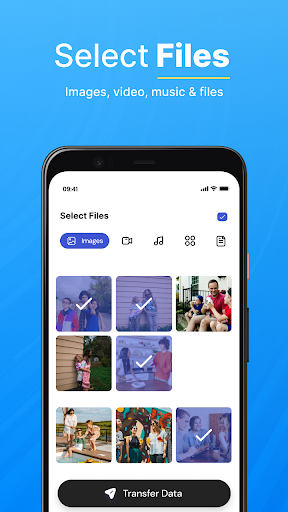
Are you tired of searching for a Smart Data Transfer – Copy My Data App that transfers data from Android to Android devices? Smart Data Transfer is a convenient Data transfer app created for users who want quick and reliable file sharing between Android devices. With the help of the Copy My Data App, you can move your important content like photos, contacts, videos, and documents in a simple way. The app helps users send files safely whenever they need to share or move their data to another device. Smart Mobile Switch – Transfer My Data Changing phones becomes easier with Switch Mobile Data and the Phone Clone app. This feature allows users to transfer data from old to new phone without complicated steps. Whether you want to move personal files or complete phone data, Smart Data Transfer provides a smooth data transfer experience. Main Features of the Mobile Data Switch & Data Transfer App > Smart Mobile Switch Data Transfer for fast data movement > Phone Clone feature to copy data from one Android phone to another > Smart File sharing to send photos, videos, documents, and apps > Smart Content Transfer that enables wireless data transfer > Switch Mobile Data app supports connection using Wi-Fi or QR Code How to Use Smart Mobile Data Transfer Phone Clone App > Install and open the Switch Mobile Data Transfer app on both devices. > Connect both phones using the same network for better file sharing. > Select Send on the phone that contains the files. > Tap Receive on the phone that will get the data. Why Choose Smart Data Transfer Copy My Data App? Easy to Use Interface The design is simple and organized, making smart data share easy for everyone. Files are grouped into categories like apps, images, and audio for better access. Secure File Sharing The Copy My Data app focuses on secure file sharing, allowing you to transfer files without worrying about losing your data. Phone Clone for Android Devices With Smart Transfer My Data, you can send large files and clone your important phone data including contacts, photos, and videos while switching mobile devices. Use the Smart Mobile Data Transfer App to transfer all mobile data quickly and enjoy easy smart data share with friends and family. The Switch Mobile Smart Transfer app provides a reliable way to complete data transfer between Android devices.
Installs, last 30 days Measured
Exact Google Play install counts, collected daily
Ratings
2,123 ratings, 12 reviews
- 5 ★59%
- 4 ★11%
- 3 ★8.4%
- 2 ★0.8%
- 1 ★21%
Recent reviews
Latest public reviews from the store
- 18 May 2026
Smart Mobile Data Transfer is easy to use and very efficient. Everything transferred without losing any files 🇺🇲
- 18 May 2026
Very useful app with excellent transfer speed. I moved all my contacts and photos without any trouble 🇺🇲
- 18 May 2026
Smart Mobile Data Transfer made my phone upgrade so easy. All my important files transferred quickly and safely 🇺🇲
- 18 May 2026
This app works perfectly for transferring data between devices. Fast connection and reliable performance 🇺🇲
What reviewers bring up
Topics mentioned in the latest 50 reviews, by how many reviews mention them
Liked in good reviews (44 reviews)
- data 20
- transfer 18
- contacts 12
- files 12
- mobile 11
- photos 11
- phones 11
- smart 11
Raised in bad reviews (6 reviews)
- waste 2
- ads 2
Top chart positions
Latest Google Play chart ranks by country, last 10 days
Not in any tracked top chart in the last 10 days.
Phone Clone - Data Transfer history
Release, install milestones, listing and store changes
- Moved from Tools to Libraries & Demo 17 Feb 2026
- Reached 100,000+ installs 17 Oct 2023
- Reached 50,000+ installs 31 Aug 2023
- Reached 10,000+ installs 21 Jun 2023
- Reached 5,000+ installs 2 Jun 2023
- First released on the store 13 May 2023
Update frequency
How often Phone Clone - Data Transfer ships a new version, month by month
1 updates in the last 12 months. More often than most similar apps: they shipped a median of 0 updates in the same year.
Recent versions
Current version 2.4.2
- Version 2.4.211 May 2026
- Improved app performance - Enhanced user experience - Fixed ad-related issues
- Version 2.3.510 Oct 2025
- Version 2.3.430 Sep 2025
- Version 2.3.317 Sep 2025
Listing keywords
Words and phrases Phone Clone - Data Transfer repeats most in its store listing
Top phrases: data transfer (14), mobile data (7), smart data (6), file sharing (5), phone clone (5).
Highlighted words also appear in the title. Counts cover the title, short description and description.
Business model and tech
From the store listing, the SDKs in the app package and its declared permissions
- Business model
- Free to downloadIn-app purchasesShows ads
- Built with
- No cross-platform framework or game engine detected
- Ad networks (1)
- AdMob
- Analytics and crash reports
- Firebase
- Sensitive access
- No sensitive permission declared
2 ad, attribution and analytics SDKs detected. SDKs are read from the app package and permissions from the store listing, so code that loads later is not seen.
Technology
36 SDKs found in the app package
Ad networks
Advertising and install-attribution SDKs found in the app package
- AdMob
Compliance
What the listing and the app package show
- Store status
- Live
- Upkeep
- Updated 11 May 2026
- Registered in
- Pakistan
- Privacy policy
- Linked on the listing
- Advertising
- Shows ads
- In-app purchases
- Offered
- Age rating
- Everyone
Apps like Phone Clone - Data Transfer
Secret codes tricks & CiphersQuint Tech130K installs★ 3.99
Software Update: APK installerBattery Pro Apps196K installs★ 4.36
Joanna de ÂngelisGilmar Rodrigues46.6K installs★ 4.88
Micro SD Card formatterzeecoder236K installs★ 3.26
Graphics Manager : GFX AddonTrilokia Inc.997K installs★ 4.18
Biblia con lenguaje actualBible Français91.9K installs★ 4.73
KJV Study Bible with concordanHoly bible79.6K installs★ 4.66
YASNAC - SafetyNet CheckerXingchen & Rikka607K installs★ 4.55
Bíblia Almeida RevistaKJV Bible offline79.3K installs★ 4.73
Phone Clone - Data Transfer: questions and answers
How many downloads does Phone Clone - Data Transfer have?
Phone Clone - Data Transfer has 270,130 installs on Google Play, measured from the store's own count on 19 Nov 2026.
Who makes Phone Clone - Data Transfer?
Phone Clone - Data Transfer is published by Excellio Tech, a developer based in PK.
When was Phone Clone - Data Transfer last updated?
The latest version (2.4.2) was released on 11 May 2026.
Is Phone Clone - Data Transfer free?
Yes. Phone Clone - Data Transfer is free to download and offers in-app purchases, and it shows ads.
Is Phone Clone - Data Transfer still available?
Yes. Phone Clone - Data Transfer is live on Google Play as of 19 Nov 2026.
Track Phone Clone - Data Transfer and its competitors
Watch any app for new versions, rating drops, chart moves and removals. Free plan, no card.