
Photo Editor: Compress, Resize
Compress high quality images into smaller sizes with same quality
- Installs
- 548
- Measured
- Rating
- —
- Ratings
- —
- Version
- Varies with device
- Updated 11 Jul 2025
- Released
- 21 Apr 2023
- Tracked since 13 May 2026
- Size
- —
Screenshots

About Photo Editor: Compress, Resize
The description on the store listing
<b>Problems:</b>
1. Fix storage-related problems that occur when you have huge-sized photos on your mobile phone or tablet device
2. Compress photo(s) due to the email attachment limits
3. Compress photo(s) due to the cloud storage limits
4. Upload photo(s) somewhere with size restrictions
5. Compress photo(s) without losing high quality
6. Share low-sized high-quality photo(s) with weak cellular or wifi connection
<b>Reasons for having Huge-Size Photos:</b>
1. You have captured high-resolution photos by setting your camera to capture photos at full resolution
2. You have copied high-resolution, DSLR specs photos into your device from your computer
3. Your friends on …
Read the full description
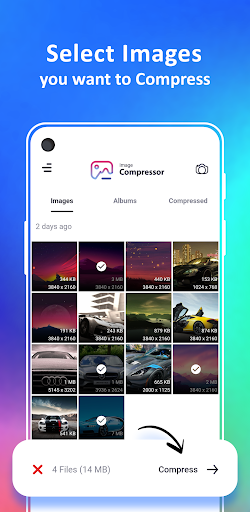
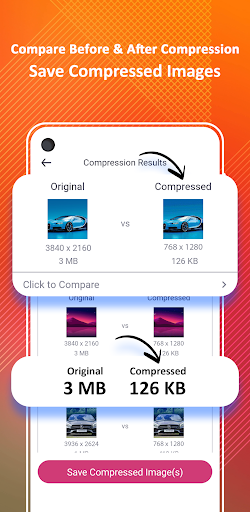
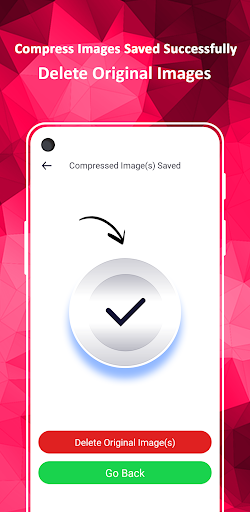
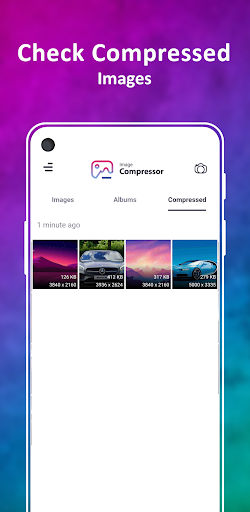
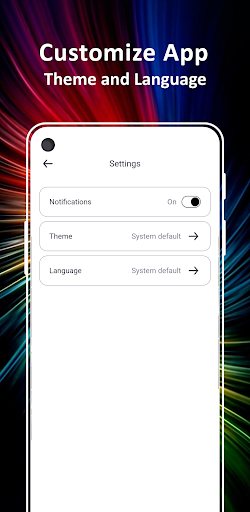
<b>Problems:</b> 1. Fix storage-related problems that occur when you have huge-sized photos on your mobile phone or tablet device 2. Compress photo(s) due to the email attachment limits 3. Compress photo(s) due to the cloud storage limits 4. Upload photo(s) somewhere with size restrictions 5. Compress photo(s) without losing high quality 6. Share low-sized high-quality photo(s) with weak cellular or wifi connection <b>Reasons for having Huge-Size Photos:</b> 1. You have captured high-resolution photos by setting your camera to capture photos at full resolution 2. You have copied high-resolution, DSLR specs photos into your device from your computer 3. Your friends on social media platforms send those images as documents so that quality is not dropped <b>Solution:</b> Use this simple, efficient, and time-saving photo compression tool that helps you compress or resize large-sized photos into small-sized high-resolution photos in a blink of an eye. After compression, you can either save the compressed photos simply or replace the original photos with the compressed photos. <b>Features:</b> <b>Gallery-Based View:</b> Get all photos on a single view similar to the device default’s gallery app <b>Folder-Based View:</b> Get all photos organized on a single view similar to the device default’s file explorer app <b>Batch Compression:</b> Select one or multiple photos for compression <b>Compression Modes:</b> Select your desired compression modes i.e scale down, size, resolution or quality 1. Scale Down: This compression mode will reduce the size, resolution, and quality of the selected photo(s) 2. Size: This compression mode will reduce the size of the selected photo(s) 3. Resolution: This compression mode will reduce the resolution of the selected photo(s) 4. Quality: This compression mode will reduce the quality of the selected photo(s) <b>Compression Results:</b> Preview the compression results on the selected photo(s), get the size and resolution metadata info of the original and compressed photo(s) metadata <b>Comparison Preview:</b> Select any compression result and get a comparison preview between the quality of the original and the compressed photo(s) <b>Saved Compressed Photo(s):</b> You can save the compressed photo(s) and they will be saved in the app’s directory and you can later preview them from the third tab of the app’s home screen i.e Compressed <b>Replace Compressed with Original:</b> After saving compressed photo(s), you can delete the original photo(s) from within the app just to prevent the duplication of the photo(s) <b>Dark-Theme Support:</b> This amazing tool comes up with Theme customizations i.e. System Default, Light Mode, and Dark Mode. <b>Multi-lingual Support:</b> This amazing tool comes up with localization support and is available in 13 different languages. Surprised?. Yes, not only the 13 languages but also supports in-app localization and obviously the device default’s localization support as well <b>Compatibility:</b> This app is compatible with your mobile devices and your tablets as well. <b>Supported Languages:</b> ☞ English ☞ Netherlands (Dutch) ☞ français (French) ☞ Deutsche (German) ☞ bahasa Indonesia (Indonesian) ☞ Português (Portuguese) ☞ Română (Romanian) ☞ русский (Russian) ☞ Español (Spanish) ☞ Türk (Turkish) <b>Contact:</b> Please write an email at [email protected] if you have any questions or issues while using the app or if you want some new feature set in the app.
Installs since 17 Nov 2026 Measured
Exact Google Play install counts, collected daily
Daily history starts once this app is in our daily install sample.
Ratings
- 5 ★0.0%
- 4 ★0.0%
- 3 ★0.0%
- 2 ★0.0%
- 1 ★0.0%
Recent reviews
Latest public reviews from the store
- 2 May 2026
GOOD APP
- 16 Apr 2026
this app is awesome, i used to have only 1Gb left of my storage because i don't want to delete videos manually, i mean i do but i get tired. because of this app i got my storage back. And it has Minumal ADS!
- 9 Apr 2026
it does what it says. perfect.
- 5 Apr 2026
Good App. Number 100
What reviewers bring up
Topics mentioned in the latest 50 reviews, by how many reviews mention them
Liked in good reviews (38 reviews)
- fast 4
- storage 3
- videos 3
- duplicate 2
- helpful 2
Raised in bad reviews (10 reviews)
- find 3
- video 2
Top chart positions
Latest Google Play chart ranks by country, last 10 days
Not in any tracked top chart in the last 10 days.
Photo Editor: Compress, Resize history
Release, install milestones, listing and store changes
- First released on the store 21 Apr 2023
Recent versions
Current version Varies with device
- Version 1.0.811 Jul 2025
- Version 1.0.726 May 2025
- Version 1.0.618 Sep 2024
- Version 1.0.519 Jul 2024
Listing keywords
Words and phrases Photo Editor: Compress, Resize repeats most in its store listing
Top phrases: compressed photo (5), selected photo (5), mode will reduce (4), compression mode (4), compress photo (3).
Highlighted words also appear in the title. Counts cover the title, short description and description.
Business model and tech
From the store listing and declared permissions
- Business model
- Free to downloadShows ads
- Sensitive access
- Photos, videos and filesAdvertising ID
16 permissions
0 special access, 5 sensitive, 11 standard
- Change or delete shared storageSensitive
- Read photosREAD_MEDIA_IMAGESSensitive
- Read photos and videos the user picksREAD_MEDIA_VISUAL_USER_SELECTEDSensitive
- Read shared storageSensitive
- Show notificationsPOST_NOTIFICATIONSSensitive
- Ad attribution (Privacy Sandbox)ACCESS_ADSERVICES_ATTRIBUTIONStandard
- Ad topics (Privacy Sandbox)ACCESS_ADSERVICES_TOPICSStandard
- Read how it was installed (install referrer)BIND_GET_INSTALL_REFERRER_SERVICEStandard
- Read the advertising IDAD_IDStandard
- Read the advertising ID (Privacy Sandbox)ACCESS_ADSERVICES_AD_IDStandard
- Keep the phone awakeStandard
- Run a foreground serviceFOREGROUND_SERVICEStandard
Compliance
What the listing and the app package show
- Store status
- Live
- Upkeep
- Updated 11 Jul 2025
- Privacy policy
- Linked on the listing
- Advertising
- Shows ads
- In-app purchases
- None declared
- Age rating
- Everyone
- Sensitive permissions
- 5 sensitive of 16
- Location access
- No
- Camera and microphone
- Neither
Apps like Photo Editor: Compress, Resize
GB CamOscar R.C.7K installs★ 3.42
Stop Motion: Dreamlapse CameraShush Creative28.8K installs★ 3.0
RGM ThermalCAM 1-external camRGM Vision10.1K installs★ 3.36
Kuvat.fi uploaderMediadrive Ltd3.1K installs★ 2.7
Beautiful Rose Flower FramesMy Photo Apps15.2K installs★ 2.5
Vintage Retro Camera - Retro FArt Photo Studio21K installs★ 3.67
Red Eye Corrector: RedFixerpaciosdev apps7.8K installs★ 1.67
Night Dual Photo FramesWallpaper Collection14.1K installs★ 4.0
DOF Calculatorio:io21K installs★ 3.67
Photo Editor: Compress, Resize: questions and answers
How many downloads does Photo Editor: Compress, Resize have?
Photo Editor: Compress, Resize has 548 installs on Google Play, measured from the store's own count on 17 Nov 2026.
Who makes Photo Editor: Compress, Resize?
Photo Editor: Compress, Resize is published by MOBI Master.
When was Photo Editor: Compress, Resize last updated?
The latest version (Varies with device) was released on 11 Jul 2025.
Is Photo Editor: Compress, Resize free?
Yes. Photo Editor: Compress, Resize is free to download, and it shows ads.
Is Photo Editor: Compress, Resize still available?
Yes. Photo Editor: Compress, Resize is live on Google Play as of 17 Nov 2026.
Track Photo Editor: Compress, Resize and its competitors
Watch any app for new versions, rating drops, chart moves and removals. Free plan, no card.